
이 페이지는 앱이나 개발자의 공식 페이지가 아니며, 정보 제공 및 논평을 목적으로 작성된 독립 편집 간행물입니다. 명시적으로 달리 언급되지 않는 한, 해당 앱이나 개발자는 MWM, Apple, Google Play, 앱 퍼블리셔 또는 앱 개발자와 제휴, 보증, 후원, 승인 또는 공식적으로 연결되어 있지 않으며, 이 페이지의 어떤 내용도 해당 앱이 MWM의 서비스를 사용하여 개발되었음을 의미하지 않습니다. 모든 상표, 로고, 스크린샷 및 기타 콘텐츠는 해당 소유자의 자산입니다.


Screen Recorder ®
이 앱은 사용자가 디지털 존재를 손쉽게 기록하고 지배하도록 만듭니다. 단순한 캡처가 아닌, 당신의 이야기가 화면에서 폭발하도록 하는 통제권을 제공합니다.
다운로드
1M+사용자 평점
총 평가 수
55.3K개발사
카테고리
Utilities지원 언어
9최신 버전
1.118크기
143.4 MB출시일
2021년 10월 12일주요 기능 및 사용자 영향력 평가
Screen Recorder ®: 모바일 콘텐츠 제작을 위한 심층 분석
화면 녹화
이 앱은 비디오 통화, 게임 플레이, 온라인 비디오, 튜토리얼 및 라이브 쇼를 부드럽고 선명하게 녹화할 수 있게 해줍니다.
실시간 스트리밍
이 앱은 사용자가 YouTube, Facebook, Twitch와 같은 다양한 소셜 미디어 플랫폼으로 자신의 화면을 라이브 스트리밍할 수 있게 해줍니다.
고급 비디오 편집
이 도구는 녹화된 비디오를 쉽게 자르고, 결합하고, 음악, 텍스트, 프레임, 스티커, 맞춤 워터마크를 추가하며, 비디오 속도 변경 및 필터 적용을 통해 전문적인 편집 기능을 제공합니다.
페이스캠 반응 비디오
이 앱은 Facecam 기능을 지원하여 사용자가 반응 비디오를 만들고, 인트로와 아웃트로, 이모티콘 및 텍스트를 추가하여 콘텐츠를 더욱 개인화할 수 있게 해줍니다.
음성 해설 녹음
이 앱은 사용자가 음성 녹음을 통해 해설 비디오를 만들고, 비디오를 시청하면서 실시간으로 음성 해설을 녹화할 수 있도록 지원합니다.
고품질 HD 비디오 출력
이 앱은 고품질 HD 비디오 클립을 생성하여 사용자에게 선명하고 전문적인 결과물을 제공합니다.
간편한 녹화 제어
사용자는 알림 표시줄 또는 플로팅 창을 통해 녹화를 쉽게 시작하고 중지할 수 있어 편리한 사용자 경험을 제공합니다.
GIF 변환 기능
이 도구는 비디오 형식을 GIF로 변환하는 기능을 제공하여 사용자가 짧은 애니메이션 콘텐츠를 쉽게 만들고 공유할 수 있도록 돕습니다.
자주 묻는 질문
에 대해 알아야 할 모든 것 Screen Recorder ®
What is the Screen Recorder ® app used for?
The Screen Recorder ® app is an HD screen recorder and screenshot capture tool for recording video games, live shows, online videos, and video chats. It also supports live streaming.
Can Screen Recorder ® livestream content to social media?
Yes, Screen Recorder ® can livestream your screen to various social media platforms like YouTube, Facebook, and Twitch, enhancing content sharing capabilities.
Does Screen Recorder ® include video editing features?
Yes, Screen Recorder ® offers comprehensive video editing tools. Users can trim, combine, add music, text, frames, stickers, filters, and change video speed.
How does Screen Recorder ® initiate and stop screen recordings?
Screen Recorder ® initiates and stops recordings smoothly with just one tap. This can be done conveniently via the notification bar or a floating window interface.
Can I add voice commentary to my videos using Screen Recorder ®?
Yes, Screen Recorder ® allows adding voice commentary. Users can record external audio and create commentary videos in real-time, ideal for tutorials or gameplay.
Does Screen Recorder ® support Facecam for reaction videos?
Yes, Screen Recorder ® supports Facecam. This feature enables users to create engaging reaction videos and respond immediately on platforms like Instagram and Facebook.
What video quality settings are available in Screen Recorder ®?
Screen Recorder ® provides adjustable video quality settings. Users can select resolution up to 4K, modify bit rate (Mbps), and set frame rate (fps) up to 60.
Are there subscription plans for Screen Recorder ®?
Yes, Screen Recorder ® offers auto-renewing subscription options. These plans, billed monthly or yearly, provide unlimited access to all features and content.
How can I cancel my Screen Recorder ® subscription?
Users can manage their Screen Recorder ® subscriptions and turn off auto-renewal by going to their Account Settings after purchase. Cancellation of the current subscription is not allowed during the active period.
Does Screen Recorder ® have a Privacy Policy?
Yes, Screen Recorder ® has a Privacy Policy. It is available for review at the URL: https://screenrecord.posterapplab.com/screenrecoder/privacy-policy.
다음 스크린샷과 설명은 앱의 공식 스토어 목록에서 직접 가져온 것이며 앱 개발자의 자산입니다.
앱 스토어
스크린샷

이 앱은 선명한 4K 비디오 녹화 기능을 통해 모바일 게임 플레이와 같은 화면 활동을 고화질로 캡처할 수 있으며, 직관적인 녹화 버튼으로 쉽게 시작할 수 있습니다.
고품질 녹화 시작
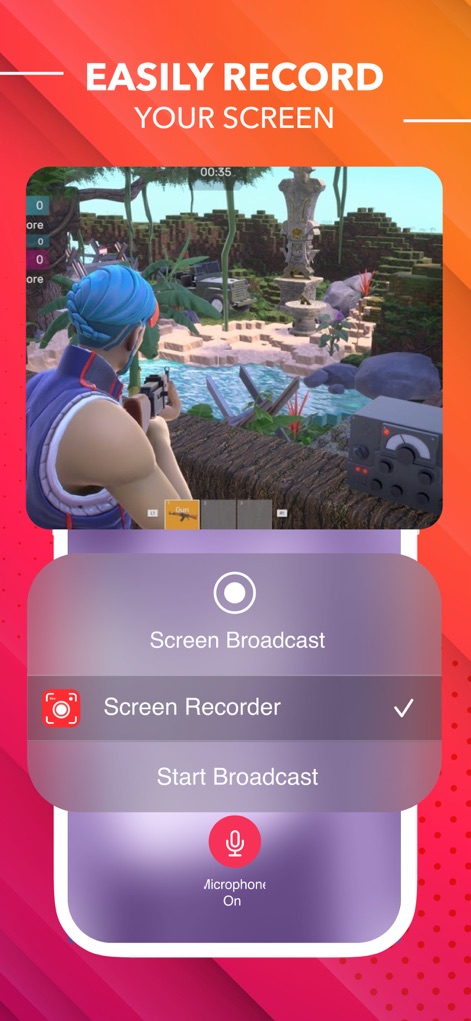
이 도구를 사용하면 화면 녹화 메뉴를 통해 게임 플레이를 손쉽게 시작할 수 있으며, 마이크 온/오프 토글로 음성 해설을 추가할 수 있습니다.
간편한 화면 녹화

사용자는 게임 화면에 실시간으로 자신의 얼굴 반응을 오버레이하여 콘텐츠에 생동감을 더할 수 있으며, 편집 바를 통해 타임라인을 쉽게 조절할 수 있습니다.
페이스캠 반응 추가

이 앱은 비디오 클립을 자르고, 여러 클립을 병합하며, 다양한 음악과 텍스트를 추가할 수 있는 강력한 편집 기능을 제공합니다.
완벽한 편집 도구

사용자는 해상도 및 비트 전송률 슬라이더를 조절하여 비디오 품질을 맞춤 설정할 수 있으며, 프레임 속도 옵션으로 녹화의 부드러움을 제어할 수 있습니다.
비디오 품질 설정

이 앱은 재생 속도 슬라이더를 통해 비디오의 특정 구간 속도를 변경할 수 있는 기능을 제공하며, 타임라인에 표시되는 속도 조절 마커로 편집 상태를 확인할 수 있습니다.
비디오 속도 조절

사용자는 다양한 음악 라이브러리에서 원하는 배경 음악을 비디오에 삽입하여 더욱 풍부한 오디오 경험을 제공하고, 파형 표시를 통해 음악 길이를 조절할 수 있습니다.
배경 음악 추가

이 도구는 자연, 로모, 폴라로이드 등 다양한 필터 컬렉션을 제공하여 비디오에 독특한 분위기와 스타일을 추가할 수 있습니다.
다채로운 필터 효과
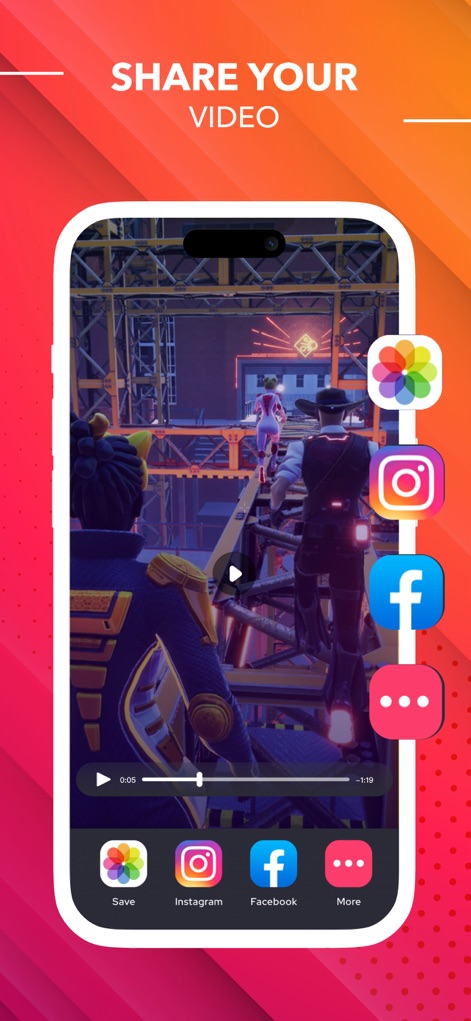
사용자는 완성된 비디오를 Instagram, Facebook 등 여러 소셜 미디어 플랫폼으로 직접 공유할 수 있으며, 저장 버튼을 통해 기기에 보관할 수 있습니다.
손쉬운 비디오 공유
설명
Download
비슷한 앱
유사한 기능과 사용자 경험을 가진 앱

Medal - Game Clipping
Medal B.V.

Screen Recorder,Video Recorder
VIDEOSHOW PTE. LTD.

Screen Recorder
App of the Year LLC

Record it! :: Screen Recorder
DIGISET LLC

Screen Recorder Voice & Video
Arthur Eduardo Skaetta Alvarez Desenvolvimento de Software LTDA.

Super Screen Recorder: Full HD
Dream United, Ltd.

Screen Recorder: Go Record
Torqued Studios LLC

Screen Recorder-Video & Voice
Danila Ianushev

Screen recorder - video
Mark Thomas
이 페이지는 앱이나 개발자의 공식 페이지가 아니며, 정보 제공 및 논평을 목적으로 작성된 독립 편집 간행물입니다. 명시적으로 달리 언급되지 않는 한, 해당 앱이나 개발자는 MWM, Apple, Google Play, 앱 퍼블리셔 또는 앱 개발자와 제휴, 보증, 후원, 승인 또는 공식적으로 연결되어 있지 않으며, 이 페이지의 어떤 내용도 해당 앱이 MWM의 서비스를 사용하여 개발되었음을 의미하지 않습니다. 모든 상표, 로고, 스크린샷 및 기타 콘텐츠는 해당 소유자의 자산입니다.