
이 페이지는 앱이나 개발자의 공식 페이지가 아니며, 정보 제공 및 논평을 목적으로 작성된 독립 편집 간행물입니다. 명시적으로 달리 언급되지 않는 한, 해당 앱이나 개발자는 MWM, Apple, Google Play, 앱 퍼블리셔 또는 앱 개발자와 제휴, 보증, 후원, 승인 또는 공식적으로 연결되어 있지 않으며, 이 페이지의 어떤 내용도 해당 앱이 MWM의 서비스를 사용하여 개발되었음을 의미하지 않습니다. 모든 상표, 로고, 스크린샷 및 기타 콘텐츠는 해당 소유자의 자산입니다.

Sharp Chart 2020 LogMAR Chart
AirPlay, Siri 음성 제어 및 HomeKit 통합을 통해 모든 화면을 고정밀 임상 디스플레이로 전환하십시오. 정확성과 최첨단 환자 경험을 요구하는 검안사를 위한 올인원 디지털 솔루션입니다.
다운로드
1K+사용자 평점
총 평가 수
0개발사
카테고리
Medical지원 언어
1최신 버전
1.61크기
23.0 MB출시일
2020년 4월 4일디지털 정밀도로 진료 수준을 높이십시오
현대 검안사를 위해 설계된 전문가급 시력 검사 솔루션으로, 비교할 수 없는 휴대성과 스마트 진료 통합을 제공하여 원활한 검사 경험을 제공합니다.
원활한 AirPlay 통합
모든 TV 또는 모니터를 고해상도 시력 검사 시스템으로 전환하십시오. iPhone 또는 Apple TV를 사용하여 부피가 크고 비싼 프로젝터를 제거하고 상담실을 현대화하십시오.
골드 스탠다드 임상 다용성
LogMAR, Sloan, Duochrome을 포함한 전체 과학적으로 검증된 차트 모음과 소아 및 저시력 환자를 위한 특수 검사를 이용하십시오.
다음 스크린샷과 설명은 앱의 공식 스토어 목록에서 직접 가져온 것이며 앱 개발자의 자산입니다.
앱 스토어
스크린샷
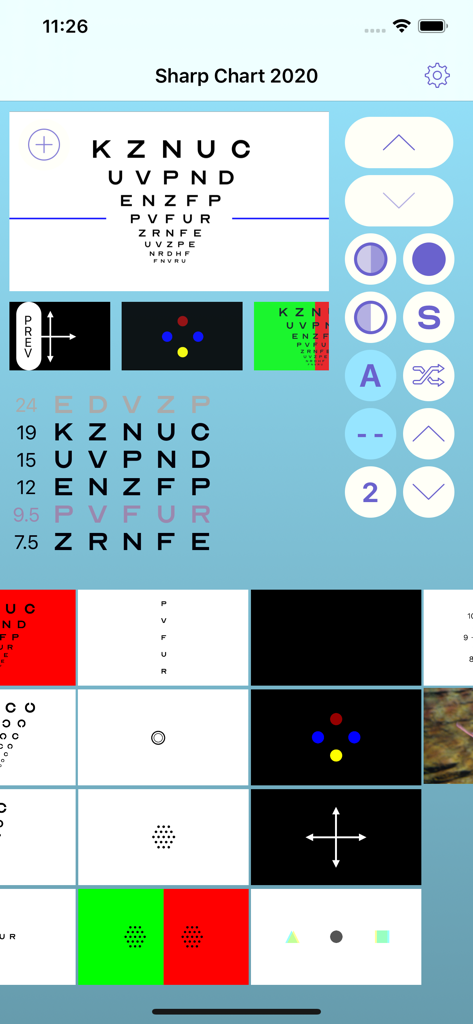
Sharp Chart 2020 앱 인터페이스로, 전문가용 눈 검사 차트와 임상 시력 검사 도구를 표시합니다.
설명
Download
비슷한 앱
같은 카테고리의 상위 앱

国家医保服务平台
National Healthcare Security Administration

MyChart
Epic Systems Corporation

Doctolib - Your health partner
Doctolib

Pregnancy + | Tracker App
Philips Digital UK Limited

CVS Health
CVS Pharmacy

江苏医保云
Jiangsu Healthcare Security Bureau

UnitedHealthcare
UNITED HEALTHCARE SERVICES, INC.

京东健康
BEIJING JINGDONG 360 DU E-COMMERCE LTD.

Meu SUS Digital
Servicos e Informacoes do Brasil
이 페이지는 앱이나 개발자의 공식 페이지가 아니며, 정보 제공 및 논평을 목적으로 작성된 독립 편집 간행물입니다. 명시적으로 달리 언급되지 않는 한, 해당 앱이나 개발자는 MWM, Apple, Google Play, 앱 퍼블리셔 또는 앱 개발자와 제휴, 보증, 후원, 승인 또는 공식적으로 연결되어 있지 않으며, 이 페이지의 어떤 내용도 해당 앱이 MWM의 서비스를 사용하여 개발되었음을 의미하지 않습니다. 모든 상표, 로고, 스크린샷 및 기타 콘텐츠는 해당 소유자의 자산입니다.