ShellHistory
ShellHistory
다운로드: App Store

이 페이지는 앱이나 개발자의 공식 페이지가 아니며, 정보 제공 및 논평을 목적으로 작성된 독립 편집 간행물입니다. 명시적으로 달리 언급되지 않는 한, 해당 앱이나 개발자는 MWM, Apple, Google Play, 앱 퍼블리셔 또는 앱 개발자와 제휴, 보증, 후원, 승인 또는 공식적으로 연결되어 있지 않으며, 이 페이지의 어떤 내용도 해당 앱이 MWM의 서비스를 사용하여 개발되었음을 의미하지 않습니다. 모든 상표, 로고, 스크린샷 및 기타 콘텐츠는 해당 소유자의 자산입니다.


로고: ShellHistory
다운로드: App Store

ShellHistory

이동 중에 macOS 명령줄 기록에 액세스하세요. 수년간의 명령어를 검색하고, 워크플로우를 노트북으로 구성하고, 개인 iCloud 저장소를 통해 안전하게 동기화하여 최고의 개발자 경험을 누리세요.

주요 수치

다운로드

400

사용자 평점

1.0/5

총 평가 수

0

개발사

Loshadki, LLC

카테고리

Developer Tools

지원 언어

2

최신 버전

3.1

크기

1.7 MB

출시일

2021년 5월 14일
기능

모든 곳에서 당신의 터미널 지식

iOS용 ShellHistory는 macOS 명령줄 전문 지식을 주머니 속으로 가져옵니다. 모든 기기에서 수년간의 터미널 기록을 쉽게 탐색, 검색 및 구성하세요.

즉각적인 전체 텍스트 검색

로그 파일 뒤지는 것을 멈추세요. iPhone에서 강력한 검색 쿼리를 사용하여 macOS 기록에서 복잡한 단일 줄 명령어 및 스크립트를 즉시 찾으세요.

정리된 노트북

명령어를 사용자 지정 노트북으로 그룹화하여 워크플로우를 구조화하세요. 중요한 배포 스크립트와 일상적인 루틴에 몇 초 안에 액세스하세요.

다음 스크린샷과 설명은 앱의 공식 스토어 목록에서 직접 가져온 것이며 앱 개발자의 자산입니다.

앱 스토어

스크린샷
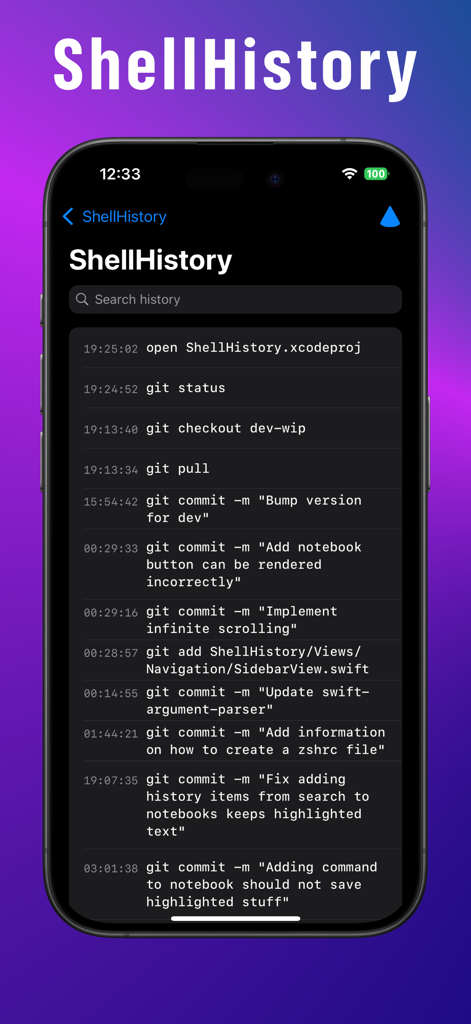
ShellHistory - ShellHistory 앱 인터페이스, 타임스탬프와 함께 셸 명령어 목록 표시
ShellHistory 앱 인터페이스, 타임스탬프와 함께 셸 명령어 목록 표시

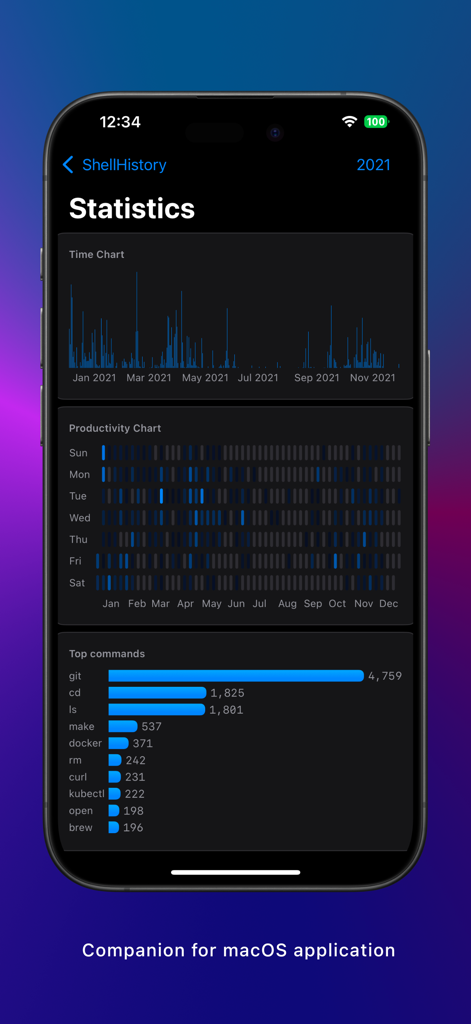
ShellHistory - ShellHistory 앱 통계 화면, 시간 경과에 따른 터미널 명령어 빈도 및 사용량 차트 표시

ShellHistory 앱 통계 화면, 시간 경과에 따른 터미널 명령어 빈도 및 사용량 차트 표시

설명

# ShellHistory for iOS ShellHistory for iOS is a companion application for the ShellHistory for macOS. iOS version of ShellHistory does not have ability to collect shell history, but allows you to browse the history collected from your macOS devices collected with ShellHistory for macOS application. ## Description With the ShellHistory, you can easily keep years of shell history, search history using Full-Text Search, back it up to your private iCloud, and create Notebooks. With ShellHistory you can: * Run full-text search queries over your shell history. * Extend your shell history by including information about the working directory, session, elapsed time, exit code, host, user, and more. * Never lose your shell history. Backup and synchronize it between Macs using your private iCloud storage. * Organize commands in notebooks to easily access the everyday workflow. * Import existing shell history. * See statistics over time. * See a complete terminal session in the order of the commands executed. * Dark and light mode support. * Multi-windows, multi-tabs support. ShellHistory easily integrates with your shell. ShellHistory supports all the most popular shells: zsh (default on macOS), bash, and fish shell. It will not break your prompt, and you can keep using your favorite terminal application. ShellHistory provides simple prompt commands, that will integrate with your shell and start recording your history. # Security ShellHistory is a sandboxed application distributed only via App Store. If you wish to synchronize your history, it will be stored in the private iCloud account, that only users with access to your AppleID can access it. Everything is stored in encrypted fields. # Feedback Check out the help page for more information https://loshadki.app/shellhistory/, have a question, or suggestion, or want to report a bug, please email us at support@loshadki.app

Download

다운로드: App Store

이 페이지는 앱이나 개발자의 공식 페이지가 아니며, 정보 제공 및 논평을 목적으로 작성된 독립 편집 간행물입니다. 명시적으로 달리 언급되지 않는 한, 해당 앱이나 개발자는 MWM, Apple, Google Play, 앱 퍼블리셔 또는 앱 개발자와 제휴, 보증, 후원, 승인 또는 공식적으로 연결되어 있지 않으며, 이 페이지의 어떤 내용도 해당 앱이 MWM의 서비스를 사용하여 개발되었음을 의미하지 않습니다. 모든 상표, 로고, 스크린샷 및 기타 콘텐츠는 해당 소유자의 자산입니다.








