Shot Designer

Shot Designer

다운로드: App Store
로고: Shot Designer

Shot Designer: 카메라 블로킹을 몇 초 만에 마스터하세요

감독과 촬영 감독을 위한 올인원 툴로, 전문적인 카메라 다이어그램, 자동 샷 목록, 실시간 애니메이션을 생성합니다. 워크플로우를 간소화하고, 시간이 촉박한 현장에서도 비전을 현실로 만드세요.

개발사

Hollywood Camera Work SRL Semplificata

카테고리

Photo & Video

다운로드

96K+

사용자 평점

4.1/5

총 평가 수

600

지원 언어

1

모든 프레임에 담긴 정밀함

이 인터페이스를 사용하는 96K+ 명의 사용자.

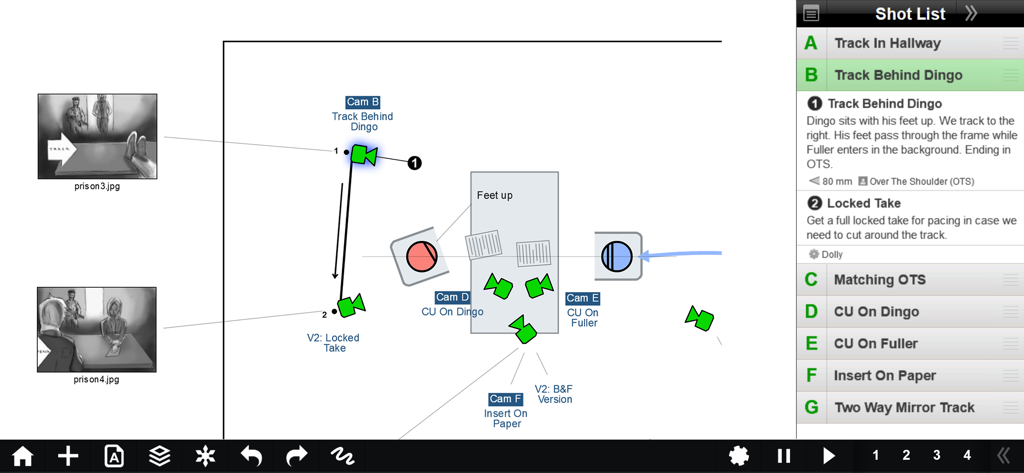
Shot Designer 앱 인터페이스가 캐릭터 움직임과 통합 샷 목록이 포함된 카메라 블로킹 다이어그램을 표시하고 있습니다.
Shot Designer 앱 인터페이스가 캐릭터 움직임과 통합 샷 목록이 포함된 카메라 블로킹 다이어그램을 표시하고 있습니다.

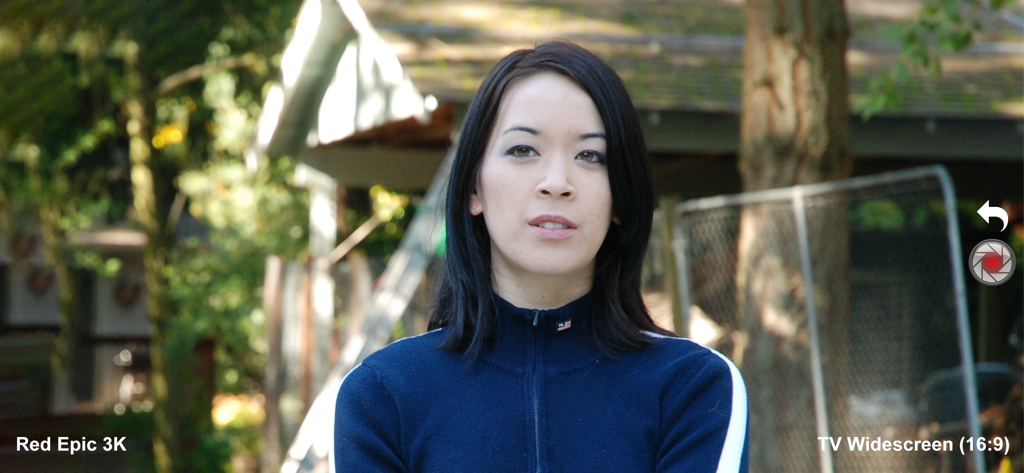
Shot Designer 앱 감독 뷰파인더가 Red Epic 3K 카메라 시뮬레이션과 와이드스크린 종횡비를 보여주고 있습니다.
Shot Designer 앱 감독 뷰파인더가 Red Epic 3K 카메라 시뮬레이션과 와이드스크린 종횡비를 보여주고 있습니다.

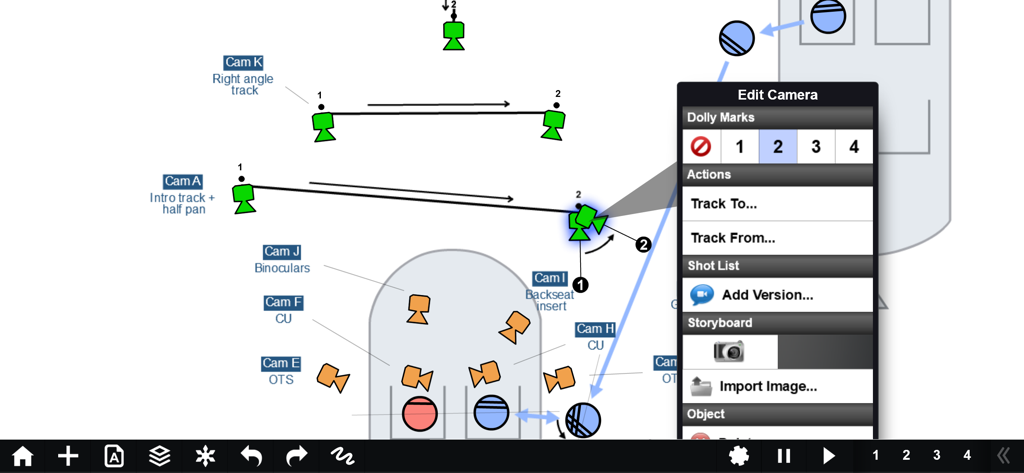
Shot Designer 앱의 전문 카메라 블로킹 다이어그램이 카메라 트래킹 움직임과 돌리 마크를 보여주고 있습니다.

Shot Designer 앱의 전문 카메라 블로킹 다이어그램이 카메라 트래킹 움직임과 돌리 마크를 보여주고 있습니다.

정밀한 블로킹으로 현장을 마스터하세요

이 앱을 돋보이게 하는 도구, 96K+ 명의 사용자가 선택.

🎬

번개처럼 빠른 블로킹

복잡한 카메라 다이어그램을 몇 초 만에 만드세요. 배우가 기다리는 동안에도 블로킹을 다시 할 수 있도록, 캐릭터를 움직이면 지능형 소프트웨어가 카메라를 자동으로 재배치합니다.

📋

자동 작성 샷 목록

스프레드시트 작업에 시간을 낭비하지 마세요. 샷 목록이 다이어그램에 직접 연결되어 작업하는 동안 실시간으로 업데이트되므로, 계획과 목록이 항상 동기화됩니다.

☁️

프로 동기화 & 팀 공유

모든 제작팀을 같은 페이지에 있게 하세요. 모든 기기에서 장면을 동기화하고 조명 감독, 촬영 감독, 조감독과 폴더를 공유하여 완벽하게 조율된 제작을 유지하세요.

앱 소개

에 대해 알아야 할 모든 것 Shot Designer.

설명

WHAT IS SHOT DESIGNER? • CAMERA DIAGRAM - Shot Designer dramatically speeds up the Director's process of making camera diagrams. Create full-blown diagrams in seconds. The software does most of the work. • ANIMATION - Animate your characters and cameras to move around your diagram in real-time. Previsualize the rhythm of a scene by seeing it play out. • SHOT LIST - The integrated Shot List is tied into the diagram and writes itself while you work. Edit shots intuitively in the diagram, not in a confusing spreadsheet. • DIRECTOR'S VIEWFINDER / STORYBOARDS - Bring in lens-accurate camera angles via the integrated Director's Viewfinder or Storyboard Import. • MAC/PC DESKTOP VERSION - An identical Mac/PC Desktop Version is included with the Pro Version (in-app upgrade). • SYNC & TEAM SHARING - Sync your scenes across all your devices. Share scene folders with teams. Control who owns which scene. (Pro Feature) Watch the feature-demo at https://www.hollywoodcamerawork.com/shot-designer-videos.html CAMERA-BLOCKING ON STEROIDS Shot Designer was developed by Per Holmes, the creator of the renowned Hollywood Camera Work training, and has been developed in conjunction with major TV and Film productions. Shot Designer is based on the realization that neither Camera Diagrams, Shot Lists, or Storyboards by themselves give you a satisfying understanding of camera-blocking -- you have to use them *together*. Shot Designer is FAST. The app knows how Directing works and automatically does most of the work for you. Cameras rearrange themselves when you move characters. Animate characters and cameras with simple Walk To and Track To commands. Create sophisticated tracking shots with multiple marks. Shot Designer is fast enough that you can rearrange the diagram with actors waiting. OTHER FEATURES • Integrated Set Designer for building floor plans. • Integrated Lighting Designer for DPs, with lighting symbols provided by Ari Golan of Atomic Imaging Studios Chicago. • Import production drawings as backgrounds and block on top of them. • Factory Templates of pre-made camera setups for any situation. • Make your own templates as starting points for new scenes. • Large and growing prop/furniture library. Email us requests, we'll build them. • Scene Freeze: Experiment easily by taking snapshots you can return to (Pro). • PDF/JPG/Excel export and emailing of Camera Diagrams and Shot Lists (Pro). • Unlimited Folder Structure for organizing scenes (Pro). The Free Version of Shot Designer is full-featured except for Save, Export and Sync/Team. Your current scene is always saved, and you can be fully productive working on one scene at a time. The Pro Version (in-app upgrade) adds File Management, identical Mac/PC Desktop Version, Sync and Team Sharing, PDF/JPG/Excel Export and more.

최신 버전

1.80.8

크기

81.8 MB

출시일

2012년 10월 10일

현장을 장악하세요

수천 명의 감독과 촬영 감독들이 사용하는 업계 최고의 툴로 블로킹을 간소화하고, 제작팀과 동기화하며, 제작 시간을 몇 시간씩 절약하세요.

다운로드: App Store

App information, icons, screenshots, and descriptions displayed on this page are sourced from the Apple App Store and are the property of their respective developers. Download estimates and rankings are based on MWM's proprietary models and may not reflect actual figures. This page is provided for informational and analytical purposes only.

Believe this page infringes your intellectual property? File a dispute