Site Report Pro- Punchlist App

Site Report Pro- Punchlist App


다운로드: App Store
로고: Site Report Pro- Punchlist App

Site Report Pro: 전문적인 현장 감사 및 하자 목록 보고서 생성

계약자 및 검사관이 문제를 문서화하고, 사진에 마크업하고, 월간 구독료 없이 현장에서 바로 세련된 PDF 또는 Excel 보고서를 제공하는 최고의 모바일 도구입니다.

다운로드: App Store

개발사

Daxesoft Ltd

카테고리

Productivity

다운로드

18K+

사용자 평점

4.7/5

총 평가 수

1K+

지원 언어

1

전문가의 시각

이 인터페이스를 사용하는 18K+ 명의 사용자.

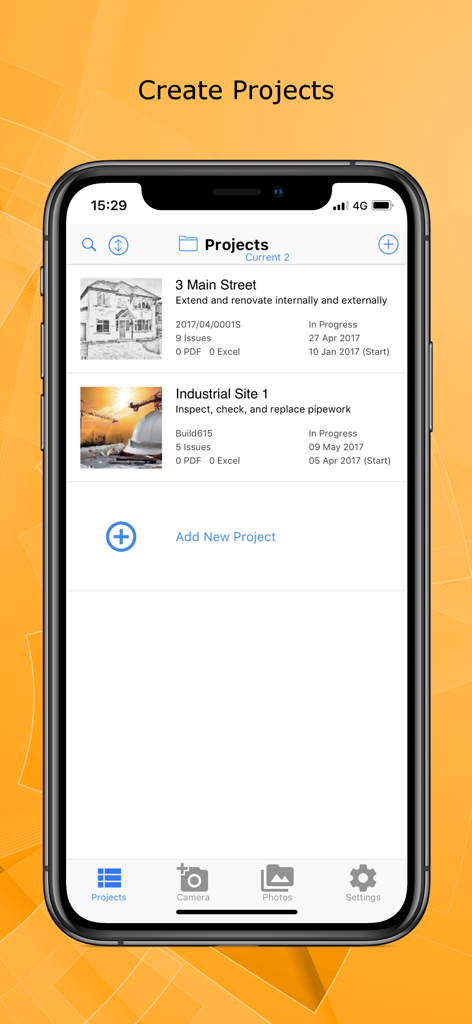
Site Report Pro 앱 인터페이스는 모바일 장치에서 건설 및 현장 감사를 위한 프로젝트 목록을 표시합니다.

Site Report Pro 앱 인터페이스는 모바일 장치에서 건설 및 현장 감사를 위한 프로젝트 목록을 표시합니다.

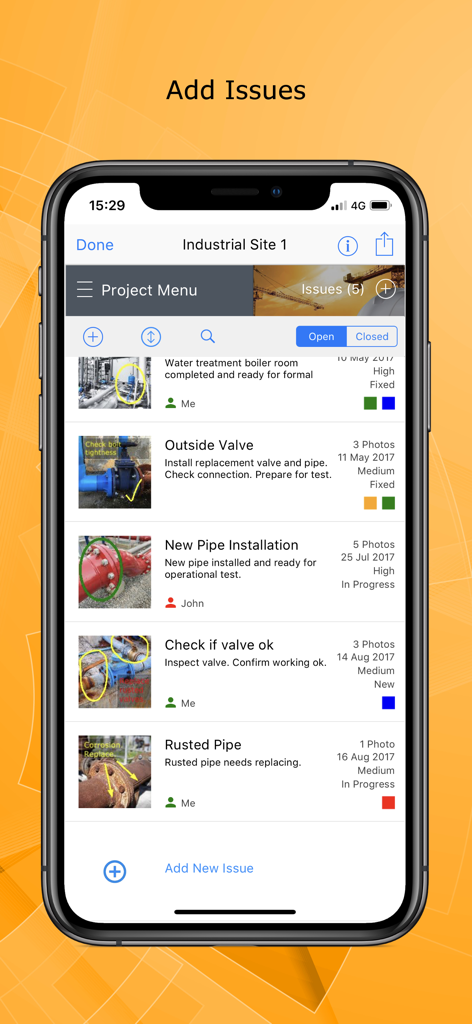
Site Report Pro 앱의 인터페이스는 주석이 달린 사진과 함께 건설 현장 문제 목록을 보여줍니다.

Site Report Pro 앱의 인터페이스는 주석이 달린 사진과 함께 건설 현장 문제 목록을 보여줍니다.

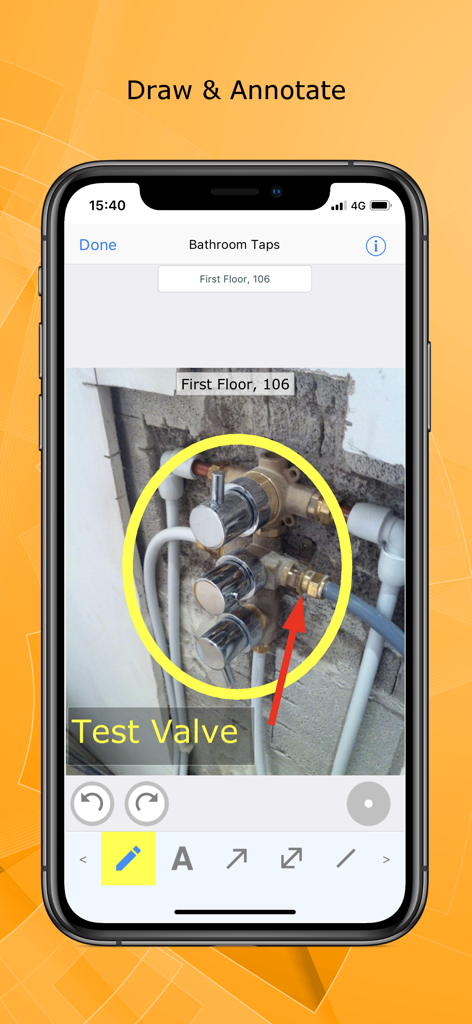
Site Report Pro 앱의 사진 주석 및 마크업 기능

Site Report Pro 앱의 사진 주석 및 마크업 기능

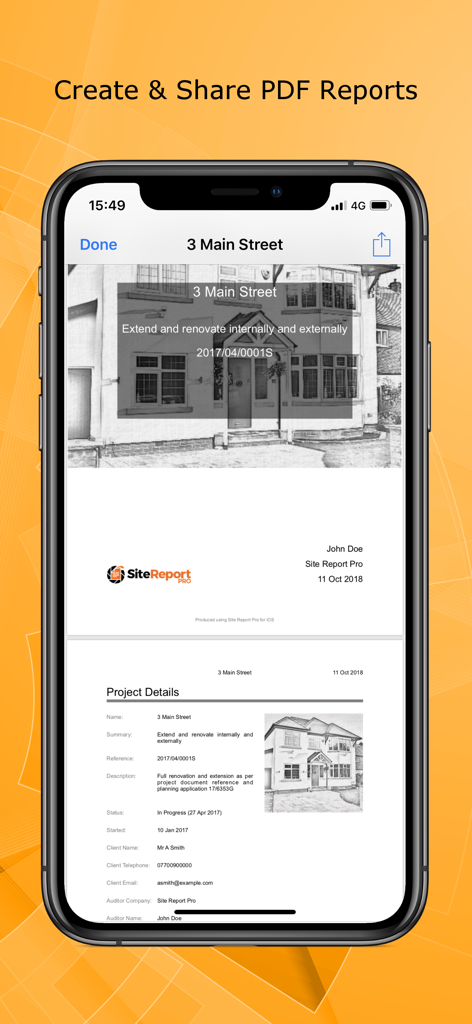
Site Report Pro 앱의 PDF 보고서 인터페이스는 프로젝트 세부 정보 및 사진이 포함된 전문적인 PDF 현장 검사 보고서를 보여줍니다.

Site Report Pro 앱의 PDF 보고서 인터페이스는 프로젝트 세부 정보 및 사진이 포함된 전문적인 PDF 현장 검사 보고서를 보여줍니다.

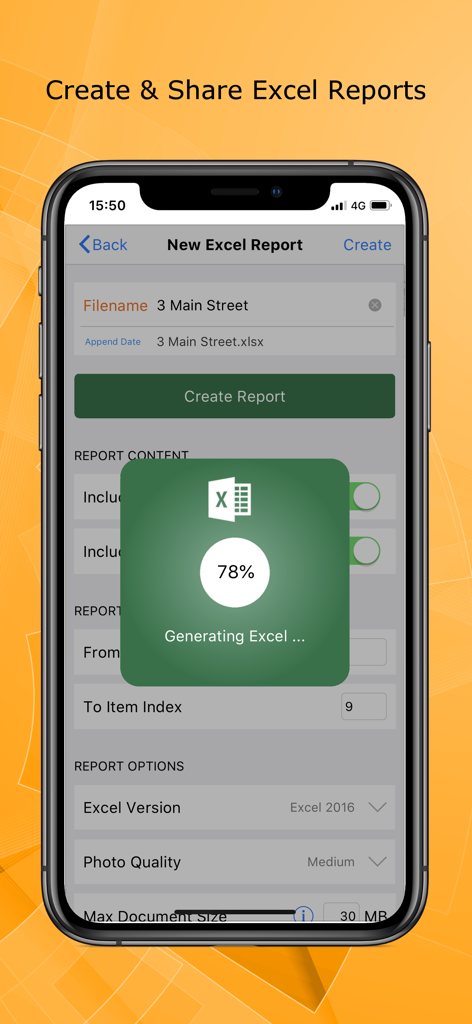
Site Report Pro 앱 인터페이스는 전문적인 Excel 현장 감사 보고서 생성을 보여줍니다.

Site Report Pro 앱 인터페이스는 전문적인 Excel 현장 감사 보고서 생성을 보여줍니다.

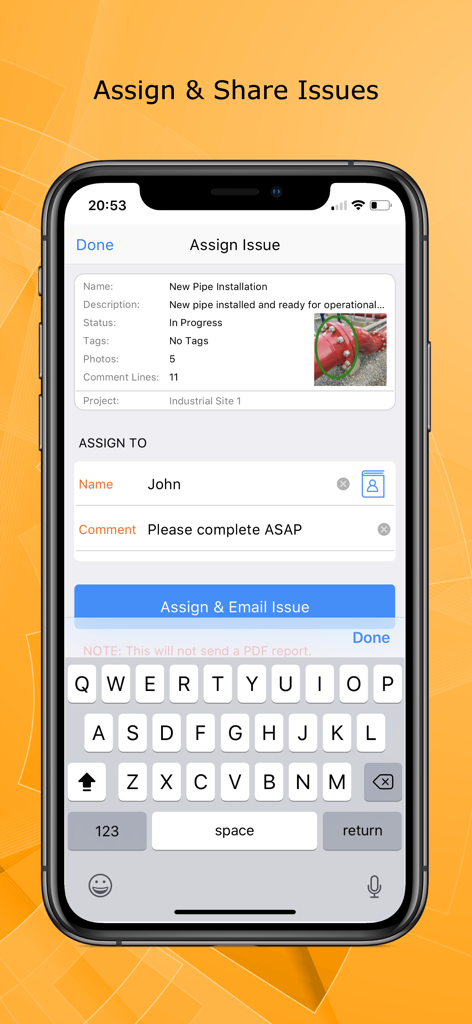
Site Report Pro 모바일 인터페이스는 사진과 지침을 통해 건설 문제를 팀원에게 할당하는 방법을 보여줍니다.

Site Report Pro 모바일 인터페이스는 사진과 지침을 통해 건설 문제를 팀원에게 할당하는 방법을 보여줍니다.

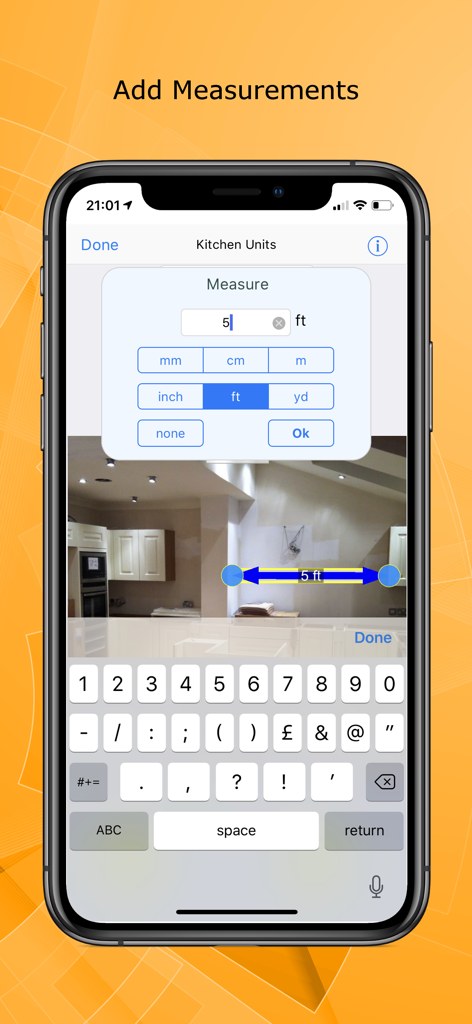
Site Report Pro 앱 인터페이스는 건설 현장 사진에 디지털 측정을 추가하는 방법을 보여줍니다.

Site Report Pro 앱 인터페이스는 건설 현장 사진에 디지털 측정을 추가하는 방법을 보여줍니다.

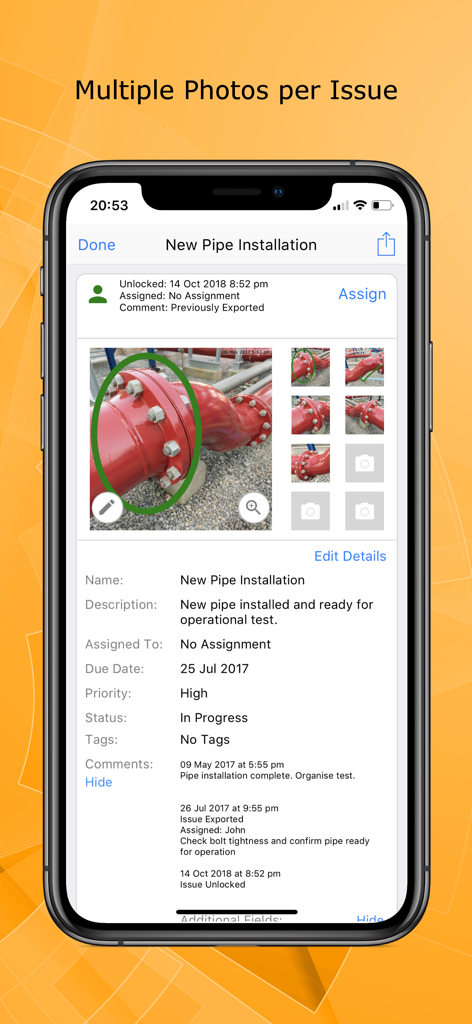
Site Report Pro의 모바일 앱 인터페이스는 파이프 설치 문제에 대한 여러 사진과 자세한 검사 메모를 보여줍니다.

Site Report Pro의 모바일 앱 인터페이스는 파이프 설치 문제에 대한 여러 사진과 자세한 검사 메모를 보여줍니다.

현장 점검을 위한 골드 스탠다드

이 앱을 돋보이게 하는 도구, 18K+ 명의 사용자가 선택.

📸

정밀한 시각적 문서화

문제당 최대 8장의 사진을 첨부하고 강력한 마크업 도구를 사용하여 결함을 강조 표시하세요. 명확한 주석은 귀하와 계약자 간의 의사소통 오류를 제거합니다.

🏆

즉시 고객 준비 보고서

30가지 프리미엄 테마 중에서 선택하여 멋진 PDF 또는 Excel 보고서를 생성하세요. 트럭에 타기도 전에 전문적이고 브랜드화된 문서를 고객에게 보내세요.

🚀

구독료 없음

'관리 피로'와 반복적인 비용에서 벗어나세요. 모든 현장에서 오프라인으로 작동하는 일회성 구매로 고급 프로젝트 관리 도구를 즐기세요.

앱 소개

에 대해 알아야 할 모든 것 Site Report Pro- Punchlist App.

설명

Site Report Pro is the #1 mobile app for generating a site audit inspection report or professional snag list report as a PDF or XLS file (Excel document). Fast and easy to use, with powerful features not found in other snag list and site audit report apps, we are confident it will revolutionise the way you manage projects, highlight snagging issues, perform risk assessments and generate your site audit or inspection report. Whether you are an individual or a team, you can benefit from tools to mark up photos, simple issue assignment, powerful filter & sort capability, and generation of PDF audit reports in a choice of 30 premium themes that will amaze clients and colleagues. Customisable for a specific trade or industry, Site Report Pro is used worldwide for site walks, reporting snagging issues, producing a custom site inspection report, performing risk assessments, tracking construction projects and much more. The Site Report Pro App makes it easy to create and share a site inspection report, site audit report, or snag list report, as an XLSX file (Excel document) or as a professional PDF report, all while on site using only your iPhone or iPad. Benefit from the following 10 features that are generally not often found in other site audit report, snag list, and snagging apps: - Add up to 8 photos per issue to ensure all observations are captured in the report. Add multiple photos at once or instantly create issues from your selected images. - Mark up each photo to highlight issues using powerful annotation tools - don’t worry if you make a mistake, annotations can be moved and resized. - Produce and share professional snag list PDFs & site audit reports via e-mail (or 3 party tools such as drop box). - Choose from 30 available report themes. - Configure each Excel document (XLS, XLSX) or PDF audit report using powerful customisation, sorting and filtering tools - e.g. generate and send each trade or contractor a report of outstanding issues. - Powerful ordering, sorting, searching and filtering of projects, issues & snag lists. - Use the flexible tagging capability to categorise the site audit report or snagging report any way you want. - Assign and send issues to your team members, colleagues and contractors. - Maintain a chronological history of work with automatically time-stamped comments. - High quality software and first class customer support. Site Report Pro does not require an online service or sign-up and there are no monthly subscription fees.

최신 버전

1.3.6

크기

52.4 MB

출시일

2017년 7월 4일

현장을 떠나기 전에 보고서 작성 완료

18,000명 이상의 전문가와 함께 즉석에서 전문적인 PDF 감사 및 하자 목록을 생성하세요. 월별 요금이나 구독 없이, 저녁 시간을 되찾을 수 있는 힘을 누리세요.

다운로드: App Store
FAQ

자주 묻는 질문

에 대해 알아야 할 모든 것 Site Report Pro- Punchlist App

Site Report Pro- Punchlist App의 주요 기능은 무엇입니까?

Site Report Pro는 전문적인 현장 감사 검사 보고서 및 누락 목록 보고서를 생성하기 위한 모바일 애플리케이션입니다. 이 보고서는 PDF 또는 XLS (Excel) 파일로 제공됩니다.

Site Report Pro에 월별 구독료가 있습니까?

아니요, Site Report Pro에는 월별 구독료가 없습니다. 또한 작동을 위해 온라인 서비스나 가입이 필요하지 않습니다.

Site Report Pro에서 한 문제에 사진을 몇 개까지 추가할 수 있습니까?

Site Report Pro는 사용자가 문제당 최대 8개의 사진을 추가할 수 있도록 허용합니다. 또한 선택한 이미지에서 즉시 문제를 생성하는 기능도 지원합니다.

사용자는 Site Report Pro 앱 내에서 사진에 주석을 달 수 있습니까?

예, 사용자는 강력한 주석 도구를 사용하여 Site Report Pro에서 사진에 주석을 달아 문제를 강조 표시할 수 있습니다. 주석은 이동 및 크기 조정이 가능합니다.

Site Report Pro는 어떤 보고서 형식을 출력으로 지원합니까?

Site Report Pro는 전문적인 누락 목록 PDF 및 현장 감사 보고서를 생성하고 공유하는 것을 지원합니다. 또한 XLS 및 XLSX 형식의 Excel 문서도 생성합니다.

Site Report Pro는 보고서 사용자 지정 옵션을 제공합니까?

예, Site Report Pro는 광범위한 보고서 사용자 지정을 제공합니다. 사용자는 강력한 사용자 지정, 정렬 및 필터링 도구를 사용하여 Excel 또는 PDF 감사 보고서를 구성하고 30가지 프리미엄 테마 중에서 선택할 수 있습니다.

Site Report Pro를 사용하여 팀원에게 문제를 할당할 수 있습니까?

예, Site Report Pro를 사용하면 사용자가 특정 문제를 팀원, 동료 및 계약자에게 직접 할당하고 보낼 수 있어 효율적인 워크플로우 관리가 가능합니다.

Site Report Pro는 프로젝트 작업 기록을 유지합니까?

예, Site Report Pro는 모든 작업의 연대순 기록을 유지합니다. 각 기록된 문제에 대해 자동으로 타임스탬프가 찍힌 댓글이 포함됩니다.

Site Report Pro에서 이미지에 측정값을 추가할 수 있습니까?

예, Site Report Pro를 사용하면 사용자가 이미지에 직접 측정값을 추가할 수 있습니다. 이 앱은 피트, 미터, 인치를 포함한 다양한 단위 옵션을 제공합니다.

App information, icons, screenshots, and descriptions displayed on this page are sourced from the Apple App Store and are the property of their respective developers. Download estimates and rankings are based on MWM's proprietary models and may not reflect actual figures. This page is provided for informational and analytical purposes only.

Believe this page infringes your intellectual property? File a dispute