
이 페이지는 앱이나 개발자의 공식 페이지가 아니며, 정보 제공 및 논평을 목적으로 작성된 독립 편집 간행물입니다. 명시적으로 달리 언급되지 않는 한, 해당 앱이나 개발자는 MWM, Apple, Google Play, 앱 퍼블리셔 또는 앱 개발자와 제휴, 보증, 후원, 승인 또는 공식적으로 연결되어 있지 않으며, 이 페이지의 어떤 내용도 해당 앱이 MWM의 서비스를 사용하여 개발되었음을 의미하지 않습니다. 모든 상표, 로고, 스크린샷 및 기타 콘텐츠는 해당 소유자의 자산입니다.


Slideshow Maker w Music
당신은 더 이상 평범한 사진 앨범에 갇히지 않습니다. 이 앱은 당신의 순간을 기억에 남는 시청각 경험으로 변모시키는 능력을 부여합니다.
다운로드
2.5M+사용자 평점
총 평가 수
2.8K개발사
카테고리
Photo & Video지원 언어
1최신 버전
6.5크기
104.9 MB출시일
2016년 6월 23일주요 기능을 통한 사용자 가치 평가
Slideshow Maker w Music 앱 분석
음악 추가 및 편집
이 앱은 사용자가 개인 소유의 음악이나 앱이 제공하는 프리미엄 사운드트랙을 추가하여 슬라이드쇼에 생동감을 더할 수 있게 해줍니다.
광고 및 워터마크 제거
이 앱은 광고와 워터마크를 제거하여 사용자가 전문적이고 깔끔한 결과물을 얻을 수 있도록 돕습니다.
출력 비율 선택
이 도구는 사용자가 슬라이드쇼 출력 비율을 선택하여 다양한 소셜 미디어 플랫폼에 최적화된 콘텐츠를 제작할 수 있도록 합니다.
슬라이드쇼 속도 조절
이 앱은 네 가지 사전 설정 중에서 슬라이드쇼 속도를 조정하여 사용자가 원하는 분위기를 연출할 수 있도록 지원합니다.
긴 슬라이드쇼 제작
이 도구는 사용자가 최대 100장의 사진으로 더 긴 슬라이드쇼를 제작하여 풍부한 스토리를 담을 수 있도록 해줍니다.
다양한 테마 선택
이 앱은 사용자가 다양한 테마를 선택하여 슬라이드쇼에 미적 감각을 더할 수 있도록 제공합니다.
음성 해설 추가
이 앱은 사용자가 음성 해설을 추가하여 슬라이드쇼에 개인적인 서사를 입힐 수 있도록 돕습니다.
사진 프레임 조정
이 도구는 사용자가 사진 프레임을 자르거나 조정하여 최적의 시각적 효과를 낼 수 있도록 합니다.
사진 순서 재정렬
이 앱은 사용자가 사진 순서를 자유롭게 재정렬하여 스토리 흐름을 구성할 수 있도록 지원합니다.
음악 시작점 조정
이 도구는 사용자가 음악의 시작 지점을 조정하여 슬라이드쇼와의 조화를 극대화할 수 있도록 해줍니다.
다음 스크린샷과 설명은 앱의 공식 스토어 목록에서 직접 가져온 것이며 앱 개발자의 자산입니다.
앱 스토어
스크린샷

이 앱은 다양한 분위기의 테마를 제공하여 사용자가 개성 있는 슬라이드쇼를 쉽게 만들 수 있으며, 'Calm' 테마와 'Eternity' 테마와 같은 독특한 옵션을 통해 시각적 스토리를 풍부하게 합니다.
매력적인 테마 선택

사용자는 이 도구를 통해 슬라이드쇼에 개인적인 음성 해설을 추가할 수 있으며, 선명한 오디오 파형과 녹음 타이머로 녹음 과정을 시각적으로 확인합니다.
음성 해설 추가

이 앱은 사용자가 사진에 직접 제목을 추가할 수 있도록 지원하며, 메인 이미지 미리보기에서 'Together it's wonderful place to be'와 같은 문구를 추가하거나 각 사진에 캡션을 입력하는 기능을 제공합니다.
사진에 제목 추가
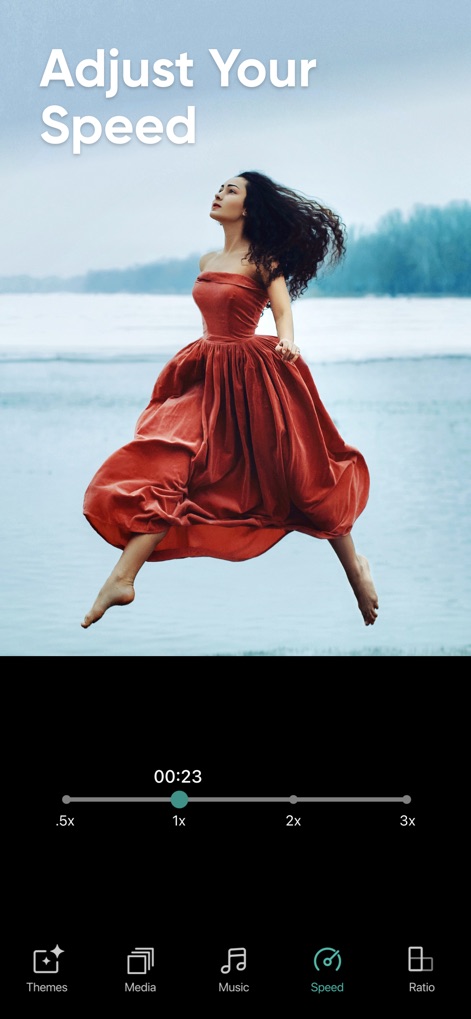
사용자는 이 도구로 슬라이드쇼의 재생 속도를 정밀하게 조절할 수 있으며, '.5x'부터 '3x'까지의 사전 설정된 속도 옵션과 직관적인 슬라이더를 통해 원하는 페이스를 설정합니다.
속도 조절

이 앱은 다양한 소셜 미디어 플랫폼에 최적화된 화면 비율을 제공하여, 사용자가 '3:4 Portrait' 및 '1:1 Square'와 같은 다양한 옵션 중에서 자신의 콘텐츠에 맞는 형식을 선택할 수 있도록 합니다.
최적의 화면 비율

이 앱은 사용자가 만든 슬라이드쇼를 쉽게 공유할 수 있도록 지원하며, 'Share Anywhere' 문구 아래에 Instagram과 Facebook을 포함한 다양한 소셜 미디어 플랫폼 아이콘을 제공합니다.
추억 공유
설명
Download
비슷한 앱
같은 카테고리의 상위 앱

CapCut: Photo & Video Editor
BYTEDANCE PTE. LTD.

Instagram, Inc.

YouTube
Google LLC

Canva: AI Photo & Video Editor
Canva Pty Ltd

Snapchat
Snap, Inc.

快手
Beijing Kwai Technology Co., Ltd.

Edits: Video Editor
Instagram, Inc.

Meitu- AI Photo & Video Editor
Xiamen Meitu Technology Co., Ltd.

Google Photos: Backup & Edit
Google LLC
이 페이지는 앱이나 개발자의 공식 페이지가 아니며, 정보 제공 및 논평을 목적으로 작성된 독립 편집 간행물입니다. 명시적으로 달리 언급되지 않는 한, 해당 앱이나 개발자는 MWM, Apple, Google Play, 앱 퍼블리셔 또는 앱 개발자와 제휴, 보증, 후원, 승인 또는 공식적으로 연결되어 있지 않으며, 이 페이지의 어떤 내용도 해당 앱이 MWM의 서비스를 사용하여 개발되었음을 의미하지 않습니다. 모든 상표, 로고, 스크린샷 및 기타 콘텐츠는 해당 소유자의 자산입니다.