
이 페이지는 앱이나 개발자의 공식 페이지가 아니며, 정보 제공 및 논평을 목적으로 작성된 독립 편집 간행물입니다. 명시적으로 달리 언급되지 않는 한, 해당 앱이나 개발자는 MWM, Apple, Google Play, 앱 퍼블리셔 또는 앱 개발자와 제휴, 보증, 후원, 승인 또는 공식적으로 연결되어 있지 않으며, 이 페이지의 어떤 내용도 해당 앱이 MWM의 서비스를 사용하여 개발되었음을 의미하지 않습니다. 모든 상표, 로고, 스크린샷 및 기타 콘텐츠는 해당 소유자의 자산입니다.


Smart Alarm Clock - Waking Up
당신은 아침의 주인이 됩니다. 이 앱은 잠에서 깨어나는 행위를 단순한 의무에서 정신적 도전으로 바꿉니다. 당신의 뇌를 속여서 잠에서 완전히 깨어나게 하고, 하루를 제어할 준비를 시킵니다.
다운로드
2.5M+사용자 평점
총 평가 수
15.0K개발사
카테고리
Utilities지원 언어
10최신 버전
2.0.2크기
202.6 MB출시일
2022년 3월 22일사용자의 효과적인 기상을 돕는 핵심 기능 평가
스마트 알람 시계 - Waking Up: 심층 분석
수학 문제 해결 알람 해제
이 앱은 수학 문제를 풀어야 알람을 해제할 수 있도록 하여, 사용자가 완전히 깨어 정신적으로 자극받을 수 있도록 돕습니다. 난이도 조절을 통해 개인에게 맞는 각성 강도를 설정할 수 있습니다.
패턴 및 색상 기억 게임 알람 해제
이 도구는 화면에 표시되는 패턴이나 색상 순서를 기억하고 반복해야 알람을 끌 수 있는 게임을 제공합니다. 이는 사용자의 기억력을 훈련시키고 아침에 두뇌를 활성화하는 데 효과적입니다.
추가 알람 해제 방식 (프리미엄)
이 앱은 프리미엄 구독을 통해 수학 문제나 기억 게임 외에 더 다양하고 도전적인 알람 해제 방식을 제공합니다. 이는 사용자가 잠에서 깨는 것을 더욱 확실하게 보장합니다.
수면 모드 및 숙면 유도 멜로디
이 앱은 수면 모드를 활성화하여 사용자가 잠들기 좋은 편안한 멜로디를 제공하고, 설정된 타이머 후에 자동으로 멜로디를 끄는 기능을 갖추고 있습니다. 이는 숙면을 유도하여 다음 날 아침의 기상을 돕습니다.
선호하는 벨소리 및 멜로디 설정
이 앱은 사용자가 좋아하는 벨소리나 멜로디로 알람을 설정할 수 있게 해줍니다. 이는 개인화된 기상 경험을 제공하여 아침을 더욱 즐겁게 시작할 수 있도록 돕습니다.
카운트다운 타이머
이 도구는 특정 시간까지 역으로 계산하는 카운트다운 타이머 기능을 제공합니다. 사용자는 중요한 이벤트나 요리 시간 등 다양한 상황에 맞춰 알림을 받을 수 있어 생산성 향상에 기여합니다.
광고 없는 사용 환경 (프리미엄)
이 앱은 프리미엄 구독을 통해 광고 없이 앱을 사용할 수 있는 환경을 제공합니다. 이는 사용자의 집중도를 높이고 방해 없이 앱 기능을 활용할 수 있게 하여 전반적인 사용자 경험을 향상시킵니다.
시간 음성 안내 기능
이 앱은 침대 옆 시계 모드에서 현재 시간을 음성으로 알려주는 기능을 갖추고 있습니다. 사용자는 화면을 직접 보지 않고도 정확한 시간을 알 수 있어 편리함을 제공합니다.
자주 묻는 질문
에 대해 알아야 할 모든 것 Smart Alarm Clock - Waking Up
How do I turn off alarms in Smart Alarm Clock?
Smart Alarm Clock offers various methods to turn off alarms, including a simple swipe. Premium access provides additional methods like solving math problems or shaking the device.
What are the subscription costs for Smart Alarm Clock?
The Smart Alarm Clock premium subscription costs $9.99 weekly, $19.99 monthly, or $49.99 annually. A free 3-day trial is available before the weekly paid subscription begins.
Does Smart Alarm Clock have features to help me wake up better?
Yes, Smart Alarm Clock includes features like solving math problems, training memory with patterns and colors, and using custom ringtones to make your awakening engaging and effective.
Can I customize the alarm sounds in Smart Alarm Clock?
Yes, Smart Alarm Clock allows you to use your favorite ringtones and melodies. The app also provides a selection of built-in sounds like "Morning Nature" and "Siren" to choose from.
What permissions does the Smart Alarm Clock app require?
Smart Alarm Clock requires permissions for background operation to trigger alarms, location access for weather forecasts, and notification system activation for alerts to function properly.
Does Smart Alarm Clock include a sleep timer or sleep mode?
Yes, Smart Alarm Clock features a sleep mode that plays soothing melodies. It automatically turns off the music after a set timer, facilitating comfortable immersion into sleep.
Is there a free trial for Smart Alarm Clock premium features?
Yes, Smart Alarm Clock offers a free 3-day trial period for its premium features. After this period, the trial automatically converts to a weekly paid subscription.
다음 스크린샷과 설명은 앱의 공식 스토어 목록에서 직접 가져온 것이며 앱 개발자의 자산입니다.
앱 스토어
스크린샷
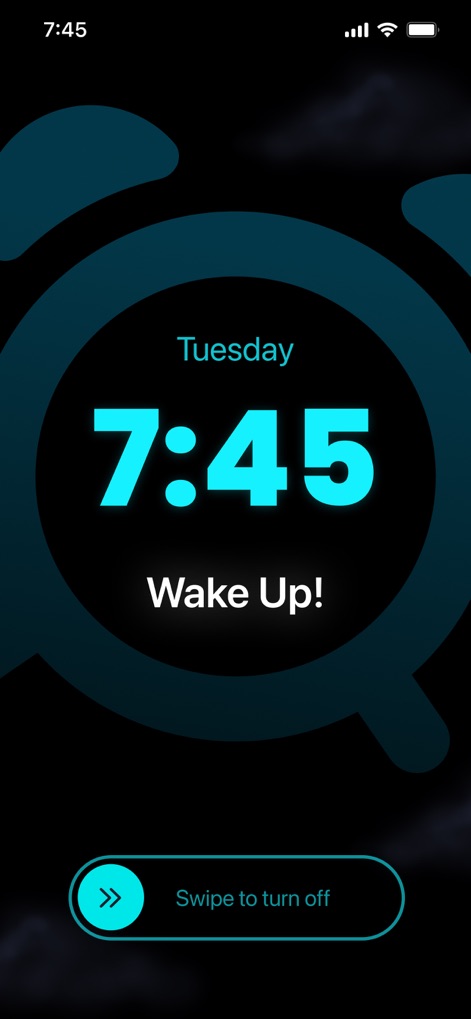
이 앱은 중요한 알람 시간인 "7:45"를 중앙에 크게 표시하며, "Swipe to turn off" 제스처를 통해 직관적인 알람 해제 방식을 제공합니다.
명확한 알람 화면
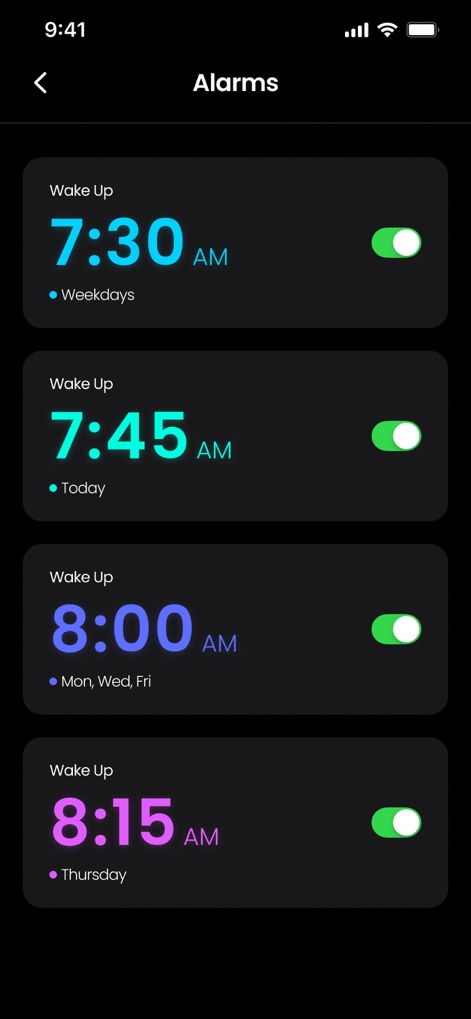
사용자는 여러 개의 알람을 설정하고 관리할 수 있으며, 각 알람은 특정 요일 반복 설정과 활성화/비활성화 토글을 통해 유연하게 제어됩니다.
맞춤형 알람 목록
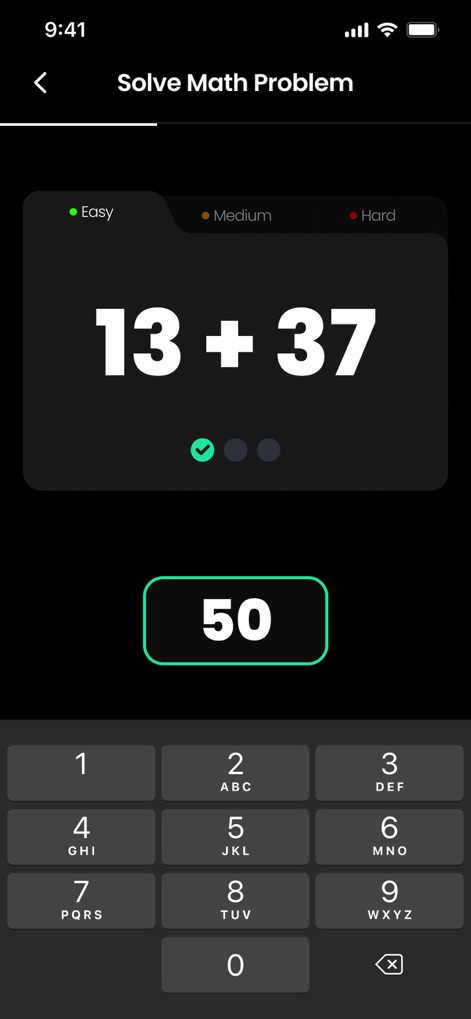
알람 해제를 위해 사용자는 "13 + 37"과 같은 수학 문제를 풀어야 하며, 쉬움, 중간, 어려움 난이도 선택이 가능하여 인지적 각성을 유도합니다.
두뇌 자극 미션
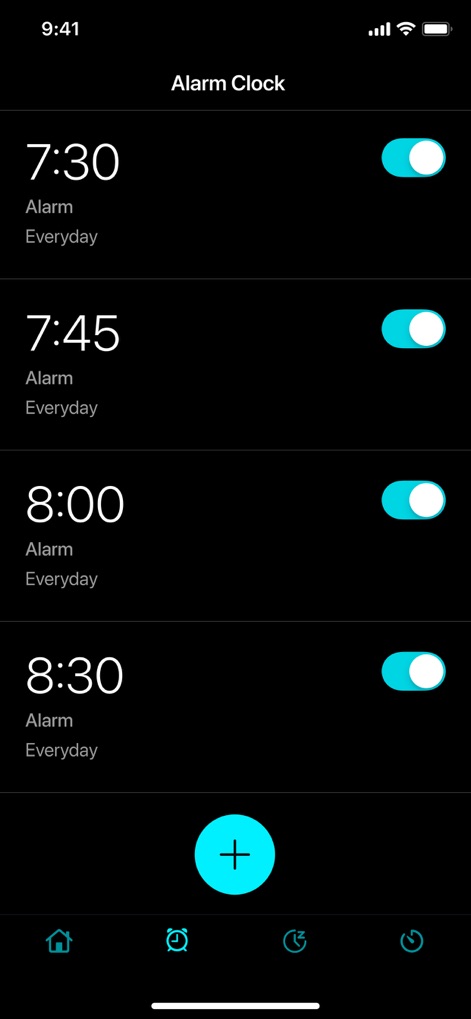
이 앱은 "7:30"과 "8:00"처럼 매일 반복되는 알람을 쉽게 설정할 수 있도록 하며, 하단의 '+' 버튼을 통해 새로운 알람을 추가하는 직관적인 인터페이스를 제공합니다.
간편한 알람 추가

사용자는 시계의 "20:51" 표시 스타일을 변경할 수 있으며, 다양한 글꼴 및 색상 옵션을 선택하여 개인화된 알람 화면을 만들 수 있습니다.
시계 화면 맞춤 설정
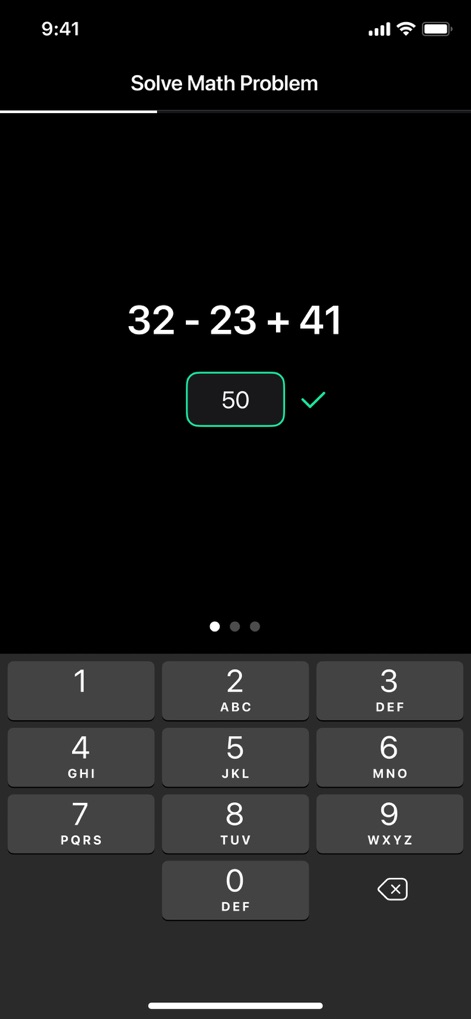
알람을 끄기 위해 "32 - 23 + 41"과 같은 계산 문제를 해결해야 하며, 정답 입력 시 초록색 확인 표시와 함께 숫자를 입력하는 키패드가 제공됩니다.
알람 해제 문제
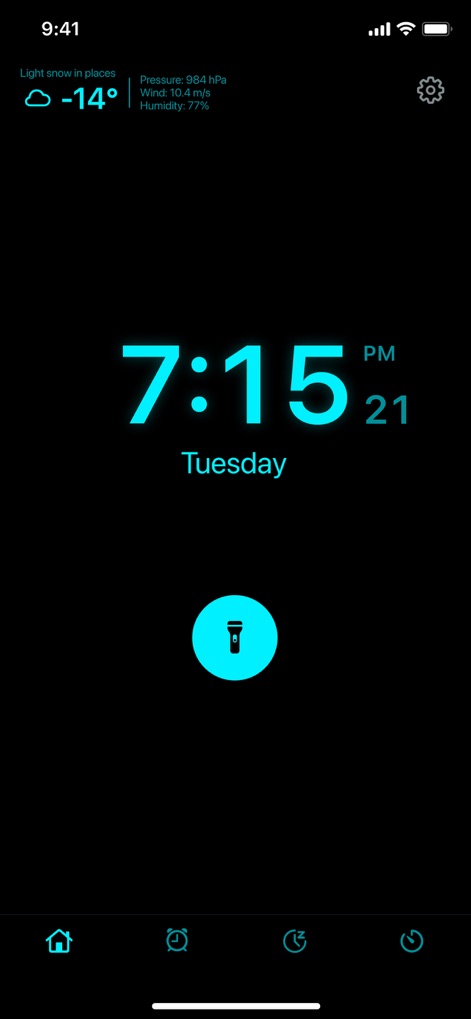
이 앱은 "7:15 PM" 현재 시간을 보여주는 침대 옆 시계 기능을 제공하며, 상단에는 현재 날씨 정보와 하단에는 손전등 기능을 위한 아이콘을 포함합니다.
다기능 침대 옆 시계
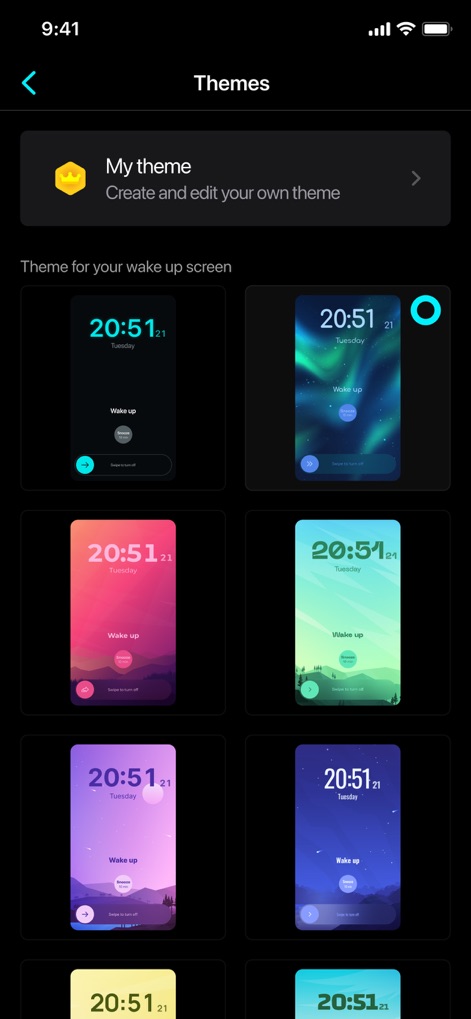
사용자는 "My theme"을 생성하고 편집할 수 있으며, 오로라 패턴이나 다양한 색상의 배경과 같은 여러 개의 미리 보기 테마 중에서 선택하여 알람 화면을 꾸밀 수 있습니다.
다채로운 테마 선택
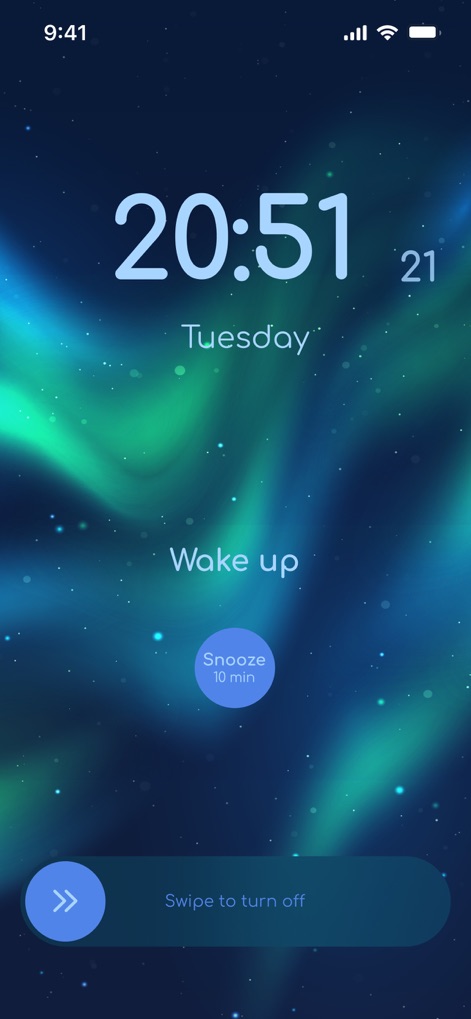
"20:51"과 요일이 표시된 이 알람 화면은 아름다운 오로라 테마를 배경으로 하며, 10분 다시 알림 기능과 알람 해제를 위한 스와이프 옵션을 제공합니다.
매력적인 테마 알람
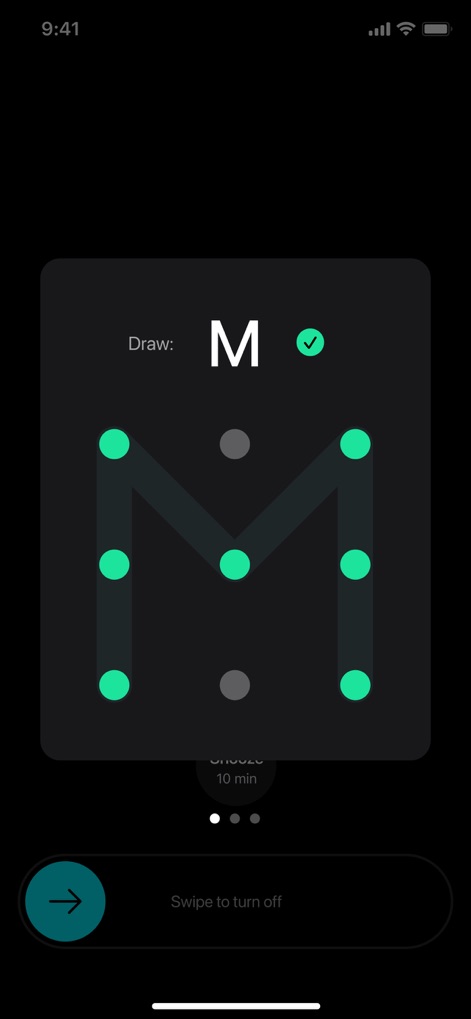
이 앱은 알람 해제를 위해 사용자가 화면에 "M" 패턴을 그리는 기억력 게임을 제공하며, 올바른 경로를 초록색 점으로 시각화하여 안내합니다.
기억력 게임 해제
설명
Download
비슷한 앱
유사한 기능과 사용자 경험을 가진 앱

Erly: Wake Up Early
Jake Glacer

Loud Alarm Clock – the LOUDEST
Jason Tongbai

Alarmy - Loud alarm clock
Delight Room Co., Ltd.

SuperAlarm - Loud Alarm Clock
Jiseop Han

Mathe Alarm Clock - Math Alarm
Jarig Duval

AlarmMon ( alarm clock )
Malang Studio Co. Ltd,
Awake: Smart Alarm Clock
unorderly GmbH
이 페이지는 앱이나 개발자의 공식 페이지가 아니며, 정보 제공 및 논평을 목적으로 작성된 독립 편집 간행물입니다. 명시적으로 달리 언급되지 않는 한, 해당 앱이나 개발자는 MWM, Apple, Google Play, 앱 퍼블리셔 또는 앱 개발자와 제휴, 보증, 후원, 승인 또는 공식적으로 연결되어 있지 않으며, 이 페이지의 어떤 내용도 해당 앱이 MWM의 서비스를 사용하여 개발되었음을 의미하지 않습니다. 모든 상표, 로고, 스크린샷 및 기타 콘텐츠는 해당 소유자의 자산입니다.