Snore Control - Stop Snoring
다운로드: App Store

이 페이지는 앱이나 개발자의 공식 페이지가 아니며, 정보 제공 및 논평을 목적으로 작성된 독립 편집 간행물입니다. 명시적으로 달리 언급되지 않는 한, 해당 앱이나 개발자는 MWM, Apple, Google Play, 앱 퍼블리셔 또는 앱 개발자와 제휴, 보증, 후원, 승인 또는 공식적으로 연결되어 있지 않으며, 이 페이지의 어떤 내용도 해당 앱이 MWM의 서비스를 사용하여 개발되었음을 의미하지 않습니다. 모든 상표, 로고, 스크린샷 및 기타 콘텐츠는 해당 소유자의 자산입니다.

로고: Snore Control - Stop Snoring
다운로드: App Store

Snore Control - Stop Snoring

머신러닝의 힘을 활용하여 수면 패턴을 추적하고, 생활 습관 유발 요인을 식별하며, 파트너를 깨우지 않고 코골이를 멈추게 하는 부드러운 Apple Watch 햅틱을 사용하세요.

주요 수치

다운로드

285K+

사용자 평점

4.5/5

총 평가 수

900

개발사

Apirox, s.r.o.

카테고리

Medical

지원 언어

10

최신 버전

4.5.21

크기

79.4 MB

출시일

2016년 5월 6일
기능

함께 더 잘 자는 법

고급 AI와 데이터 기반 인사이트를 활용하여 코골이를 잠재우고, 휴식을 되찾으며, 침실의 조화를 회복하세요.

AI 기반 코골이 감지

고급 머신러닝이 배경 소음을 필터링하여 과학적인 정밀도로 코골이 패턴을 정확하게 추적합니다.

스마트 햅틱 개입

깨지 않고 코골이를 멈추세요. 코골이가 감지되는 순간 부드러운 Apple Watch 진동이 자세를 바꾸도록 유도합니다.

다음 스크린샷과 설명은 앱의 공식 스토어 목록에서 직접 가져온 것이며 앱 개발자의 자산입니다.

앱 스토어

스크린샷
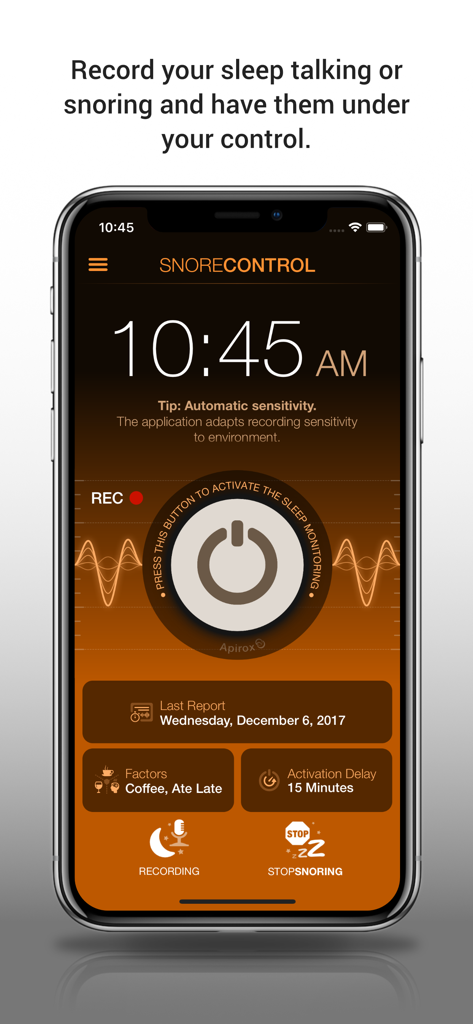
Snore Control - Stop Snoring - 수면 모니터링을 활성화하는 커다란 전원 버튼과 생활 습관 요인을 추적하는 섹션이 특징인 Snore Control 앱의 메인 인터페이스
수면 모니터링을 활성화하는 커다란 전원 버튼과 생활 습관 요인을 추적하는 섹션이 특징인 Snore Control 앱의 메인 인터페이스

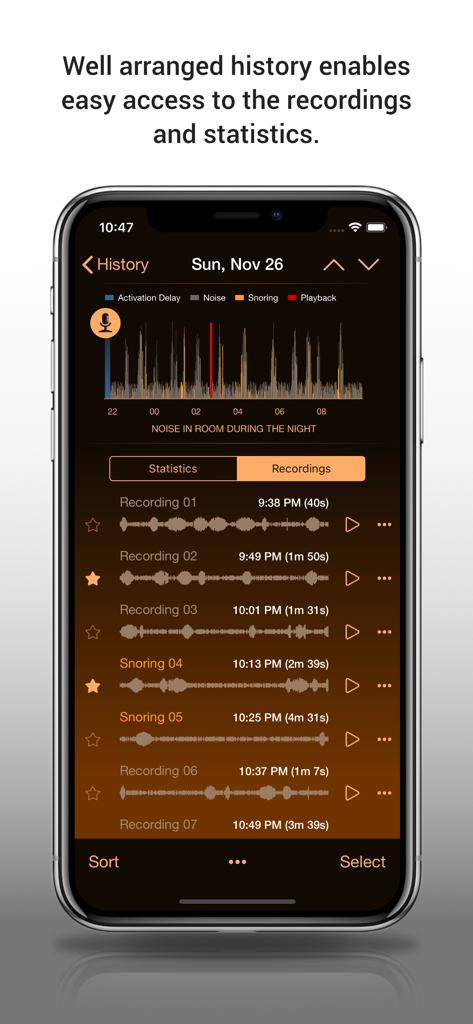
Snore Control - Stop Snoring - 실내 소음 그래프와 코골이 녹음 목록이 포함된 수면 기록을 보여주는 스마트폰
실내 소음 그래프와 코골이 녹음 목록이 포함된 수면 기록을 보여주는 스마트폰

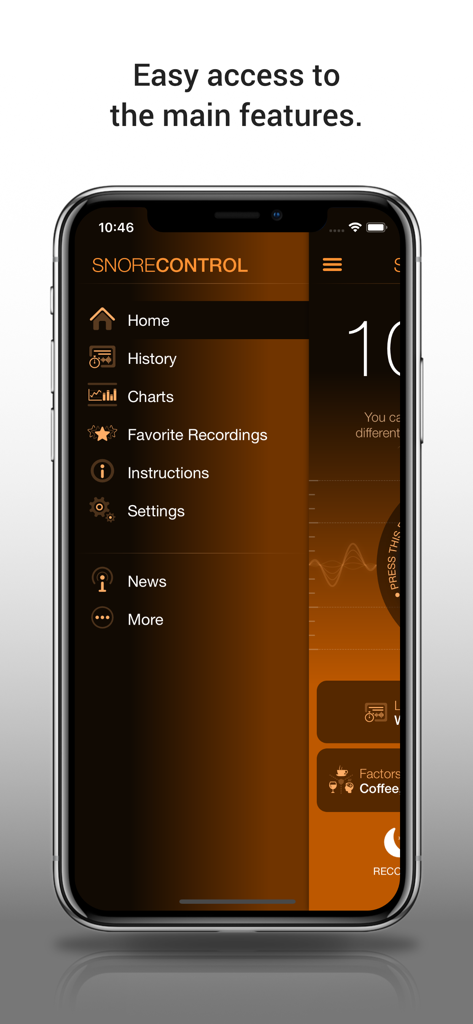
Snore Control - Stop Snoring - 기록, 차트, 수면 녹음 옵션이 포함된 메인 탐색 메뉴를 보여주는 Snore Control 앱 스크린샷.
기록, 차트, 수면 녹음 옵션이 포함된 메인 탐색 메뉴를 보여주는 Snore Control 앱 스크린샷.

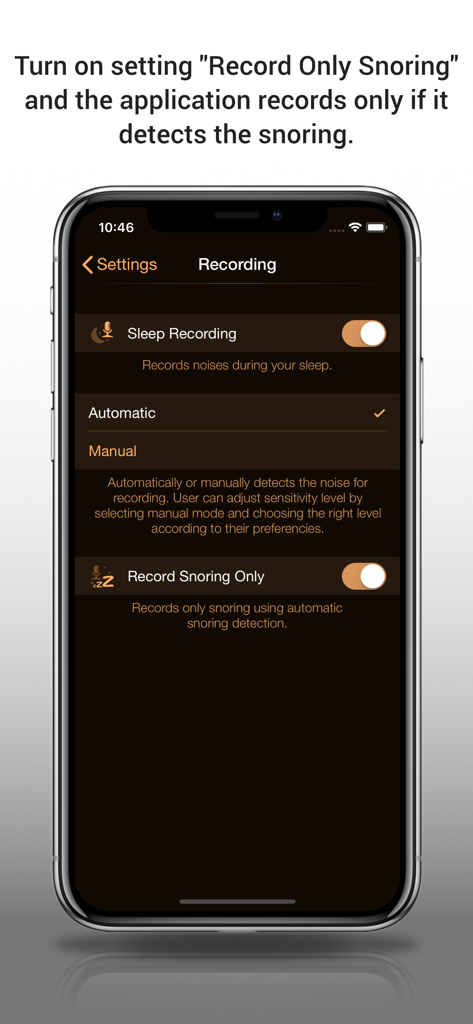
Snore Control - Stop Snoring - 녹음 및 코골이 감지 설정을 보여주는 Snore Control 앱의 iPhone 인터페이스
녹음 및 코골이 감지 설정을 보여주는 Snore Control 앱의 iPhone 인터페이스

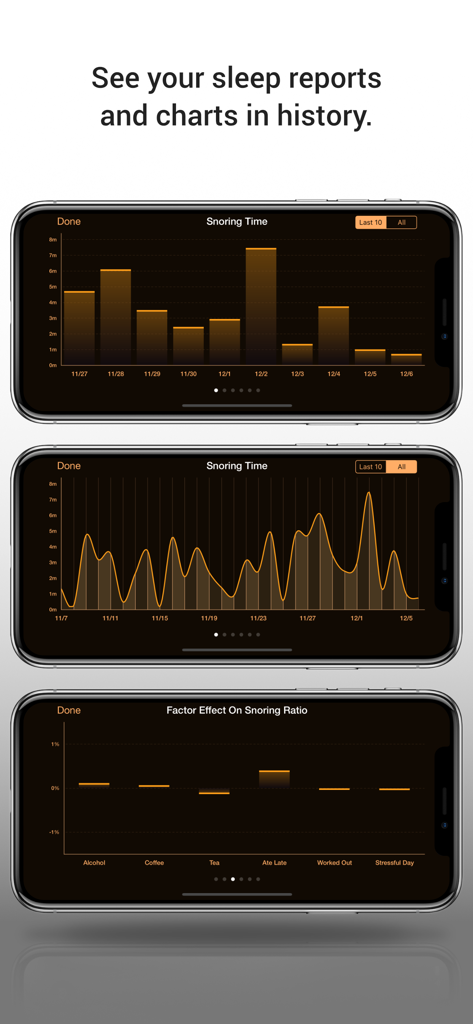
Snore Control - Stop Snoring - Snore Control 앱에서 코골이 시간 차트와 요인 영향 보고서를 표시하는 세 개의 iPhone 화면

Snore Control 앱에서 코골이 시간 차트와 요인 영향 보고서를 표시하는 세 개의 iPhone 화면

설명

Do you snore at night and your partner complains about it? Are you sick to death of snoring of your partner? Snore Control can be the right solution for you. This application records your talk or snoring while you are asleep, creates the graph of noise in room during the night, takes the total time of snoring down and moreover it can try to stop your snoring. Snoring detection is based on artificial intelligence (A.I.) with the support of a new Apple machine learning technology. By using a large number of snoring samples, we can achieve high accuracy in statistics and in snoring detection itself. How it works: Mobile microphone is used to monitor and optionally record the noise in surroundings. By using intelligent noise analysis the application detects the snoring, makes the statistics or else activates the stop snoring function (at least two snores one after another) - it quiets you down using a sound or vibration (only iPhone). How to place your device correctly is shown in instructions. By using the tracker data and by defining your own factors (activities/means/drugs/custom notes) it is possible to find out which facts influence your sleep positively and limit your snoring. At your disposal there are beautiful statistic charts for simple and efficient analyzing of your sleeps/nights. HIGHLIGHTS: - SNORE ANALYZER (TRACKER): Snoring analyzes and statistics with complete history and beautiful charts. - HIGH TECH SNORING DETECTION: Accurate snoring detection based on A.I. - ADJUSTABLE RECORDING SOUND SENSITIVITY: For different sound conditions in your room (a quiet or loud environment). - RECORDING ONLY SNORING - FAVORITE RECORDINGS - SHARING RECORDINGS WITH YOUR FRIENDS: Send recordings via email, iMessage or post to Facebook. - STOP SNORING: Possibility of playing chosen sound or using iPhone vibration when the snoring is detected. - FACTORS, WAKE UP MOOD, NOTES: User can place factors (alcohol, coffee, stress etc.) to every night as well as the mood after waking up or users own notes. - ACTIVATION DELAY: Start monitoring after a period of time. - BACKGROUND MODE: Monitoring runs also in background mode. - APPLE HEALTH INTEGRATION - iCLOUD SYNCHRONIZATION: Synchronization among your devices (optionally). - EXPORTING HISTORY TO CSV FILE - APPLE WATCH: Plays haptic (sound, vibration) if snoring is detected. If you buy SMART ALARMS then it will track your sleep movements and it can play haptic (sound, vibration) if alarm is set. PLEASE NOTE THE FOLLOWING: * It is recommended to connect your iPhone (iPad) to a charger. * Set "Airplane Mode" or "Do Not Disturb" on your iPhone (iPad) for undisturbed sleep. * Place your iPhone (iPad) according to the instructions (see screenshots). CUSTOMER SUPPORT Happy customers are our highest priority. If you have a problem with our app, please contact us at stopsnoring2@apirox.com. SUBSCRIPTION INFORMATION Your payment will be charged to your iTunes Account as soon as you confirm your purchase. You can manage your subscriptions and turn off auto-renewal from your Account Settings after the purchase. Your subscription will renew automatically, unless you turn off auto-renew at least 24 hours before the end of the current period. The cost of renewal will be charged to your account in the 24 hours prior to the end of the current period. When canceling a subscription, your subscription will stay active until the end of the period. Auto-renewal will be disabled, but the current subscription will not be refunded. Any unused portion of a free trial period, if offered, will be forfeited when purchasing a subscription. Terms and Conditions: https://apirox.com/docs/snore_control_lite/terms_and_conditions.php Terms of Use: https://apirox.com/docs/snore_control_lite/terms_of_use.php Privacy Policy: https://apirox.com/docs/snore_control_lite/privacy_policy.php

Download

다운로드: App Store

이 페이지는 앱이나 개발자의 공식 페이지가 아니며, 정보 제공 및 논평을 목적으로 작성된 독립 편집 간행물입니다. 명시적으로 달리 언급되지 않는 한, 해당 앱이나 개발자는 MWM, Apple, Google Play, 앱 퍼블리셔 또는 앱 개발자와 제휴, 보증, 후원, 승인 또는 공식적으로 연결되어 있지 않으며, 이 페이지의 어떤 내용도 해당 앱이 MWM의 서비스를 사용하여 개발되었음을 의미하지 않습니다. 모든 상표, 로고, 스크린샷 및 기타 콘텐츠는 해당 소유자의 자산입니다.