Solartelligent: PV Planner

Solartelligent: PV Planner

다운로드: App Store
로고: Solartelligent: PV Planner

Solartelligent: PV Planner — 전문적인 태양광 계획 및 정밀한 ROI 분석

고급 AR 음영 시뮬레이션과 상세한 출력 예측으로 에너지 미래를 제어하세요. 독립 계약자든 데이터 중심의 주택 소유자든, 태양광 투자를 극대화하고 에너지 독립을 달성하는 데 필요한 전문적인 통찰력을 얻으세요.

다운로드: App Store

개발사

Thomas Moder

카테고리

Utilities

다운로드

3K+

사용자 평점

3.9/5

총 평가 수

0

지원 언어

3

모든 픽셀에 담긴 정밀함

이 인터페이스를 사용하는 3K+ 명의 사용자.

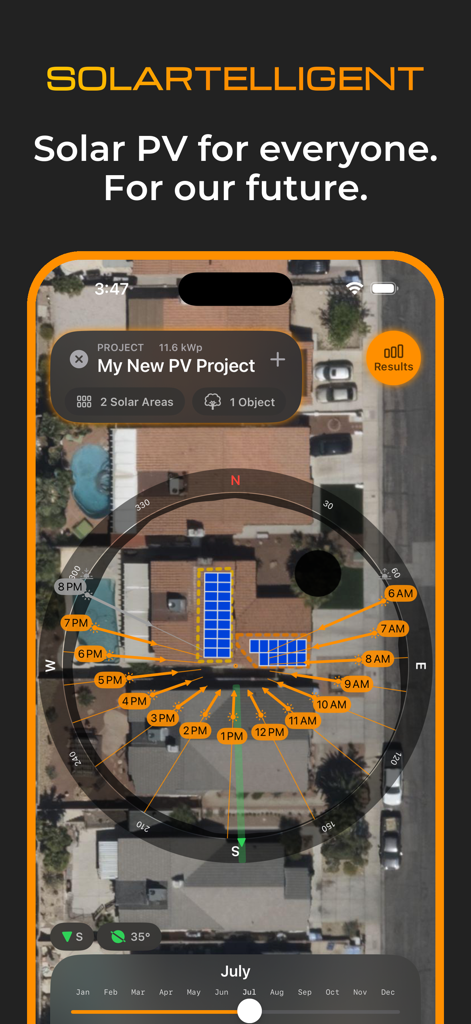
Solartelligent 앱 인터페이스가 주택 지붕 위성 보기에서 태양광 패널 레이아웃 및 태양 경로 분석을 보여줌
Solartelligent 앱 인터페이스가 주택 지붕 위성 보기에서 태양광 패널 레이아웃 및 태양 경로 분석을 보여줌

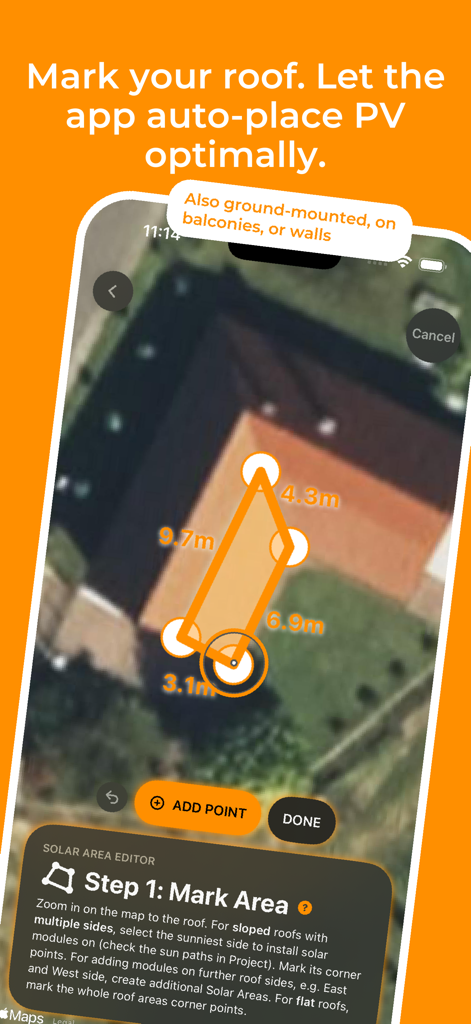
Solartelligent 앱 인터페이스가 사용자가 위성 지도에서 태양광 패널을 위한 지붕 영역을 표시하는 것을 보여줌
Solartelligent 앱 인터페이스가 사용자가 위성 지도에서 태양광 패널을 위한 지붕 영역을 표시하는 것을 보여줌

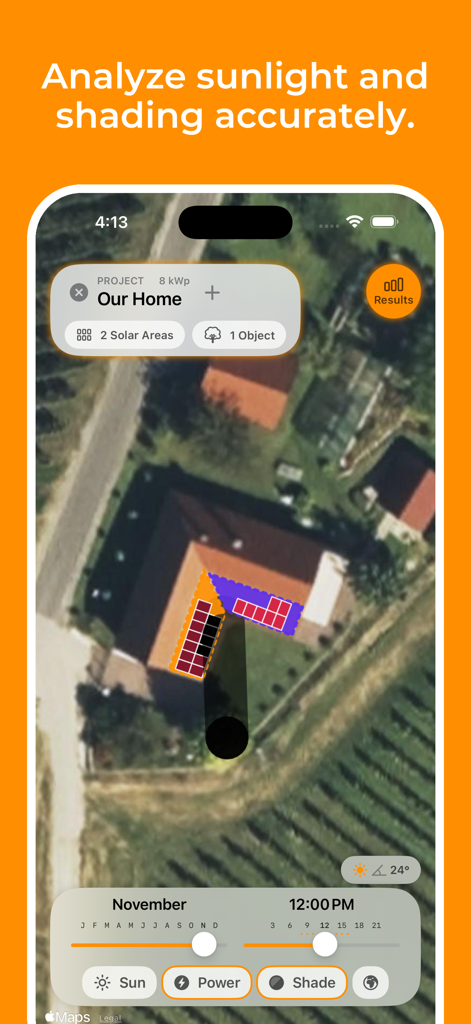
Solartelligent PV Planner 앱 인터페이스가 주택 지붕에서 태양광 패널 매핑 및 음영 시뮬레이션을 보여줌
Solartelligent PV Planner 앱 인터페이스가 주택 지붕에서 태양광 패널 매핑 및 음영 시뮬레이션을 보여줌

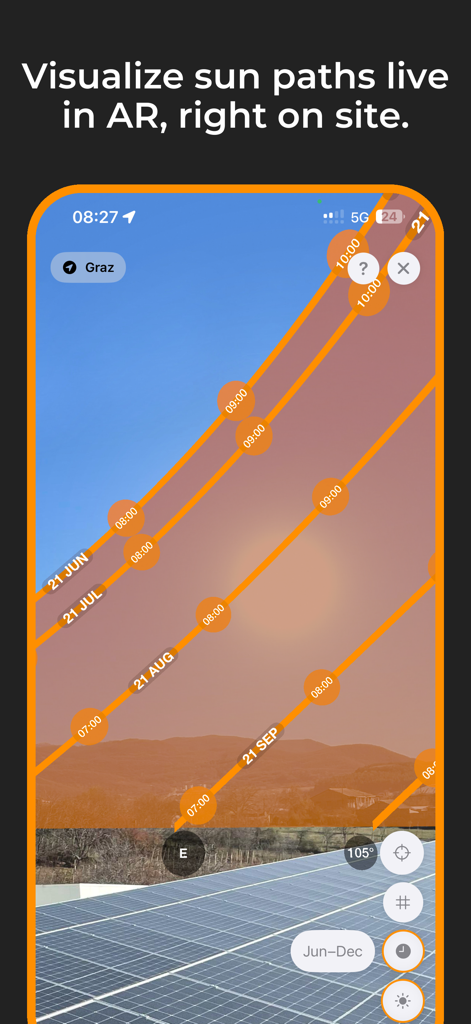
지붕 위 태양광 패널 위로 태양 경로를 보여주는 증강 현실 보기
지붕 위 태양광 패널 위로 태양 경로를 보여주는 증강 현실 보기

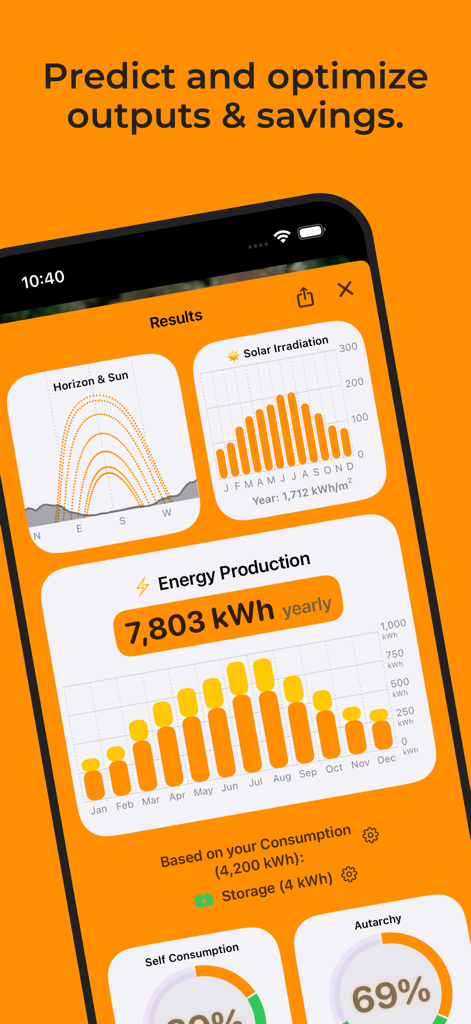
Solartelligent 앱 결과 화면이 태양 복사열, 연간 에너지 생산량 및 자율성 지표를 보여줌
Solartelligent 앱 결과 화면이 태양 복사열, 연간 에너지 생산량 및 자율성 지표를 보여줌

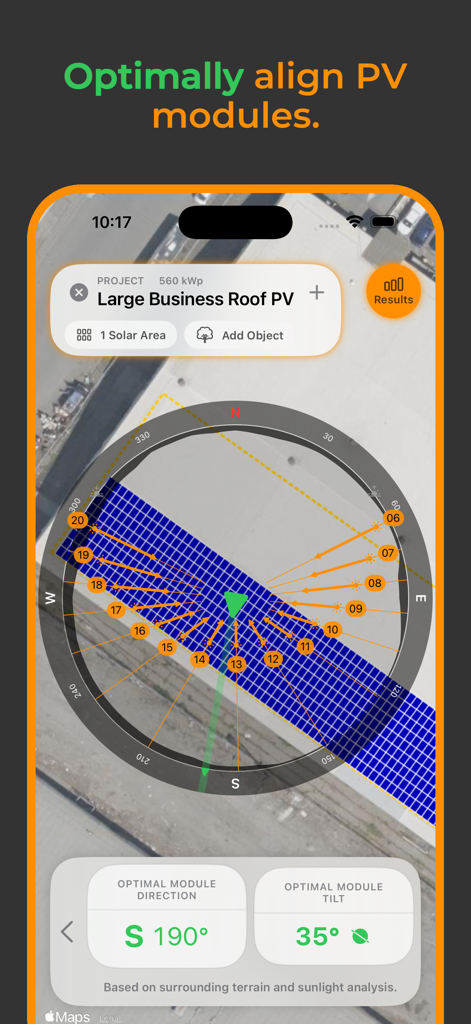
지붕 프로젝트를 위한 최적의 태양광 모듈 방향 및 기울기를 보여주는 모바일 앱 인터페이스
지붕 프로젝트를 위한 최적의 태양광 모듈 방향 및 기울기를 보여주는 모바일 앱 인터페이스

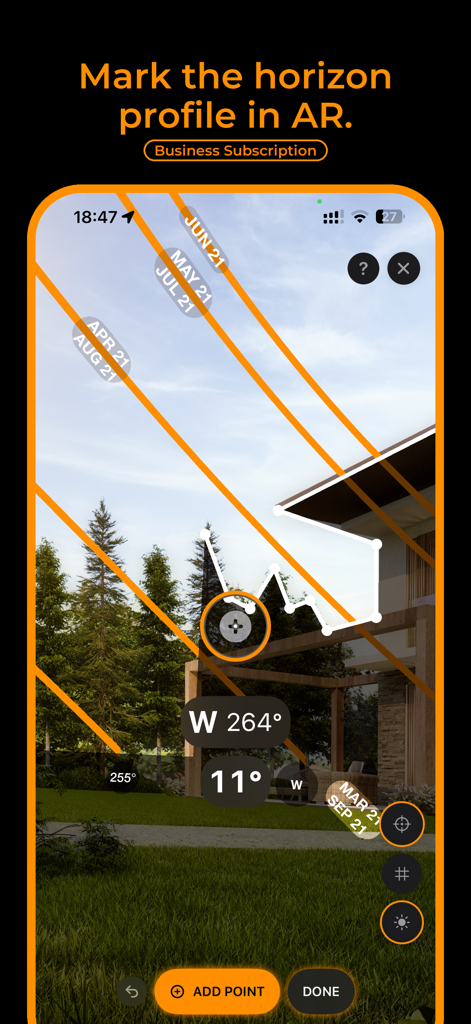
태양광 에너지 계획을 위한 태양 경로 분석 및 지평선 프로필 표시를 보여주는 증강 현실 인터페이스
태양광 에너지 계획을 위한 태양 경로 분석 및 지평선 프로필 표시를 보여주는 증강 현실 인터페이스

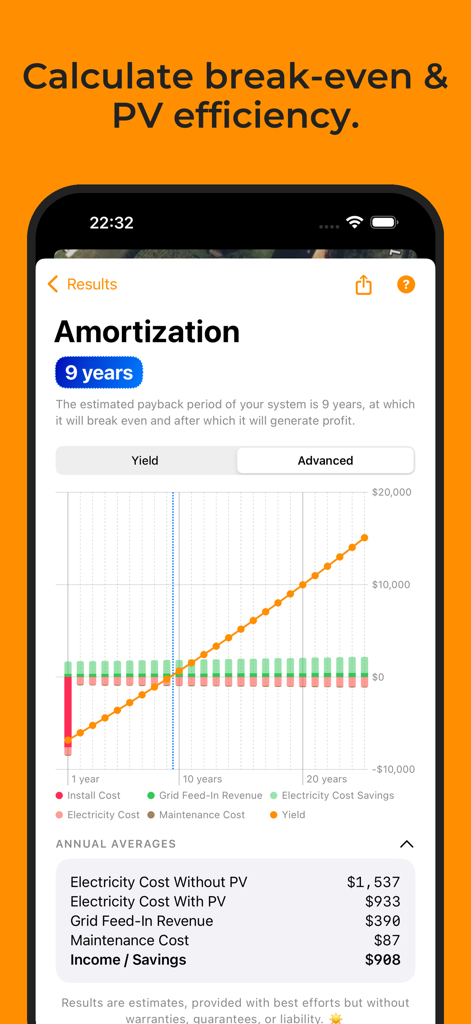
9년 상환 기간과 재정 성과 그래프를 보여주는 태양광 PV 상환 화면
9년 상환 기간과 재정 성과 그래프를 보여주는 태양광 PV 상환 화면

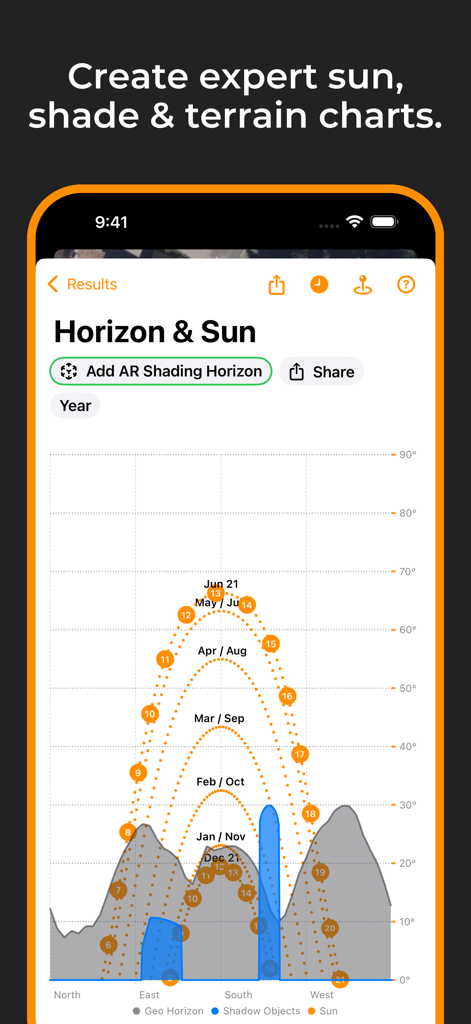
태양광 에너지 계획을 위한 대화형 태양 경로 및 지평선 음영 차트
태양광 에너지 계획을 위한 대화형 태양 경로 및 지평선 음영 차트

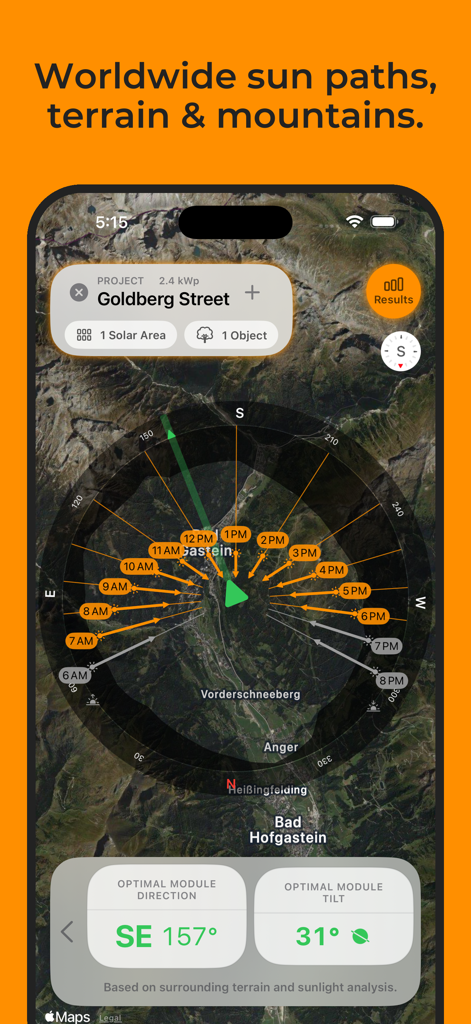
위성 지형 지도에서 태양 경로 분석 및 최적의 태양광 모듈 기울기 및 방향을 표시하는 Solartelligent 앱 화면.

위성 지형 지도에서 태양 경로 분석 및 최적의 태양광 모듈 기울기 및 방향을 표시하는 Solartelligent 앱 화면.

태양광 잠재력을 마스터하세요

이 앱을 돋보이게 하는 도구, 3K+ 명의 사용자가 선택.

📱

실시간 AR 음영 분석

증강 현실을 사용하여 태양 경로를 시각화하고 나무나 주변 구조물의 그림자를 즉시 감지하여 패널이 최대 햇빛을 받도록 배치하세요.

📊

데이터 기반 ROI 예측

저축액을 추측하지 마세요. 특정 위치와 에너지 요구 사항을 기반으로 정확한 손익분기점, 평생 수익 및 자가 소비율을 계산하세요.

🛠️

전문 프로젝트 설계자

지붕, 발코니 또는 지상 설치를 위한 최적화된 레이아웃을 생성하세요. 맞춤 브랜딩이 포함된 전문 PDF 보고서를 생성하여 고객 또는 설치업체와 공유하세요.

앱 소개

에 대해 알아야 할 모든 것 Solartelligent: PV Planner.

설명

Discover Solartelligent: The Ultimate Solar Planning Tool. Whether you’re a curious homeowner or a solar expert, Solartelligent makes solar energy planning, simulation, and installation simple, precise, and effective. Easy for beginners with integrated step-by-step guidance, and indispensable for professionals with advanced calculations, sun and shadow simulations, output predictions, and powerful utilities. For rooftop systems, ground-mounted panels, balconies, or walls. For Homeowners: • Determine if solar energy is right for your location. • Predict PV energy output and savings. • Save money and evaluate installation offers with confidence. For Professionals: • Plan and manage detailed projects with ease. • Use (AR) tools for real-time shading and sun path analysis. • Amaze clients with professional and innovative insights on-site. Key Features: • Select any location worldwide and analyze its solar potential. • Plan PV projects with integrated utilities for design, shading, and energy optimization. • Use Augmented Reality (AR) to visualize sun paths and mark precise horizon lines on-site. • Simulate energy outputs, shading, and system efficiency for any month or time of day. • Add solar areas for rooftops, ground-mounted panels, balconies, or walls to your projects. • Use automatic, optimal PV module placement on a solar area based on best sunlight conditions. • On flat surfaces, PV Modules can also be tilted or dual-tilted (e.g., east-west) for maximum efficiency. • Adjust row spacing or add additional walkways between module rows or modules. • Manually mark custom shadow objects like nearby houses or trees on the map for precise shadow analysis. • Calculate optimal angles for PV modules based on sunlight and shadows. • Incorporate energy consumption, storage (batteries), and grid data to predict self-consumption and savings. • Generate detailed project reports, including yield, break-even time and lifetime revenue predictions. • Generate accurate sun path and horizon diagrams for any location. • Export results as PDF for easy sharing. • Export horizon data for mountains and shadow objects in projects as a CSV or horizon file. • Measure tilt or align modules to optimal orientation and tilt with the Inclinometer tool. • Sync projects via iCloud to seamlessly share them between iPhone and iPad. • Works anywhere in the world. Solartelligent Business Features: Unlock advanced functionality with a subscription: • Manage multiple projects seamlessly. • Use AR shading horizons to mark exact site conditions quickly and for maximum precision. No need to add shadow objects manually. • Calculate outputs and revenues based on AR inputs. • Add your logo on all reports and exported PDFs. With Solartelligent, you can plan, optimize, and install solar energy systems confidently and efficiently. Solar energy for everyone. For our future. Let’s start! Terms of Use (EULA): https://www.apple.com/legal/internet-services/itunes/dev/stdeula/

최신 버전

3.3

크기

13.7 MB

출시일

2025년 1월 30일

태양광 잠재력을 마스터할 준비가 되셨나요?

정확한 시뮬레이션과 최대 ROI를 위해 Solartelligent를 신뢰하는 수천 명의 주택 소유자 및 전문가와 함께하세요. 지금 바로 궁극의 PV 툴킷을 다운로드하고 에너지 독립을 향한 여정을 시작하세요.

다운로드: App Store

App information, icons, screenshots, and descriptions displayed on this page are sourced from the Apple App Store and are the property of their respective developers. Download estimates and rankings are based on MWM's proprietary models and may not reflect actual figures. This page is provided for informational and analytical purposes only.

Believe this page infringes your intellectual property? File a dispute