Songistic
Songistic
다운로드: App Store

이 페이지는 앱이나 개발자의 공식 페이지가 아니며, 정보 제공 및 논평을 목적으로 작성된 독립 편집 간행물입니다. 명시적으로 달리 언급되지 않는 한, 해당 앱이나 개발자는 MWM, Apple, Google Play, 앱 퍼블리셔 또는 앱 개발자와 제휴, 보증, 후원, 승인 또는 공식적으로 연결되어 있지 않으며, 이 페이지의 어떤 내용도 해당 앱이 MWM의 서비스를 사용하여 개발되었음을 의미하지 않습니다. 모든 상표, 로고, 스크린샷 및 기타 콘텐츠는 해당 소유자의 자산입니다.


로고: Songistic
다운로드: App Store

Songistic

고품질 반주 트랙과 강력한 악보 편집기로 2,500개 이상의 검증된 곡을 마스터하세요. 무대 공연이든 집에서 연습이든, iPhone 및 iPad에 최적화된 디지털 악보의 정확성을 경험하세요.

주요 수치

다운로드

0

사용자 평점

4.4/5

총 평가 수

0

개발사

RV Software LTD

카테고리

Music

지원 언어

1

최신 버전

2.7.66

크기

222.7 MB

출시일

2020년 2월 13일
기능

실력 있는 뮤지션을 위한 최고의 도구

연습실부터 메인 무대까지, Songistic은 레퍼토리를 마스터하고 자신 있게 밴드를 이끌어가는 데 필요한 정확성, 유연성 및 전문적인 반주를 제공합니다.

검증된 프로급 악보

정확하지 않고 사용자가 만든 탭에 의존하는 것을 멈추세요. Jazz, Latin, Pop 장르의 2,500개 이상의 전문적으로 검증된 코드 악보 라이브러리에 액세스하여 모든 공연에서 화음의 완벽함을 보장받으세요.

나만의 가상 반주 밴드

전체 앙상블을 시뮬레이션하는 고품질 MIDI 그루브로 연습하세요. 즉시 키를 전환하고, 템포를 조정하고, 편곡을 사용자 정의하여 솔로 공연 또는 리허설 요구에 맞추세요.

다음 스크린샷과 설명은 앱의 공식 스토어 목록에서 직접 가져온 것이며 앱 개발자의 자산입니다.

앱 스토어

스크린샷
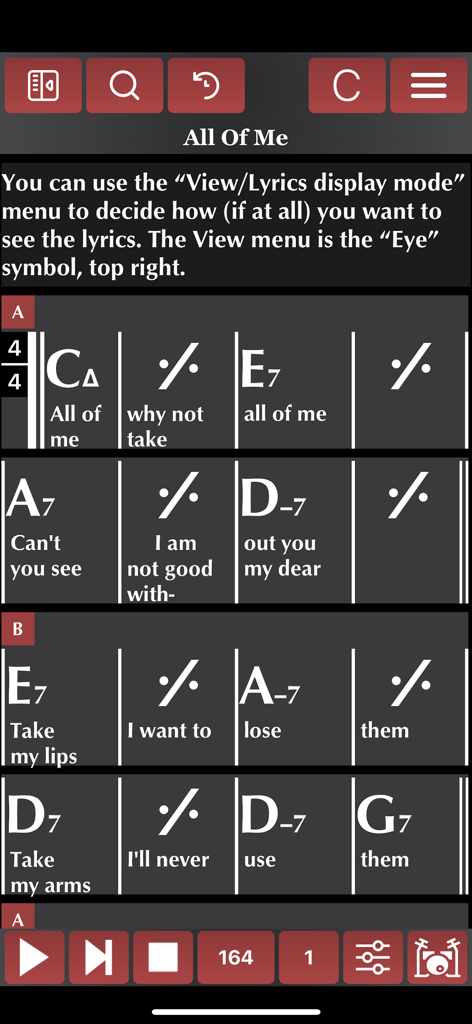
Songistic - Songistic 모바일 앱이 'All of Me'라는 노래의 재즈 코드 악보와 가사를 보여줍니다.
Songistic 모바일 앱이 'All of Me'라는 노래의 재즈 코드 악보와 가사를 보여줍니다.

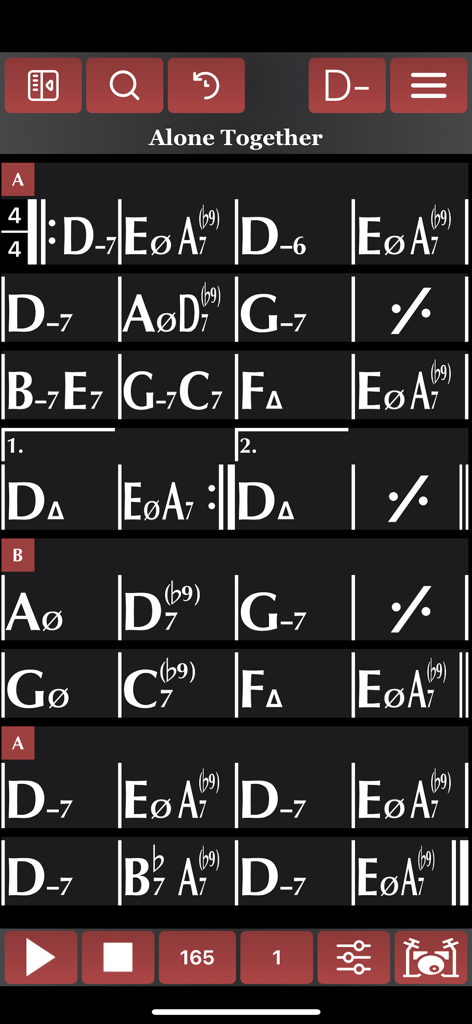
Songistic - Songistic 앱 인터페이스 내에서 재즈 표준곡 'Alone Together'의 고대비 디지털 코드 악보로, 복잡한 코드 기호와 재생 컨트롤을 보여줍니다.
Songistic 앱 인터페이스 내에서 재즈 표준곡 'Alone Together'의 고대비 디지털 코드 악보로, 복잡한 코드 기호와 재생 컨트롤을 보여줍니다.

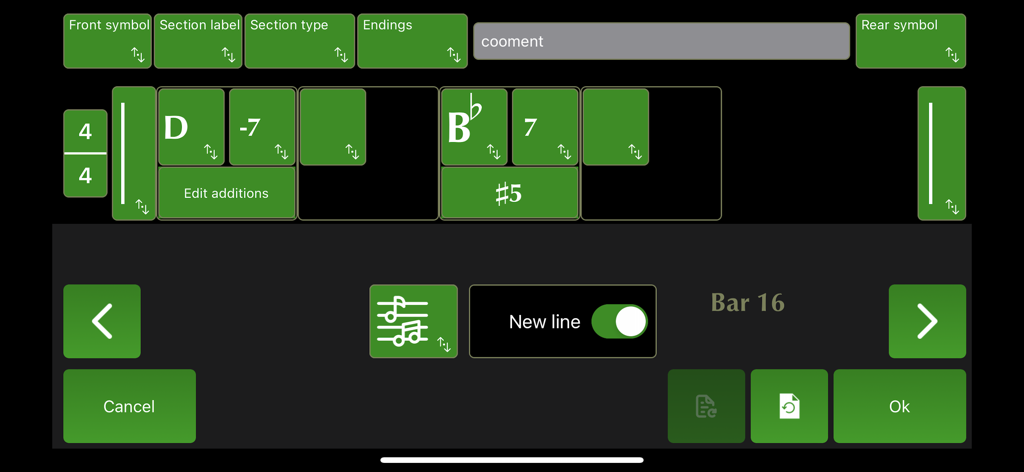
Songistic - Songistic 앱의 바 편집기 인터페이스로, D-7 및 Bb7과 같은 음악 코드 기호와 섹션 레이블 및 마침표 편집 컨트롤을 보여줍니다.

Songistic 앱의 바 편집기 인터페이스로, D-7 및 Bb7과 같은 음악 코드 기호와 섹션 레이블 및 마침표 편집 컨트롤을 보여줍니다.

설명

Songistic is a pop, rock, jazz, gypsy jazz, latin, etc. digital chord chart, chord sheet library with more than 2500 songs. It is a full-band play-along app with many-many styles, and a new tool for creating and editing chord chart in a real easy way. It is very useful for both beginners, music students, hobbyists, and professional musicians, for both skill development and as a performance aid. 1. The Players The players will simply use the charts, in chart mode, will probably do little or no editing at all. Assemble some playlists for gigs/practice and simply read the charts on their device. In Songistic we enforce correct use of the symbols for both chord and navigation, and we give the end user (the player) the control over how the charts will look on his particular device. The charts we supply with Songistic are all audited to be correct in both form and harmonic content. Options: How the charts will look on your particular device, will depend on your individual settings. The symbols for "minor" or "major" chords will be what you set, how many bars will display in a single line, and many chart layout options will determine how the chart will look on your device. These options will give you deep control on the chart layout regardless of how they looked on the author's machine. The reason for this is very simple: the same chart wants to look very different on a small iPhone screen from what it will look like on an iPad Professional. Our view options and features (including auto-navigation) are far more advanced than anything you would find in the other apps. 2. The practicing musicians Music students of all ages/levels, even professional musicians can use Songistic for practicing. Songistic has many sounds and grooves built in you can choose from. All gooves/groove options can be audited while the song is playing. For instance you can select "Shuffle" for your song then pick the appropriate drum and bass grooves while the song is playing. Songistic is a full featured play-along app, has great sounding grooves, the songs can be played in any key and tempo. 3. The Writes/Editors These are the musicians who will write/customize existing songs for their own purposes. They will use the editing function a lot. Songistic has a first class bar editor that is very powerful, has many features to speed your work in either editing existing music or entering a new song from scratch. Our quick-bar-insert bar lets you enter a new song in matter of minutes. The logical breakdown of harmonies will ensure that you do not have to dig through a hundred obscure chord types to find a minor7. After analyzing thousands of songs we know what the most used chord combinations are, and these are quickly at your fingertips as you edit. Once you are ready to save, another Songistic feature kicks in: error checking. In order to maintain consistency of the charts we enforce many rules in how repeat signs, repeat bars, codas etc.. are used. When you save a song Songistic will warn you if the chart have errors that were detected during the error check. Once you fix these errors and save without warnings, your song is ready to be played or presented as a chart. 4. Performance Songistic is more than a practicing tool. By default, the chart is being repeated in midi-play infinitely. However, there are repeat settings, where you can set the song to just play the song from top to bottom, once. Or, repeat the "form" of the song a predetermined number of times. Even better, using the solo-section feature (which identifies the form, the "meat"of the song between the intro and the outro), a performance can be set up easily where the intro is played, then the middle section is repeated a number of times, then the outro is played, possibly with a fermata (birdseye) at the end. This can be used for performances where a singer or a soloist play along the Songistic backing. Terms of service: https://songistic.eu/terms-of-service/

Download

다운로드: App Store

이 페이지는 앱이나 개발자의 공식 페이지가 아니며, 정보 제공 및 논평을 목적으로 작성된 독립 편집 간행물입니다. 명시적으로 달리 언급되지 않는 한, 해당 앱이나 개발자는 MWM, Apple, Google Play, 앱 퍼블리셔 또는 앱 개발자와 제휴, 보증, 후원, 승인 또는 공식적으로 연결되어 있지 않으며, 이 페이지의 어떤 내용도 해당 앱이 MWM의 서비스를 사용하여 개발되었음을 의미하지 않습니다. 모든 상표, 로고, 스크린샷 및 기타 콘텐츠는 해당 소유자의 자산입니다.