Sound Level Analyzer PRO
다운로드: App Store

이 페이지는 앱이나 개발자의 공식 페이지가 아니며, 정보 제공 및 논평을 목적으로 작성된 독립 편집 간행물입니다. 명시적으로 달리 언급되지 않는 한, 해당 앱이나 개발자는 MWM, Apple, Google Play, 앱 퍼블리셔 또는 앱 개발자와 제휴, 보증, 후원, 승인 또는 공식적으로 연결되어 있지 않으며, 이 페이지의 어떤 내용도 해당 앱이 MWM의 서비스를 사용하여 개발되었음을 의미하지 않습니다. 모든 상표, 로고, 스크린샷 및 기타 콘텐츠는 해당 소유자의 자산입니다.

로고: Sound Level Analyzer PRO
다운로드: App Store

Sound Level Analyzer PRO

실시간 FFT 스펙트럼 분석, 1/3 옥타브 밴드 데이터 및 포괄적인 소음 통계로 전문 프로젝트에 힘을 실어주세요. 손안에서 정밀한 사운드 엔지니어링을 경험하세요.

주요 수치

다운로드

3K+

사용자 평점

1.0/5

총 평가 수

0

개발사

TOON,LLC

카테고리

Utilities

지원 언어

1

최신 버전

8.0

크기

0.7 MB

출시일

2017년 12월 12일
기능

전문가 수준의 음향 지능

저주파 험 소음 식별부터 환경 소음 기록까지, 실험실 품질 데이터 분석으로 iPhone을 정밀 측정 도구로 전환하세요.

증거 기반 데이터 로깅

최대 8시간의 시간별 이력 및 통계 히스토그램을 캡처하여 소음 불만 또는 직장 안전 감사에 대한 객관적이고 확실한 증거를 제공합니다.

실시간 스펙트럼 인사이트

전문 FFT 및 1/3 옥타브 밴드 응답을 사용하여 음원을 분석하여 고급 오디오 시스템을 최적화하고 특정 주파수 문제를 격리합니다.

다음 스크린샷과 설명은 앱의 공식 스토어 목록에서 직접 가져온 것이며 앱 개발자의 자산입니다.

앱 스토어

스크린샷
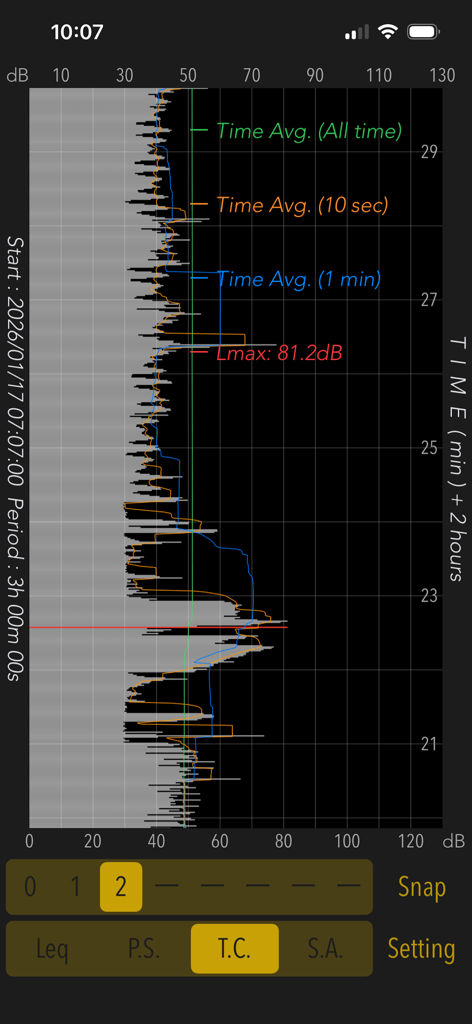
Sound Level Analyzer PRO - Sound Level Analyzer PRO 앱이 3시간 동안의 음향 수준 시간 이력 그래프를 표시합니다.
Sound Level Analyzer PRO 앱이 3시간 동안의 음향 수준 시간 이력 그래프를 표시합니다.

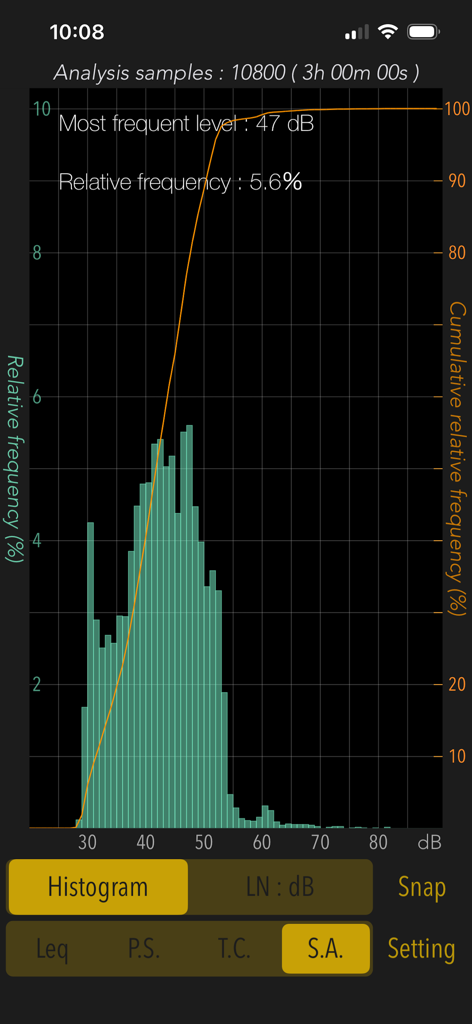
Sound Level Analyzer PRO - Sound Level Analyzer PRO의 통계 분석 히스토그램이 3시간 동안의 소음 수준 분포를 보여줍니다.
Sound Level Analyzer PRO의 통계 분석 히스토그램이 3시간 동안의 소음 수준 분포를 보여줍니다.

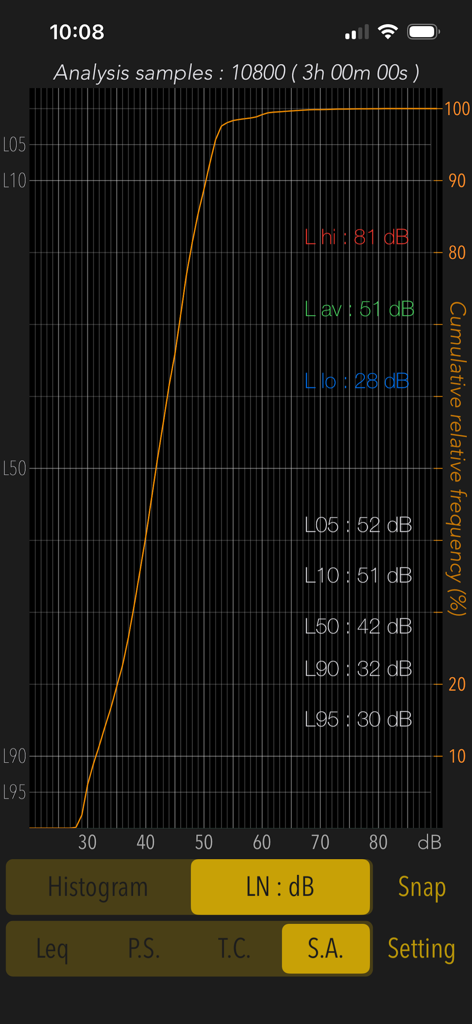
Sound Level Analyzer PRO - 통계 분석 화면이 3시간 동안의 누적 상대 주파수 및 데시벨 백분위수 수준을 표시합니다.
통계 분석 화면이 3시간 동안의 누적 상대 주파수 및 데시벨 백분위수 수준을 표시합니다.

Sound Level Analyzer PRO - Sound Level Analyzer PRO 앱의 실시간 데시벨 측정 인터페이스가 현재, 최소, 최대 및 평균 음향 수준을 표시합니다.
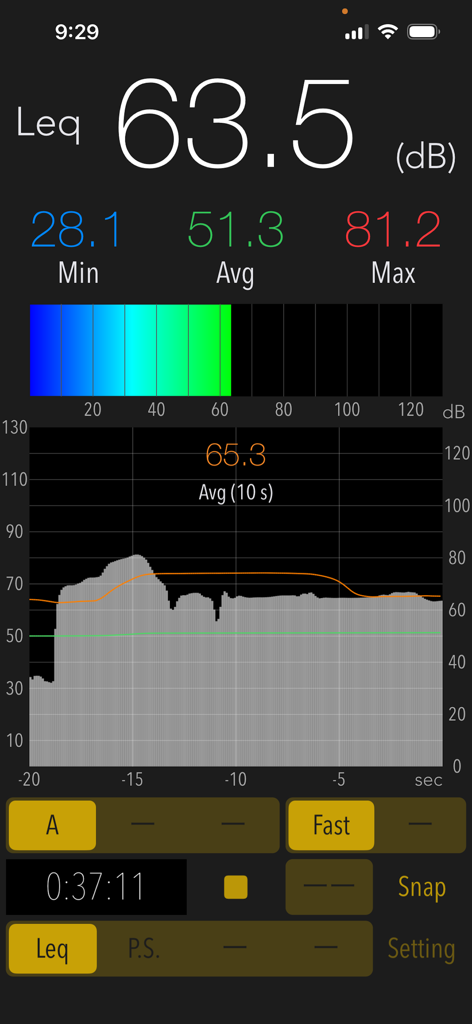
Sound Level Analyzer PRO 앱의 실시간 데시벨 측정 인터페이스가 현재, 최소, 최대 및 평균 음향 수준을 표시합니다.

Sound Level Analyzer PRO - Sound Level Analyzer PRO 앱의 전력 스펙트럼 및 FFT 주파수 분석 화면
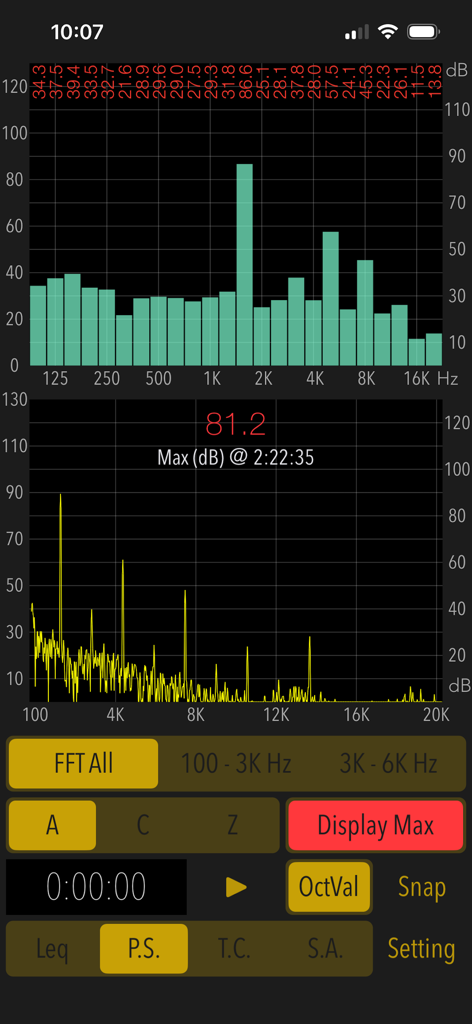
Sound Level Analyzer PRO 앱의 전력 스펙트럼 및 FFT 주파수 분석 화면

Sound Level Analyzer PRO - Sound Level Analyzer PRO 앱의 인터페이스가 64.2dB의 실시간 데시벨 측정값과 소음 이력 그래프 및 통계를 보여줍니다.
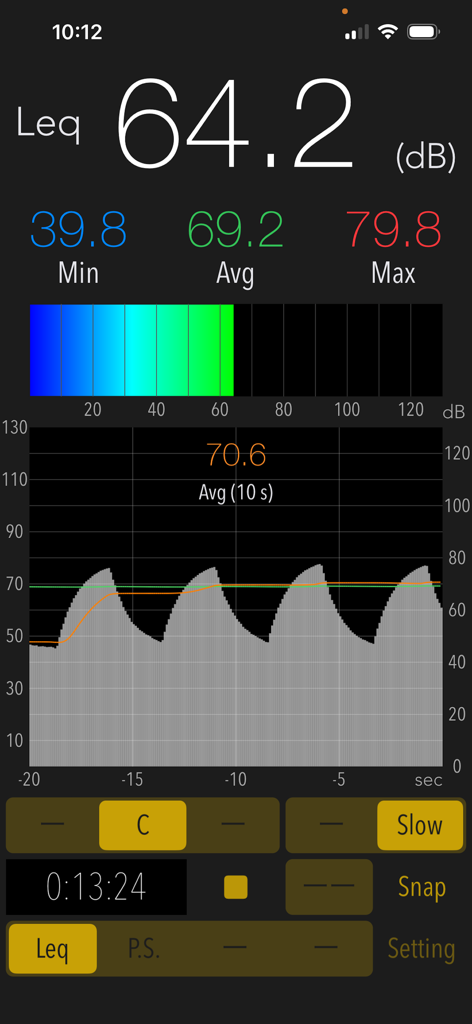
Sound Level Analyzer PRO 앱의 인터페이스가 64.2dB의 실시간 데시벨 측정값과 소음 이력 그래프 및 통계를 보여줍니다.

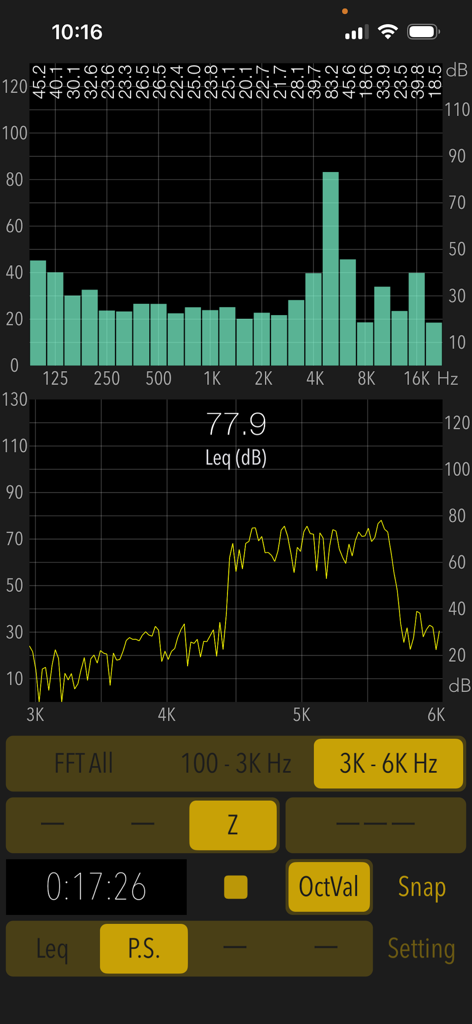
Sound Level Analyzer PRO - Sound Level Analyzer PRO의 인터페이스가 실시간 주파수 스펙트럼 분석 및 데시벨 수준을 보여줍니다.
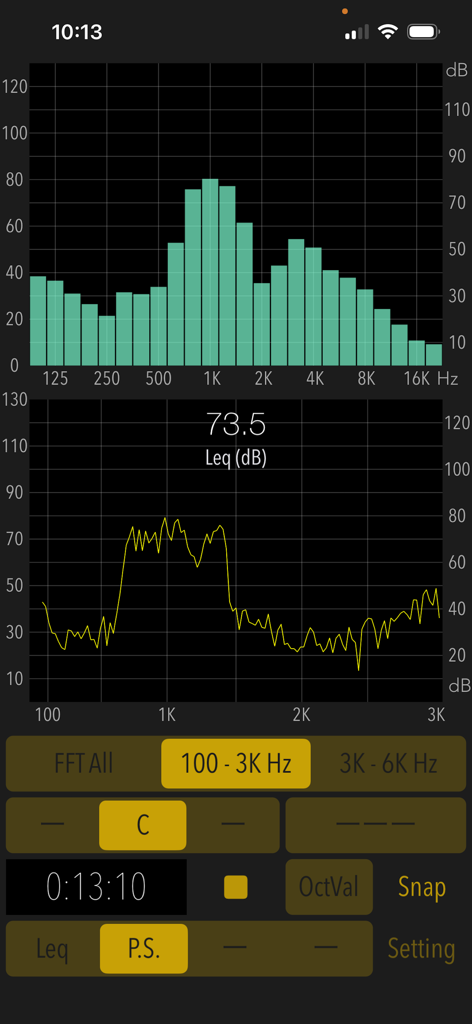
Sound Level Analyzer PRO의 인터페이스가 실시간 주파수 스펙트럼 분석 및 데시벨 수준을 보여줍니다.

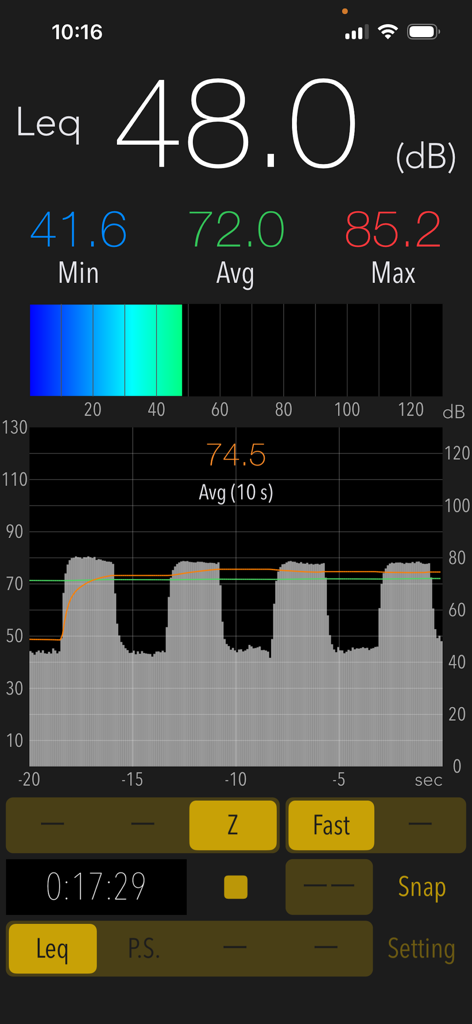
Sound Level Analyzer PRO - Sound Level Analyzer PRO의 인터페이스가 실시간 데시벨 측정값과 소음 수준 이력 그래프를 보여줍니다.
Sound Level Analyzer PRO의 인터페이스가 실시간 데시벨 측정값과 소음 수준 이력 그래프를 보여줍니다.

Sound Level Analyzer PRO - Sound Level Analyzer PRO 앱의 인터페이스가 실시간 FFT 스펙트럼 및 1/3 옥타브 밴드 분석 그래프를 보여줍니다.
Sound Level Analyzer PRO 앱의 인터페이스가 실시간 FFT 스펙트럼 및 1/3 옥타브 밴드 분석 그래프를 보여줍니다.

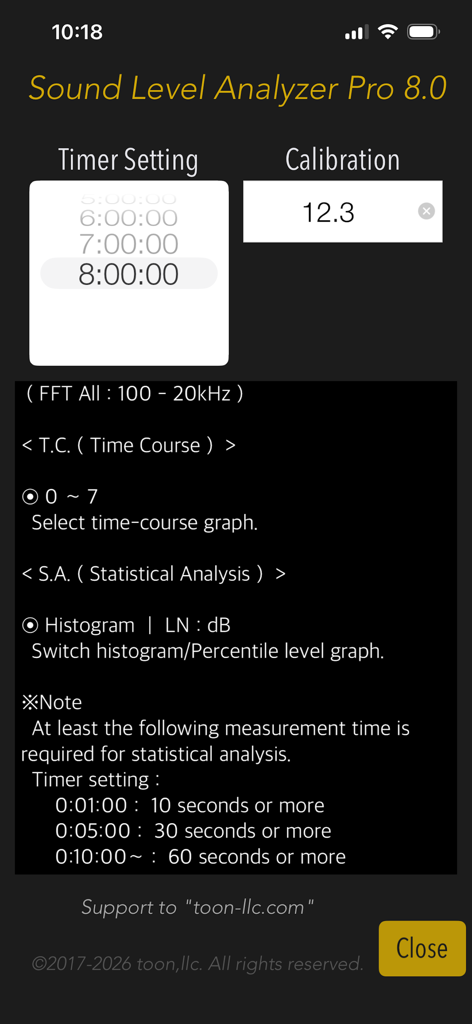
Sound Level Analyzer PRO - Sound Level Analyzer PRO 설정 화면이 타이머 및 보정 설정을 보여줍니다.

Sound Level Analyzer PRO 설정 화면이 타이머 및 보정 설정을 보여줍니다.

설명

"Sound Level Analyzer PRO" is an integrated sound measurement app featuring a sound level meter and powerful acoustic analysis tools. It is available for a wide variety of applications, such as measuring ambient noise in neighborhoods, testing audio systems, checking interior noise in vehicles, checking sound at live events, and much more. Its advanced sound analysis capabilities allow you to perform real-time frequency spectrum analysis, time-varying level measurement, and in-depth statistical analysis of sound levels. It can also be used to analyze the multifaceted characteristics and trends in the occurrence frequency of any sound source. # Measurement functions Main (Leq): Sound level measurement in real-time. - Sound level measurement (dB): Leq (equivalent sound level), Min (minimum value), Max (maximum value), Avg (time-averaged equivalent sound level) - Frequency weighting correction characteristics: A (general sound level measurement with auditory correction), C (sound level measurement with almost flatter correction than A correction, e.g. peak evaluation at high volume), Z (flat characteristics without auditory correction, physical sound level measurement) - Time weighting characteristics: Fast=0.125 sec, Slow=1.0 sec Power Spectrum (P.S.): View of frequency spectrum analysis in real-time. - Spectrum analyzer function: FFT analysis, 1/3-octave band response analysis. - FFT frequency range settings: 100Hz - 20kHz (FFT All) / 100Hz - 3kHz / 3kHz - 6kHz - Measured value display function in 1/3 oct band response analysis. (OctVal) - Power spectrum display function at the occurrence time of maximum level. (Display Max) Time Course (T.C.): View of time-history of the sound level. (Graphical representation after measuring completion.) - Time-domain fluctuation level display function: up to 8 hours linked on a timer. Statistical Analysis (S.A.): Statistical analysis of sound level at A-weighting and Fast. (Analysis display after measuring completion.) - Histogram: Displays all detected sound level distribution as a percentage. - Percentile Level (LN:dB): Display the levels of L05 / L10 / L50 / L90 / L95 on the percentile level graph. # Control functions - Calibration function: level correction value setting, -20 to +20dB - Measurement timer function: 1 minute / 5 minutes / 10 minutes / 15 minutes / 20 minutes / 30 minutes / 1 - 8 hours (1 hour unit) - Snapshot: Save measurement display with time stamp to Photos. # Examples of usage scenes: - Measure the noise situation in the workplace. - Examine the frequency component and time variation of noise target. - Check the sound level and background noise level during music performance. - To know the sound volume of snoring at sleep. - Measure the quiet characteristics of electric products for the judgment of purchase. - To know the noise level of the car. Also, as a purchase consideration material for automobiles, measure the in-car noise level at the test drive and compare it. - To know the noise situation in my home. Also, when buying a house, knowing the noise situation of the surrounding environment. # Example of the noise level situation: - 130dB: Engine sound of Airplane - 110dB: Horn of Car - 100dB: Noise of passing train - 90dB: In loud factory - 80dB: In the train, Vacuum cleaner - 70dB: Noisy office, Noisy Street - 60dB: Quiet Car, Normal conversation - 50dB: Quiet office - 40dB: In the library, Quiet residential area - 30dB: Outskirts of midnight, Whisper - 20dB: Sounds of rubbing leaves # Note: At the time of the first access to Microphone and Photos after installing the app, you will be asked authorization to access them by the iOS system. If you have not enabled this setting, the app cannot access them by privacy restrictions of the iOS system. Please enable the access permission on the iOS setting, "Settings > Privacy & Security > Photos or Microphone". Please visit our iOS App support page for more information on this app.

Download

다운로드: App Store

이 페이지는 앱이나 개발자의 공식 페이지가 아니며, 정보 제공 및 논평을 목적으로 작성된 독립 편집 간행물입니다. 명시적으로 달리 언급되지 않는 한, 해당 앱이나 개발자는 MWM, Apple, Google Play, 앱 퍼블리셔 또는 앱 개발자와 제휴, 보증, 후원, 승인 또는 공식적으로 연결되어 있지 않으며, 이 페이지의 어떤 내용도 해당 앱이 MWM의 서비스를 사용하여 개발되었음을 의미하지 않습니다. 모든 상표, 로고, 스크린샷 및 기타 콘텐츠는 해당 소유자의 자산입니다.








