
이 페이지는 앱이나 개발자의 공식 페이지가 아니며, 정보 제공 및 논평을 목적으로 작성된 독립 편집 간행물입니다. 명시적으로 달리 언급되지 않는 한, 해당 앱이나 개발자는 MWM, Apple, Google Play, 앱 퍼블리셔 또는 앱 개발자와 제휴, 보증, 후원, 승인 또는 공식적으로 연결되어 있지 않으며, 이 페이지의 어떤 내용도 해당 앱이 MWM의 서비스를 사용하여 개발되었음을 의미하지 않습니다. 모든 상표, 로고, 스크린샷 및 기타 콘텐츠는 해당 소유자의 자산입니다.

Soundboard Studio
팟캐스터와 AV 전문가들이 신뢰하는 스마트하고 지연 시간이 낮은 재생 앱입니다. 완벽한 라이브 실행을 위해 설계된 맞춤형 그리드로 음악, SFX, 음성 해설을 정리하세요.
다운로드
625K+사용자 평점
총 평가 수
4K+개발사
카테고리
Music지원 언어
1최신 버전
2.6.1크기
30.0 MB출시일
2016년 5월 5일손끝에서 이루어지는 전문 오디오 제어
정밀함과 신뢰성을 위해 설계된 Soundboard Studio는 팟캐스터와 라이브 공연자에게 소리, 음악, 효과를 자신 있게 실행할 수 있는 최고의 도구를 제공합니다.
지연 없는 실시간 실행
지연 없는 즉각적인 재생을 경험하세요. 라이브 방송이나 무대 공연 중에 여러 트랙을 동시에 실행하여 복잡한 사운드스케이프를 만드세요.
시각적 그리드 구성
트랙에 색상을 지정하고 맞춤형 아이콘을 추가하여 쉽게 식별하세요. 주변 시야를 고려하여 설계된 대형 버튼 레이아웃으로 큐를 절대 놓치지 않게 해줍니다.
자주 묻는 질문
에 대해 알아야 할 모든 것 Soundboard Studio
Soundboard Studio는 무엇인가요?
Soundboard Studio는 광고용 사운드, 음악 및 음향 효과를 위한 전문 사운드 재생 앱입니다. 다양한 오디오 요구에 맞춰 사용자 정의 가능한 트랙 레이아웃과 상세 설정을 제공합니다.
Soundboard Studio는 여러 트랙을 동시에 재생할 수 있나요?
예, Soundboard Studio를 사용하면 여러 트랙을 동시에 재생할 수 있습니다. 이 기능은 라이브 사용 중에 다양한 사운드를 믹싱하는 데 기본적입니다.
Soundboard Studio에서 트랙을 사용자 정의하려면 어떻게 해야 하나요?
Soundboard Studio는 개별 볼륨 수준, 시작/종료 지점 트리밍, 페이드 인/아웃 효과, 이미지 추가 또는 색상 할당 옵션을 포함하여 광범위한 트랙 사용자 정의를 제공합니다.
Soundboard Studio는 어떤 오디오 파일 형식을 가져올 수 있나요?
Soundboard Studio는 .mp3, .wav, .aiff 및 .m4a와 같은 오디오 파일을 가져오는 것을 지원합니다. 사용자는 기기의 음악 라이브러리, 클라우드 서비스 또는 iTunes 파일 공유를 통해 가져올 수 있습니다.
Soundboard Studio Pro는 무제한 보드와 트랙을 제공하나요?
예, Soundboard Studio Pro는 무제한 보드와 트랙을 제공합니다. Pro 업그레이드가 없으면 사용자는 4개의 보드와 24개의 트랙으로 제한됩니다.
Soundboard Studio는 백그라운드 오디오 재생을 지원하나요?
예, Soundboard Studio Pro는 백그라운드 오디오 재생을 지원합니다. 이 기능은 앱이 닫혀 있어도 트랙이 계속 재생되도록 보장합니다.
Soundboard Studio Pro의 가격은 얼마인가요?
Soundboard Studio Pro는 구독 또는 일회성 구매를 통해 이용할 수 있습니다. 구독 옵션에는 7일 무료 체험이 포함됩니다. 가격 정보는 iTunes 계정 설정을 통해 관리됩니다.
Soundboard Studio Pro는 무료 체험을 제공하나요?
예, Soundboard Studio Pro 구독에는 7일 무료 체험이 포함됩니다. 구독은 체험 기간이 끝나면 iTunes 계정에 적용됩니다.
Soundboard Studio는 누구를 위해 설계되었나요?
Soundboard Studio는 팟캐스트, 라이브 연극, 이벤트, 교회 서비스 및 워크숍의 전문가를 위해 설계되었습니다. 또한 음성 발표자, 웨딩 플래너 및 안무가에게도 유용합니다.
Soundboard Studio에서 트랙을 자동화할 수 있나요?
예, Soundboard Studio Pro는 강력한 트랙 자동화를 제공합니다. 사용자는 트랙이 시작, 중지 또는 종료될 때 다른 트랙을 재생하거나 볼륨을 변경하는 등의 작업을 트리거하도록 이벤트를 프로그래밍할 수 있습니다.
Soundboard Studio에 사운드 시각화 기능이 있나요?
예, Soundboard Studio Pro는 실시간 사운드 시각화 기능을 제공합니다. 사용자는 장치를 외부 디스플레이에 연결하고 Waves 또는 Space Fireworks와 같은 세 가지 시각화 옵션 중에서 선택할 수 있습니다.
Soundboard Studio는 트랙에 드래그 앤 드롭을 지원하나요?
예, Soundboard Studio는 드래그 앤 드롭 기능을 지원합니다. 사용자는 효율적인 정리를 위해 쉬운 드래그 앤 드롭 동작으로 트랙을 쉽게 재정렬하고 편집할 수 있습니다.
Soundboard Studio에서 기본 트랙 설정을 지정할 수 있나요?
예, Soundboard Studio를 사용하면 사용자가 기본 트랙 설정을 지정할 수 있습니다. 이러한 설정은 새로 가져온 모든 트랙에 자동으로 적용되어 설정 프로세스를 간소화합니다.
Soundboard Studio Pro 구독을 취소하려면 어떻게 해야 하나요?
사용자는 현재 기간이 끝나기 24시간 전에 Soundboard Studio Pro 구독을 취소할 수 있습니다. 취소는 앱의 설정 메뉴 또는 iTunes 계정 설정을 통해 가능합니다.
다음 스크린샷과 설명은 앱의 공식 스토어 목록에서 직접 가져온 것이며 앱 개발자의 자산입니다.
앱 스토어
스크린샷
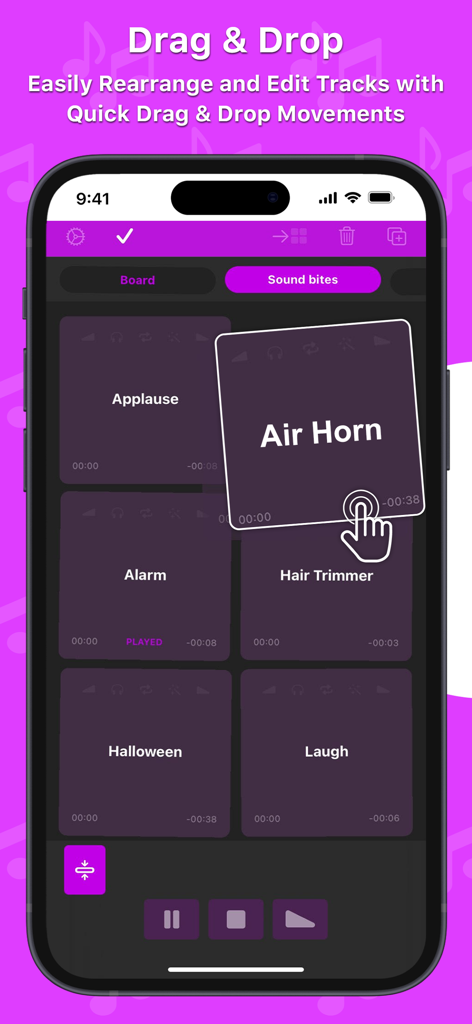
에어혼(Air Horn)이나 박수(Applause)와 같은 사운드 타일을 재배치하기 위해 드래그 앤 드롭 기능을 시연하는 손 아이콘이 있는 Soundboard Studio 앱을 보여주는 스마트폰 화면
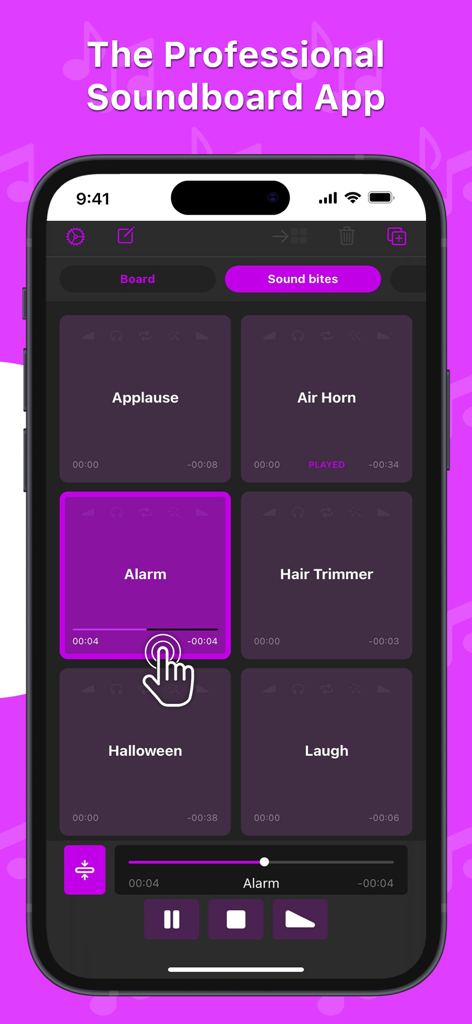
박수 및 알람과 같은 효과음 버튼과 재생 제어 기능이 포함된 전문적인 사운드보드 앱 그리드
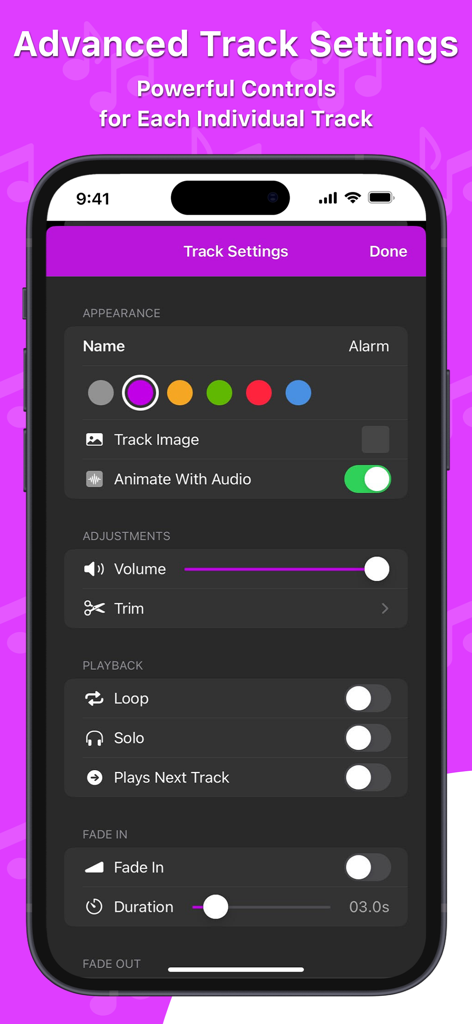
iPhone에서 고급 트랙 설정 및 오디오 제어 기능을 보여주는 Soundboard Studio의 인터페이스.
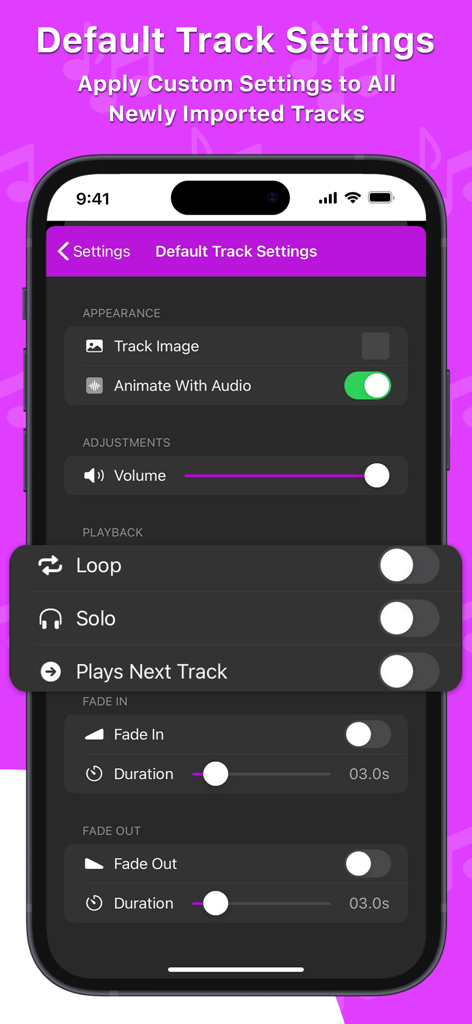
스마트폰의 Soundboard Studio 앱에서 오디오 재생을 위한 기본 트랙 설정을 보여주는 인터페이스
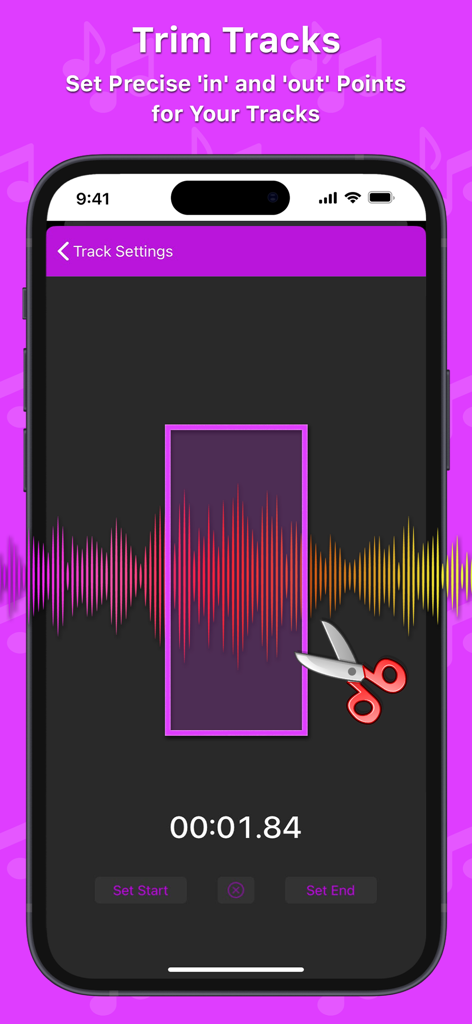
파형 시각화와 정밀한 시작 및 종료 지점이 포함된 오디오 트리밍 기능을 보여주는 Soundboard Studio 앱의 인터페이스.
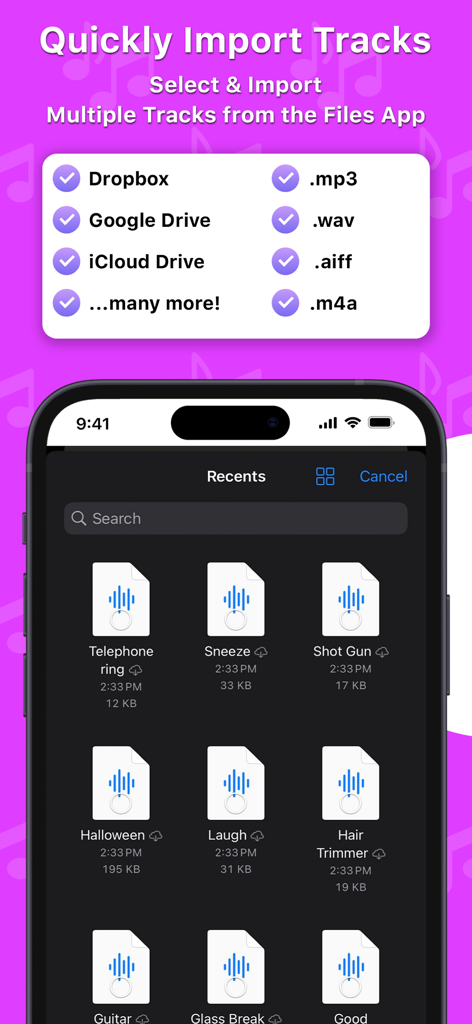
파일 앱 및 클라우드 저장소에서 여러 오디오 트랙을 Soundboard Studio로 가져오는 기능을 보여주는 인터페이스.
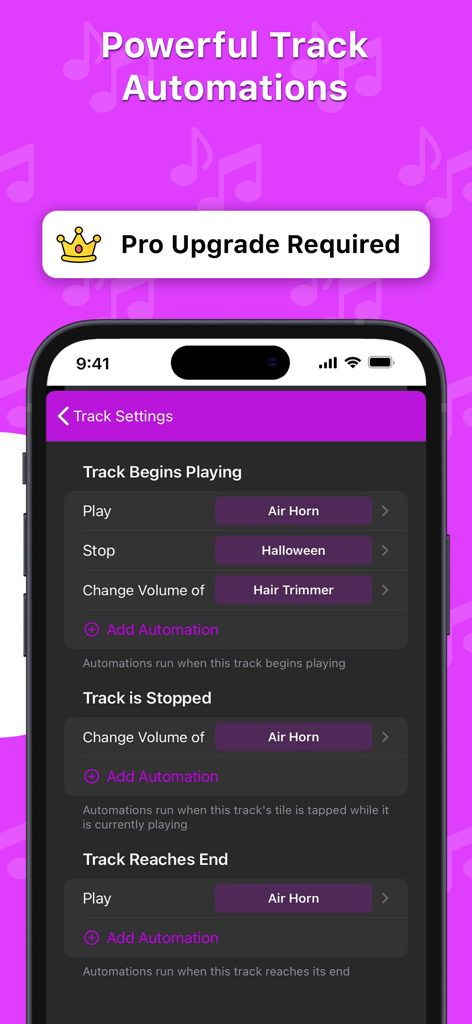
트랙 재생 시작 또는 중지와 같은 트리거를 위한 전문 트랙 자동화 설정을 보여주는 Soundboard Studio 앱의 인터페이스.
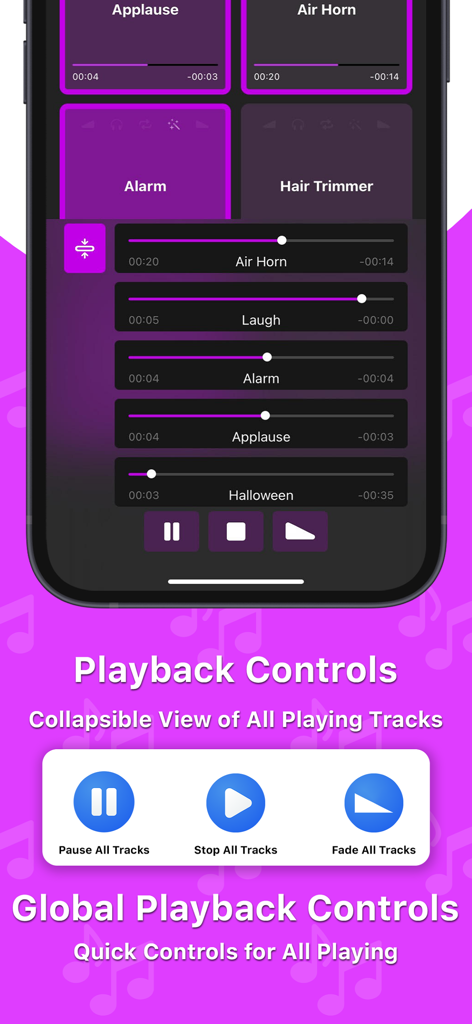
글로벌 재생 제어 장치와 진행률 표시줄이 있는 활성 사운드 트랙 목록을 보여주는 Soundboard Studio 앱의 인터페이스.
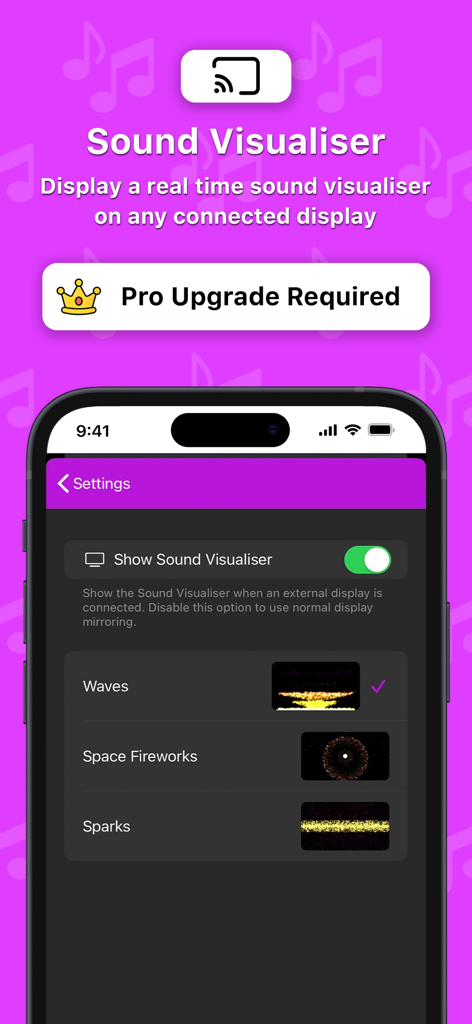
외부 디스플레이의 실시간 사운드 비주얼라이저를 위한 Soundboard Studio 앱 설정
설명
Download
비슷한 앱
유사한 기능과 사용자 경험을 가진 앱

Whoop Triggerz Plus
The C-Dub Brand, LLC

Worship Backing Tracks
XME Inc.

Stage Traxx 3
Peter Dikant
OND - طبلة وعود
Essam Salah

Loops & Clicks - LiveTrackz
Four-Four Software Inc

XME LOOPS
XME Inc.

XME TRIGGERS
XME Inc.

Playback
MULTITRACKS.COM, LLC

Easy Performer
RV Applications B.V.
이 페이지는 앱이나 개발자의 공식 페이지가 아니며, 정보 제공 및 논평을 목적으로 작성된 독립 편집 간행물입니다. 명시적으로 달리 언급되지 않는 한, 해당 앱이나 개발자는 MWM, Apple, Google Play, 앱 퍼블리셔 또는 앱 개발자와 제휴, 보증, 후원, 승인 또는 공식적으로 연결되어 있지 않으며, 이 페이지의 어떤 내용도 해당 앱이 MWM의 서비스를 사용하여 개발되었음을 의미하지 않습니다. 모든 상표, 로고, 스크린샷 및 기타 콘텐츠는 해당 소유자의 자산입니다.