Tennis - Score Keeper
다운로드: App Store

이 페이지는 앱이나 개발자의 공식 페이지가 아니며, 정보 제공 및 논평을 목적으로 작성된 독립 편집 간행물입니다. 명시적으로 달리 언급되지 않는 한, 해당 앱이나 개발자는 MWM, Apple, Google Play, 앱 퍼블리셔 또는 앱 개발자와 제휴, 보증, 후원, 승인 또는 공식적으로 연결되어 있지 않으며, 이 페이지의 어떤 내용도 해당 앱이 MWM의 서비스를 사용하여 개발되었음을 의미하지 않습니다. 모든 상표, 로고, 스크린샷 및 기타 콘텐츠는 해당 소유자의 자산입니다.


로고: Tennis - Score Keeper
다운로드: App Store

Tennis - Score Keeper

경쟁적인 플레이어를 위한 궁극의 Apple Watch 컴패니언. Apple Health와 경기 강도를 직접 동기화하면서 스코어, 서브 로테이션, 프로 타이 브레이커를 손쉽게 추적하세요.

주요 수치

다운로드

9K+

사용자 평점

1.0/5

총 평가 수

0

개발사

Peter Stahl

카테고리

Health & Fitness

지원 언어

1

최신 버전

2.13

크기

17.6 MB

출시일

2020년 10월 22일
기능

게임에 집중하세요, 스코어에 집중하지 마세요

테니스 선수를 위한 궁극의 Apple Watch 컴패니언. Apple Health와 경기 성과 데이터를 직접 동기화하면서 모든 포인트를 손쉽게 추적하세요.

직관적인 제스처 컨트롤

스와이프하여 스코어를 기록하고 탭하여 서버를 변경하세요. 리듬을 깨거나 세트 수를 잃지 않고 경기에 완전히 몰입하세요.

성과 측정

실시간 심박수, 소모 칼로리, 거리를 확인하세요. 원활한 Apple Health 통합으로 코트를 지배하면서 링을 닫으세요.

다음 스크린샷과 설명은 앱의 공식 스토어 목록에서 직접 가져온 것이며 앱 개발자의 자산입니다.

앱 스토어

스크린샷
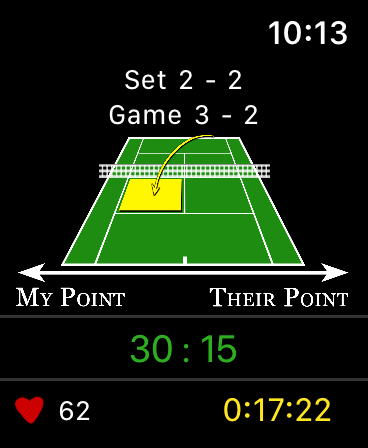
Tennis - Score Keeper - Apple Watch의 테니스 스코어 키퍼 앱 인터페이스로 게임 및 세트 스코어 표시
Apple Watch의 테니스 스코어 키퍼 앱 인터페이스로 게임 및 세트 스코어 표시

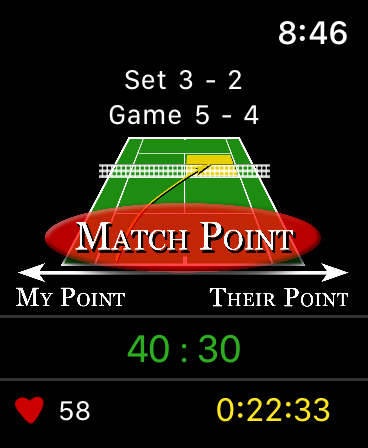
Tennis - Score Keeper - 피트니스 지표가 표시된 매치 포인트에서 테니스 스코어 키퍼 앱을 보여주는 Apple Watch 화면
피트니스 지표가 표시된 매치 포인트에서 테니스 스코어 키퍼 앱을 보여주는 Apple Watch 화면

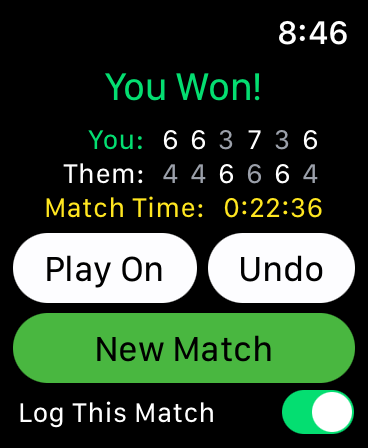
Tennis - Score Keeper - 경기 스코어, 승자 알림 및 경기 시간을 보여주는 Apple Watch 화면
경기 스코어, 승자 알림 및 경기 시간을 보여주는 Apple Watch 화면

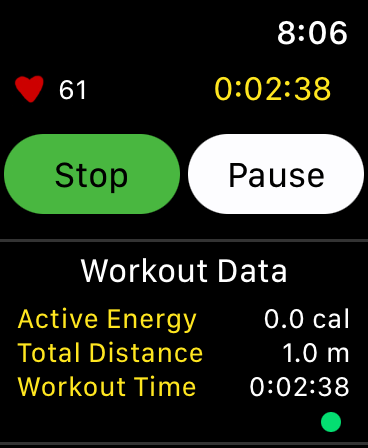
Tennis - Score Keeper - 심박수 및 활동 에너지 지표가 포함된 테니스 운동 데이터를 보여주는 Apple Watch 화면
심박수 및 활동 에너지 지표가 포함된 테니스 운동 데이터를 보여주는 Apple Watch 화면

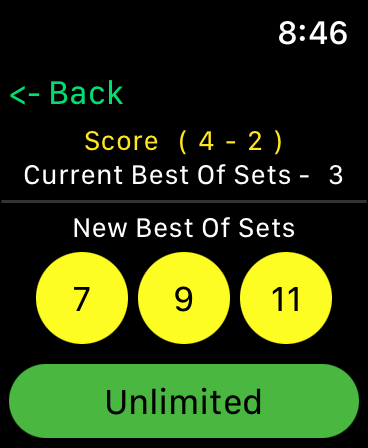
Tennis - Score Keeper - 7 9 11 또는 무제한을 포함한 경기 세트 수를 선택하는 옵션을 보여주는 Apple Watch의 테니스 스코어 키퍼 앱 인터페이스
7 9 11 또는 무제한을 포함한 경기 세트 수를 선택하는 옵션을 보여주는 Apple Watch의 테니스 스코어 키퍼 앱 인터페이스

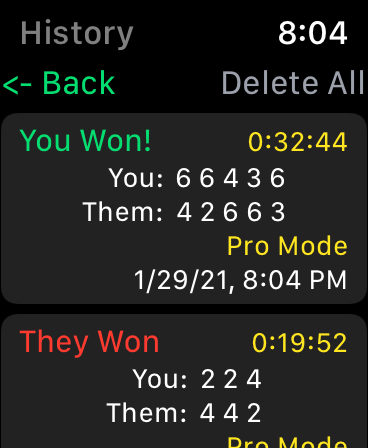
Tennis - Score Keeper - 과거 경기 결과 및 스코어를 보여주는 Apple Watch의 테니스 경기 기록 화면
과거 경기 결과 및 스코어를 보여주는 Apple Watch의 테니스 경기 기록 화면

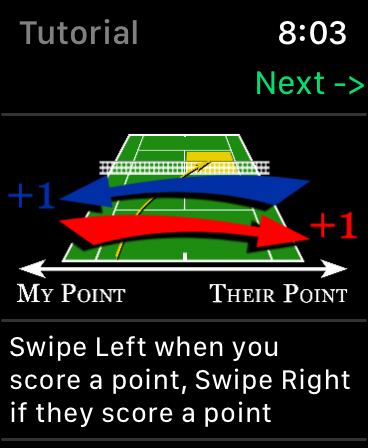
Tennis - Score Keeper - 디지털 코트 그래픽에서 테니스 스코어를 추적하는 스와이프 제스처를 보여주는 Apple Watch 튜토리얼
디지털 코트 그래픽에서 테니스 스코어를 추적하는 스와이프 제스처를 보여주는 Apple Watch 튜토리얼

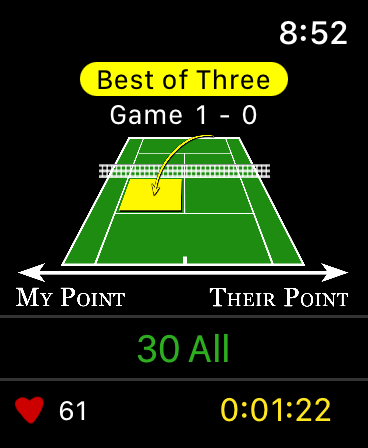
Tennis - Score Keeper - 스코어 추적 및 심박수 모니터링이 있는 테니스 스코어 키퍼 앱 인터페이스를 보여주는 Apple Watch 화면
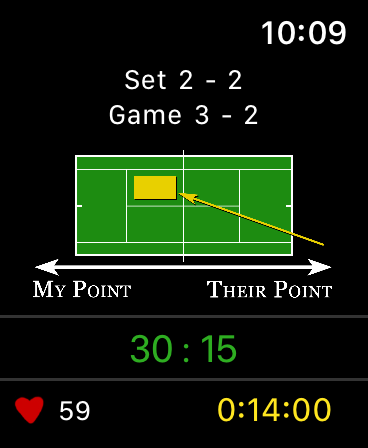
스코어 추적 및 심박수 모니터링이 있는 테니스 스코어 키퍼 앱 인터페이스를 보여주는 Apple Watch 화면

Tennis - Score Keeper - 경기 스코어 및 심박수 추적을 보여주는 테니스 스코어 키퍼 앱의 Apple Watch 인터페이스
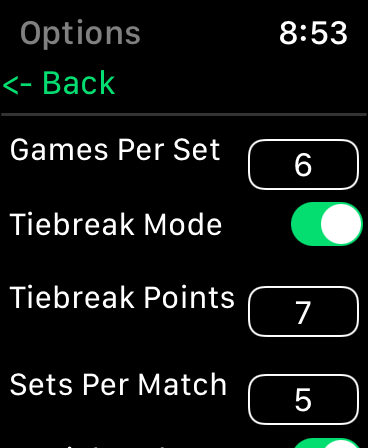
경기 스코어 및 심박수 추적을 보여주는 테니스 스코어 키퍼 앱의 Apple Watch 인터페이스

Tennis - Score Keeper - 경기 규칙 구성을 보여주는 Apple Watch의 테니스 스코어 키퍼 앱 설정

경기 규칙 구성을 보여주는 Apple Watch의 테니스 스코어 키퍼 앱 설정

설명

This tennis score keeper app exclusively for the Apple Watch offers an intuitive score tracker for friendly or competitive gameplay. Tennis – Score Keeper app is designed keep track of Your Match Score, Set Score, Game Score, Server and Serve Side during gameplay, as well as keeping the History of all matches played. Using simple gestures on the tennis court image, you can swipe left or right when a point is scored, tap to change serve side (Optional), and double tap to change server (Optional). Once initially synced the app automatically updates after each point, and game. A long press locks the screen to prevent inadvertent scrolling. The app has setup options to allow you to customize your gameplay from professional rules to casual “Best Of” matches. In casual mode choose best of games, from 1-7 and even infinity. (Stop the game at any time to tally up the score) Pro Score Mode allows you to choose Games per Set (2-10, or Infinity) A tiebreaker mode with official rules of who is serving and to which side and the option to choose how many tiebreak points (1-10). Sets per Match (1,3,5,7 and 9 or infinity), played as Best Of. And a + 1 tiebreaker set is optional depending on the rules you play. At any time, you can stop the game to tally the current points, particularly if you are playing with an Infinity set point. If you’re in a match and win or lose and want to keep it going “Play on” allows you to add more sets to the match in pro mode or switch to unlimited in pro or casual game play. There is also a “Game Score Mode” that allows you to swipe for games vs points for big picture score keeping. A History of each match is kept under the “History” button, individual matches can be deleted with a swipe, or the whole history cleared using the “Delete All” Button. Factory Reset does not clear the history or the workout information but resets all the settings. Additionally, Apple Health is integrated to keep track of your workout, and displays current Heart Rate, Active Energy, Distance and Workout Time (pending your authorization). These workout sessions can also be accessed from your connected IOS devices under the Apple Health App. A tutorial in the app shows how to interact, and what each setting does. A Local Notification is sent if you are in a workout but haven’t logged a point in a user defined amount of time, this helps remind you if you are heading home but forgot to end the match. There are NO external notifications (as in, you won’t get notifications unrelated to an active workout, nothing to annoy you). Apple Health Integration: You have the option to confirm the apps access to health parameters and allow the app to log “Tennis” as a workout activity. You can deny this access to any feature or parameter. You can also choose at any time to go into the Apple Health App and remove access. Alternatively, you can deselect “Save Workout” within the app, so that you can view the health data without saving the workout. For More information read “Privacy Policy” link provided. If you have any suggestions or issues, feel free to contact me through the “Support Link” provided. I would really appreciate any feedback! Most of the updates from 2.1 to 2.3 have come from suggestions by users, and 2.8 was specifically made to update the tap to change serve function that one user found frustrating if it was accidentally pressed during a match. If there is anything you would like to see… just ask!

Download

다운로드: App Store

이 페이지는 앱이나 개발자의 공식 페이지가 아니며, 정보 제공 및 논평을 목적으로 작성된 독립 편집 간행물입니다. 명시적으로 달리 언급되지 않는 한, 해당 앱이나 개발자는 MWM, Apple, Google Play, 앱 퍼블리셔 또는 앱 개발자와 제휴, 보증, 후원, 승인 또는 공식적으로 연결되어 있지 않으며, 이 페이지의 어떤 내용도 해당 앱이 MWM의 서비스를 사용하여 개발되었음을 의미하지 않습니다. 모든 상표, 로고, 스크린샷 및 기타 콘텐츠는 해당 소유자의 자산입니다.








