Time Jump - Date Calculator
다운로드: App Store

이 페이지는 앱이나 개발자의 공식 페이지가 아니며, 정보 제공 및 논평을 목적으로 작성된 독립 편집 간행물입니다. 명시적으로 달리 언급되지 않는 한, 해당 앱이나 개발자는 MWM, Apple, Google Play, 앱 퍼블리셔 또는 앱 개발자와 제휴, 보증, 후원, 승인 또는 공식적으로 연결되어 있지 않으며, 이 페이지의 어떤 내용도 해당 앱이 MWM의 서비스를 사용하여 개발되었음을 의미하지 않습니다. 모든 상표, 로고, 스크린샷 및 기타 콘텐츠는 해당 소유자의 자산입니다.


로고: Time Jump - Date Calculator
다운로드: App Store

Time Jump - Date Calculator

달력일과 영업일 사이의 간격을 두 날짜 사이에 손쉽게 계산합니다. 미국 공휴일이 통합된 나란히 표시되는 달력을 통해 최대 2,000년까지 탐색하고 iOS 달력과 원활하게 동기화할 수 있습니다.

주요 수치

다운로드

3K+

사용자 평점

5.0/5

총 평가 수

0

개발사

Time Theory Software, LLC

카테고리

Utilities

지원 언어

1

최신 버전

3.12.0

크기

2.4 MB

출시일

2015년 4월 15일
기능

정확한 타임라인을 완벽하게 마스터하세요

정확한 날짜 계산, 영업일 로직, 장기 계획을 몇 초 만에 필요로 하는 전문가를 위한 최고의 유틸리티입니다.

고급 영업일 계산

주말 및 사용자 정의 가능한 미국 연방 또는 주 공휴일을 자동으로 제외하여 간격을 즉시 계산하여 완벽한 프로젝트 추적을 제공합니다.

이중 달력 탐색

iPhone 및 iPad 모두에서 시각적 명확성과 빠른 날짜 비교를 위해 설계된 나란히 표시되는 보기로 최대 2,000년까지 탐색합니다.

다음 스크린샷과 설명은 앱의 공식 스토어 목록에서 직접 가져온 것이며 앱 개발자의 자산입니다.

앱 스토어

스크린샷
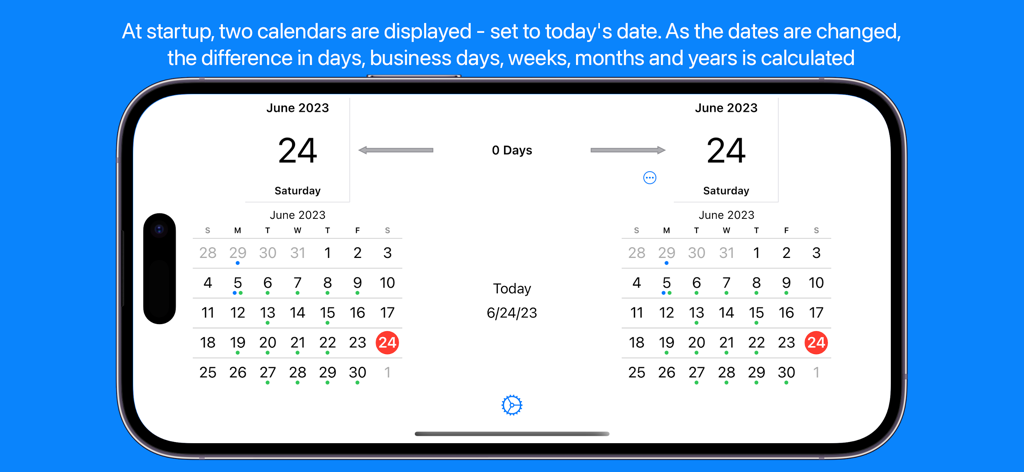
Time Jump - Date Calculator - 날짜 간의 차이를 계산하기 위한 Time Jump 앱 인터페이스의 나란히 달력
날짜 간의 차이를 계산하기 위한 Time Jump 앱 인터페이스의 나란히 달력

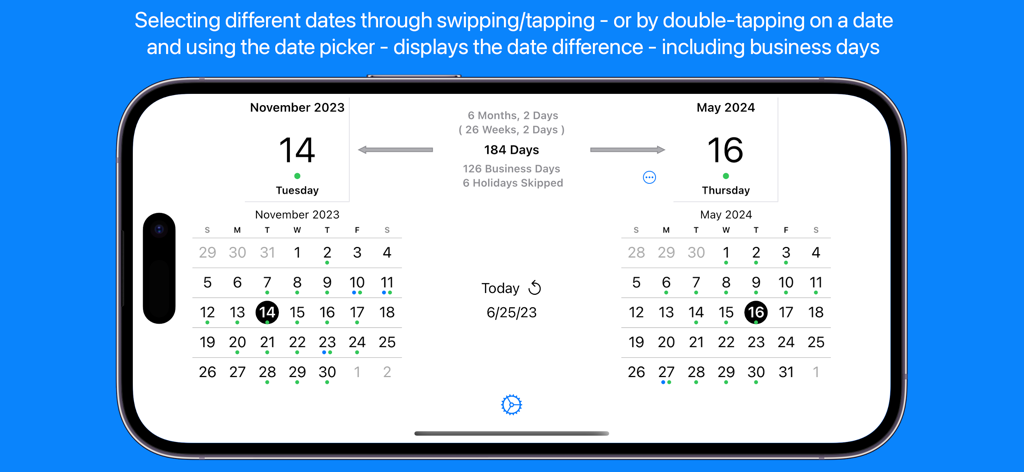
Time Jump - Date Calculator - Time Jump 앱 이중 달력 인터페이스는 2023년 11월과 2024년 5월 사이의 날짜 차이 및 영업일 계산을 보여줍니다.
Time Jump 앱 이중 달력 인터페이스는 2023년 11월과 2024년 5월 사이의 날짜 차이 및 영업일 계산을 보여줍니다.

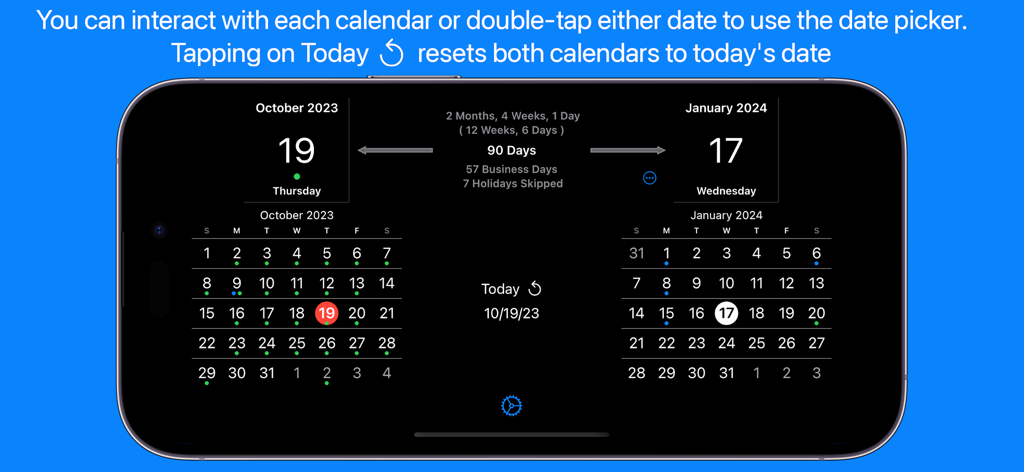
Time Jump - Date Calculator - Time Jump 앱 인터페이스는 영업일 및 공휴일 계산과 함께 나란히 달력을 보여줍니다.
Time Jump 앱 인터페이스는 영업일 및 공휴일 계산과 함께 나란히 달력을 보여줍니다.

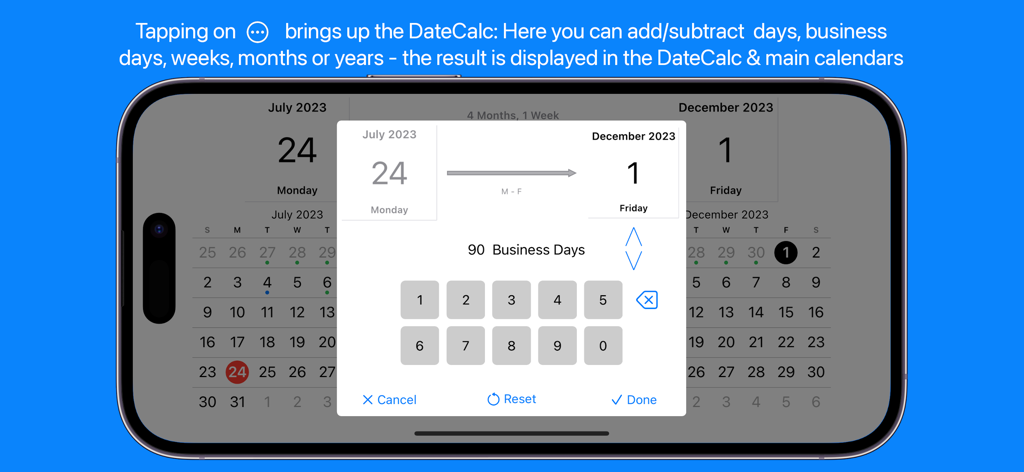
Time Jump - Date Calculator - Time Jump 앱 인터페이스는 7월과 12월 사이의 90영업일 계산을 보여줍니다.
Time Jump 앱 인터페이스는 7월과 12월 사이의 90영업일 계산을 보여줍니다.

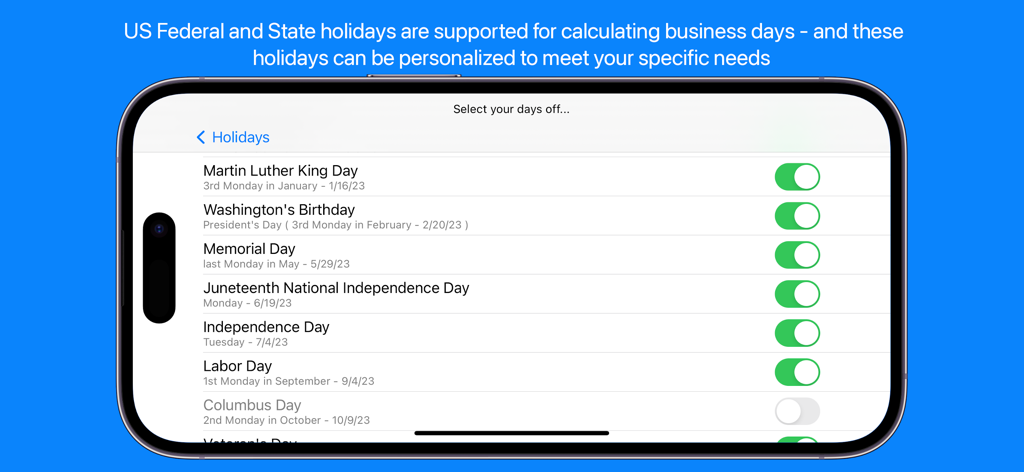
Time Jump - Date Calculator - Time Jump 앱에서 영업일 계산을 위한 미국 공휴일 선택 화면
Time Jump 앱에서 영업일 계산을 위한 미국 공휴일 선택 화면

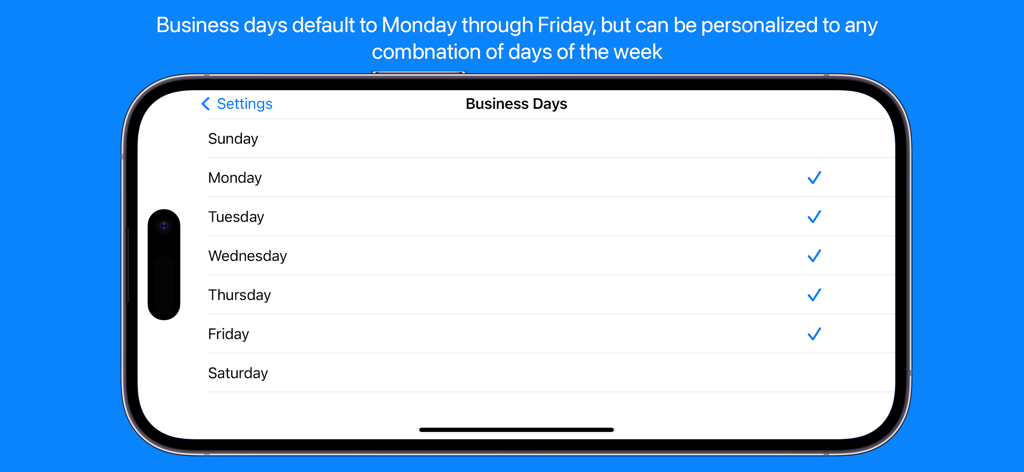
Time Jump - Date Calculator - 사용자가 사용자 지정 작업일을 선택할 수 있는 Time Jump 앱의 영업일 설정 화면
사용자가 사용자 지정 작업일을 선택할 수 있는 Time Jump 앱의 영업일 설정 화면

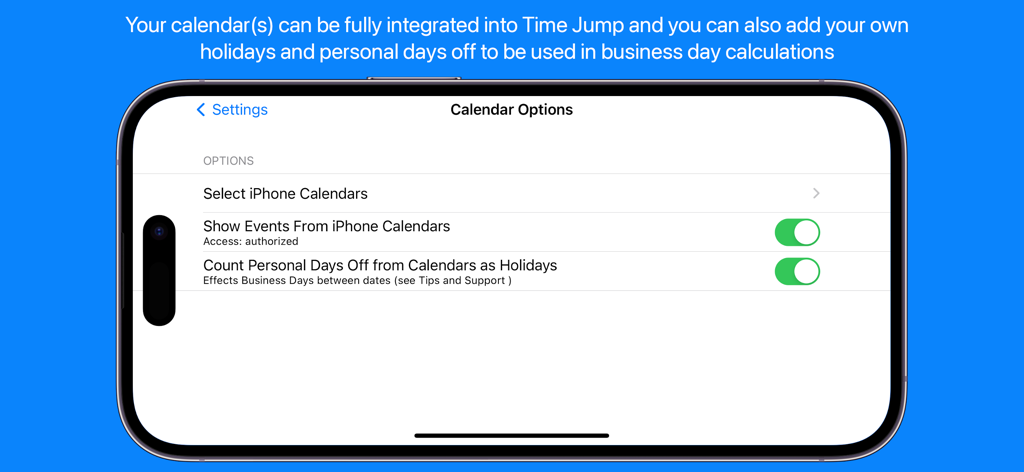
Time Jump - Date Calculator - 달력 통합 및 개인 공휴일 계산을 위한 Time Jump 앱 설정 화면
달력 통합 및 개인 공휴일 계산을 위한 Time Jump 앱 설정 화면

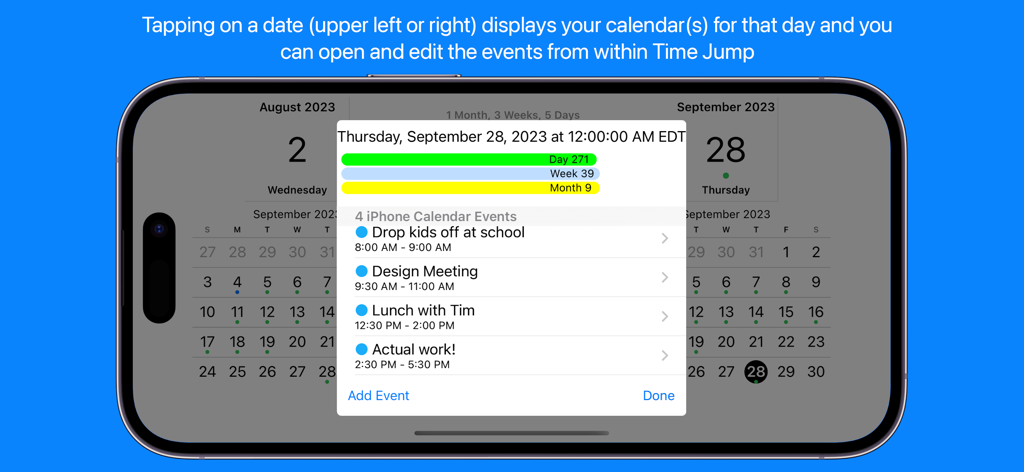
Time Jump - Date Calculator - Time Jump 앱은 통합 iPhone 달력 이벤트 및 일일 일정 세부 정보를 표시합니다.
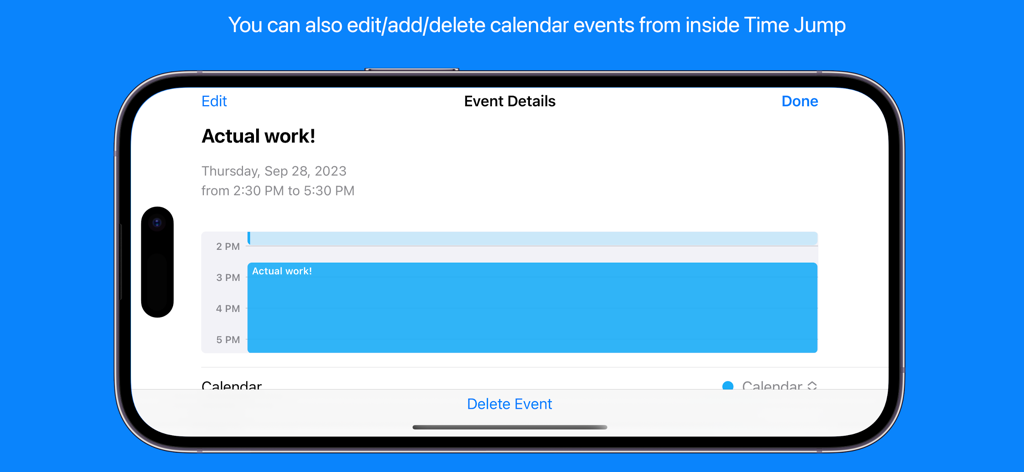
Time Jump 앱은 통합 iPhone 달력 이벤트 및 일일 일정 세부 정보를 표시합니다.

Time Jump - Date Calculator - iPhone에서 달력 이벤트 세부 정보 및 편집 옵션을 보여주는 Time Jump 앱 스크린샷
iPhone에서 달력 이벤트 세부 정보 및 편집 옵션을 보여주는 Time Jump 앱 스크린샷

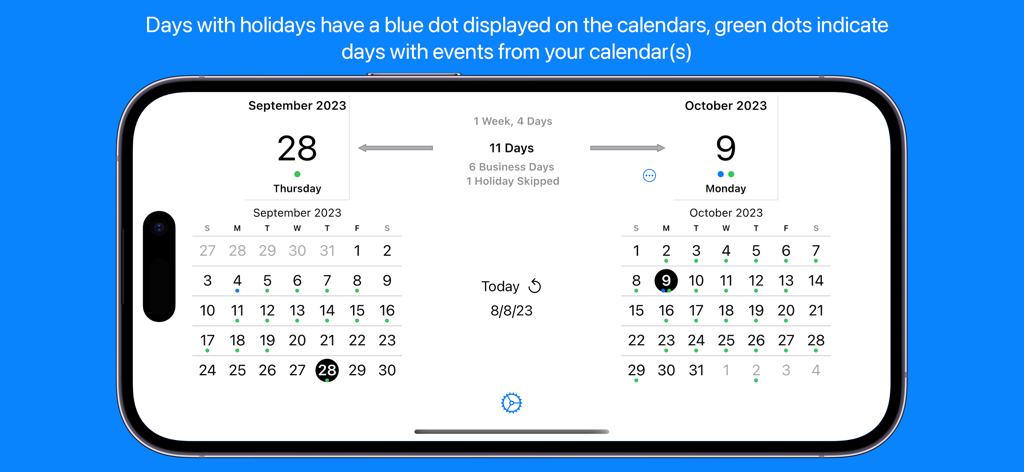
Time Jump - Date Calculator - Time Jump 앱은 날짜와 영업일을 계산하는 나란히 달력을 표시합니다.

Time Jump 앱은 날짜와 영업일을 계산하는 나란히 달력을 표시합니다.

설명

Date Calculator Time Jump for iPhone & iPad is a full-featured date calculator (counts the days between two dates) that uses side-by-side calendars to allow you to flip backward and forward in time. Tap on dates and instantly see the time difference between them in days and business days as well as the total time in years, months, weeks and days. Based on a recent customer request, results are also displayed in weeks & days. Don't want to flip through calendars? Double-tap on the selected date above either calendar and use the date picker to select a specific date – your birthday, a project deadline, an anniversary – anything. Time Jump supports dates up to 2,000 years in the past or the future. You can always tap days directly on the calendar to fine tune your selection. Time Jump's DateCalc When you need to do a specific calculation - like 180 days from a date, 45 business days before a date, 40 weeks from a date, etc. - use the DateCalc feature that allows you to add/subtract days, business days, weeks, months or years to/from any date. Business Day Calculations In addition to calendar days, Time Jump quickly and easily calculates the number of business days between two dates – this can be essential for project managers, shippers, attorneys, software developers, manufacturers – anyone working in business days. Time Jump can take US Federal and State holidays into account (skipping them) when calculating business days and you can select exactly which holidays to skip. You can also add your own custom days off (Personal Days) that are skipped for business day calculations. You can even set which days of the week are considered business days if you need to use something other than Monday through Friday. Integrated with Your iPhone/iPad Calendar Time Jump - with your permission - can be fully integrated with your iPhone/iPad calendar. You can see events - and even create or delete them - from within Time Jump. A tap on the selected date above either calendar and you will see a list of the calendar events you have chosen to view from within Time Jump in the Date Detail View. Use the Time Jump settings to select one, some or all of your calendars - including your Google calendar. Create Custom Days Off for Business Day Calculations As mentioned above, in addition to standard business day calculations, you can also add your own custom days off - Personal Days - (vacations, travel, school schedules, etc.) and Time Jump will treat these days as non-business days in the business day calculations. Of course, you can use settings to turn this feature on and off. Time Jump allows you to create your days off directly from within the app - and then they will appear in your selected iPhone calendar. Time Jump Date Detail View The Date Detail View shows you more details about a selected date: holiday information and/or a list of activities from your iPhone/iPad calendar (if you've given Time Jump permission to take a look). Once you've done a calculation you may wonder what's on your calendar and you can see your schedule from within Time Jump. Who's Time Jump for? Project managers Planners & schedulers Attorneys & paralegals Scientists Procurement managers Logistics specialists Shippers Investors & bankers Historians Educators Time explorers Anyone interested in time Follow us in Twitter: http://www.twitter.com/timetheoryapps Time Jump does not use a network connection during normal operation - use it anywhere, anytime. It does use a network connection if you access our website from within the app or provide app feedback directly to us.

Download

다운로드: App Store

이 페이지는 앱이나 개발자의 공식 페이지가 아니며, 정보 제공 및 논평을 목적으로 작성된 독립 편집 간행물입니다. 명시적으로 달리 언급되지 않는 한, 해당 앱이나 개발자는 MWM, Apple, Google Play, 앱 퍼블리셔 또는 앱 개발자와 제휴, 보증, 후원, 승인 또는 공식적으로 연결되어 있지 않으며, 이 페이지의 어떤 내용도 해당 앱이 MWM의 서비스를 사용하여 개발되었음을 의미하지 않습니다. 모든 상표, 로고, 스크린샷 및 기타 콘텐츠는 해당 소유자의 자산입니다.








