
이 페이지는 앱이나 개발자의 공식 페이지가 아니며, 정보 제공 및 논평을 목적으로 작성된 독립 편집 간행물입니다. 명시적으로 달리 언급되지 않는 한, 해당 앱이나 개발자는 MWM, Apple, Google Play, 앱 퍼블리셔 또는 앱 개발자와 제휴, 보증, 후원, 승인 또는 공식적으로 연결되어 있지 않으며, 이 페이지의 어떤 내용도 해당 앱이 MWM의 서비스를 사용하여 개발되었음을 의미하지 않습니다. 모든 상표, 로고, 스크린샷 및 기타 콘텐츠는 해당 소유자의 자산입니다.


다운로드
12.5M+사용자 평점
총 평가 수
462.9K개발사
카테고리
Photo & Video지원 언어
27최신 버전
6.0.1.1크기
382.1 MB출시일
2014년 12월 12일VideoShow AI Video Editor 앱 분석
Z세대 및 밀레니얼 세대 콘텐츠 크리에이터를 위한 핵심 기능 평가
트렌디한 AI 효과
이 도구는 AI 애니메이션, AI 댄스 등 입소문이 난 다양한 템플릿을 제공하여 사용자가 TikTok, Instagram, Facebook에서 돋보이는 독특하고 시선을 사로잡는 AI 비디오를 만들 수 있게 해줍니다.
AI 기반 자동 편집
이 앱은 사용자가 콘텐츠를 선택하면 AI가 자동으로 효과, 필터, 전환 및 자막을 추가하여 원탭으로 영화 같은 비디오를 제작할 수 있도록 지원합니다. 시각 자료, 보이스오버, 캡션을 한 번에 통합합니다.
AI 비디오 생성
이 앱은 사진이나 텍스트를 기반으로 놀라운 AI 기반 비디오를 생성하는 기능을 제공합니다. 사용자는 사진, 이미지 또는 텍스트를 즉시 비디오로 전환하여 세련된 스토리 클립이나 바이럴 효과를 손쉽게 만들 수 있습니다.
AI 음악 생성
이 도구는 텍스트를 독특한 음악 트랙으로 변환하는 AI 기능을 갖추고 있습니다. 사용자는 자신의 단어로부터 독창적인 멜로디를 생성하여 브이로그, 단편 영화 또는 스토리텔링에 활용할 수 있습니다.
AI 배경 제거 도구
이 앱은 AI 기반 비디오 및 이미지 오려내기 기능을 통해 비디오 또는 이미지 배경을 즉시 제거하여 편집을 간소화하고 전문가 수준의 결과를 만들 수 있도록 돕습니다.
AI 객체 제거
이 도구는 정밀한 AI 기술로 비디오나 사진에서 원치 않는 객체를 즉시 제거하여 사용자가 콘텐츠를 완벽하게 만들 수 있게 해줍니다.
AI 음성 변환기
이 앱은 음성을 귀엽거나, 성숙하거나, 로봇 같거나, 재미있는 톤으로 변경하는 AI 기능을 제공하여 사용자가 비디오에 개성과 재미를 더할 수 있도록 합니다.
창의적인 요소 및 스티커
이 도구는 30개 이상의 필터, 재미있는 스티커, 역동적인 전환, GIF 및 세련된 텍스트 옵션을 포함한 다양한 창의적인 요소를 제공합니다. 사용자는 테마, 효과, 스티커, 이모지 및 사운드 FX로 가득한 콘텐츠 센터를 이용할 수 있습니다.
자주 묻는 질문
에 대해 알아야 할 모든 것 VideoShow AI Video Editor
What is VideoShow AI Video Editor?
VideoShow AI Video Editor is an app that creates videos using photos, music, stickers, filters, and AI effects. It offers AI-powered video generation, editing, and enhancement features.
How does VideoShow AI Video Editor generate videos from text?
VideoShow AI Video Editor features an AI Video Generator that converts text into videos. Users input text, and the AI instantly creates corresponding video content.
Can VideoShow AI Video Editor automatically add effects to my videos?
Yes, VideoShow AI Video Editor's AI Video Editing feature automatically adds effects, filters, transitions, and subtitles to chosen content. It crafts cinematic videos in one tap.
What kind of AI effects are available in VideoShow AI Video Editor?
VideoShow AI Video Editor includes trending AI effects such as AI Anime and AI Dance. These viral templates help create unique, eye-catching videos for social media platforms.
Does VideoShow AI Video Editor offer tools to remove backgrounds from videos?
Yes, VideoShow AI Video Editor provides AI Cutout Tools. These tools instantly remove video or image backgrounds with precision, simplifying editing for professional results.
Can I change video speed using VideoShow AI Video Editor?
Yes, VideoShow AI Video Editor allows users to adjust video speed. It includes features for merging, cropping, splitting, reversing, copying, and rotating clips.
Is there a subscription service for VideoShow AI Video Editor?
Yes, VideoShow offers a VIP Membership Service. This unlocks all premium features. Payment charges to your iTunes account and renews automatically unless canceled.
How do I manage or cancel my VideoShow VIP Membership?
Users can manage or cancel their VideoShow VIP Membership anytime within their iTunes settings. The membership renews automatically unless canceled 24 hours before the period ends.
Where can I find the privacy policy for VideoShow AI Video Editor?
The privacy policy for VideoShow AI Video Editor is available at the following URL: https://d10nkoc3mu17gd.cloudfront.net/privacy/VideoShow_Privacy_Policy_ios_en.html.
Can VideoShow AI Video Editor generate original music?
Yes, VideoShow AI Video Editor features an AI Music Generator. This tool transforms text into unique music tracks, generating original melodies for various content like vlogs or short films.
Does VideoShow AI Video Editor enhance photo quality?
Yes, VideoShow AI Video Editor includes an AI Photo Enhancer. This feature brings photos to life with AI-powered upscaling and detail enhancement capabilities.
Can I remove unwanted objects from my videos or photos with VideoShow AI Video Editor?
Yes, VideoShow AI Video Editor offers an AI Object Removal feature. This tool perfects videos and photos by instantly removing unwanted objects with precision AI.
다음 스크린샷과 설명은 앱의 공식 스토어 목록에서 직접 가져온 것이며 앱 개발자의 자산입니다.
앱 스토어
스크린샷

AI 비디오 스타일
이 앱은 사용자가 네온 효과와 같은 트렌디한 AI 스타일(X)을 적용하여 감각적인 영상을 만들고, #YOLO 스티커(Y)로 개성을 더할 수 있도록 지원합니다.

트렌딩 AI 효과
이 앱은 사용자가 역동적인 AI 모션 효과(X)와 빛나는 에너지 트레일(Y)을 활용하여 바이럴 영상 콘텐츠를 손쉽게 제작하도록 돕습니다.

AI 영상 생성
사용자는 텍스트 입력(X)만으로 상상력을 현실로 만들어내는 AI 영상 콘텐츠를 생성하여, 쌓여 있는 강아지들(Y)처럼 독특한 장면을 연출할 수 있습니다.

슈퍼 트랜지션
이 앱은 다양한 전환 효과(X)를 제공하여 영상 클립 간의 연결을 부드럽게 하며, 마치 빛의 궤적(Y)과 같은 시각적 요소를 추가하여 몰입감을 높입니다.

AI 강화 효과
사용자는 AI 강화 효과를 통해 인물 주변에 불꽃 효과(X)와 빛나는 아우라(Y)를 추가하여 평범한 영상을 극적인 분위기로 변신시킬 수 있습니다.
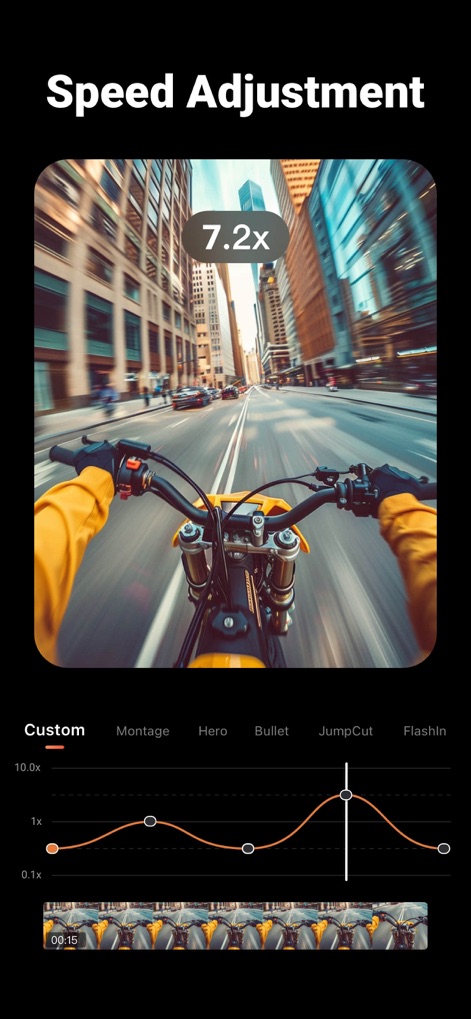
속도 조절 마스터
이 도구는 정교한 속도 조절 곡선(X)을 통해 사용자가 역동적인 영상 속도 변화를 부여하고, 모션 블러 효과(Y)로 속도감을 극대화할 수 있도록 지원합니다.

AI 비디오 누끼
이 앱은 AI 기반 누끼 따기 기능(X)을 통해 인물 배경을 깔끔하게 제거하고, 흰색 테두리(Y)로 피사체를 강조하여 전문적인 합성을 가능하게 합니다.
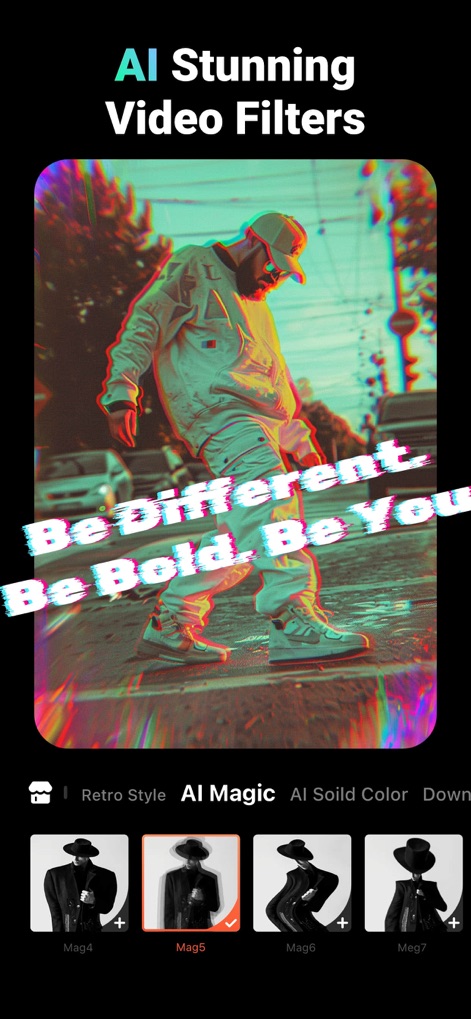
AI 영상 필터
사용자는 다양한 AI 비디오 필터(X)를 활용하여 영상에 레트로 스타일이나 글리치 효과(Y)를 적용하고, 자신만의 독특한 미학을 표현할 수 있습니다.

AI 음악 생성
이 앱은 텍스트 설명(X)을 기반으로 사용자 맞춤형 음악을 생성하며, 미니멀한 피아노 선율(Y)과 같은 특정 분위기의 사운드트랙을 손쉽게 만들 수 있습니다.

애니메이션 스티커
사용자는 애니메이션 스티커(X)와 같은 동적인 요소를 추가하여 영상에 생동감을 불어넣고, 'Holiday'처럼 시선을 사로잡는 커스텀 텍스트(Y)로 메시지를 전달할 수 있습니다.
설명
Download
비슷한 앱
유사한 기능과 사용자 경험을 가진 앱

InShot - Video Editor
SHANTANU PTE. LTD.

快影
Beijing Kwai Technology Co., Ltd.

Leto: Font for Instagram Story
Leto.Fonts FZCO

Templify・ Photo & Video Editor
Templify Media, Inc.

Spring - Video Editor
KineMaster Corporation

Impresso - Video & Logo Maker
PIXERY BILGI TEKNOLOJILERI ANONIM SIRKETI

Movavi - Video Editor
Movavi Emea LLC

Zebra: Photo & Video Editor
Dmitriy Biserov

快剪辑-AI写真&视频大片一键制作
Wenzhou XunChi Digital Technology Co., Ltd.
이 페이지는 앱이나 개발자의 공식 페이지가 아니며, 정보 제공 및 논평을 목적으로 작성된 독립 편집 간행물입니다. 명시적으로 달리 언급되지 않는 한, 해당 앱이나 개발자는 MWM, Apple, Google Play, 앱 퍼블리셔 또는 앱 개발자와 제휴, 보증, 후원, 승인 또는 공식적으로 연결되어 있지 않으며, 이 페이지의 어떤 내용도 해당 앱이 MWM의 서비스를 사용하여 개발되었음을 의미하지 않습니다. 모든 상표, 로고, 스크린샷 및 기타 콘텐츠는 해당 소유자의 자산입니다.