이 페이지는 앱이나 개발자의 공식 페이지가 아니며, 정보 제공 및 논평을 목적으로 작성된 독립 편집 간행물입니다. 명시적으로 달리 언급되지 않는 한, 해당 앱이나 개발자는 MWM, Apple, Google Play, 앱 퍼블리셔 또는 앱 개발자와 제휴, 보증, 후원, 승인 또는 공식적으로 연결되어 있지 않으며, 이 페이지의 어떤 내용도 해당 앱이 MWM의 서비스를 사용하여 개발되었음을 의미하지 않습니다. 모든 상표, 로고, 스크린샷 및 기타 콘텐츠는 해당 소유자의 자산입니다.
WebDebug - Web debugging tool
iPhone 또는 iPad에서 직접 요소를 검사하고, 네트워크 요청을 모니터링하고, 콘솔 로그를 디버깅하세요. 이동 중에 JS 삽입, 로컬 사이트 호스팅 및 데스크톱급 코드 편집으로 모바일 워크플로우를 강화하세요.
주요 수치
다운로드
44K+
사용자 평점
4.0/5
총 평가 수
0
개발사
Shanghai Dazhuo Information Technology Co., Ltd.
카테고리
Developer Tools
지원 언어
2
최신 버전
1.7
크기
74.9 MB
출시일
2020년 6월 24일
기능
주머니 속의 전문 웹 도구
데스크톱 개발과 모바일 현실 간의 격차를 해소하세요. WebDebug는 iOS 생태계를 위해 특별히 설계된 전체 검사 및 테스트 도구 제품군을 제공합니다.
전체 검사기 및 콘솔
데스크톱 개발자 도구와 마찬가지로 실시간 콘솔 로그에 액세스하고, DOM 구조를 검사하고, 로컬 스토리지를 관리합니다.
통합 로컬 서버
장치에서 로컬 정적 서버를 시작하여 스테이징 환경이나 원격 배포 없이 프로젝트를 즉시 테스트합니다.
다음 스크린샷과 설명은 앱의 공식 스토어 목록에서 직접 가져온 것이며 앱 개발자의 자산입니다.
앱 스토어
스크린샷
설명
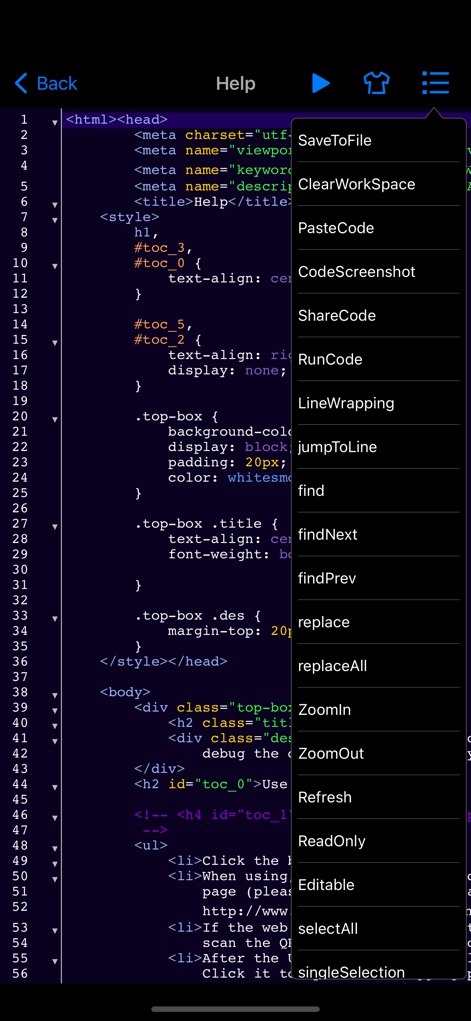
This app is a web debugging panel that can be run on iPhone, iPad, and other devices. You can conveniently debug web pages on your mobile phone. It supports local static websites, allows for testing multiple projects locally, and manages various document files.
Features:
- Debug by inputting the URL
- Debug by scanning a QR code to open the URL
- Automatically save debugging page link information to the database and record debugging time
- View console logs
- View system information
- View network requests
- View page element structure
- View cookies, localStorage, and SessionStorage
- Input JavaScript commands, e.g., alert(document.body.outerHTML);
- Inject JavaScript code snippets or plugins for web page debugging (e.g., injecting jq, vue plugins or JS code snippets), with the console displaying return values
- Web page code editing and preview function
- Code auto-suggestions for HTML, JavaScript, CSS, and content
- Keyboard extensions
- Tokenization of debugging code for easy input
- HTML, CSS, and JavaScript code input with auto-suggestions, auto-bracket matching, line numbering, code folding, and more
- Syntax error correction for HTML, CSS, and JavaScript code input, further enhancing mobile testing capabilities
Version 1.5 introduces the following new features:
1. Static server function: You can now start a local static server on your phone, supporting the creation of multiple local websites for testing. It supports WiFi, WebDAV file management, remote file downloading with decompression, direct preview of most document, video, audio, image files, and various code files on your phone.
2. Automatic injection of window.onerror code before page loading: Now, before the page loads, the application will automatically inject some code into the webpage that helps capture potential errors and print these error messages to the application's console. You can also choose to send these error reports to a backend server for further analysis and processing.
3. Show network requests when shaking the phone: When you shake your phone, the application will display the network requests made by the current page. This can help you better understand the communication between the application and the server. Additionally, you can choose to send the recorded HTTP request logs via email for further analysis.
4. jQuery-like element selector function: The application has added a feature similar to using jQuery's element selector, which means you can select and manipulate various DOM elements on the webpage more precisely, allowing for more flexible customization of page behavior and styles.
5. Code injection function: Now, you can mix HTML and JS code in the webpage being loaded. This feature supports multiple injection scenarios, meaning you can conveniently control or intercept page requests and execute custom code on the page.
6. Added dozens of code themes and code editing commands: You can easily use code auto-suggestions and customize code themes.
Unlimited Access Subscription:
- With this subscription, you can enjoy unlimited access to all features within the app.
- Subscriptions are charged weekly, monthly, or yearly, depending on the selected subscription plan.
- Payment will be charged to your iTunes account upon confirmation of purchase.
- You can turn off auto-renewal at least 24 hours before the current subscription period ends; otherwise, the subscription will automatically renew.
- The renewal fee will be charged to your account within 24 hours before the end of the current subscription period, depending on the chosen plan.
- Users can manage their subscriptions and can turn off auto-renewal in their account settings after purchase.
- Any unused portion of a free subscription trial period will be forfeited upon purchase.
Privacy Policy: https://www.dazhuogroup.com/debugweb/privacy_statement_en.php
Terms of Use: https://www.dazhuogroup.com/debugweb/terms_of_use_en.php
이 페이지는 앱이나 개발자의 공식 페이지가 아니며, 정보 제공 및 논평을 목적으로 작성된 독립 편집 간행물입니다. 명시적으로 달리 언급되지 않는 한, 해당 앱이나 개발자는 MWM, Apple, Google Play, 앱 퍼블리셔 또는 앱 개발자와 제휴, 보증, 후원, 승인 또는 공식적으로 연결되어 있지 않으며, 이 페이지의 어떤 내용도 해당 앱이 MWM의 서비스를 사용하여 개발되었음을 의미하지 않습니다. 모든 상표, 로고, 스크린샷 및 기타 콘텐츠는 해당 소유자의 자산입니다.