Widget for Messages
Widget for Messages
다운로드: App Store

이 페이지는 앱이나 개발자의 공식 페이지가 아니며, 정보 제공 및 논평을 목적으로 작성된 독립 편집 간행물입니다. 명시적으로 달리 언급되지 않는 한, 해당 앱이나 개발자는 MWM, Apple, Google Play, 앱 퍼블리셔 또는 앱 개발자와 제휴, 보증, 후원, 승인 또는 공식적으로 연결되어 있지 않으며, 이 페이지의 어떤 내용도 해당 앱이 MWM의 서비스를 사용하여 개발되었음을 의미하지 않습니다. 모든 상표, 로고, 스크린샷 및 기타 콘텐츠는 해당 소유자의 자산입니다.

로고: Widget for Messages
다운로드: App Store

Widget for Messages

최신 대화를 표시하는 아름다운 위젯으로 홈 화면을 개인화하세요. 대기 모드 지원으로 연결 상태를 유지하고 탭 한 번으로 바로 대화에 참여하세요.

주요 수치

다운로드

1K+

사용자 평점

1.0/5

총 평가 수

0

개발사

Jerrod Banks

카테고리

Social Networking

지원 언어

11

최신 버전

1.03.1

크기

22.0 MB

출시일

2025년 9월 14일
기능

내 대화, 바로 홈 화면에

iPhone의 고유한 스타일에 맞는 아름답고 사용자 정의 가능한 위젯으로 최신 메시지에 즉시 액세스하세요.

미적인 홈 화면 위젯

레이아웃에 맞게 작음, 중간 또는 큰 크기를 선택하고 최신 문자를 한눈에 확인하세요.

탭하여 즉시 채팅

검색은 건너뛰세요 — 위젯의 아무 메시지나 탭하여 Messages 앱 내 대화로 바로 이동하세요.

다음 스크린샷과 설명은 앱의 공식 스토어 목록에서 직접 가져온 것이며 앱 개발자의 자산입니다.

앱 스토어

스크린샷
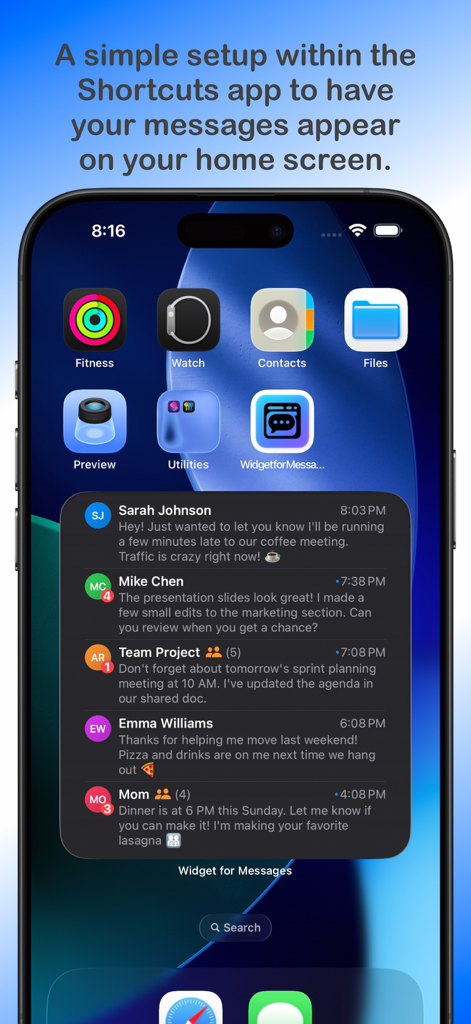
Widget for Messages - 읽지 않음 배지가 있는 여러 연락처의 최근 메시지 미리 보기를 표시하는 대형 위젯이 있는 iPhone 홈 화면
읽지 않음 배지가 있는 여러 연락처의 최근 메시지 미리 보기를 표시하는 대형 위젯이 있는 iPhone 홈 화면

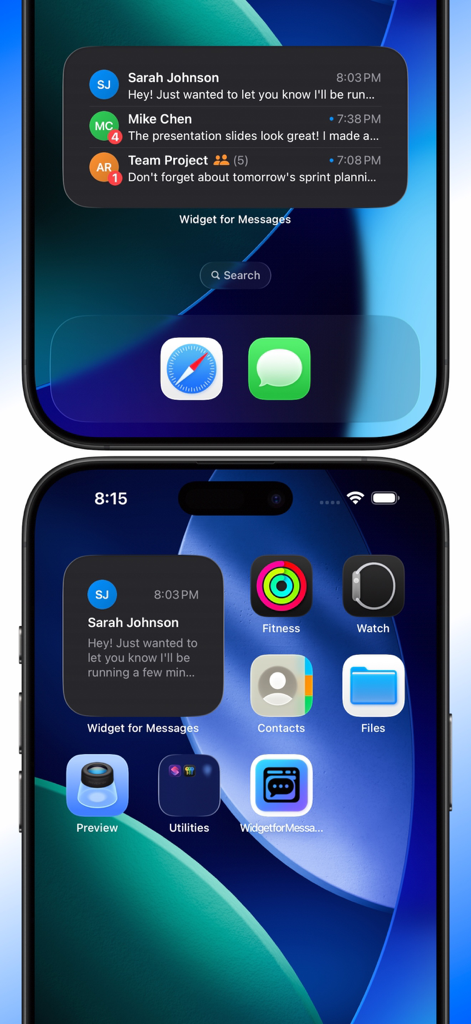
Widget for Messages - Sarah Johnson 및 Mike Chen의 최근 문자 메시지를 표시하는 작고 중간 크기의 위젯이 있는 iPhone 홈 화면
Sarah Johnson 및 Mike Chen의 최근 문자 메시지를 표시하는 작고 중간 크기의 위젯이 있는 iPhone 홈 화면

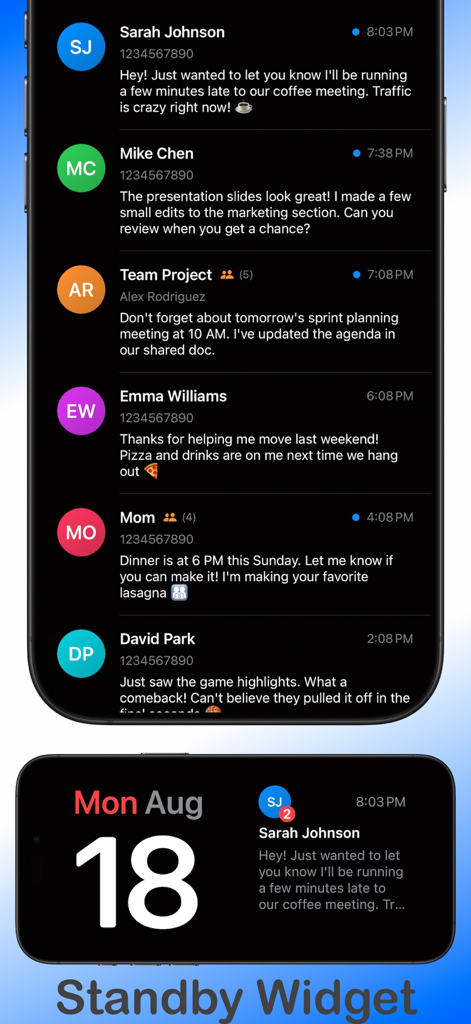
Widget for Messages - 메시지 미리 보기 목록과 메시지 알림이 있는 iOS 대기 모드 위젯 보기를 보여주는 메시지 위젯 앱의 스크린샷
메시지 미리 보기 목록과 메시지 알림이 있는 iOS 대기 모드 위젯 보기를 보여주는 메시지 위젯 앱의 스크린샷

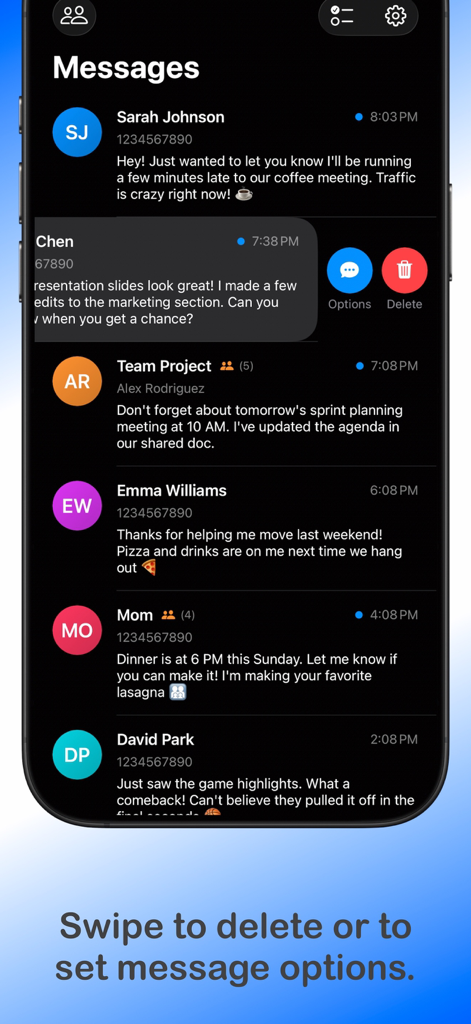
Widget for Messages - 삭제 및 옵션 버튼에 액세스하기 위한 스와이프 제스처가 있는 문자 대화 목록을 보여주는 메시지 위젯 앱의 인터페이스
삭제 및 옵션 버튼에 액세스하기 위한 스와이프 제스처가 있는 문자 대화 목록을 보여주는 메시지 위젯 앱의 인터페이스

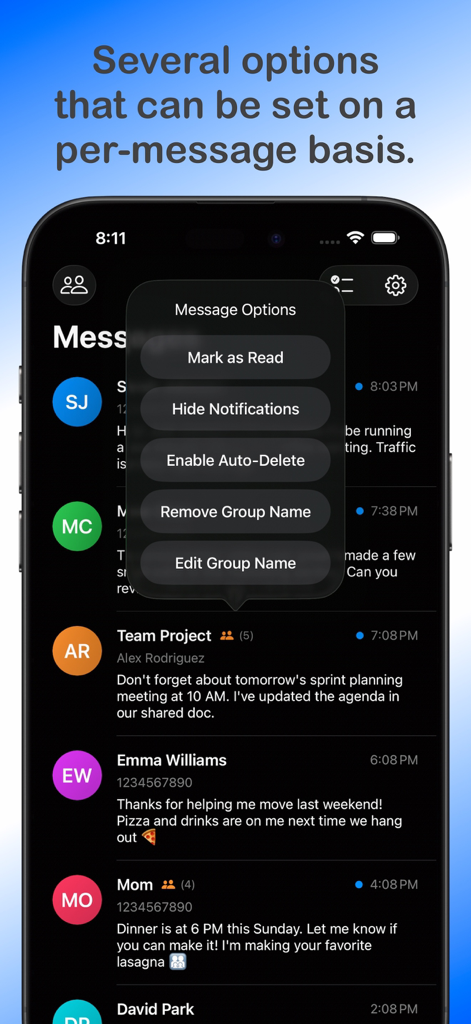
Widget for Messages - 읽음으로 표시 및 자동 삭제 설정을 포함한 메시지 옵션 메뉴를 보여주는 스마트폰 화면

읽음으로 표시 및 자동 삭제 설정을 포함한 메시지 옵션 메뉴를 보여주는 스마트폰 화면

설명

Widget for Messages utilizes the Shortcuts app and Shortcuts automations to display messages from the Messages app onto a widget on the Home Screen. The widget will display only the most recent message from each user; tapping the message on the widget will take you to the conversation in the Messages app. Please review the limitations listed below before purchasing the app. This app may not suit your needs due to these limitations. Important Note: Please review the limitations of the app found within this description below or at the support URL listed below prior to purchasing, as the app may not be suitable for your needs. The app does not collect or provide me or anyone else any of your message, contacts or personal contact information in any way. The app requires such information in order to display your conversation data into the widget and to properly work with group conversations. Features - Small, medium, and large widgets. - Open directly to a chat conversation within the Messages app just by tapping on the conversation in the widget. - Badge that displays the unread messages count that can be toggled on/off. - Push Notifications for messages to open directly to the conversation. - Push Notifications can be on a per-message basis, selectable in the three dots on the conversation row. - Group Message support - Display only messages received from different contact groups. - Ties directly into the Contacts app to allow for modifying and creating groups. - Support for international numbers using native iOS APIs. - Support for short codes that the companies and the lame spammers use. - Support for email addresses used for iMessages. - Automatically delete specific or all messages after opening it and it is marked as read. - Supports StandBy widgets. - Support for over 100 countries/regions and the following languages English Spanish German French Japanese Arabic Portuguese Italian Russian Korean Chinese Simplified Limitations *The limitations listed below are due to system level features, functions, or APIs that my app does not have access to or are required in the currently released Apple Operating Systems* - Photos and Videos within messages will not display in the widget or the app. - One-word messages likely won’t come through as the message received trigger relies on having at least one space in the message. - The Widget for Messages app must open first in order to open to the conversation in the Messages app when tapping a message on the widget. - There’s no easy way to detect group messages, but I’ve tried my best with a workaround; therefore, it may or may not work correctly. Apple does not provide an API to achieve this. - Shortcuts will always display a notification when the automation runs; Apple does not offer a toggle to disable it for this automation trigger. - Reading a message in the Messages app without going through the widget does not mark the message read in the Widget for Messages app as this is not possible. - Conversations of group chats with custom group names aren’t able to be opened directly as there is no API to do so.

Download

다운로드: App Store

이 페이지는 앱이나 개발자의 공식 페이지가 아니며, 정보 제공 및 논평을 목적으로 작성된 독립 편집 간행물입니다. 명시적으로 달리 언급되지 않는 한, 해당 앱이나 개발자는 MWM, Apple, Google Play, 앱 퍼블리셔 또는 앱 개발자와 제휴, 보증, 후원, 승인 또는 공식적으로 연결되어 있지 않으며, 이 페이지의 어떤 내용도 해당 앱이 MWM의 서비스를 사용하여 개발되었음을 의미하지 않습니다. 모든 상표, 로고, 스크린샷 및 기타 콘텐츠는 해당 소유자의 자산입니다.








