X.app
X.app
다운로드: App Store

이 페이지는 앱이나 개발자의 공식 페이지가 아니며, 정보 제공 및 논평을 목적으로 작성된 독립 편집 간행물입니다. 명시적으로 달리 언급되지 않는 한, 해당 앱이나 개발자는 MWM, Apple, Google Play, 앱 퍼블리셔 또는 앱 개발자와 제휴, 보증, 후원, 승인 또는 공식적으로 연결되어 있지 않으며, 이 페이지의 어떤 내용도 해당 앱이 MWM의 서비스를 사용하여 개발되었음을 의미하지 않습니다. 모든 상표, 로고, 스크린샷 및 기타 콘텐츠는 해당 소유자의 자산입니다.


로고: X.app
다운로드: App Store

X.app

소프트웨어의 한계에서 벗어나세요. iPhone, iPad, Apple Watch 및 Vision Pro 전반에서 Picture-in-Picture, 백그라운드 오디오 및 전문가 수준의 Safari 확장을 이용하세요.

주요 수치

다운로드

773K+

사용자 평점

4.7/5

총 평가 수

8K+

개발사

X.app LLC

카테고리

Utilities

지원 언어

73

최신 버전

2025.12.13

크기

143.5 MB

출시일

2021년 4월 22일
기능

Apple 경험을 향상시키세요

파워 유저를 위해 구축된 도구 모음으로 전문가 수준의 멀티태스킹을 이용하고 플랫폼 제한을 우회하세요.

무제한 Picture-in-Picture

모든 웹사이트 또는 로컬 파일에서 PiP 및 백그라운드 오디오를 강제로 사용하여 다른 앱을 탐색하는 동안 계속 시청하세요.

듀얼 스트림 재생 (PiP 믹스)

한 화면에서 두 개의 동영상을 동시에 시청하세요. 스포츠 팬, 게이머 및 여러 실시간 피드를 추적하는 데 적합합니다.

다음 스크린샷과 설명은 앱의 공식 스토어 목록에서 직접 가져온 것이며 앱 개발자의 자산입니다.

앱 스토어

스크린샷
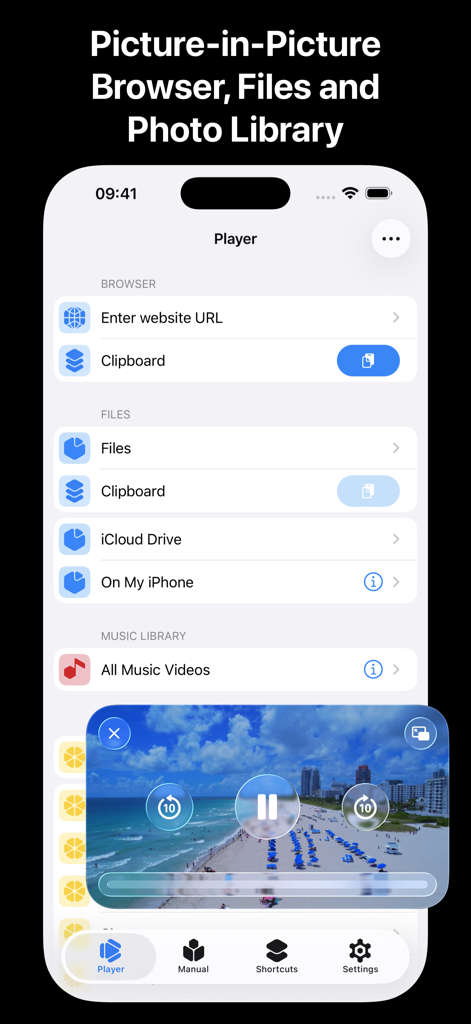
X.app - X.app 모바일 플레이어 인터페이스와 Picture-in-Picture 동영상 오버레이 및 파일 선택 옵션.
X.app 모바일 플레이어 인터페이스와 Picture-in-Picture 동영상 오버레이 및 파일 선택 옵션.

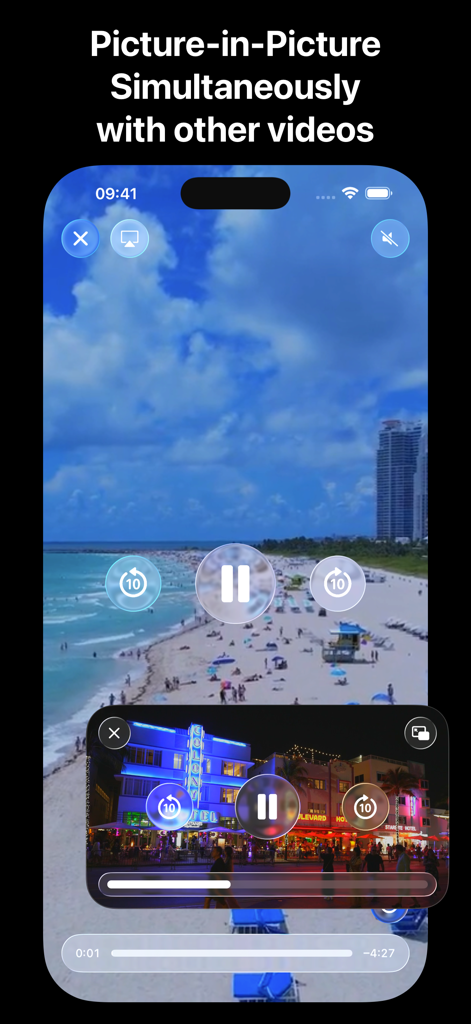
X.app - X.app Picture in Picture 모드를 사용하여 동시에 두 개의 동영상을 재생 중인 iPhone 화면
X.app Picture in Picture 모드를 사용하여 동시에 두 개의 동영상을 재생 중인 iPhone 화면

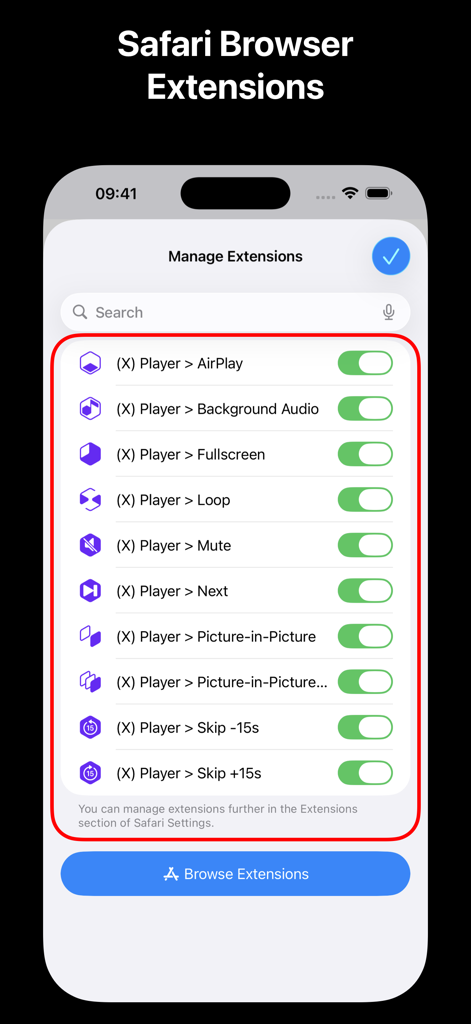
X.app - Picture-in-Picture 및 백그라운드 오디오와 같은 다양한 Safari 브라우저 확장을 토글 스위치와 함께 보여주는 X.app 메뉴
Picture-in-Picture 및 백그라운드 오디오와 같은 다양한 Safari 브라우저 확장을 토글 스위치와 함께 보여주는 X.app 메뉴

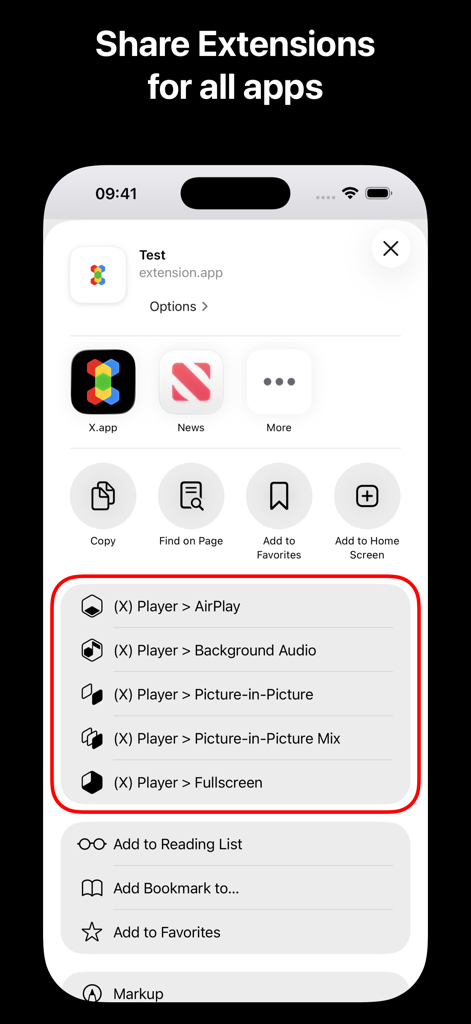
X.app - Picture-in-Picture 및 백그라운드 오디오 도구가 포함된 iOS의 X.app 공유 확장 메뉴
Picture-in-Picture 및 백그라운드 오디오 도구가 포함된 iOS의 X.app 공유 확장 메뉴

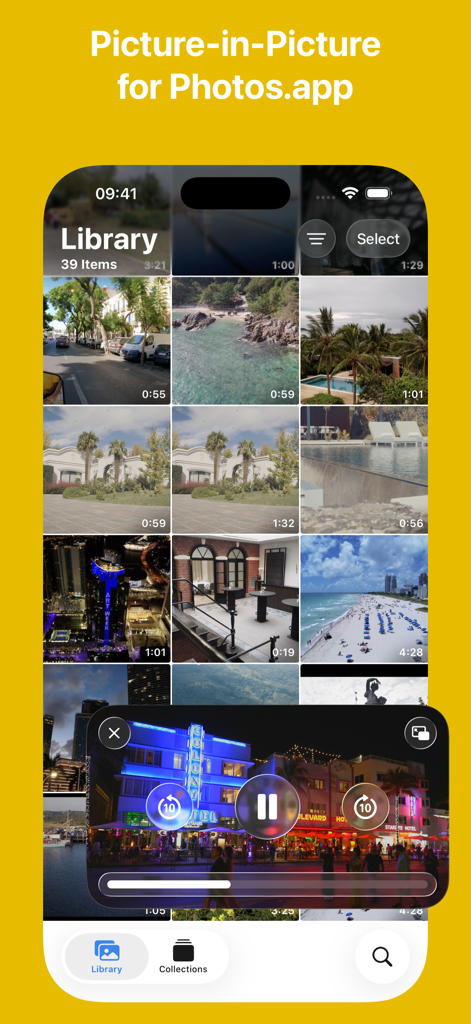
X.app - X.app이 iOS 사진 라이브러리 위에 Picture-in-Picture 동영상 모드를 표시하고 있음
X.app이 iOS 사진 라이브러리 위에 Picture-in-Picture 동영상 모드를 표시하고 있음

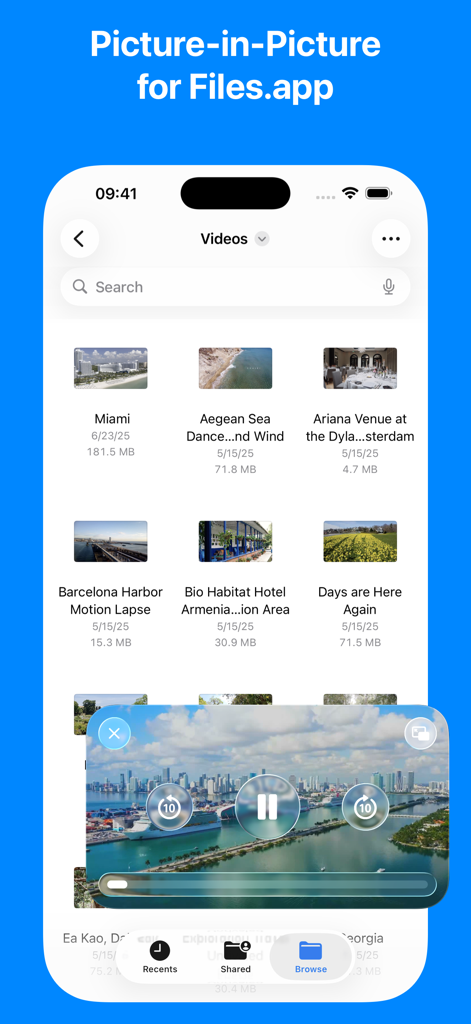
X.app - X.app이 iPhone의 파일 앱 위에 Picture in Picture 동영상 플레이어를 표시하고 있음
X.app이 iPhone의 파일 앱 위에 Picture in Picture 동영상 플레이어를 표시하고 있음

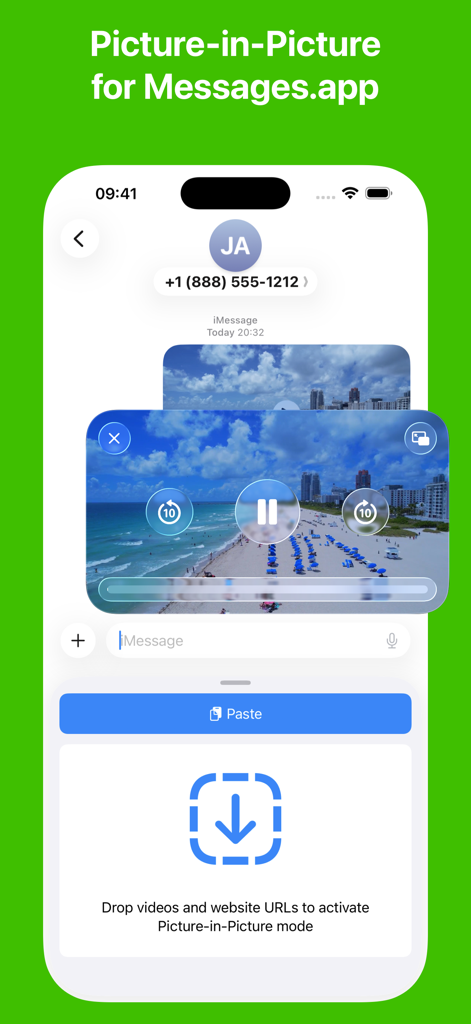
X.app - 메시지 앱 내에서 X.app Picture in Picture 동영상 재생 중인 iPhone 화면
메시지 앱 내에서 X.app Picture in Picture 동영상 재생 중인 iPhone 화면

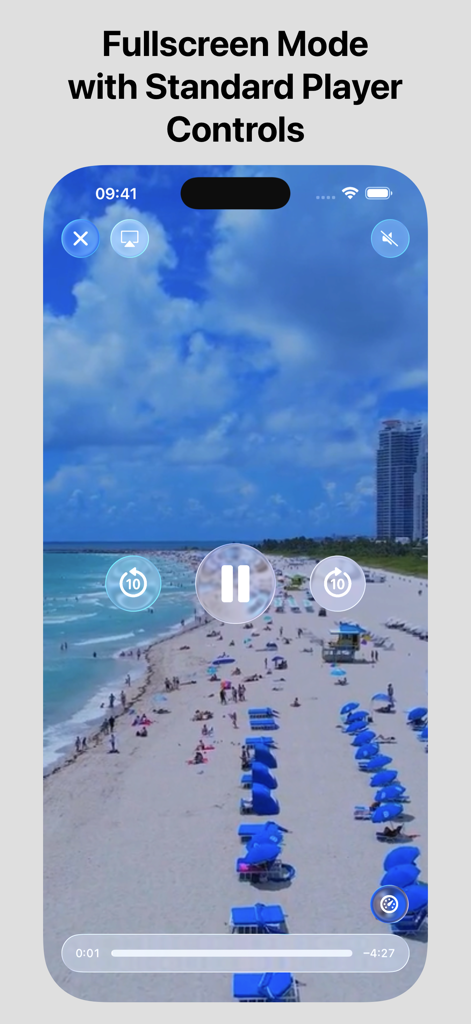
X.app - iPhone의 X.app에서 표준 컨트롤이 있는 전체 화면 동영상 플레이어
iPhone의 X.app에서 표준 컨트롤이 있는 전체 화면 동영상 플레이어

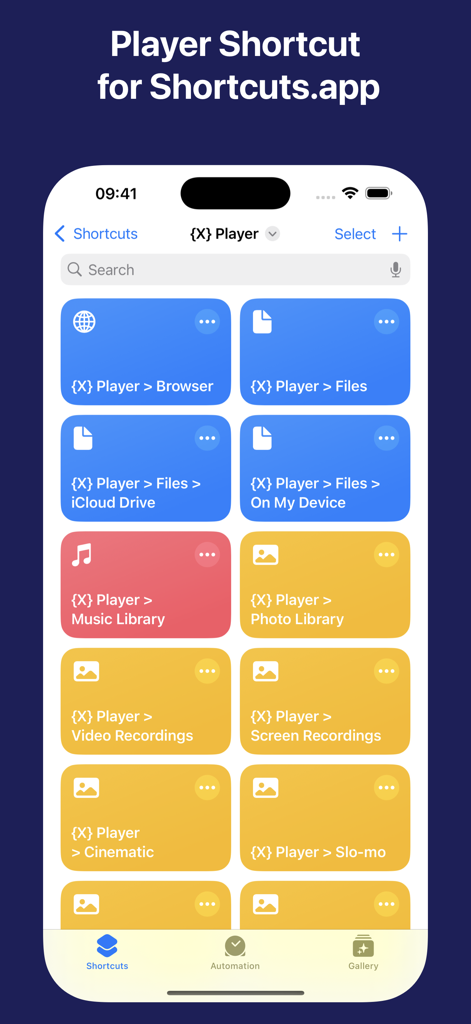
X.app - 브라우저 및 파일에 빠르게 액세스하기 위한 iOS 단축키 앱 내 X.app 플레이어 단축키 모음

브라우저 및 파일에 빠르게 액세스하기 위한 iOS 단축키 앱 내 X.app 플레이어 단축키 모음

설명

X.app is the All-in-One Extension App for iOS, iPadOS, iMessage, watchOS and visionOS. ■■■ X.app for iOS ■ In-App Web Browser: - Automatic activation of "Picture-in-Picture" video mode on supported websites. - Simultaneous playback of "Picture-in-Picture" video with other video apps, without sound. ■ In-App Video Picker: - Selection of video files from Files app, iCloud Drive and On My Device directories. - Selection of music videos from Music Library. - Selection of videos from Photo Library. - Simultaneous playback of "Picture-in-Picture" video with other video apps, with or without sound. ■ Share extensions: - Player > Picture-in-Picture: extension activates Picture-in-Picture mode for videos. - Player > Picture-in-Picture Mix: extension activates Picture-in-Picture mode for videos to play simultaneously with other video apps, without sound. - Player > Fullscreen: extension activates Fullscreen mode for videos. - Player > AirPlay: extension activates AirPlay for sharing video to another device. - Player > Background Audio extension plays video in background. - Supported apps: Safari, Photos, Files, Messages and other apps with a Share button. ■ Safari browser extensions: - Player > Picture-in-Picture: extension activates Picture-in-Picture mode for videos. - Player > Picture-in-Picture Mix: extension activates Picture-in-Picture mode for videos to play simultaneously with other video apps, without sound. - Player > Fullscreen: extension activates Fullscreen mode for videos. - Player > AirPlay: extension activates AirPlay for sharing video and audio to another device. - Player > Background Audio extension plays video and audio in background. - Player > Mute: extension mutes or unmutes video and audio. - Player > Loop: extension loops video and audio playback. - Player > Skip Forward and Backward: extension skips forward or backward 15 seconds of video and audio. - Player > Next: extension skips to the next video and audio, or skips to the end of video and audio. ■ iMessage extension: - Activation of "Picture-in-Picture" video mode via Copy&Paste and Drag&Drop of a video or a website URL from a conversation. ■ Shortcuts: - Collection of Shortcuts to launch X.app from Home Screen, Action Button, Tap Back or automation. - "Browser" shortcut to open In-App Web Browser with On Screen website, Clipboard or list of suggested websites. - "Browser > Favorite" shortcut to open favorite website. - "Files" shortcut to open Files picker. - "Photo Library" shortcut to open Photo Library picker. ■■■ X.app for iMessage - Activation of "Picture-in-Picture" video mode via Copy&Paste and Drag&Drop of a video or a website URL from a conversation. ■■■ X.app for watchOS ■ In-App Web Browser: - Input of a website URL to open a website. ■ Web Search: - Supported search engines: Google, Bing or DuckDuckGo. --- X.app is free to use and provides an optional auto-renewable subscription. X.app+ is a Universal Subscription, which hides “Subscription Banner” at the top of the app and unlocks additional features on all supported platforms: iOS, iPadOS, iMessage and watchOS. Features, which require X.app+ subscription, are marked with (+) sign. Terms of Use: https://extension.app/terms Privacy Policy: https://extension.app/privacy

Download

다운로드: App Store

이 페이지는 앱이나 개발자의 공식 페이지가 아니며, 정보 제공 및 논평을 목적으로 작성된 독립 편집 간행물입니다. 명시적으로 달리 언급되지 않는 한, 해당 앱이나 개발자는 MWM, Apple, Google Play, 앱 퍼블리셔 또는 앱 개발자와 제휴, 보증, 후원, 승인 또는 공식적으로 연결되어 있지 않으며, 이 페이지의 어떤 내용도 해당 앱이 MWM의 서비스를 사용하여 개발되었음을 의미하지 않습니다. 모든 상표, 로고, 스크린샷 및 기타 콘텐츠는 해당 소유자의 자산입니다.








