Zoho Lens
Zoho Lens
다운로드: App Store

이 페이지는 앱이나 개발자의 공식 페이지가 아니며, 정보 제공 및 논평을 목적으로 작성된 독립 편집 간행물입니다. 명시적으로 달리 언급되지 않는 한, 해당 앱이나 개발자는 MWM, Apple, Google Play, 앱 퍼블리셔 또는 앱 개발자와 제휴, 보증, 후원, 승인 또는 공식적으로 연결되어 있지 않으며, 이 페이지의 어떤 내용도 해당 앱이 MWM의 서비스를 사용하여 개발되었음을 의미하지 않습니다. 모든 상표, 로고, 스크린샷 및 기타 콘텐츠는 해당 소유자의 자산입니다.


로고: Zoho Lens
다운로드: App Store

Zoho Lens

실시간 증강 현실 지원으로 현장 기술자의 역량을 강화하세요. 대화형 AR 주석과 HD 영상 스트리밍으로 복잡한 수리를 안내하여 다운타임을 줄이고 출장 비용을 절감하세요.

주요 수치

다운로드

1K+

사용자 평점

4.8/5

총 평가 수

0

개발사

Zoho Corporation

카테고리

Business

지원 언어

11

최신 버전

2.16.1

크기

37.5 MB

출시일

2019년 9월 6일
기능

현장 운영 역량 강화

실시간 AR 지원으로 전문가 지식과 현장 실행 간의 격차를 해소하여 다운타임을 줄이고 출장 비용을 제거하도록 설계되었습니다.

정밀 AR 주석

기술자가 정확히 무엇을 수정해야 하는지 알 수 있도록 실제 개체에 고정되는 디지털 지침을 그려 통신 오류를 제거하세요.

즉각적인 전문가 협업

가장 숙련된 엔지니어를 가상으로 모든 현장에 투입하여 한 명의 전문가가 중앙 대시보드에서 여러 현장 팀을 지원할 수 있도록 하세요.

다음 스크린샷과 설명은 앱의 공식 스토어 목록에서 직접 가져온 것이며 앱 개발자의 자산입니다.

앱 스토어

스크린샷
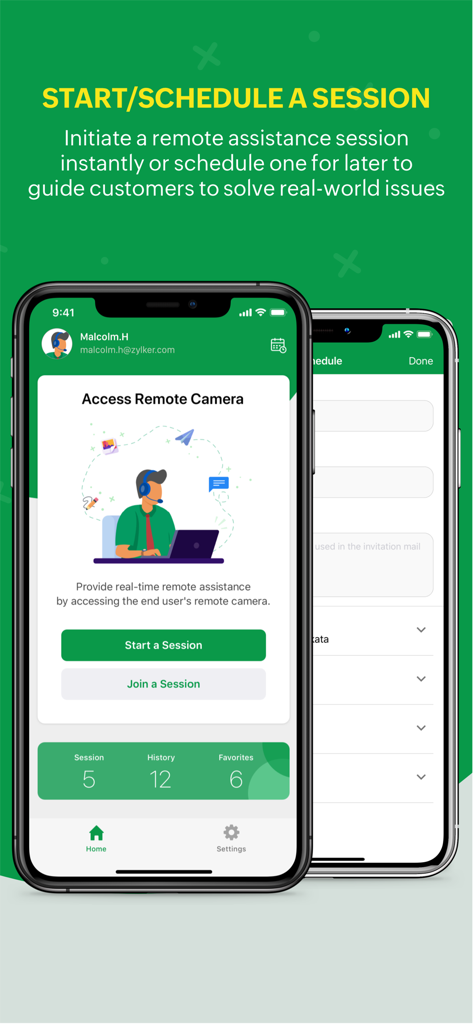
Zoho Lens - Zoho Lens 앱 화면에 원격 지원을 위한 세션 시작 및 예약 옵션 표시
Zoho Lens 앱 화면에 원격 지원을 위한 세션 시작 및 예약 옵션 표시

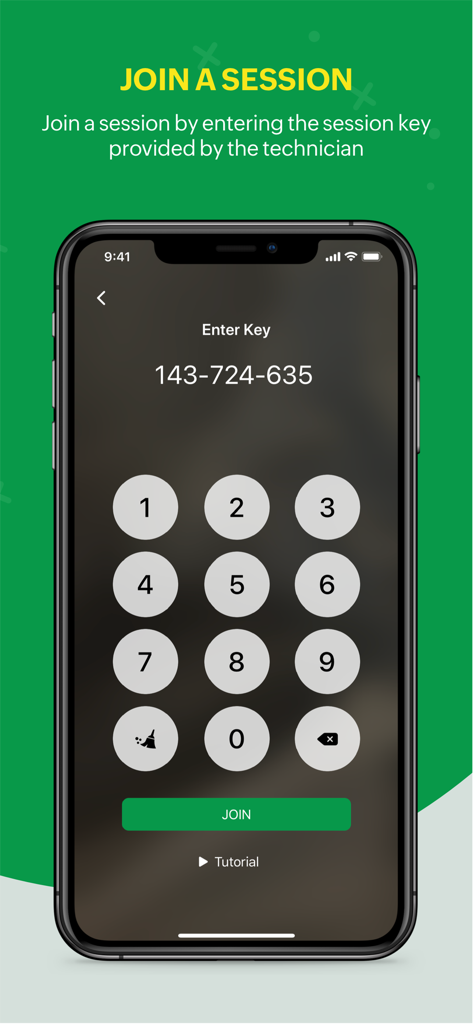
Zoho Lens - Zoho Lens 모바일 앱 화면에 세션 키를 입력하고 원격 지원 세션에 참여하기 위한 숫자 키패드 표시
Zoho Lens 모바일 앱 화면에 세션 키를 입력하고 원격 지원 세션에 참여하기 위한 숫자 키패드 표시

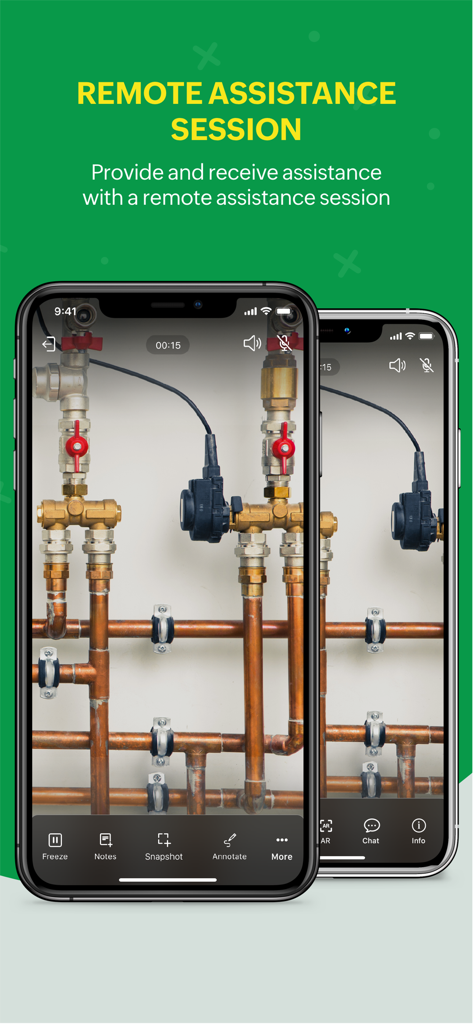
Zoho Lens - Zoho Lens 모바일 앱 인터페이스에 원격 지원 세션 표시

Zoho Lens 모바일 앱 인터페이스에 원격 지원 세션 표시
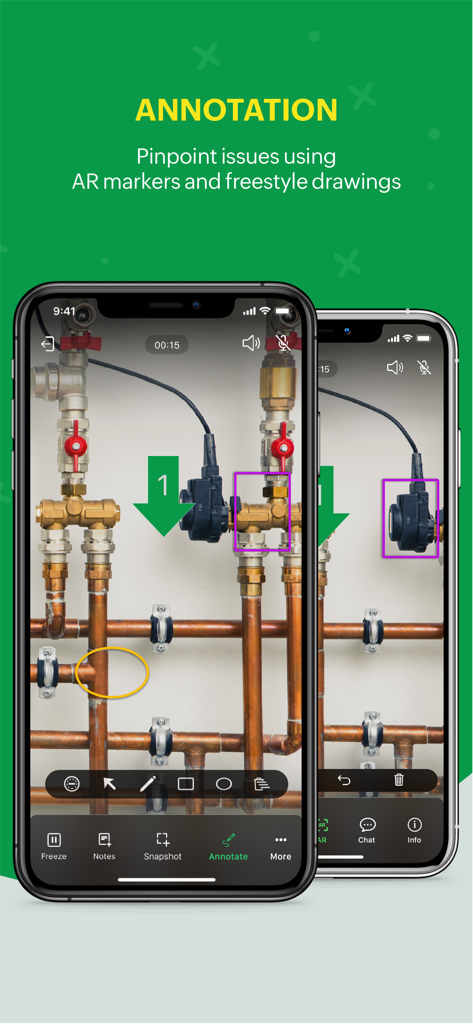
Zoho Lens - Zoho Lens 앱이 AR 주석 및 산업용 파이프의 마커와 함께 표시되는 두 개의 스마트폰으로 원격 기술 지원 제공
Zoho Lens 앱이 AR 주석 및 산업용 파이프의 마커와 함께 표시되는 두 개의 스마트폰으로 원격 기술 지원 제공

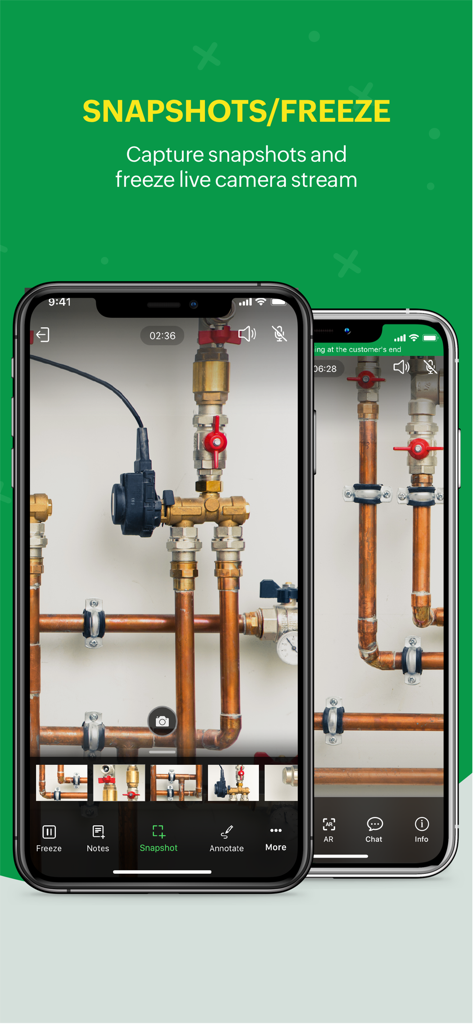
Zoho Lens - Zoho Lens 모바일 인터페이스에 산업용 파이프에 대한 원격 기술 지원을 위한 스냅샷 및 라이브 카메라 스트림 일시 중지 기능 표시
Zoho Lens 모바일 인터페이스에 산업용 파이프에 대한 원격 기술 지원을 위한 스냅샷 및 라이브 카메라 스트림 일시 중지 기능 표시

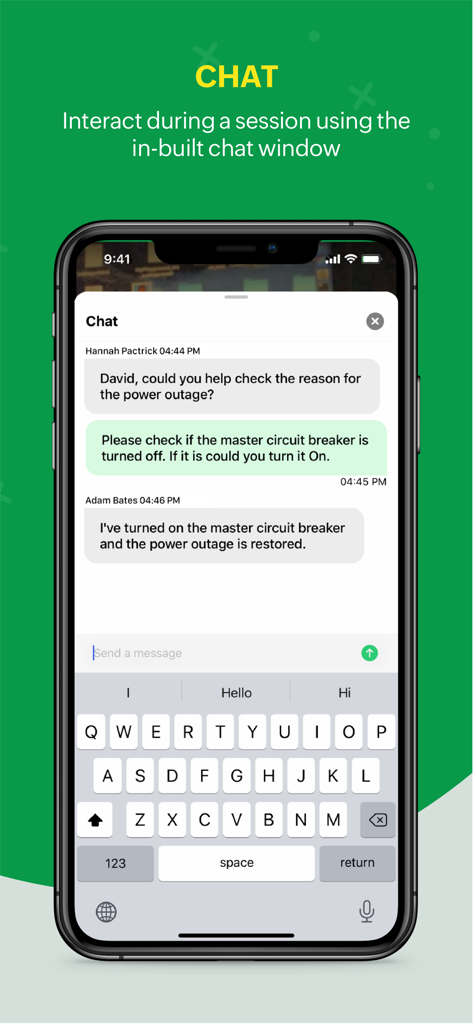
Zoho Lens - Zoho Lens의 앱 내 채팅 인터페이스로, 원격 세션 중 기술자와 전문가 간의 통신 표시
Zoho Lens의 앱 내 채팅 인터페이스로, 원격 세션 중 기술자와 전문가 간의 통신 표시

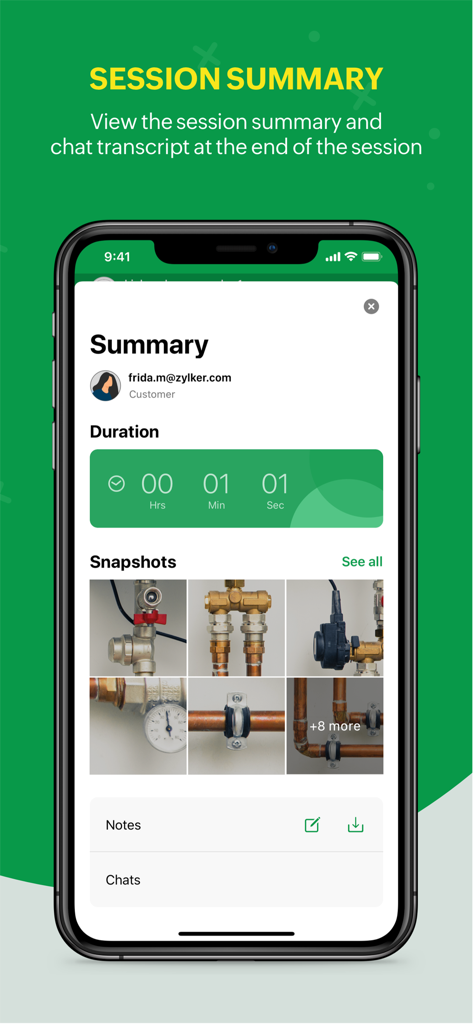
Zoho Lens - Zoho Lens 앱 세션 요약 화면으로 파이프의 기간 스냅샷 및 메모 표시
Zoho Lens 앱 세션 요약 화면으로 파이프의 기간 스냅샷 및 메모 표시

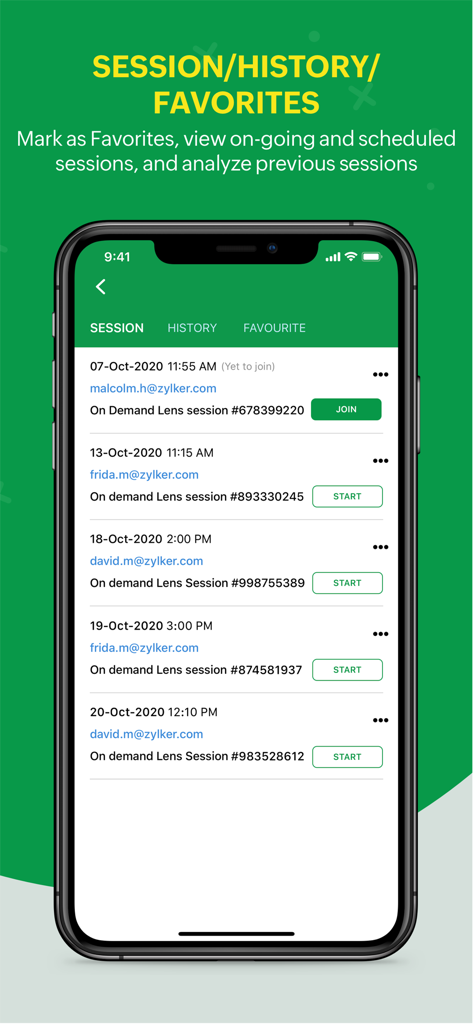
Zoho Lens - Zoho Lens 앱 인터페이스에 진행 중이거나 예약된 원격 지원 세션 목록이 기록 및 즐겨찾기 탭과 함께 표시됨

Zoho Lens 앱 인터페이스에 진행 중이거나 예약된 원격 지원 세션 목록이 기록 및 즐겨찾기 탭과 함께 표시됨

설명

Zoho Lens - Remote assistance through augmented reality! Ease the means to get expert visual support from the agents, using Zoho Lens. Zoho Lens allows support agents to provide expert work instructions to customers or field agents by initiating a session and accessing their smartphone. The efficient remote assistance tool with both HD video and audio lets you annotate live objects in need for problem solving. Zoho Lens entails the following features: Live stream View high definition real-time video from the customer's smartphone to the agent's desk. Initiate a Zoho Lens session and quickly access the live footage of the issue demanding a solution. AR annotation Add AR annotations to the video stream for extra virtual information. Easily add arrows, or even point to the parts that need technical aid. Chat and communicate Reduce response time by interacting with your customer through voice support or initiate an in-app chat session. Zoom, freeze and screenshot Pinch the screen to zoom into the video feed to get a closer look at the real world objects. Additionally, freeze the screen to access more intricate issues within a particular screen. Capture a screenshot, share with the customer to analyse the issue further or document the screenshots for offline appraisal. Session Notes Jot down notes and thoughts during the session which you can reference back later. Initiate and schedule sessions Agents can initiate a quick session and share the Join Now link to the customer. Sessions can also be scheduled based on convenience. Join a session Customers can simply tap the shared join link or enter Name & Session Key and tap 'Join'. Multi-participant Session Experts can invite secondary technicians with different skill sets to help them out during a session. Camera Switch End-users can switch between the front-facing and rear-facing camera during a session to communicate better with the Expert. In App Purchases in Zoho Lens allows users to subscribe to Zoho Lens which enables these features for them: AR Annotations AR Comments AR Measure QR/Barcode/Live Text scanning Advanced Chat & File Transfer Session Recording Rebranding For further comments, suggestions, and questions, please write to us at support@zoholens.com Privacy Policy and Terms & Conditions: -https://www.zoho.com/privacy.html -https://www.zoho.com/terms.html

Download

다운로드: App Store

이 페이지는 앱이나 개발자의 공식 페이지가 아니며, 정보 제공 및 논평을 목적으로 작성된 독립 편집 간행물입니다. 명시적으로 달리 언급되지 않는 한, 해당 앱이나 개발자는 MWM, Apple, Google Play, 앱 퍼블리셔 또는 앱 개발자와 제휴, 보증, 후원, 승인 또는 공식적으로 연결되어 있지 않으며, 이 페이지의 어떤 내용도 해당 앱이 MWM의 서비스를 사용하여 개발되었음을 의미하지 않습니다. 모든 상표, 로고, 스크린샷 및 기타 콘텐츠는 해당 소유자의 자산입니다.








