
이 페이지는 앱이나 개발자의 공식 페이지가 아니며, 정보 제공 및 논평을 목적으로 작성된 독립 편집 간행물입니다. 명시적으로 달리 언급되지 않는 한, 해당 앱이나 개발자는 MWM, Apple, Google Play, 앱 퍼블리셔 또는 앱 개발자와 제휴, 보증, 후원, 승인 또는 공식적으로 연결되어 있지 않으며, 이 페이지의 어떤 내용도 해당 앱이 MWM의 서비스를 사용하여 개발되었음을 의미하지 않습니다. 모든 상표, 로고, 스크린샷 및 기타 콘텐츠는 해당 소유자의 자산입니다.


Zoho Meeting - Online Meetings
당신은 더 이상 회의실에 묶이지 않습니다. 이 앱은 당신의 손안에 언제든 회의를 소환하는 능력을 부여합니다.
다운로드
1M+사용자 평점
총 평가 수
5.6K개발사
카테고리
Business지원 언어
39최신 버전
1.8.1크기
138.1 MB출시일
2017년 10월 2일전문가, 기업 및 교육자를 위한 안정적이고 효율적인 가상 협업 솔루션 평가.
Zoho Meeting - 온라인 회의 앱 주요 기능 분석
실시간 협업 도구
이 앱은 비디오, 오디오 및 화면 공유를 포함한 실시간 협업 기능을 제공하여 팀원들이 효과적으로 소통하고 공동 작업할 수 있게 합니다.
포괄적인 웨비나 기능
이 도구는 사용자가 웨비나에 참여하고, 질의응답, 설문조사, 손 들기 기능으로 상호 작용하며, 공동 주최자가 이동 중에도 웨비나를 운영할 수 있도록 지원하여 가상 이벤트의 효과를 극대화합니다.
안전한 회의 환경
이 도구는 암호 보호 및 강력한 참가자 관리 기능(음소거, 제거)을 통해 안전하고 방해 없는 회의를 보장하여 개인 정보 보호와 생산적인 토론을 유지합니다.
유연한 회의 관리
사용자가 무제한 회의를 주최하고, 즉시 회의를 시작하며, 초대 링크나 회의 ID를 통해 간편하게 참여할 수 있도록 지원하여 효율적인 일정 관리와 접근성을 제공합니다.
회의 녹화 및 파일 공유
이 앱은 회의 내용을 기록하고 채팅 중 메시지, 이모티콘, 이미지 및 파일을 공유할 수 있도록 하여 정보 보존과 효율적인 커뮤니케이션을 가능하게 합니다.
대규모 참가자 지원
이 앱은 최대 250명의 참가자를 수용하는 온라인 회의를 주최할 수 있도록 하여 대규모 팀, 고객 또는 학생 그룹과의 소통을 원활하게 합니다.
자주 묻는 질문
에 대해 알아야 할 모든 것 Zoho Meeting - Online Meetings
How many participants can join a Zoho Meeting?
Zoho Meeting allows up to 250 participants to join a secure online meeting or webinar. This feature ensures large-scale collaboration and communication for all users.
Can I share my mobile screen during a Zoho Meeting?
Yes, Zoho Meeting allows you to share your mobile screen during a meeting. This enables contextual collaboration with other participants.
Is an account required for participants to join a Zoho Meeting?
No, participants do not require an account to join Zoho Meeting. They can easily join a meeting using the invitation link or the meeting ID.
Does Zoho Meeting support recording of meetings?
Yes, the meeting host can record the screen, audio, and video from a computer or mobile device. Recorded videos are playable online and sharable.
Can Zoho Meeting participants engage in polls during webinars?
Yes, participants can interact by participating in polls during live webinars within Zoho Meeting. This allows for gathering opinions and feedback.
How does Zoho Meeting ensure secure online meetings?
Zoho Meeting secures online meetings using password protection. It also allows hosts to mute individuals or all participants and remove unwanted attendees to maintain privacy.
Can I host unlimited meetings with Zoho Meeting?
Yes, Zoho Meeting allows users to host unlimited meetings. This enables flexible and frequent online collaboration without restrictions.
Does Zoho Meeting offer a Q&A feature for webinars?
Yes, Zoho Meeting provides a Q&A feature for webinars. Attendees can interact with organizers by asking questions and receiving responses.
Can I chat with other participants during a Zoho Meeting?
Yes, Zoho Meeting includes a chat feature. You can send messages, emojis, images, and files to other participants during the meeting for contextual conversations.
Can co-organizers manage webinars from a mobile device using Zoho Meeting?
Yes, co-organizers can join webinars on the go with Zoho Meeting. They can engage attendees through audio and video directly from their mobile device.
다음 스크린샷과 설명은 앱의 공식 스토어 목록에서 직접 가져온 것이며 앱 개발자의 자산입니다.
앱 스토어
스크린샷
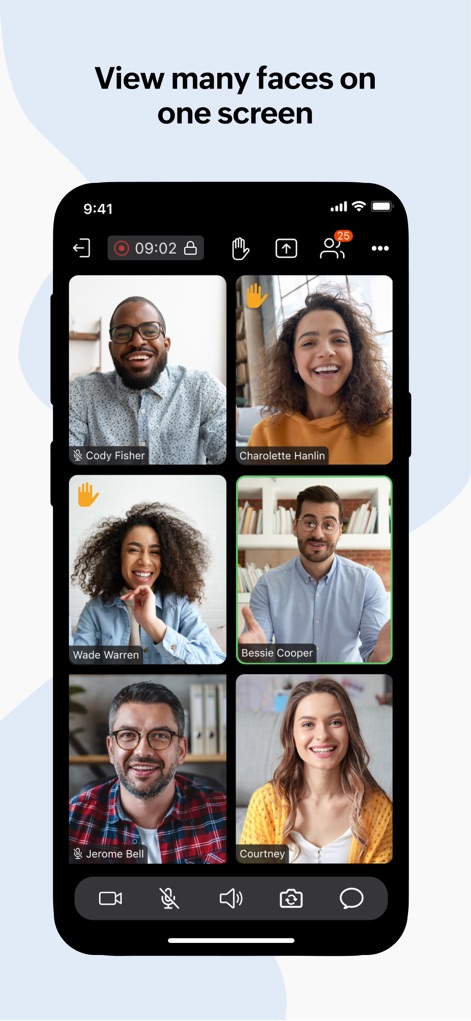
이 앱은 여러 참가자의 얼굴을 그리드 뷰로 보여주며, 각자의 이름과 손들기 아이콘으로 활발한 참여를 독려합니다.
다자간 화상 회의
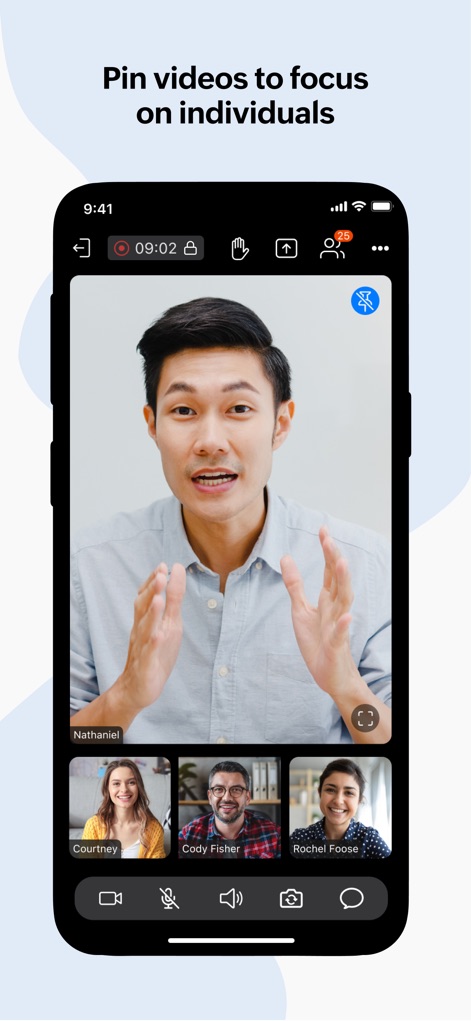
이 도구는 특정 발표자를 중앙에 크게 고정하고, 다른 참가자의 축소판 비디오를 하단에 배열하여 중요한 내용에 집중할 수 있도록 지원합니다.
주요 발표자 고정
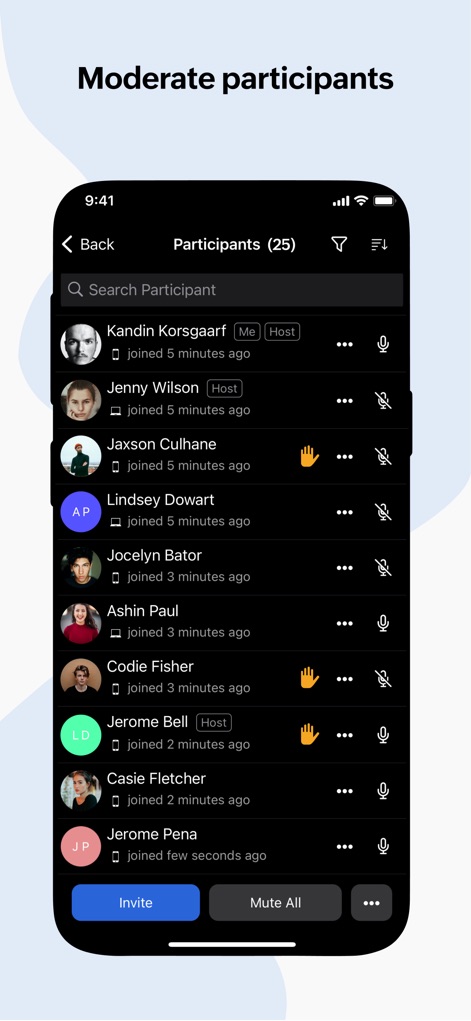
이 앱은 상세한 참가자 목록을 제공하여 주최자가 각 참가자의 마이크 상태를 제어하고, 손들기 아이콘을 통해 발언 요청을 확인할 수 있게 합니다.
회의 진행 조절
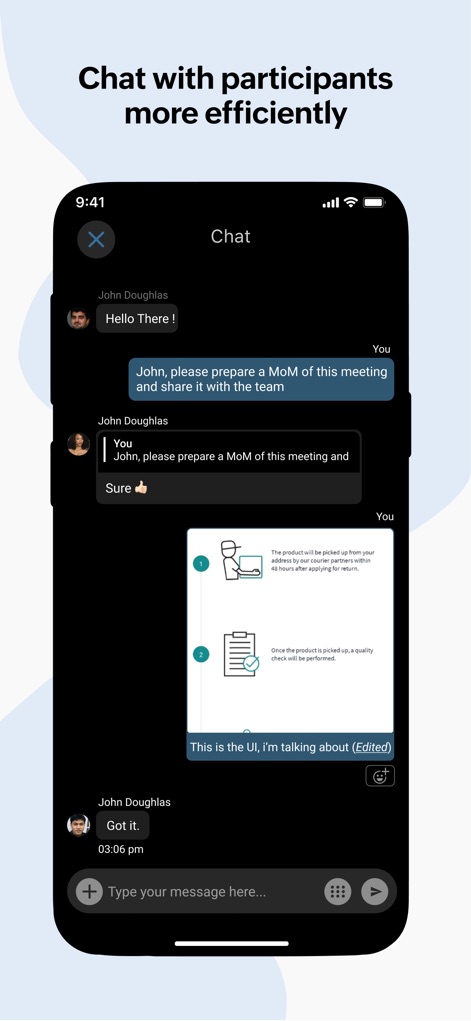
이 도구는 참가자들이 텍스트 메시지를 주고받을 수 있는 채팅 인터페이스와 이미지 공유 기능을 제공하여 회의 중 효과적인 소통을 지원합니다.
효율적인 실시간 채팅
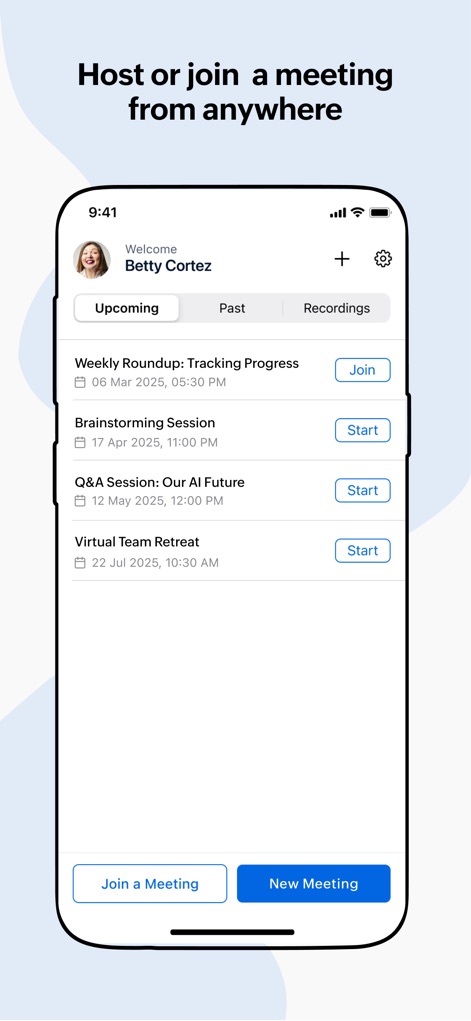
이 앱은 '예정된 회의' 목록과 '새 회의' 생성 버튼을 명확하게 표시하여, 사용자가 언제 어디서든 회의를 손쉽게 예약하고 참여할 수 있도록 돕습니다.
회의 예약 및 참여
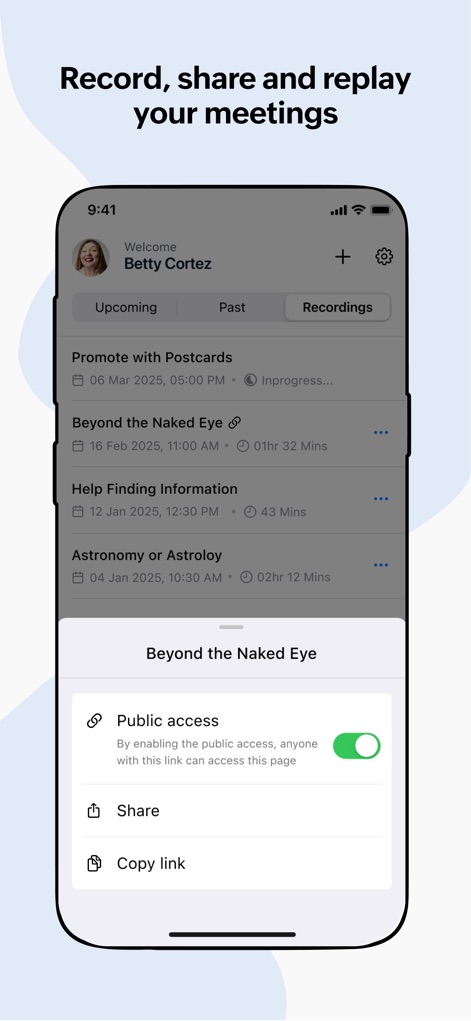
이 도구는 '녹화' 탭을 통해 지난 회의 기록을 관리하며, '공개 접근' 및 '링크 공유' 옵션을 제공하여 녹화본을 유연하게 배포할 수 있게 합니다.
회의 녹화 및 공유
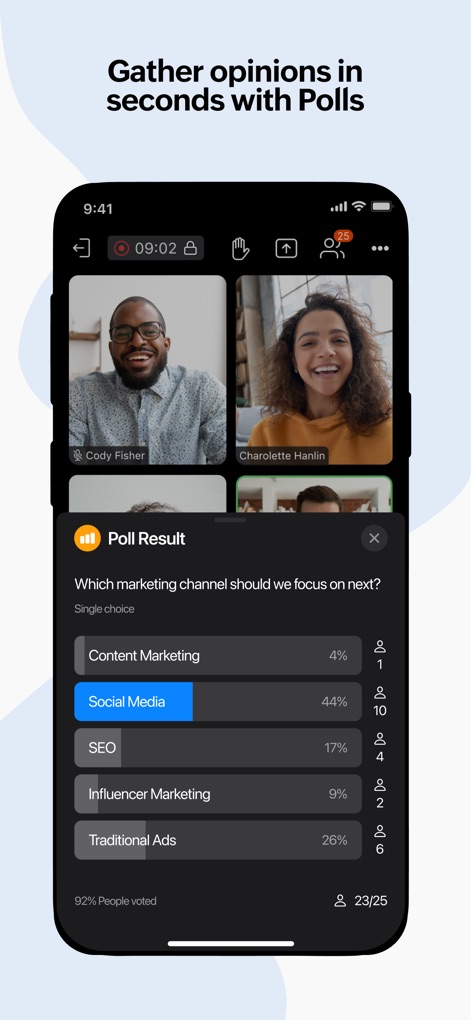
이 앱은 회의 중 '설문 결과' 오버레이를 통해 실시간 투표율을 보여주며, 각 선택지에 대한 참여 인원수를 명확히 표시하여 신속한 의사결정을 돕습니다.
즉각적인 설문조사
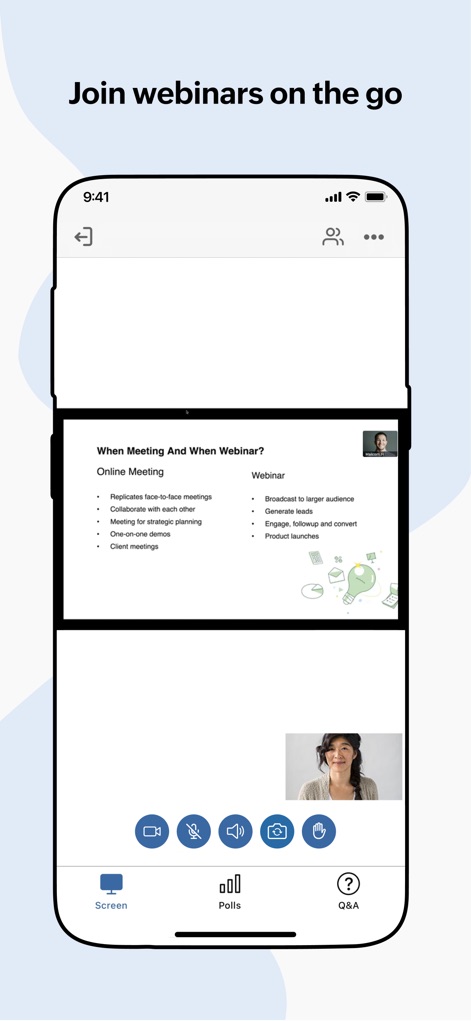
이 앱은 모바일 기기에서 웹 세미나 발표 화면을 전체적으로 보여주고, 발표자의 실시간 비디오를 PIP(Picture-in-Picture) 형태로 제공하여 몰입감 있는 참여를 가능하게 합니다.
모바일 웹 세미나
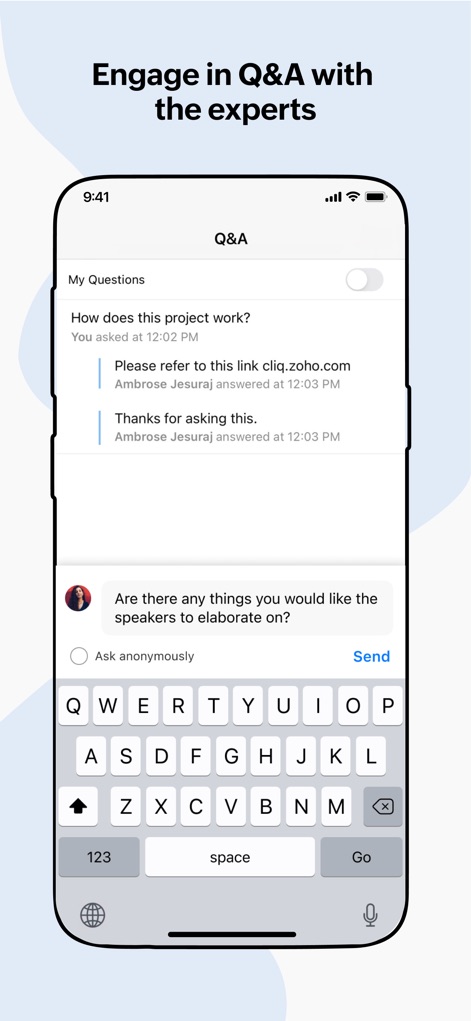
이 도구는 '질의응답' 섹션을 통해 사용자가 질문을 제출하고 전문가의 답변을 확인할 수 있는 직관적인 인터페이스를 제공합니다.
전문가와의 Q&A
설명
Download
비슷한 앱
유사한 기능과 사용자 경험을 가진 앱

GoTo
GoTo Group, Inc.

Lark - Team Collaboration
LARK TECHNOLOGIES PTE. LTD.

RingCentral
RingCentral, Inc

MTS Link
VEBINAR TEKHNOLOGII, OOO

Pronto Team Communication
Hit Labs, Inc.

Zoho Cliq - Team Communication
Zoho Corporation

Microsoft Teams
Microsoft Corporation

Zoom Workplace
Zoom Communications, Inc.

Google Meet
Google LLC
이 페이지는 앱이나 개발자의 공식 페이지가 아니며, 정보 제공 및 논평을 목적으로 작성된 독립 편집 간행물입니다. 명시적으로 달리 언급되지 않는 한, 해당 앱이나 개발자는 MWM, Apple, Google Play, 앱 퍼블리셔 또는 앱 개발자와 제휴, 보증, 후원, 승인 또는 공식적으로 연결되어 있지 않으며, 이 페이지의 어떤 내용도 해당 앱이 MWM의 서비스를 사용하여 개발되었음을 의미하지 않습니다. 모든 상표, 로고, 스크린샷 및 기타 콘텐츠는 해당 소유자의 자산입니다.