Zones for Training
Zones for Training
다운로드: App Store

이 페이지는 앱이나 개발자의 공식 페이지가 아니며, 정보 제공 및 논평을 목적으로 작성된 독립 편집 간행물입니다. 명시적으로 달리 언급되지 않는 한, 해당 앱이나 개발자는 MWM, Apple, Google Play, 앱 퍼블리셔 또는 앱 개발자와 제휴, 보증, 후원, 승인 또는 공식적으로 연결되어 있지 않으며, 이 페이지의 어떤 내용도 해당 앱이 MWM의 서비스를 사용하여 개발되었음을 의미하지 않습니다. 모든 상표, 로고, 스크린샷 및 기타 콘텐츠는 해당 소유자의 자산입니다.


로고: Zones for Training
다운로드: App Store

Zones for Training

Apple Watch에서 모든 운동을 극대화하세요. 정확한 데이터로 지방 연소 및 유산소 존을 추적하여 피트니스 목표에 더 빠르고 효율적으로 도달하세요.

주요 수치

다운로드

1M+

사용자 평점

4.7/5

총 평가 수

24K+

개발사

Flask LLP

카테고리

Health & Fitness

지원 언어

2

최신 버전

9.0.0

크기

40.2 MB

출시일

2016년 9월 13일
기능

과학적인 정밀함으로 훈련하세요

Apple Watch를 고성능 트레이닝 대시보드로 바꿔보세요. Zones는 심박수 데이터를 실시간으로 시각화하여 더 스마트하게 운동하고, 더 빠르게 회복하며, 목표를 달성할 수 있도록 도와줍니다.

목표 중심의 트레이닝 존

운동 강도를 더 이상 짐작하지 마세요. 지방 연소부터 최대 성과까지 색상으로 구분된 4개의 존이 당신의 모든 운동 시간을 특정 목표에 맞춰 최적화합니다.

원활한 햅틱 코칭

화면을 확인하지 않고도 운동에 집중하세요. 심박수 존이 바뀔 때마다 Apple Watch가 직관적인 손목 진동으로 알려줍니다.

다음 스크린샷과 설명은 앱의 공식 스토어 목록에서 직접 가져온 것이며 앱 개발자의 자산입니다.

앱 스토어

스크린샷
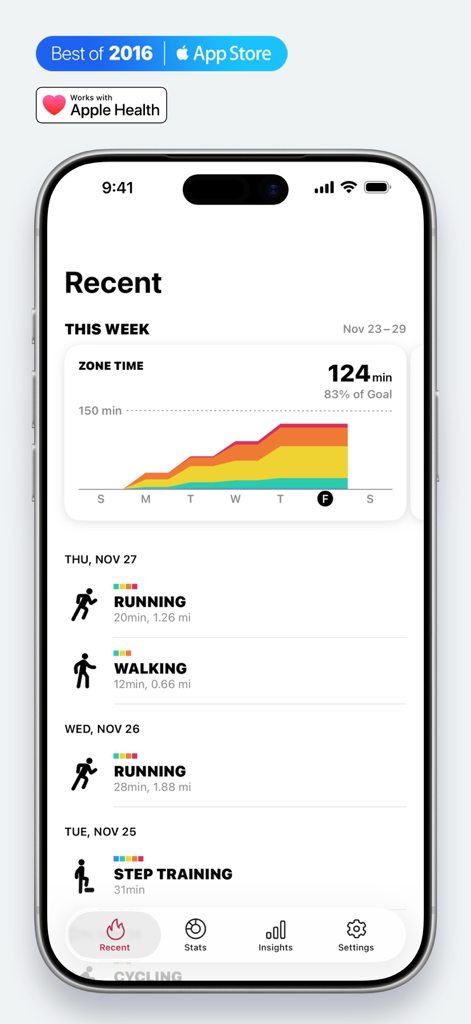
Zones for Training - Zones for Training 앱 대시보드에 표시된 주간 심박수 존 시간 차트 및 최근 운동 기록
Zones for Training 앱 대시보드에 표시된 주간 심박수 존 시간 차트 및 최근 운동 기록

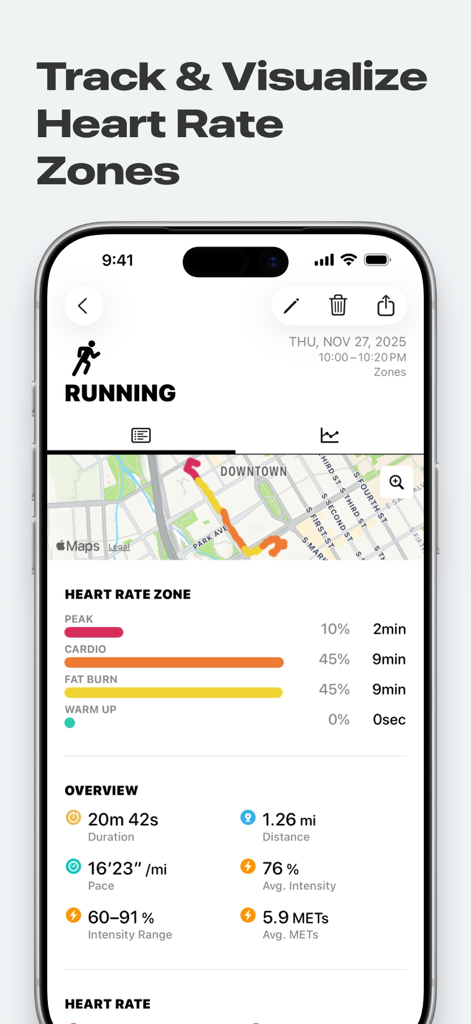
Zones for Training - 러닝 운동에 대한 상세한 심박수 존 분석을 보여주는 Zones for Training 앱 인터페이스
러닝 운동에 대한 상세한 심박수 존 분석을 보여주는 Zones for Training 앱 인터페이스

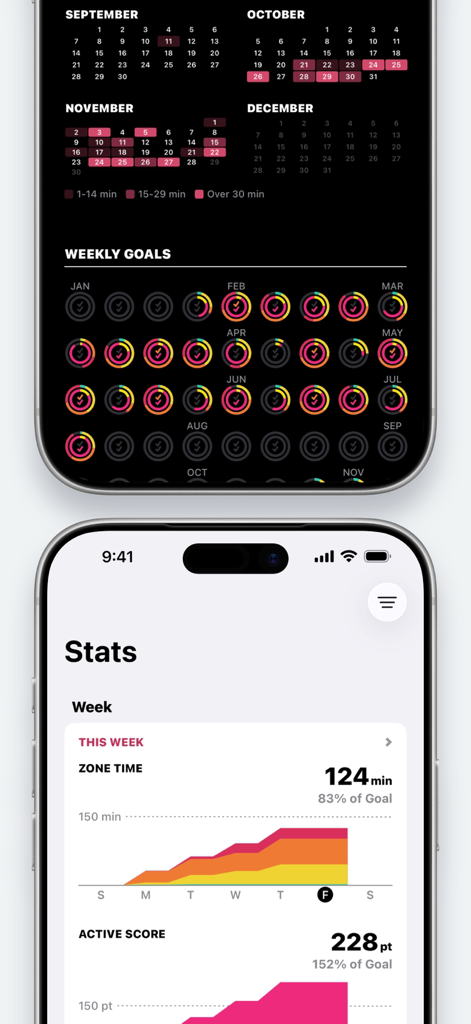
Zones for Training - 주간 운동 통계, 심박수 존 분포 그래프 및 연간/월간 목표 달성 링을 보여주는 Zones for Training 앱의 iPhone 화면
주간 운동 통계, 심박수 존 분포 그래프 및 연간/월간 목표 달성 링을 보여주는 Zones for Training 앱의 iPhone 화면

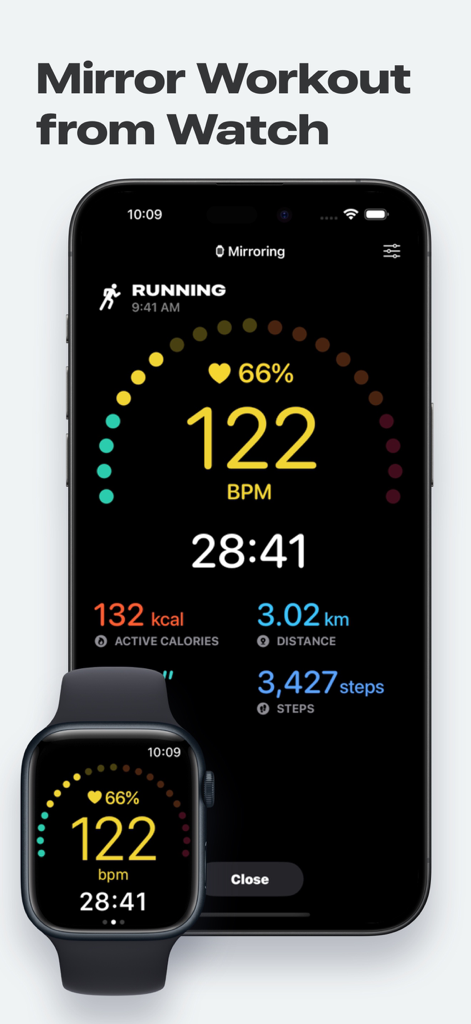
Zones for Training - Apple Watch의 러닝 운동을 iPhone으로 미러링하여 심박수와 시간을 보여주는 Zones for Training 앱
Apple Watch의 러닝 운동을 iPhone으로 미러링하여 심박수와 시간을 보여주는 Zones for Training 앱

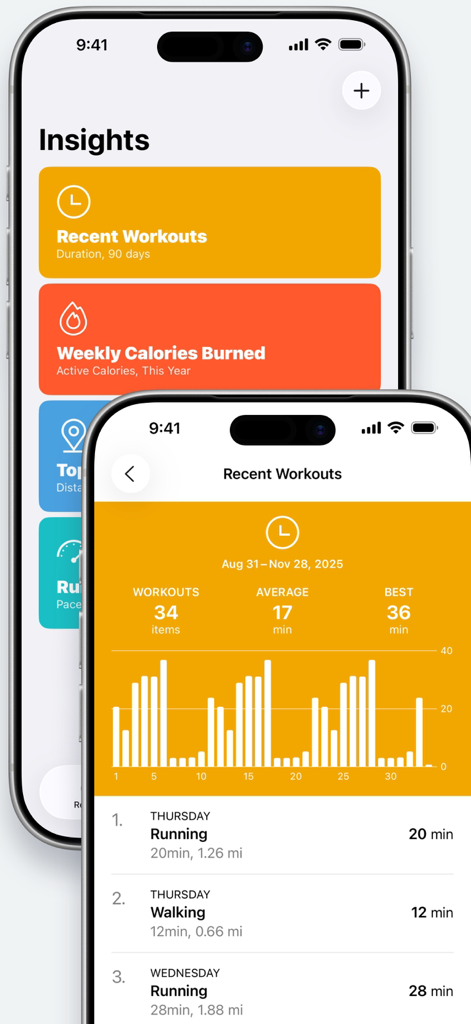
Zones for Training - Zones for Training 앱에서 운동 인사이트와 막대 그래프가 포함된 최근 활동 상세 목록을 보여주는 두 개의 iPhone 화면
Zones for Training 앱에서 운동 인사이트와 막대 그래프가 포함된 최근 활동 상세 목록을 보여주는 두 개의 iPhone 화면

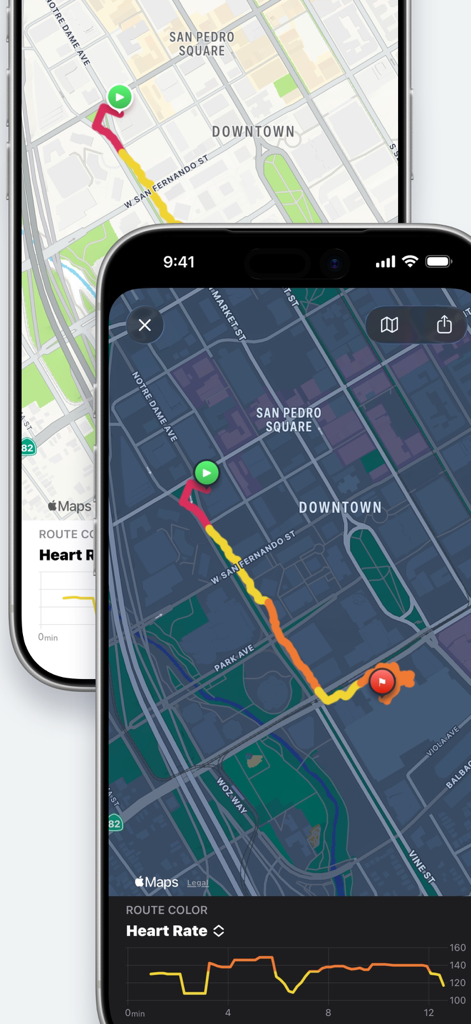
Zones for Training - 심박수 존 및 강도 수준에 따라 색상으로 구분된 운동 경로 지도

심박수 존 및 강도 수준에 따라 색상으로 구분된 운동 경로 지도

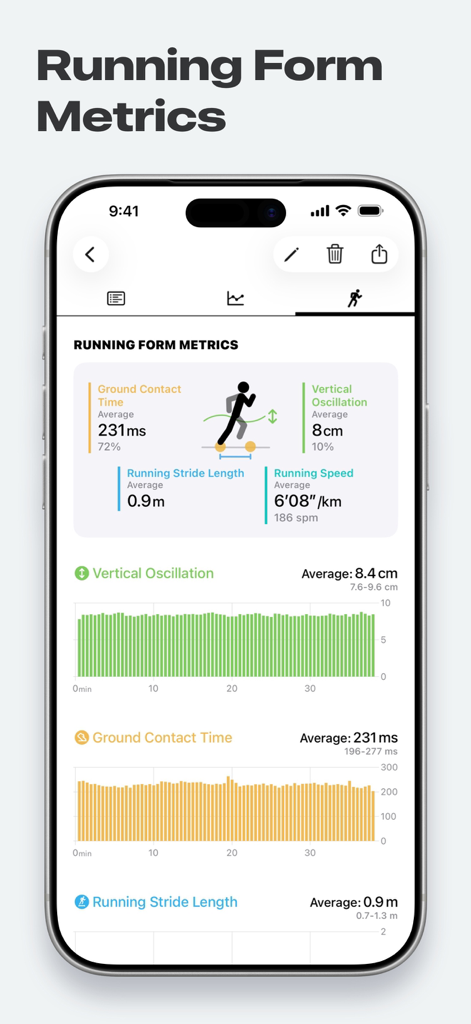
Zones for Training - 수직 진동 및 지면 접촉 시간 데이터를 보여주는 러닝 자세 지표 대시보드
수직 진동 및 지면 접촉 시간 데이터를 보여주는 러닝 자세 지표 대시보드

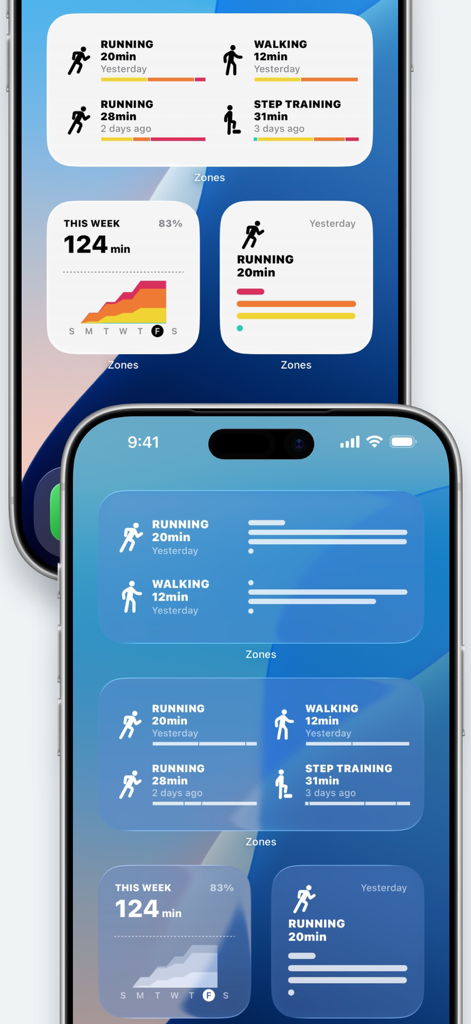
Zones for Training - 운동 요약 및 심박수 강도 차트가 포함된 Zones for Training 위젯이 표시된 iPhone 홈 화면

운동 요약 및 심박수 강도 차트가 포함된 Zones for Training 위젯이 표시된 iPhone 홈 화면

설명

Get the most out of your Apple Watch! Zones monitors your exercise intensity and visualize it in meaningful ways. Know your activities and be smart about how you work out. Zones supports over 70 types of workouts like Running, Walking, Cycling, Treadmill, Exercise Bike, and Strength Training. Great for outdoor/indoor/gym workouts. Measure it on your Apple Watch, review it on your iPhone. Efficient workouts with Zones! ------------------------------------------------ ■ Features ------------------------------------------------ ◎ Monitor real-time exercise intensity and heart rate during workouts. (Apple Watch only) ◎ Show your time spent in the four Heart Rate Zones. ◎ Display all workouts data from the Apple Health app, so that you can use Zones as a total workouts dashboard. ------------------------------------------------ ■ Training With Heart Rate Zones ------------------------------------------------ Everybody has a different purpose for their training. Someone run for diet, someone ride for improving their cardio endurance. Exercising at the correct intensity can help you get the most out of your workouts. This app shows you your exercise intensity using your real-time heart rate, and it has four heart rate zones to understand your exercise intensity at a glance. • PEAK - for improving performance and speed. • CARDIO - for improving cardio endurance. • FAT BURN - For longer exercise. Predominantly uses fat for energy. • WARM UP - For preparation and recovery. With these four zones, you can start heart rate training very easily and quickly. You don't have to remember your target heart rate or intensity %. ------------------------------------------------ ■ Measuring with Apple Watch ------------------------------------------------ ◎ Heart Rate and Exercise Intensity in real-time • You can easily see which Heart Rate Zone you are in while exercise. • Your Apple Watch taps you on the wrist when heart rate zone changes. • Automatic pause/resume function (Running only) ◎ Review your improvements with Recovery Heart Rate Recovery Heart Rate is the difference between your exercising heart rate and your heart rate one minutes after the exercise has stopped. It is a good indicator to gauge your fitness level! This app measures it automatically right after your workouts. (Over CARDIO intensities only) ◎ Leave your iPhone at home You can leave your iPhone at home when you go for training! ※ Measurement function is only available on the Apple Watch. ------------------------------------------------ ■ Detailed Information of Your Workouts ------------------------------------------------ ◎ Details of Workout • Duration • Active Calories • Distance, Pace, Splits • Time in heart rate zones • Heart Rate and Exercise Intensity (Average, min/max heart rate) • Graphs of heart rate and pace • Show your workout on Widgets ◎ Insights (Graphs & Lists) • Recent Workouts • Weekly Calories Burned • Top 10 Distance • Running Pace ------------------------------------------------ ■ Many Ways to Use Zones ------------------------------------------------ ◎ Supports over 70 types of workouts Running, Walking, Cycling, Core Training, Flexibility, Strength Training... and so on! ◎ Works great with other apps through the Apple Health Zones reads all Workouts data from the Apple Health app, so you can use Zones as a total workouts dashboard. In this way, you can continue using the apps you already love. Of course, you can see your workouts data from Apple Workouts app in Zones. ◎ Upgrade to PRO • Stats (Weekly, Monthly, Yearly) • Create & customize Insights • Change Heart Rate Zones • Create Custom Workouts (5 Zones) • Edit Workout Name ------------------------------------------------ ■ Required Device ------------------------------------------------ Apple Health is required to use. For iPad, please update your OS to iPadOS 17 or higher.

Download

다운로드: App Store

이 페이지는 앱이나 개발자의 공식 페이지가 아니며, 정보 제공 및 논평을 목적으로 작성된 독립 편집 간행물입니다. 명시적으로 달리 언급되지 않는 한, 해당 앱이나 개발자는 MWM, Apple, Google Play, 앱 퍼블리셔 또는 앱 개발자와 제휴, 보증, 후원, 승인 또는 공식적으로 연결되어 있지 않으며, 이 페이지의 어떤 내용도 해당 앱이 MWM의 서비스를 사용하여 개발되었음을 의미하지 않습니다. 모든 상표, 로고, 스크린샷 및 기타 콘텐츠는 해당 소유자의 자산입니다.