A320 ECAM Reset Pro
A320 ECAM Reset Pro
Download on App Store

This page is not an official page of the app or its developer, but an independent editorial publication created for informational and commentary purposes. Unless expressly stated otherwise, neither the app nor its developer is affiliated with, endorsed by, sponsored by, authorized by, or otherwise officially connected with MWM, Apple, Google Play, the app publisher, or the app's developer, and nothing on this page implies that the app was developed using MWM's services. Any trademarks, logos, screenshots, and other content remain the property of their respective owners.

Logo of A320 ECAM Reset Pro
Download on App Store

A320 ECAM Reset Pro

The professional-grade utility for A&P mechanics and pilots. Instantly find reset procedures, CB locations, and AMM/MEL references for the entire A320 CEO & NEO fleet.

Key Figures

Downloads

10K+

User Rating

1.0/5

Total Ratings

0

Publisher

Nemanja Dimitrijevic

Category

Reference

Locales

1

Latest Version

2.0

Size

2.0 MB

First Released

Feb 25, 2024
Features

Engineered for the Flight Line

Minimize ground delays and master the Airbus A320 fleet with the industry's most efficient troubleshooting and system reset tool.

Rapid Fault Resolution

Search by ECAM message or system to access precise reset procedures in seconds, preventing costly gate delays and operational pressure.

Visual CB Identification

Eliminate guesswork in the cockpit with clear image references for Circuit Breaker locations across both CEO and NEO aircraft variants.

The following screenshots and description are sourced directly from the app's official store listing and are the property of the app developer.

App Store

Screenshots
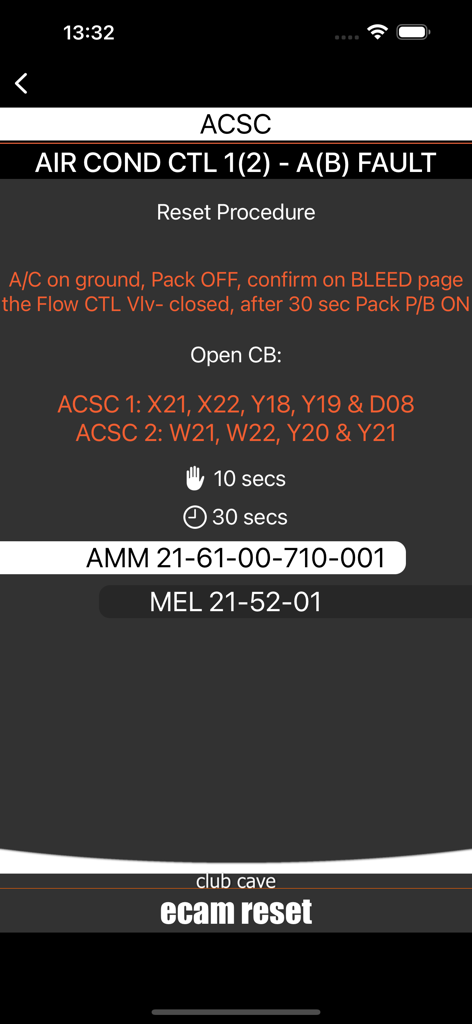
A320 ECAM Reset Pro - A320 ECAM reset procedure screen for air conditioning control system fault including circuit breaker locations and maintenance references
A320 ECAM reset procedure screen for air conditioning control system fault including circuit breaker locations and maintenance references

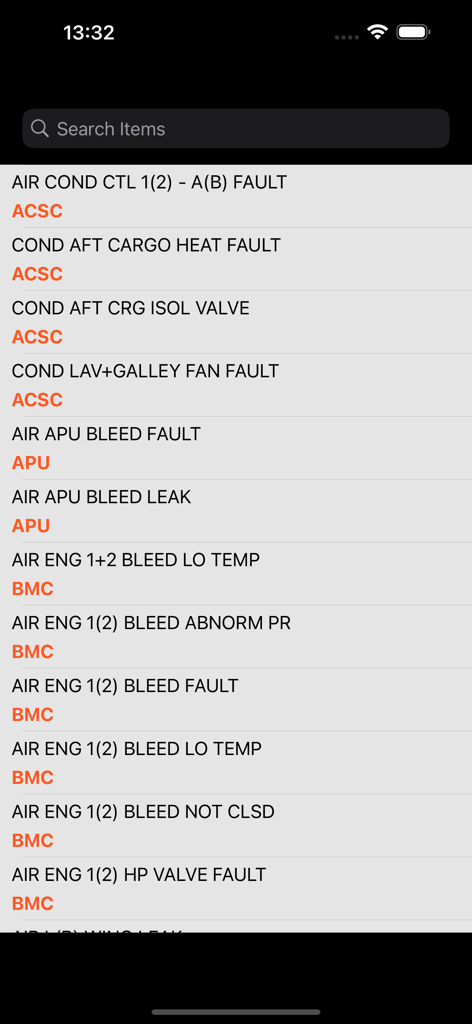
A320 ECAM Reset Pro - Search screen listing Airbus A320 ECAM fault messages and maintenance categories

Search screen listing Airbus A320 ECAM fault messages and maintenance categories

Description

A320 System Reset Pro app CEO & NEO (with SEARCH option) is designed to speed up the troubleshooting process for the Airbus A320 fleet. Search by ECAM Fault message or System to find relevant reset procedures, minimizing aircraft delays. System Reset: Use with Caution. Content Includes: Aircraft configuration (Pre-reset status). Circuit Breakers (CB) and Push Buttons (PB) for reset. System reset duration. AMM references (for logbook sign-off) MEL references (for dispatch). TSM reference (for Troubleshooting) CB location (with image ref) SEARCH field is added in app, to speed up process, and find answer for certain problem. Use it like a professional and prevent aircraft delay. Learn how to quickly solve problem, system errors and faults. OPERATIONAL WARNINGS: Reference Only: This tool is for training and quick reference. It does NOT replace official Airbus or Operator documentation. Always prioritize the approved FCOM, QRH, and AMM. Ground Use Only: Do not attempt resets in flight unless specified in the approved FCOM/QRH. Reset vs. Tripped CB: System reset ("Recycling") involves turning systems OFF/ON to restore function. This is distinct from re-engaging a tripped CB. Never reset a tripped CB without following the specific maintenance procedure. Configuration: Ensure the aircraft is returned to its NORMAL configuration (or original state) after any reset attempt. TECHNICAL NOTES: Configuration Variations: CB locations may vary between specific A320 aircraft. Only use the CBs present on your aircraft; ignore non-applicable entries (e.g., CIDS variances). Latent Faults: A reset may occasionally only swap the active channel (e.g., resetting a "BRAKES N/WS MINOR FAULT" may simply switch to the other BSCU channel). While the ECAM clears, the underlying fault may persist. Always use professional judgment and perform proper troubleshooting. Documentation: MEL and AMM references in the app are generic. You must use the operator-specific MEL and effective AMM for actual dispatch and sign-off. A320 ECAM Reset can be used by line maintenance (Base maintenance) personnel and pilots can use it, with caution, following Airbus and operator’s manuals. Disclaimer: This app is not connected with or endorsed by Airbus. Information may not reflect the latest manual revisions. The user accepts full responsibility for using this data. Maintenance personnel can perform system resets Inappropriate system resets can have serious consequences. If there is no reset procedure available in the System Reset table of the FCOM/QRH associated with the malfunction or ECAM alert encountered, the flight crew must not attempt a reset. Resets that are only authorized on the ground can have dramatic consequences if performed in flight. Maintenance personnel may perform system resets only when a reset is explicitly requested in an approved maintenance procedure. It is important to perform troubleshooting and check why errors occur. In some cases, when there is a real problem with system, this app will not fix it, but You can use it for FAST fixing spurious message and when SYS is temporary U/S due to various reasons. The user must take full responsibility for using it. Thanks for feedback (for all App’s), friends from AirAsia X, Cathay Pacific, Korean Air, Air Canada, Aer Lingus, Virgin, Alitalia and others. This version introduces auto-renewable subscriptions (Pro Monthly and Pro Yearly). Users are offered a 3-day free trial before the subscription begins. After the trial period ends, the subscription renews automatically according to the selected plan. https://www.freeprivacypolicy.com/live/0de0f69b-a647-4830-a0a1-b455de7cf047 Terms of Use: https://www.apple.com/legal/internet-services/itunes/dev/stdeula/ Feel free to contact us via email. Cave Club

Download

Download on App Store

This page is not an official page of the app or its developer, but an independent editorial publication created for informational and commentary purposes. Unless expressly stated otherwise, neither the app nor its developer is affiliated with, endorsed by, sponsored by, authorized by, or otherwise officially connected with MWM, Apple, Google Play, the app publisher, or the app's developer, and nothing on this page implies that the app was developed using MWM's services. Any trademarks, logos, screenshots, and other content remain the property of their respective owners.