AmpliTube CS for iPad

AmpliTube CS for iPad

Download on App Store
Logo of AmpliTube CS for iPad

AmpliTube CS for iPad: The Ultimate Professional Guitar & Bass Tone Studio

Carry a massive collection of iconic, officially licensed gear from Fender, Orange, and Mesa/Boogie. Practice, record, and perform with world-class sound anywhere—from your bedroom to the main stage.

Publisher

IK Multimedia US, LLC

Category

Music

Downloads

558K+

User Rating

3.3/5

Total Ratings

5K+

Locales

6

Your Dream Rig, Visualized

Discover the interface used by 558K+ users.
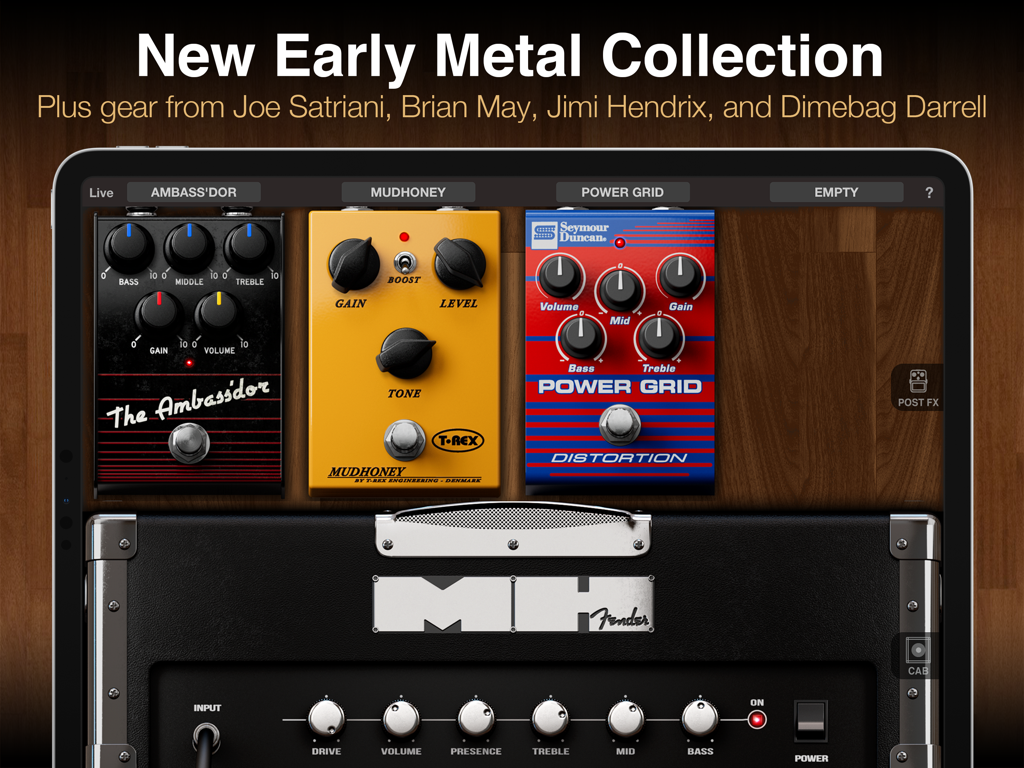
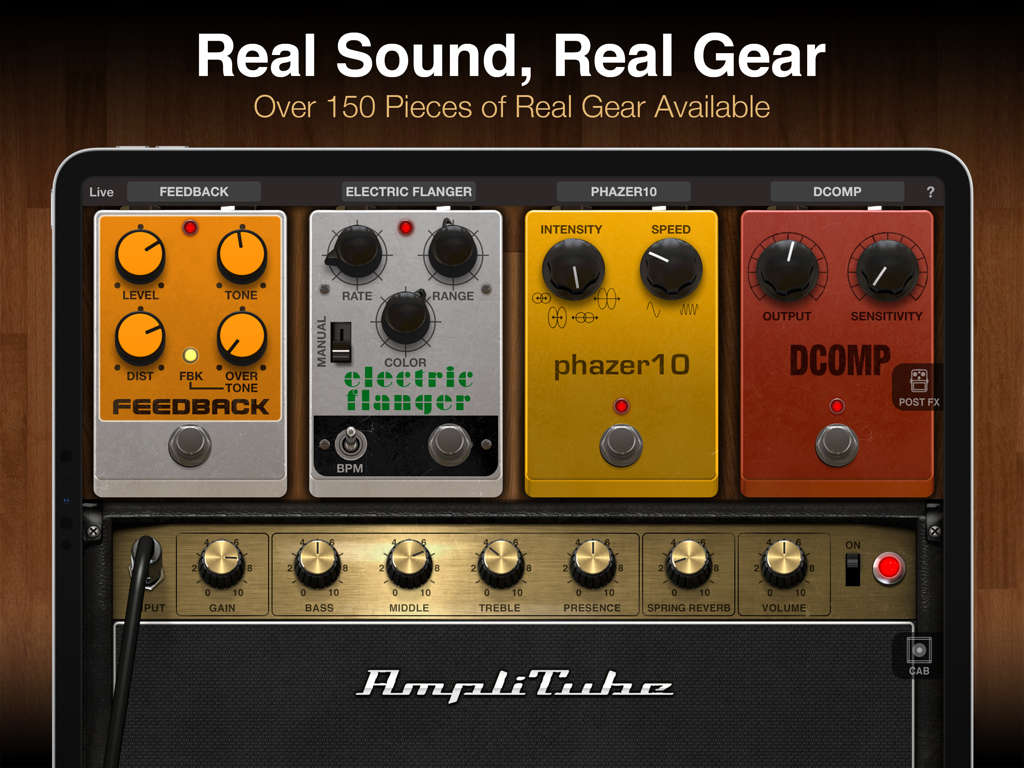
AmpliTube CS for iPad interface showing virtual guitar pedals and a Fender amplifier

AmpliTube CS for iPad interface showing virtual guitar pedals and a Fender amplifier

iPad screen displaying the AmpliTube CS interface with virtual guitar pedals and an amplifier

iPad screen displaying the AmpliTube CS interface with virtual guitar pedals and an amplifier

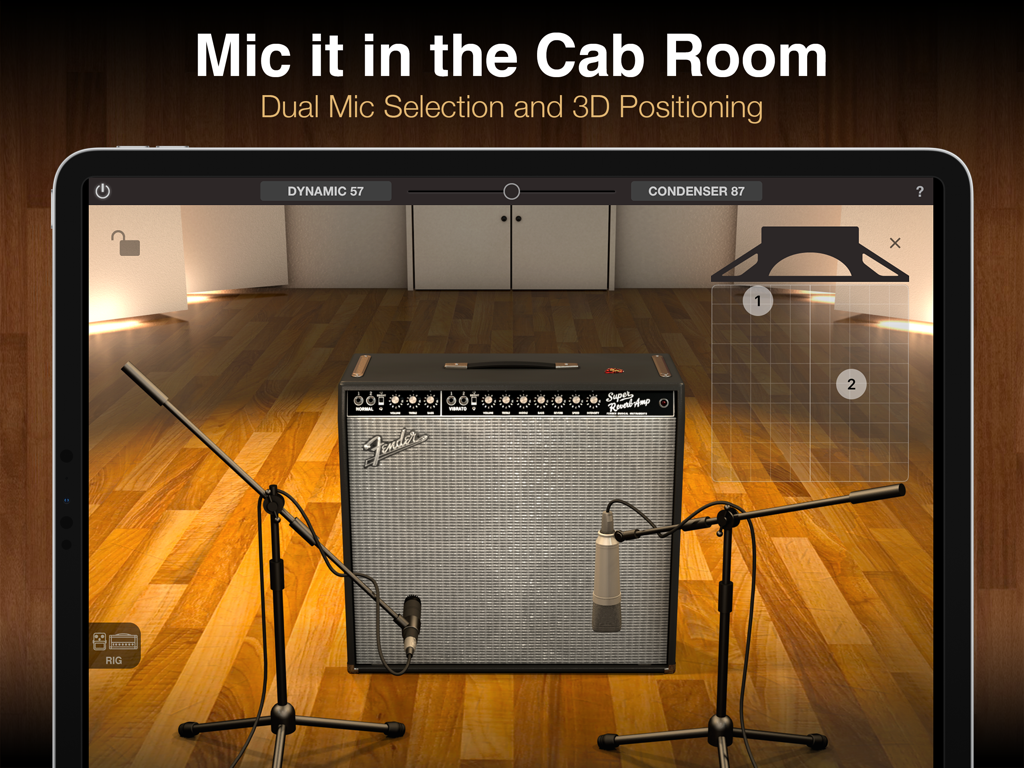
AmpliTube CS for iPad cab room showing dual microphone selection and 3D positioning on a Fender amplifier

AmpliTube CS for iPad cab room showing dual microphone selection and 3D positioning on a Fender amplifier

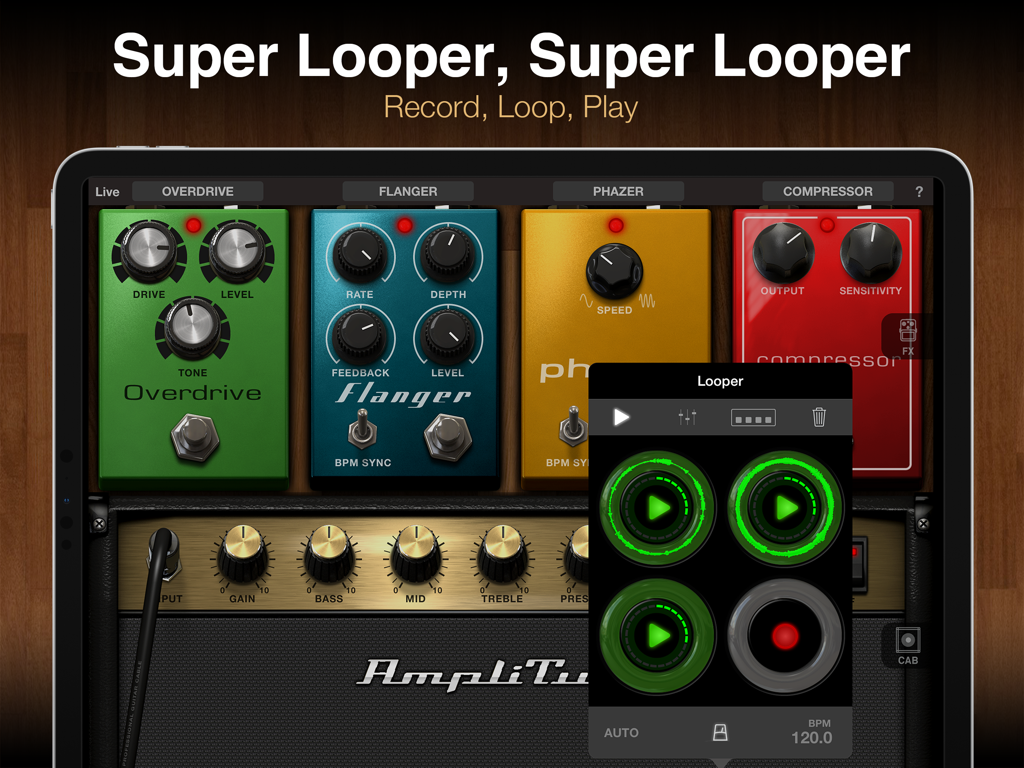
AmpliTube CS for iPad showing virtual guitar pedals and looper interface

AmpliTube CS for iPad showing virtual guitar pedals and looper interface

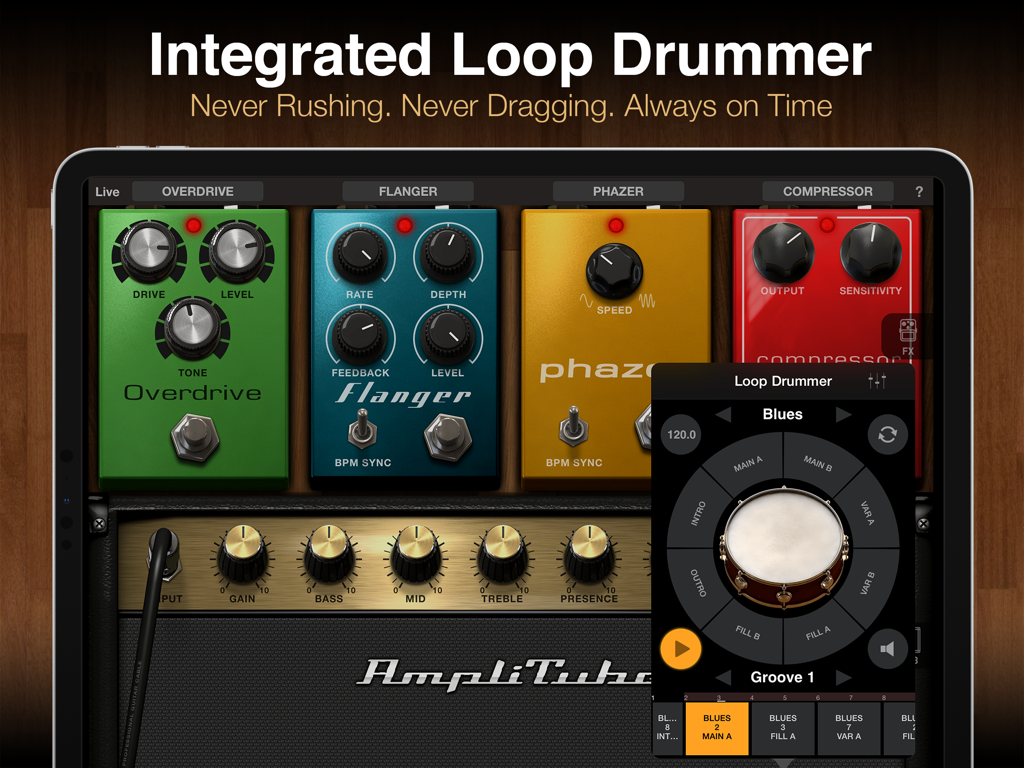
AmpliTube CS iPad app interface featuring virtual guitar effects pedals and the integrated loop drummer module.

AmpliTube CS iPad app interface featuring virtual guitar effects pedals and the integrated loop drummer module.

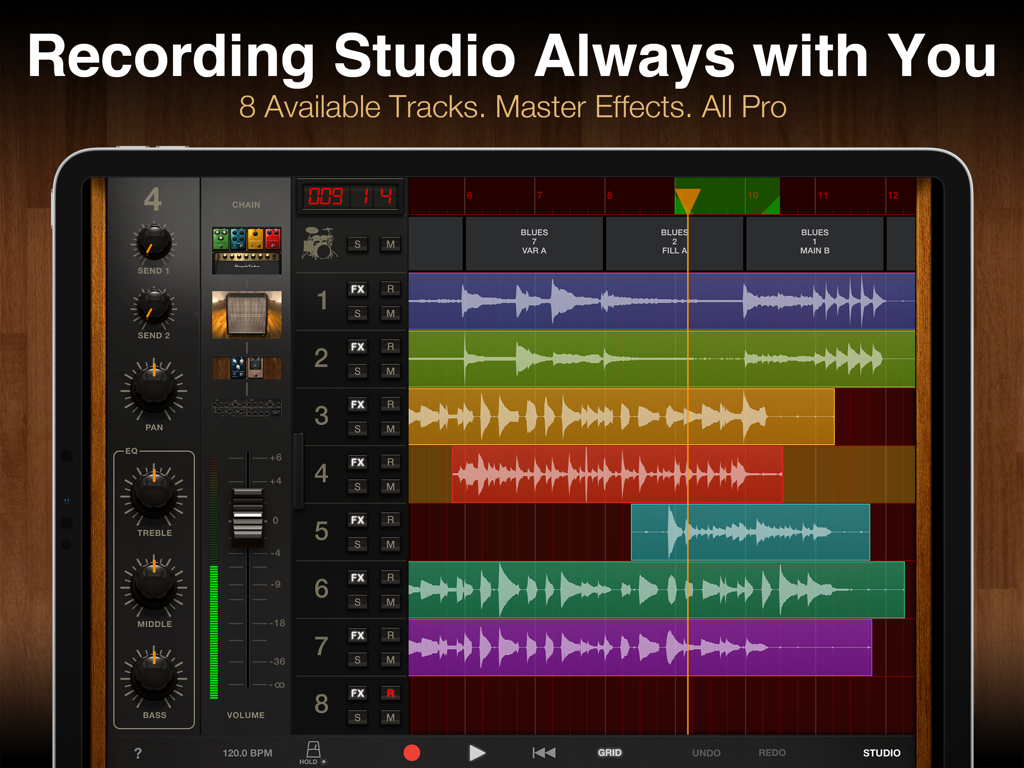
AmpliTube CS for iPad professional 8 track recording studio interface with audio waveforms and mixer

AmpliTube CS for iPad professional 8 track recording studio interface with audio waveforms and mixer

AmpliTube CS for iPad interface displaying officially licensed Mesa Boogie amplifier and vintage guitar pedals.

AmpliTube CS for iPad interface displaying officially licensed Mesa Boogie amplifier and vintage guitar pedals.

Your Dream Guitar Rig, Reimagined for iPad

The tools that make this app stand out, trusted by 558K+ users.

🎸

Iconic Tone Collections

Play through officially licensed models from brands you love like Fender, Orange, and Mesa/Boogie for unrivaled sonic authenticity.

🤘

From Bedroom to Big Stage

Transform your iPad into a professional touring rig with Live Mode, featuring low latency and seamless MIDI control for any performance.

🎙️

Your All-in-One Studio

Record, edit, and share your tracks anywhere with a built-in DAW-style recorder, looper, and professional drum module.

About the app

Everything you need to know about AmpliTube CS for iPad.

Description

Want the ultimate mobile guitar and bass tone studio? AmpliTube gives you a massive collection of virtual gear that you can use to practice, play and record with world-class tone anytime and anywhere. Build your own guitar or bass rig with up to 6 stompbox FX, an amplifier and cabinet with mics. Plug your instrument into your iPad with one of IK's interfaces like iRig 2 or iRig HD 2, and get ready to be blown away. AmpliTube CS gives you 7 stompbox effects, 3 amplifiers, 3 speaker cabinets and 2 mics, a free Loop Drummer Rock groove pack and a 2-track recorder. You can expand this via a massive library of over 150 amps and stompboxes from top brands like Fender™, Ampeg®, Orange®, Mesa/Boogie®, and many more, or unlock the rigs of your heroes with gear from Joe Satriani, Dimebag Darrell, and Brian May. Ready to hit the stage? AmpliTube’s Live Mode offers an optimized GUI for live use, with all the settings and controls you need in an easy-to-read format. Control your virtual rig just like real gear: change presets, trigger FX, loops and more all right from your feet. AmpliTube pairs with iRig Stomp I/O for a powerful all-in-one stage rig, works wirelessly with iRig Blueboard, and supports other MIDI controllers as well. AmpliTube also offers innovative ways to play, practice and record with an optional Looper, more drum track loops, a full 8-track recorder and DAW-style studio all available for in-app purchase. Whether it’s at home, in the studio or on stage, AmpliTube is the dream rig you’ve always wanted, in a device that’s always with you! AmpliTube CS features: • Create guitar & bass rigs with up to 6 stomps, 1 amp and 1 cab with 2 mics • Includes 7 stomps, 3 amp, 3 cabinet and 2 mics • Expandable with over 150 gear models available from Fender™, Ampeg®, Orange®, Mesa/Boogie®, Joe Satriani, Dimebag Darrell and Brian May • Live Mode shows your entire rig at a glance, with all the parameters you need on stage easily accessible • Included 2-track recorder (in-app purchase unlocks up to 8-tracks) • Studio mode for intuitive DAW-style editing (unlocked via in-app purchase) • Loop drummer module that plays in sync with the recorder • Includes speed trainer, metronome and tuner • Inter-App Audio and AudioBus support • Project sharing between versions and devices • Import and play songs as backing tracks from your Music Library or computer • Export audio via E-mail, SoundCloud or File Sharing • MIDI controllable and with built-in integration for iRig Stomp I/O, iRig Blueboard and other controllers • Low-latency for real-time playing More info: www.amplitube.com/ios Accessory info: www.ikmultimedia.com/irig

Latest Version

4.14.5

Size

1.0 GB

First Released

Jul 22, 2010

Ready to Revolutionize Your Tone?

Join over 500,000 guitarists and bassists using the world’s most powerful mobile studio. Download AmpliTube CS for iPad and take your dream rig from the bedroom to the stage.

Download on App Store
FAQ

Frequently Asked Questions

Everything you need to know about AmpliTube CS for iPad

What is AmpliTube CS for iPad?

AmpliTube CS for iPad is a mobile guitar and bass tone studio. It offers a massive collection of virtual gear, enabling users to practice, play, and record with world-class tone on their iPad.

What virtual gear does AmpliTube CS provide initially?

AmpliTube CS initially provides 7 stompbox effects, 3 amplifiers, 3 speaker cabinets, 2 mics, a free Loop Drummer Rock groove pack, and a 2-track recorder.

Can AmpliTube CS expand its gear collection?

Yes, AmpliTube CS expands with over 150 gear models. These include amps and stompboxes from top brands like Fender, Ampeg, Orange, and Mesa/Boogie, plus artist rigs such as Joe Satriani's.

Does AmpliTube CS support live performances?

Yes, AmpliTube CS features an optimized Live Mode. This mode provides a streamlined graphical user interface, making all necessary settings and controls easily accessible for stage use.

What recording functions are available in AmpliTube CS?

AmpliTube CS includes a 2-track recorder. Users can purchase an in-app upgrade to unlock a full 8-track recorder and a DAW-style studio for advanced editing.

Is AmpliTube CS compatible with MIDI controllers?

Yes, AmpliTube CS is MIDI controllable. It supports iRig Stomp I/O, iRig Blueboard, and other MIDI controllers, allowing for external control of virtual rigs and effects.

What audio interfaces work with AmpliTube CS?

AmpliTube CS works with IK Multimedia's interfaces, specifically mentioning iRig 2 and iRig HD 2. These interfaces allow users to connect their instruments to an iPad.

Does AmpliTube CS include a drum track feature?

Yes, AmpliTube CS integrates a Loop Drummer module. This module plays drum tracks in sync with the recorder, and includes a free Loop Drummer Rock groove pack.

Can I use multiple microphones in AmpliTube CS?

Yes, AmpliTube CS supports dual mic selection. Users can also adjust the 3D positioning of these microphones within the virtual cab room for customized sound.

How can I use backing tracks in AmpliTube CS?

AmpliTube CS allows users to import songs from their Music Library or computer. These imported tracks then function as backing tracks for practice or recording sessions.

App information, icons, screenshots, and descriptions displayed on this page are sourced from the Apple App Store and are the property of their respective developers. Download estimates and rankings are based on MWM's proprietary models and may not reflect actual figures. This page is provided for informational and analytical purposes only.

Believe this page infringes your intellectual property? File a dispute