
This page is not an official page of the app or its developer, but an independent editorial publication created for informational and commentary purposes. Unless expressly stated otherwise, neither the app nor its developer is affiliated with, endorsed by, sponsored by, authorized by, or otherwise officially connected with MWM, Apple, Google Play, the app publisher, or the app's developer, and nothing on this page implies that the app was developed using MWM's services. Any trademarks, logos, screenshots, and other content remain the property of their respective owners.


百度输入法-语音表情斗图输入法
In fast-paced digital chats, plain text fails. This app empowers users to dominate conversations with unparalleled voice speed and an instant, limitless arsenal for meme battles.
Downloads
12.5M+User Rating
Total Ratings
498.0KPublisher
Category
UtilitiesLocales
1Latest Version
13.2.19.1Size
363.4 MBFirst Released
Sep 18, 2014Key Features of Baidu Input Method
Analysis of key functionalities and user value proposition for the target demographic.
Meme and Emoji Search
This tool allows users to instantly search and use a vast collection of memes and emojis from across the internet, making conversations highly expressive and engaging.
Expressive Kaomoji Collection
The app provides a comprehensive and trendy collection of Kaomoji (Japanese-style emoticons) to add fun and personality to messages, enhancing emotional expression.
Customizable Text Effects
It offers hundreds of special font styles and cool text effects to make messages more visually striking and personalized, standing out in digital conversations.
Intelligent Voice Input
Users can quickly input text by simply speaking after long-pressing the spacebar, offering a highly efficient and hands-free input method.
Integrated Quick Search
This feature enables users to perform searches directly within the chat interface, providing instant access to information without leaving the conversation, boosting efficiency.
Dynamic Keyboard Themes
The app provides a vast selection of exquisite, personalized keyboard skins with sound and dynamic effects, allowing users to customize their typing experience to match their style.
Gaming-Optimized Keyboard
It includes quick-send common phrases and commands specifically designed for gaming, enhancing communication efficiency during online team battles.
Advanced AI Engine
This tool features an AI engine that enhances handwriting input with predictive text and smarter error correction, leading to more accurate and fluid typing.
Customizable One-Handed Mode
It allows users to adjust the keyboard's size, height, and position for comfortable one-handed typing on large-screen devices, improving usability and convenience.
High-Accuracy Input
The app ensures ultra-high input accuracy through an extensive vocabulary, precise word association, and whole-sentence error correction.
Frequently Asked Questions
Everything you need to know about 百度输入法-语音表情斗图输入法
What is the Baidu Input Method app?
Baidu Input Method is an iOS keyboard app offering smart voice input, an AI engine for handwriting and correction, quick search, and various input methods like Pinyin, Wubi, and handwriting. It is highly versatile.
How can I enable Baidu Input Method on my iOS device?
Enable Baidu Input Method by going to System Settings > General > Keyboard > Add Keyboard. Select "Baidu - Baidu Input Method," enable full access, then switch to it by long-pressing the globe key in any input field.
Does Baidu Input Method feature a one-hand typing mode for large phones?
Yes, Baidu Input Method includes a one-hand mode. Users can freely adjust the keyboard's size, height, and position. This customization allows for easy and comfortable single-hand input on larger iPhone screens.
What are the subscription options for Baidu Input Method's Privilege Pack?
Baidu Input Method offers auto-renewing subscription options for its Privilege Pack: continuous monthly and continuous yearly. These subscriptions provide access to exclusive app features and content.
What is the cost of the monthly subscription for Baidu Input Method?
The monthly subscription for Baidu Input Method's Privilege Pack costs 1 Yuan for the first month. After the initial month, the price is 8 Yuan per month. This is an auto-renewing service.
How do I cancel the Baidu Input Method auto-renewal subscription?
To cancel, navigate to iPhone Settings > iTunes Store & App Store > Apple ID > View Apple ID > Account Settings > Subscriptions. Manage your services and turn off the subscription at least 24 hours before the current billing cycle ends.
Does Baidu Input Method provide an AI writing assistant for chat and social media?
Yes, Baidu Input Method features an AI writing assistant called "Super Write" (超会写). It assists users in generating chat responses, social media content, and creative comments for enhanced expression.
Can Baidu Input Method correct typing mistakes and pinyin errors?
Yes, Baidu Input Method includes an AI engine that offers intelligent correction. It performs accurate association, whole sentence correction, and corrects pinyin errors for fast and precise typing.
Does Baidu Input Method offer customizable keyboard skins and themes?
Yes, Baidu Input Method provides thousands of personalized keyboard skins. These skins include sound and dynamic effects, allowing users to fully customize their keyboard's visual and auditory experience.
How can I backup my user vocabulary and settings in Baidu Input Method?
Backup is possible by first enabling full access via iOS Settings > General > Keyboard. Then, open the Baidu Input Method app, go to "Input Settings," select "Cloud Backup," log in with your Baidu account, and choose to backup settings or user words.
Does Baidu Input Method support voice input for multiple languages and dialects?
Yes, Baidu Input Method supports intelligent voice input for Mandarin, English, and various dialects. It provides accurate speech recognition for these languages, whether online or offline.
The following screenshots and description are sourced directly from the app's official store listing and are the property of the app developer.
App Store
Screenshots

AI Chat Assistant
Users can leverage the 'Super Writer' feature, with options like 'Love Master', to generate engaging replies and conversation starters, enhancing their digital communication.

Empathetic AI Replies
The app's 'High EQ Communication' module provides users with AI-generated empathetic responses and supportive dialogue options, making interactions more nuanced and considerate.

Social Content Creation
This tool streamlines social media content creation, offering 'Community Creation Artifact' features like 'High-praise Moments' suggestions and trending title generation for various platforms.

Witty Comment Generator
Users can effortlessly craft engaging and 'God-tier Comments' with the 'Super Writer' feature, providing a quick way to add creative input to online discussions or social posts.

Smart Input Correction
The app ensures accurate input with its smart pinyin correction capabilities and predictive text, displayed on a responsive QWERTY keyboard for seamless typing.
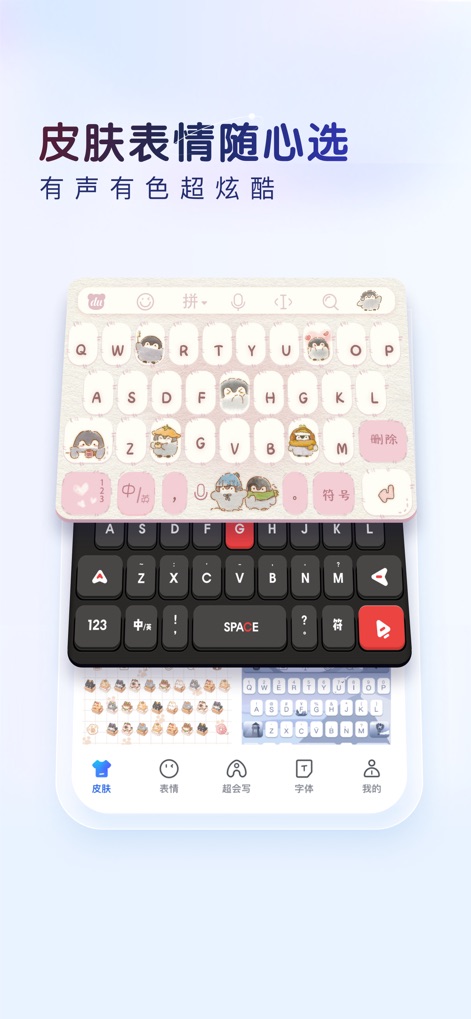
Personalized Keyboard Themes
Users can personalize their typing experience with a vast array of 'Special Skins' that offer visual themes and sound effects, alongside an extensive library of emojis and stickers.
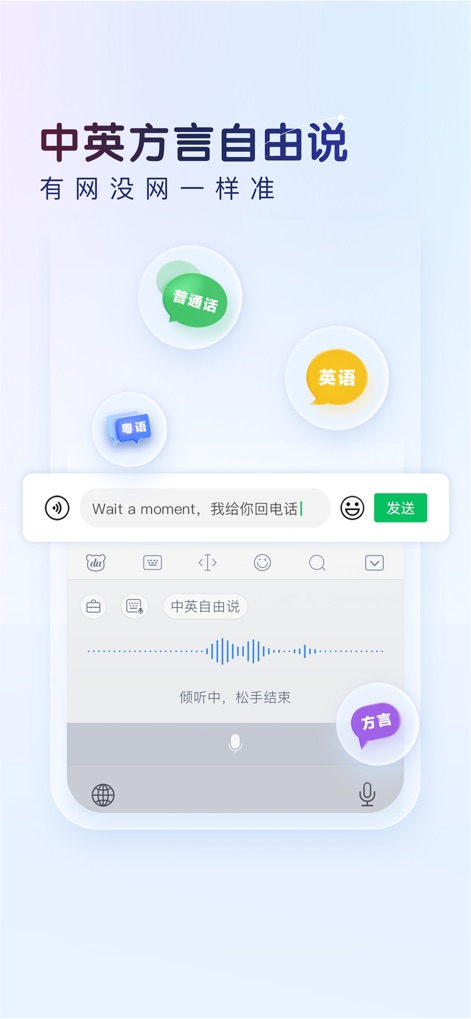
Multilingual Voice Input
This tool supports versatile voice input, allowing users to speak in Mandarin, English, and various dialects, with a clear waveform display for active speech recognition.
Description
Download
More Like This
Apps with similar features and user experience




This page is not an official page of the app or its developer, but an independent editorial publication created for informational and commentary purposes. Unless expressly stated otherwise, neither the app nor its developer is affiliated with, endorsed by, sponsored by, authorized by, or otherwise officially connected with MWM, Apple, Google Play, the app publisher, or the app's developer, and nothing on this page implies that the app was developed using MWM's services. Any trademarks, logos, screenshots, and other content remain the property of their respective owners.