
This page is not an official page of the app or its developer, but an independent editorial publication created for informational and commentary purposes. Unless expressly stated otherwise, neither the app nor its developer is affiliated with, endorsed by, sponsored by, authorized by, or otherwise officially connected with MWM, Apple, Google Play, the app publisher, or the app's developer, and nothing on this page implies that the app was developed using MWM's services. Any trademarks, logos, screenshots, and other content remain the property of their respective owners.


Aqua credit card
Credit control, demystified. This app empowers users to master their financial flow, not just monitor it.
Downloads
1M+User Rating
Total Ratings
215.5KPublisher
Category
FinanceLocales
1Latest Version
2026.14.1Size
169.3 MBFirst Released
Mar 21, 2016Key Features for Credit Management and Financial Improvement
Aqua Credit Card App Evaluation
Secure In-App Payments
This tool features a secure method for making timely payments directly from the app, helping users avoid late fees and consistently meet payment obligations, a key factor in credit improvement.
Real-time Balance & Limit Tracking
The app provides immediate access to current balances and available credit limits, empowering users to stay within their budget and avoid overspending, which is crucial for improving credit scores.
Direct Debit Management
The app provides functionality to set up or modify Direct Debits, ensuring automated and punctual payments that contribute significantly to a strong payment history and credit score.
Comprehensive Transaction History
It allows users to review all past and pending transactions, enabling effective spending tracking and reconciliation, which supports responsible financial management.
In-App Registration & Onboarding
It allows new users to register for the Online Account Manager directly within the app, simplifying the onboarding process and providing immediate access to features.
Seamless Existing User Login
The app offers seamless integration with existing Online Account Manager credentials, providing a familiar and hassle-free login experience for established users.
Integrated Support & FAQs
The app provides direct access to customer support options and frequently asked questions, offering quick resolutions to queries and enhancing user confidence.
Statement Preference Control
It allows users to conveniently manage how they receive their statements, offering flexibility and potentially reducing paper waste, aligning with modern digital preferences.
Frequently Asked Questions
Everything you need to know about Aqua credit card
How can I view my Aqua credit card balance?
The Aqua credit card app displays your latest balance and available credit limit. This information is easily accessible on the main account overview screen upon logging in.
Is the Aqua credit card mobile app free to download?
Yes, the Aqua credit card mobile app is free to download for all users. There are no charges associated with downloading and installing the application.
What transaction details does the Aqua credit card app provide?
The Aqua credit card app allows users to view their latest transactions, including those that are still pending. It provides a comprehensive overview of recent spending activity.
Can I make a payment on my Aqua credit card account through the app?
Yes, the Aqua credit card app enables users to make payments directly on their account. A dedicated "Pay" button facilitates quick and secure payment processing.
How do new users register for the Aqua credit card app?
New users download the Aqua credit card app and select ‘Register for Online Account Manager’. They need their last name, date of birth, postcode, and either card details or account number.
Does the Aqua credit card app offer biometric login options like Face ID?
Yes, the Aqua credit card app supports biometric authentication, including Face ID, for secure and convenient login. This enhances the security posture of the application.
Can I freeze my Aqua credit card using the mobile app?
Yes, the Aqua credit card app provides a "Freeze Card" toggle feature. This allows users to instantly freeze and unfreeze their card directly from the "My Card" section.
Does the Aqua credit card app help improve my credit score?
Yes, the Aqua credit card app features "Aqua Coach," which assists users in building their credit score. It provides score updates and access to tools like a score simulator.
Can I manage my Direct Debit preferences within the Aqua credit card app?
Yes, the Aqua credit card app allows users to set up or manage their Direct Debit arrangements. This feature streamlines the payment management process.
How can I add my Aqua credit card to Apple Wallet through the app?
The Aqua credit card app provides an option to add your card to Apple Wallet. This feature is accessible from the "My Card" section for quick setup.
The following screenshots and description are sourced directly from the app's official store listing and are the property of the app developer.
App Store
Screenshots

Discover how the app guides users through a clear "Welcome" message and a simple "account setup" prompt, making initial registration effortless.
Seamless Onboarding Process

This screen provides users with an instant financial snapshot, clearly displaying the current "Balance" and "Available" credit, alongside a prominent "Payment Requested" section for timely payments.
Account Overview At-a-Glance

Users gain comprehensive insight into their expenditures through the "Transactions" tab, offering a detailed list of activities including both "Pending" and "Payment Received" transactions for clarity.
Detailed Transaction History

The app prioritizes security by offering multiple robust authentication methods, including a traditional "passcode entry" system and convenient biometric "Face ID" integration.
Secure Access Methods
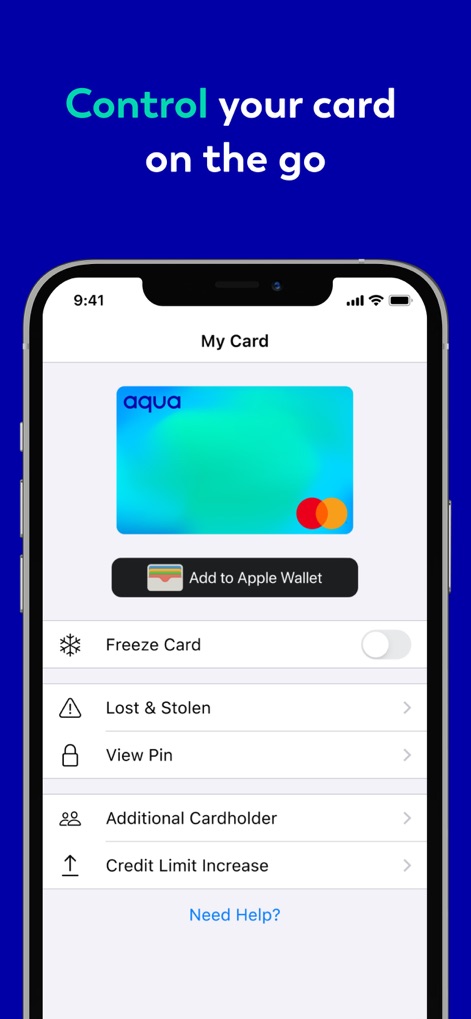
Users can manage their card's security and accessibility with features like the "Freeze Card" toggle for immediate control and the option to "Add to Apple Wallet" for seamless digital integration.
Instant Card Management

This section empowers users to monitor and improve their financial standing, showcasing their current "Credit score" with recent changes and providing a "Score simulator" to project future outcomes.
Credit Building Tools
Description
Download
More Like This
Apps with similar features and user experience

掌上生活-招商银行信用卡
CHINA MERCHANTS BANK CO.,LTD.

平安口袋银行-更懂您的智能银行
PingAn Bank

Credit One Bank Mobile
Credit One Bank, National Association

MySynchrony
Synchrony Financial

买单吧-交通银行信用卡
Bank of Communications

浦大喜奔-浦发银行信用卡
Shanghai Pudong Development Bank Co.Ltd

Bread Financial
Bread Financial Holdings, Inc.

丰收互联
Zhejiang Rural Commercial United Bank

CareCredit Mobile
Synchrony Financial
This page is not an official page of the app or its developer, but an independent editorial publication created for informational and commentary purposes. Unless expressly stated otherwise, neither the app nor its developer is affiliated with, endorsed by, sponsored by, authorized by, or otherwise officially connected with MWM, Apple, Google Play, the app publisher, or the app's developer, and nothing on this page implies that the app was developed using MWM's services. Any trademarks, logos, screenshots, and other content remain the property of their respective owners.