
This page is not an official page of the app or its developer, but an independent editorial publication created for informational and commentary purposes. Unless expressly stated otherwise, neither the app nor its developer is affiliated with, endorsed by, sponsored by, authorized by, or otherwise officially connected with MWM, Apple, Google Play, the app publisher, or the app's developer, and nothing on this page implies that the app was developed using MWM's services. Any trademarks, logos, screenshots, and other content remain the property of their respective owners.


Artstudio Pro: Draw, Paint
Unleash your inner artist with this beast of a creative toolkit. The app delivers a studio-grade experience directly to your Apple device.
Downloads
1M+User Rating
Total Ratings
16.5KPublisher
Category
Graphics & DesignLocales
3Latest Version
5.2.9Size
384.5 MBFirst Released
Dec 13, 2017An in-depth evaluation of essential functionalities tailored for advanced digital art and photo editing workflows on Apple devices.
Artstudio Pro: Key Feature Analysis for Creative Professionals
Powerful ArtEngine & Performance
The app provides a robust, GPU-accelerated ArtEngine supporting multiple documents, large canvas sizes (up to 64Mpix), and an unlimited number of layers, ensuring smooth performance even with complex, high-resolution projects.
Advanced Brush Engine
This tool features an advanced brush engine with over 150 built-in brushes and more than 100 customizable settings, offering a lag-free, 64-bit painting experience with realistic strokes and full Apple Pencil optimization.
Extensive Import/Export Compatibility
It allows users to import and export a wide range of industry-standard file formats, including PSD, PNG, JPEG, TIFF, PDF, and crucial assets like ABR/TPL brushes, ASE/ACO color swatches, and TTF/OTF fonts, facilitating seamless integration into professional workflows.
Flexible Non-Destructive Layer System
The app introduces a flexible layer system with grouping, non-destructive adjustment layers, and 9 layer effects (e.g., Bevel/Emboss, Drop Shadow), providing sophisticated control for complex compositions and edits.
Professional Photo Editing Tools
This tool features comprehensive photo editing capabilities, including 15 non-destructive adjustments, auto-adjustments, transformation tools (Perspective, Warp), and filters, making it suitable for professional image manipulation and retouching.
Apple Ecosystem Optimization
The app is optimized to take full advantage of Apple's latest technologies, including Metal, iCloud Drive, and Apple Pencil, leveraging 64-bit multi-core processors for a highly responsive and integrated experience within the Apple ecosystem.
Advanced Selection & Transformation Tools
It provides a comprehensive set of 27 tools, including advanced selection, cropping, healing, cloning, dodging, and burning, alongside powerful transformation options like perspective and warp, enabling precise control over digital artwork.
Integrated Animation Capabilities
The app allows users to create animations directly from layers or groups, featuring a scrollable timeline, onion skinning, customizable frame duration, and export options to MP4, HEVC, Animated GIF, or PNG.
Frequently Asked Questions
Everything you need to know about Artstudio Pro: Draw, Paint
What is Artstudio Pro?
Artstudio Pro is a powerful painting and photo editing application available for iOS and macOS. It serves as the successor to the original ArtStudio app, leveraging advanced technologies for an optimized and smooth workflow experience.
What features does Artstudio Pro offer?
Artstudio Pro offers a GPU-accelerated engine, a flexible layer system, an advanced brush engine, professional photo editing tools, and animation capabilities. It also includes comprehensive import/export options and iCloud integration.
Can Artstudio Pro create animations?
Yes, Artstudio Pro allows users to create animations from layers or groups. It features onion skin, customizable frame duration, and options to export animations to MP4, HEVC, Animated GIF, or PNG formats.
What file formats does Artstudio Pro support for import and export?
Artstudio Pro imports PNG, JPEG, PSD, HEIC, TIFF, GIF, PDF, and most raw image formats. It also supports importing ABR/TPL brushes. Export options include PNG, JPEG, PSD, TIFF, and PDF images.
Does Artstudio Pro support Apple Pencil?
Yes, Artstudio Pro fully supports Apple Pencil. The app's advanced brush engine is optimized to leverage Apple Pencil's capabilities, enabling smooth and realistic-looking strokes during painting and drawing.
What are the limitations of the free version of Artstudio Pro?
The free version of Artstudio Pro has several limitations. These include locked saving, canvas size restricted to the device screen, a maximum of 3 layers, export only to JPG format, and locked animation export functionality.
What are the system requirements for Artstudio Pro on iOS?
Artstudio Pro for iOS requires an iPhone or iPad running iOS 15.0 or above. This ensures the app's powerful features and performance optimizations function correctly on compatible devices.
How many layers can Artstudio Pro handle?
Artstudio Pro supports an unlimited number of layers, allowing for complex and detailed compositions. It also handles large canvas sizes, up to 64 Megapixels, optimized for smooth performance.
Does Artstudio Pro include photo editing tools like Curves?
Yes, Artstudio Pro includes professional photo editing tools, such as Curves. It offers 15 non-destructive adjustments, including Levels, Exposure/Gamma, and Curves, which are visible within the application's UI.
What brush types are available in Artstudio Pro?
Artstudio Pro offers over 150 built-in brushes organized into various categories. These include Pens, Pencils, Oil Painting, Inking, Charcoals, Airbrushes, and Watercolor, as demonstrated in the brushes menu interface.
Does Artstudio Pro support iCloud integration?
Yes, Artstudio Pro features full iCloud integration. This capability allows users to seamlessly save and access their creative projects and files across all their iCloud Drive-enabled devices.
Can Artstudio Pro perform advanced transformations like Warp?
Yes, Artstudio Pro provides advanced transformation options within its professional photo editor. These tools enable basic, perspective, and warp transformations to precisely manipulate images.
Does Artstudio Pro offer non-destructive layer effects?
Yes, Artstudio Pro features a flexible layer system that supports non-destructive layer effects. It also includes layer grouping, masks, clipping masks, and various adjustment layers for advanced editing workflows.
The following screenshots and description are sourced directly from the app's official store listing and are the property of the app developer.
App Store
Screenshots
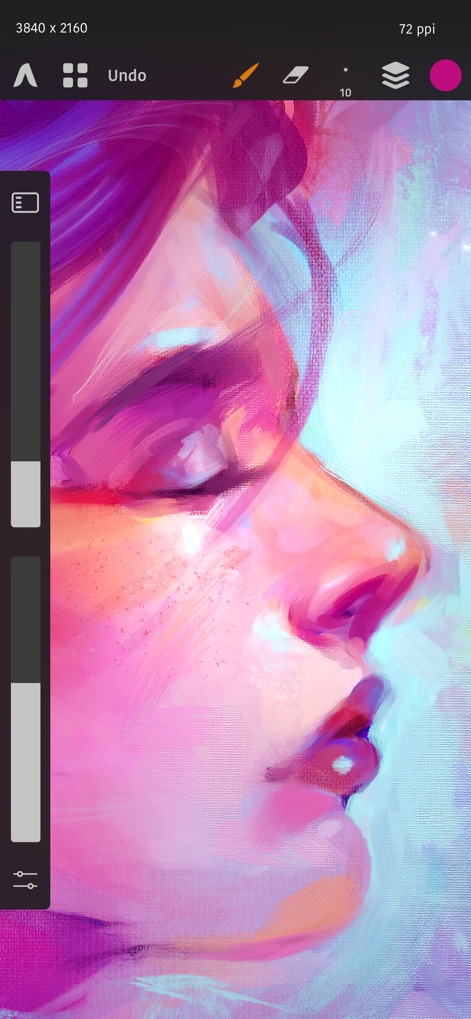
Witness the app's powerful engine rendering a high-resolution canvas with exquisite detail, complemented by intuitive slider controls for precise adjustments.
Masterpiece in Progress
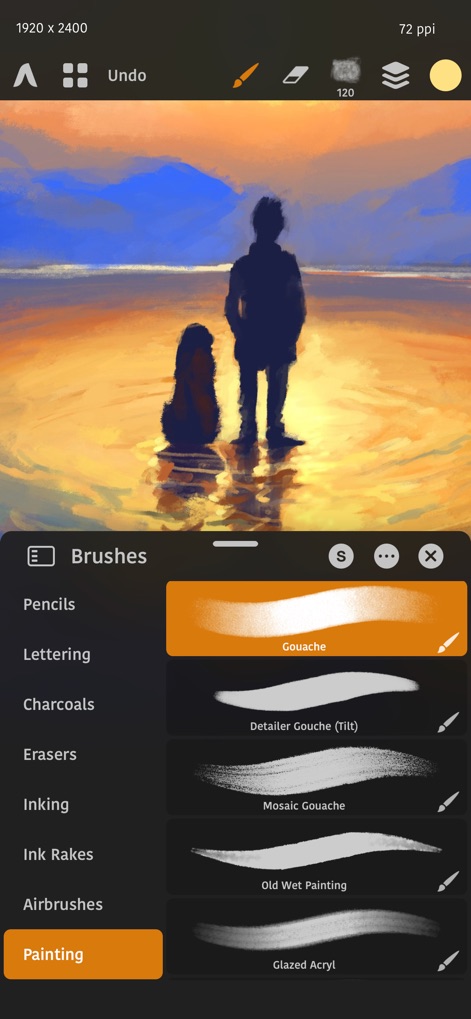
Explore the app's extensive brush library, featuring categories like Gouache and Charcoals, and observe the realistic rendering of diverse brush stroke previews.
Brush Library Depth
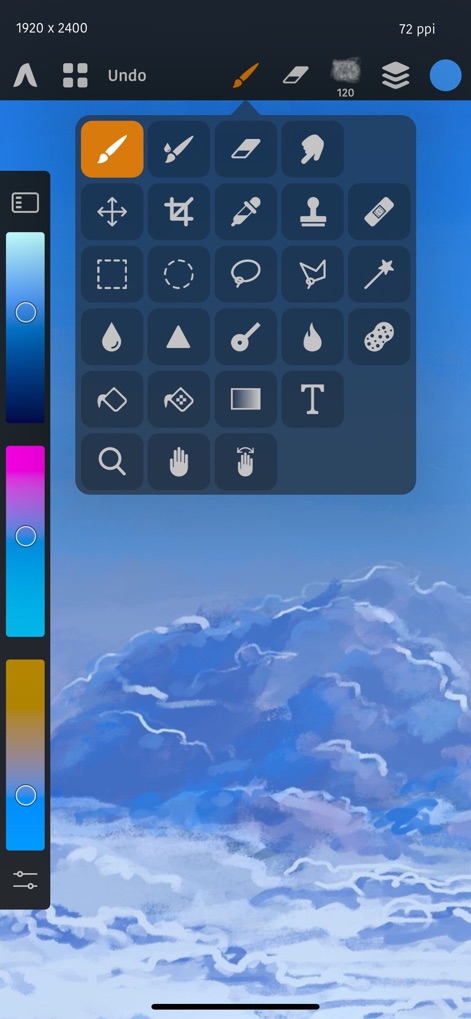
Discover the comprehensive floating tool palette offering quick access to essential functions like selection and painting, alongside the versatile color picker for precise hue control.
Intuitive Toolkit Access

Achieve perfect hues with the advanced color wheel selector and fine-tune your palette using the intuitive color swatch display for ultimate artistic control.
Precision Color Control

Refine image tones with the powerful Curves adjustment graph, allowing precise control over master channels and individual Red, Green, and Blue color channels.
Advanced Tonal Adjustments
Description
Download
More Like This
Apps with similar features and user experience

Sketchbook®
Sketchbook, Inc.

Mental Canvas Draw
Mental Canvas, Inc.

ibis Paint
ibis inc.

ibis Paint X
ibis inc.

Paper: Sketch, Draw & Create
Evernote Corporation

Adobe Fresco: Draw & Paint App
Adobe Inc.

Art Set 4
Lofopi Ltd

MediBang Paint – Drawing & Art
MediBang inc.

Tayasui Sketches
SKETCHES SRL
This page is not an official page of the app or its developer, but an independent editorial publication created for informational and commentary purposes. Unless expressly stated otherwise, neither the app nor its developer is affiliated with, endorsed by, sponsored by, authorized by, or otherwise officially connected with MWM, Apple, Google Play, the app publisher, or the app's developer, and nothing on this page implies that the app was developed using MWM's services. Any trademarks, logos, screenshots, and other content remain the property of their respective owners.