
This page is not an official page of the app or its developer, but an independent editorial publication created for informational and commentary purposes. Unless expressly stated otherwise, neither the app nor its developer is affiliated with, endorsed by, sponsored by, authorized by, or otherwise officially connected with MWM, Apple, Google Play, the app publisher, or the app's developer, and nothing on this page implies that the app was developed using MWM's services. Any trademarks, logos, screenshots, and other content remain the property of their respective owners.


AutoSleep: Watch Sleep Tracker
Uncover your night. This app reveals the secrets of your sleep, no fuss, no subscriptions.
Downloads
2.5M+User Rating
Total Ratings
151.4KPublisher
Category
Health & FitnessLocales
14Latest Version
6.16Size
47.6 MBFirst Released
Dec 20, 2016An analytical overview of essential functionalities enhancing sleep health and data insights for Apple Watch users.
Key Features of AutoSleep: Watch Sleep Tracker
Automatic Sleep Tracking
The app automatically tracks sleep from an Apple Watch without requiring any manual interaction, providing convenience and ensuring consistent data collection.
Comprehensive Data Privacy
This tool features a strict privacy policy with no user analytics tracking, advertising plugins, third-party code, or data uploads, ensuring personal health data remains entirely private.
Subscription-Free Access
It provides all features and functionalities with a single purchase, eliminating recurring subscription costs or in-app purchases, aligning with the target audience's preference for cost-effective solutions.
Advanced Sleep Analysis
The app offers detailed insights into sleep duration, deep sleep, REM, heart rate, respiration rate, and sleep quality, allowing users to comprehensively understand and analyze their sleep patterns.
Daily Readiness Score
It indicates physical and mental stress levels through a "Readiness" score, helping users optimize their daily activities based on their recovery and overall well-being.
Advanced Health Monitoring
This tool can help discover potential sleep apnea and monitors blood oxygen levels during sleep, offering critical health insights for proactive management.
Seamless Apple Health Integration
It fully integrates with Apple's native Sleep Stages data, providing a unified view and leveraging the Apple ecosystem for comprehensive sleep insights.
Personalized Sleep Guidance
The app allows users to customize sleep goals, receive notifications, and track sleep consistency, fostering better sleep habits and helping to improve sleep quality over time.
Intelligent Smart Alarm
It features a Watch-integrated smart alarm designed to wake users during lighter sleep cycles, promoting a more refreshed and natural awakening experience.
Wrist Temperature Monitor
The app tracks sleeping wrist temperature, providing an additional valuable data point for advanced health monitoring and deeper sleep analysis.
Frequently Asked Questions
Everything you need to know about AutoSleep: Watch Sleep Tracker
Is AutoSleep a private sleep tracking app?
Yes, AutoSleep prioritizes privacy. It has no user analytics tracking, advertising plugins, 3rd party code, or data upload, ensuring complete confidentiality for user information.
Does AutoSleep require additional purchases or subscriptions?
No, AutoSleep does not require any additional purchases or subscriptions. All features are included with the initial app purchase, providing a complete sleep monitoring experience.
How does AutoSleep track sleep automatically?
AutoSleep automatically tracks sleep from your Apple Watch without buttons. If you wear your Watch to bed, it tracks sleep and quality. If not, it tracks time in bed when you remove the Watch.
What Apple Watch WatchOS version does AutoSleep require?
AutoSleep requires an Apple Watch running WatchOS 4 or higher. This ensures compatibility for automatic sleep tracking and access to all its features.
Does AutoSleep integrate with Apple Sleep Stages?
Yes, AutoSleep fully integrates with Sleep Stages from the Apple Sleep app. Users have the option to view Apple Sleep app information directly within AutoSleep for comprehensive data.
What sleep metrics does AutoSleep monitor?
AutoSleep monitors various metrics including time asleep, sleep rating, sleep rings, Apple Sleep Stages, sleep apnea, blood oxygen, respiration rate, noise, sleep fuel, snoring intensity, and readiness.
Does AutoSleep include a smart alarm feature?
Yes, AutoSleep includes a Watch in-built smart alarm. This feature helps users wake up in lighter sleep stages, enhancing the waking experience.
Has AutoSleep received recognition or awards?
Yes, AutoSleep has received 'Best of' awards from the Apple App Store for multiple years, specifically from 2018 through 2023. It is recognized as a top sleep tracker.
The following screenshots and description are sourced directly from the app's official store listing and are the property of the app developer.
App Store
Screenshots
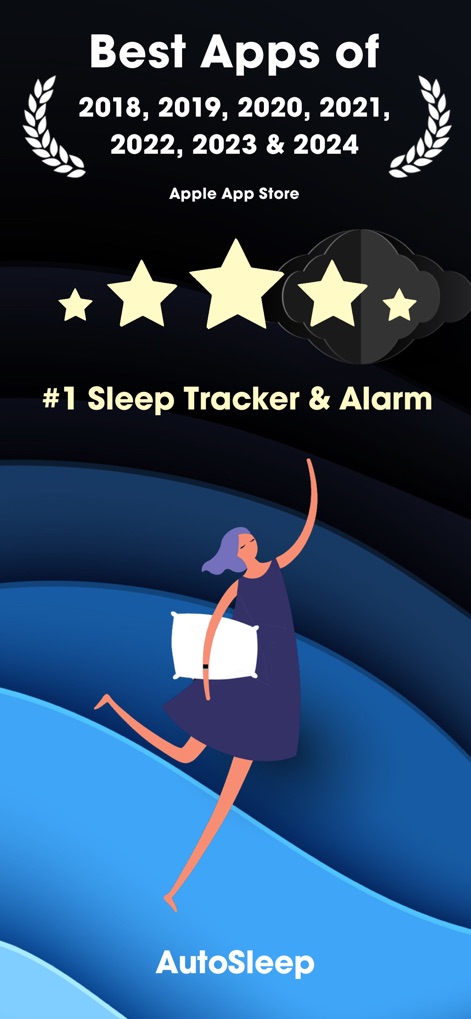
Discover the app's consistent recognition as a top-tier sleep tracker, highlighted by its multiple "Best Apps of" award laurels and high user ratings indicated by the stars.
App Store Recognition

Observe how the app simplifies sleep monitoring, showcasing the Apple Watch display with its intuitive sleep rings and the iPhone's detailed sleep session summary.
Effortless Sleep Tracking

Explore the app's comprehensive sleep analysis with color-coded circular metrics for sleep duration, quality, and deep sleep, alongside a clear weekly overview of sleep patterns.
Detailed Sleep Metrics

This tool provides a holistic view of health, presenting intuitive gauge charts for Sleep SpO2 and Respiration Rate, complemented by detailed Sleep Fuel Rating and Readiness meters.
Holistic Health Dashboard

See the Apple Watch interface displaying a smart alarm notification and a concise summary of the user's sleep quality and readiness.
Smart Alarm Features

Examine the Apple Watch display featuring concentric quality rings that visualize sleep quality and deep sleep duration, alongside heart rate (BPM) measurements.
Visual Sleep Quality

The app guides users to optimal sleep with a visual "Latest Bedtime" clock dial recommending ideal sleep and wake times, supported by customizable "Reminders".
Optimized Bedtime Guidance

View the comprehensive sleep session graph detailing various sleep stages and individual metric graphs, including BPM, Noise, Respiration, and SpO2.
In-depth Sleep Analysis

This tool provides users with a daily readiness assessment, shown through a clear progress bar with a star rating and key metrics like HRV and Waking heart rate.
Daily Readiness Assessment

Access an extensive overview of sleep patterns with a detailed monthly sleep rating bar chart and a calendar view of daily sleep rings, enabling long-term trend analysis.
Extensive Sleep History
Description
Download
More Like This
Apps with similar features and user experience

SleepTracker: Record & Improve
APPSKY HONG KONG LIMITED
MooNite:Sleep Tracker &Record
BEABLE TECHNOLOGY PTE. LTD.
Mintal Tracker:Sleep Recorder
HICLUB, INC.
RISE: Sleep Tracker
Rise Science Inc
Sleep Cycle - Tracker & Sounds
Sleep Cycle AB

Sleep Tracker: Recorder, Sound
Leap Health Fitness Limited

SleepWatch - Top Sleep Tracker
Bodymatter, Inc.
Sleep Monitor: Sleep Tracker
Xi'an Monster Software Technology Co., Ltd

熊猫睡眠 -睡眠白噪音提升冥想专注放松助眠减压
Xian Guosheng Likang Information Technology Co., LTD
This page is not an official page of the app or its developer, but an independent editorial publication created for informational and commentary purposes. Unless expressly stated otherwise, neither the app nor its developer is affiliated with, endorsed by, sponsored by, authorized by, or otherwise officially connected with MWM, Apple, Google Play, the app publisher, or the app's developer, and nothing on this page implies that the app was developed using MWM's services. Any trademarks, logos, screenshots, and other content remain the property of their respective owners.