Bangkok Bank Mobile Banking

Bangkok Bank Mobile Banking


Download on App Store
Logo of Bangkok Bank Mobile Banking

Bangkok Bank Mobile Banking: Your Powerful Financial Bridge to Thailand

Manage your Thai assets, investments, and home loans directly from the US. Experience seamless cross-border banking with instant international transfers, multi-currency accounts, and digital ready-to-use payments for your next trip home.

Publisher

Bangkok Bank Public Company Limited

Category

Finance

Downloads

7M+

User Rating

2.7/5

Total Ratings

20K+

Locales

1

Banking Without Borders

Discover the interface used by 7M+ users.

A woman relaxing on a large smartphone with the text Elevated Experience for Bangkok Bank mobile banking.

A woman relaxing on a large smartphone with the text Elevated Experience for Bangkok Bank mobile banking.

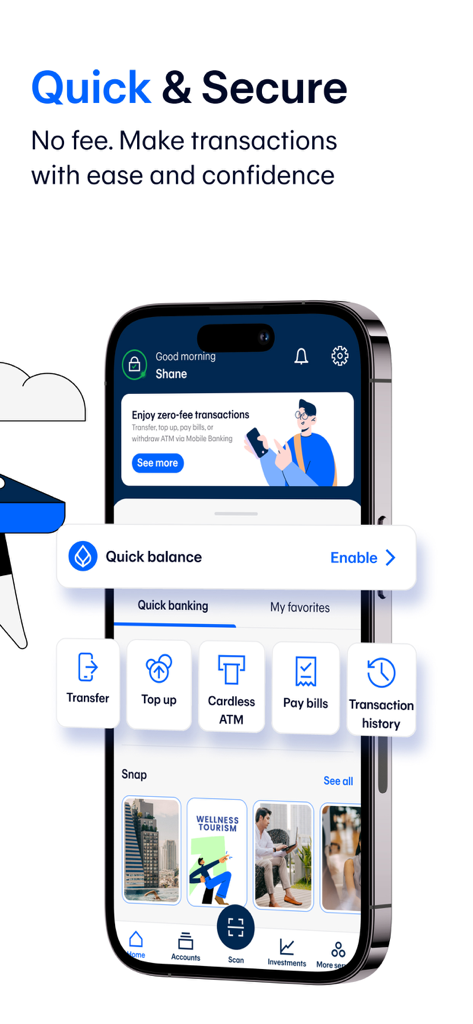
Bangkok Bank Mobile Banking dashboard showing secure transaction options and account features

Bangkok Bank Mobile Banking dashboard showing secure transaction options and account features

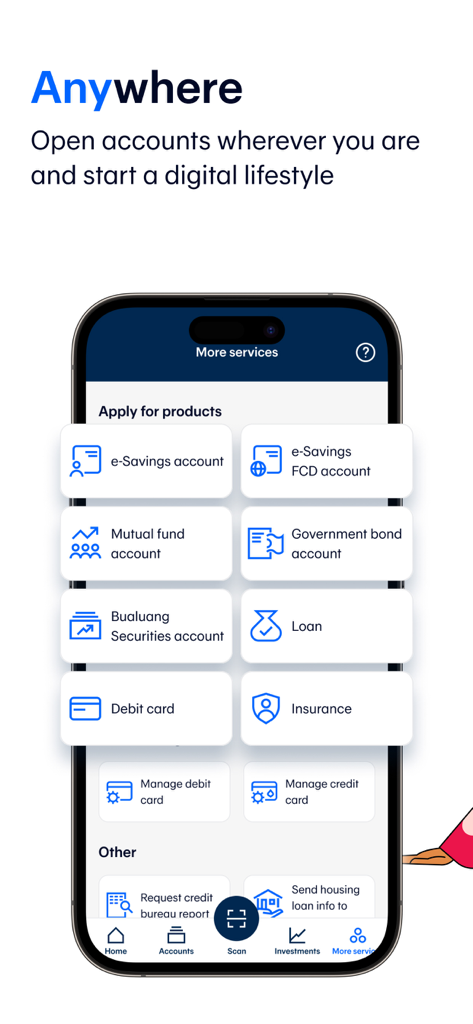
Smartphone showing Bangkok Bank app menu for opening e-Savings, mutual funds, and loan accounts.

Smartphone showing Bangkok Bank app menu for opening e-Savings, mutual funds, and loan accounts.

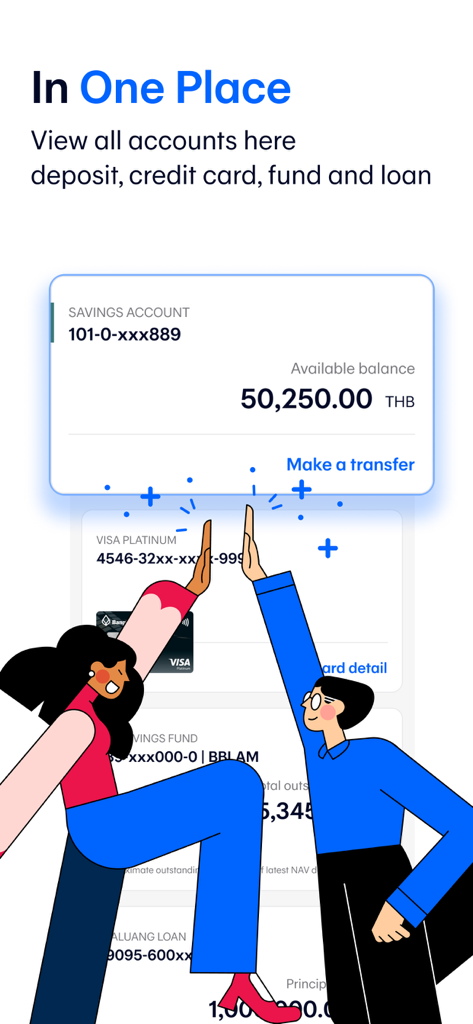
Bangkok Bank Mobile Banking app dashboard showing savings credit card and loan accounts in one place

Bangkok Bank Mobile Banking app dashboard showing savings credit card and loan accounts in one place

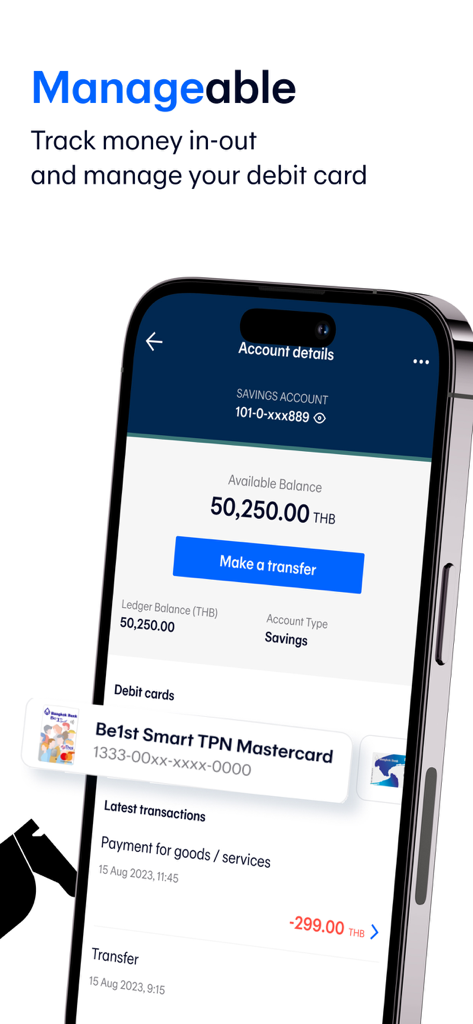
Bangkok Bank Mobile Banking app interface showing savings account balance and debit card management.

Bangkok Bank Mobile Banking app interface showing savings account balance and debit card management.

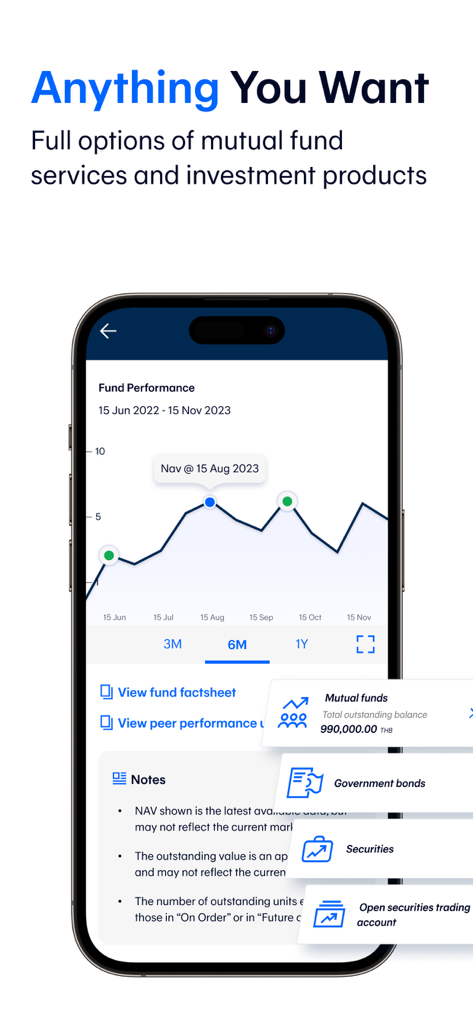
Bangkok Bank Mobile Banking app showing mutual fund performance chart and investment services

Bangkok Bank Mobile Banking app showing mutual fund performance chart and investment services

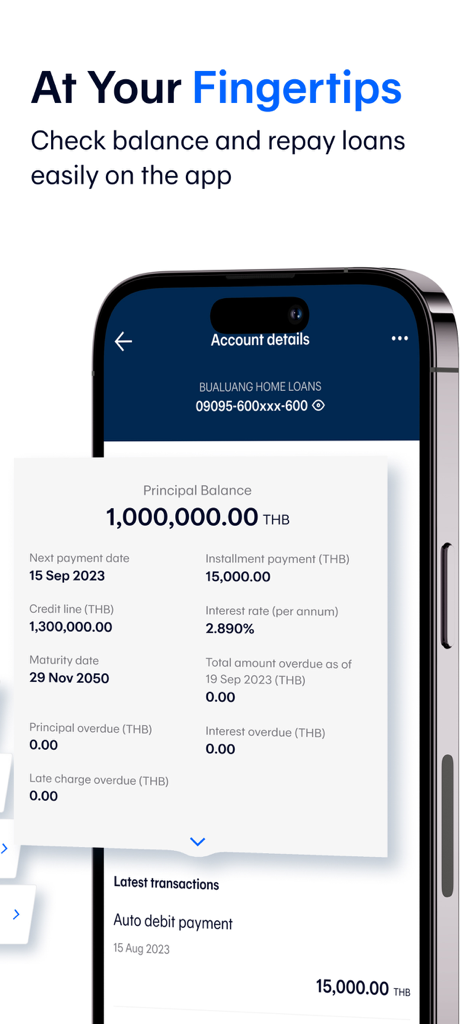
Bangkok Bank Mobile Banking app interface showing Bualuang home loan account details including principal balance and installment payments

Bangkok Bank Mobile Banking app interface showing Bualuang home loan account details including principal balance and installment payments

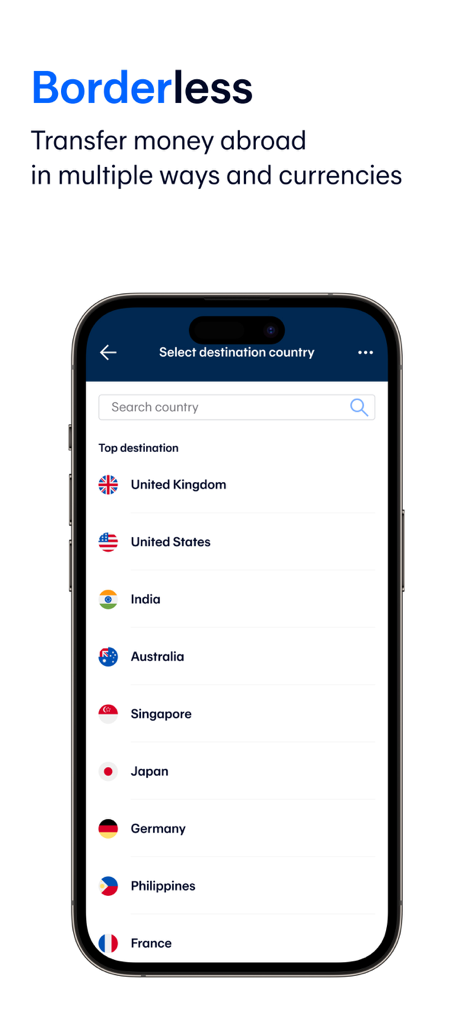
Bangkok Bank Mobile Banking app screen for selecting a destination country for international money transfers

Bangkok Bank Mobile Banking app screen for selecting a destination country for international money transfers

Your Financial Bridge to Thailand

The tools that make this app stand out, trusted by 7M+ users.

💸

Seamless Cross-Border Transfers

Send money via SWIFT in 18 currencies to 135 countries or use PromptPay International and Western Union for instant global remittances.

🏠

Total Property & Asset Control

Effortlessly manage your Bualuang home loan payments and invest in Thai mutual funds or government bonds directly from your phone.

✈️

Ready for Your Next Visit

Experience the convenience of cardless ATM withdrawals and top up your Rabbit LINE Pay for the BTS Skytrain before you even land in Bangkok.

Review Analysis

Insights from user reviews.

Sentiment Score

32%
Negative

Summary

This banking app garners largely negative feedback from users, who frequently report issues with its overall performance, citing it as slow, unstable, and prone to freezing or crashing, particularly during late-night hours. Common frustrations include mandatory and inconveniently timed updates, as well as significant login and registration hurdles, such as malfunctioning facial recognition and difficulties when migrating to new devices. Furthermore, users highlight critical problems with account management, including unexplained account freezes, incorrect money deductions, and a lack of competitive features like in-app credit limit requests or online verification for overseas users, leading many to seek alternative banking solutions.

Common Themes

Overall App Experience(3)
App Stability(2)
Ease of Use(2)
Information Clarity(2)
Fund Transfers(1)

About the app

Everything you need to know about Bangkok Bank Mobile Banking.

Description

With the Bangkok Bank Mobile Banking app, your banking transactions are more convenient with these features: • View all types of deposits, credit cards, mutual funds, government bonds and Bualuang loan accounts • Request Thai baht and FCD account statements • Open an e-Savings account • Make cardless withdrawals at Bangkok Bank and KBank ATM and Banking Agents (7-Eleven, Thailand Post offices, Sabuy Counter and TermDee kiosk) • Invest in mutual funds, government bonds and corporate debentures • Make a Bualuang home loan payment and request the Bank to submit housing loan information to the Revenue Department for a convenient tax deduction claim • Add a Foreign Currency Deposit Account (FCD) and transfer funds to your own FCD account • Make an international funds transfer via SWIFT with 18 currencies for 135 countries • Make an international funds transfer to Singapore via PromptPay International • Send and receive money to or from more than 200 countries via Western Union • Apply for Be Together Smart Return 789 savings insurance from AIA. • Buy travel insurance • Check the balance of and top up your Rabbit LINE Pay and view BTS trip history • Apply for and manage the following banking services: - Request and activate a debit card - Apply for a Bangkok Bank Credit Card – choose the card that fits your lifestyle then upload the relevant documents and check your approval status in the app - Request to open a Securities Trading Account with Bualuang Securities - Register for direct debit service - Register/edit/deregister with PromptPay - Suspend debit card/credit card - Renew debit card - Request a Bualuang Home Loan - Request a Credit Bureau Report - Lock and Unlock accounts to prevent transfers, top ups and payments • QuickPay – scan to pay merchants without a mobile PIN • Scan a QR Code for payment with a Widget • Change your registered mobile number/email How to apply: For customers without a Bangkok Bank account • Open an e-Savings account and apply for mobile banking services in the app For customers with a Bangkok Bank account • Download the application and apply with your Bangkok Bank deposit account, debit card or credit card. • Visit any Bangkok Bank ATM or branch to get a temporary PIN to log in to the application. For further assistance please call 1333 or (66) 0-2645-5555 or visit www.bangkokbank.com/mobilebanking Head Office: 333 Silom Road, Silom, Bang Rak, Bangkok 10500 Disclaimer: The use of this application is for prospective customers and customers of Bangkok Bank only and this application shall not be used for any illegal purpose.

Latest Version

3.46.0

Size

299.8 MB

First Released

Dec 18, 2013

Your Financial Bridge to Thailand, Right in Your Pocket

Join over 7 million users managing their Thai assets, investments, and daily payments from abroad. Download the Bangkok Bank Mobile Banking app today and stay connected to home, no matter where you are.

Download on App Store
FAQ

Frequently Asked Questions

Everything you need to know about Bangkok Bank Mobile Banking

What account types can I view through the Bangkok Bank Mobile Banking app?

Yes, the Bangkok Bank Mobile Banking app allows users to view all types of deposits, credit cards, mutual funds, government bonds, and Bualuang loan accounts.

Can I request account statements using the Bangkok Bank Mobile Banking app?

Yes, you can request both Thai baht and Foreign Currency Deposit (FCD) account statements directly from the Bangkok Bank Mobile Banking app.

Does the Bangkok Bank Mobile Banking app offer cardless withdrawal services?

Yes, the Bangkok Bank Mobile Banking app supports cardless withdrawals. You can make these withdrawals at Bangkok Bank ATMs, KBank ATMs, and banking agents like 7-Eleven, Thailand Post offices, Sabuy Counter, and TermDee kiosks.

Can I invest in mutual funds and government bonds via the Bangkok Bank Mobile Banking app?

Yes, the Bangkok Bank Mobile Banking app facilitates investments in mutual funds, government bonds, and corporate debentures.

Can I manage my Bualuang home loan payments using the Bangkok Bank Mobile Banking app?

Yes, the Bangkok Bank Mobile Banking app enables users to make Bualuang home loan payments and request the bank to submit housing loan information for tax deduction claims.

What international money transfer options are available in the Bangkok Bank Mobile Banking app?

Yes, the Bangkok Bank Mobile Banking app allows you to make international funds transfers via SWIFT, supporting 18 currencies for 135 countries. You can also transfer to Singapore via PromptPay International.

Does the Bangkok Bank Mobile Banking app support Western Union transfers?

Yes, the Bangkok Bank Mobile Banking app integrates with Western Union, enabling users to send and receive money to or from over 200 countries.

Can I apply for and manage debit and credit cards using the Bangkok Bank Mobile Banking app?

Yes, you can apply for a Bangkok Bank Credit Card, request and activate a debit card, and renew a debit card directly through the Bangkok Bank Mobile Banking app.

Can I register for PromptPay services using the Bangkok Bank Mobile Banking app?

Yes, the Bangkok Bank Mobile Banking app provides functionality to register, edit, or deregister from PromptPay services.

Can I lock and unlock my accounts through the Bangkok Bank Mobile Banking app?

Yes, the Bangkok Bank Mobile Banking app allows you to lock and unlock your accounts to prevent unauthorized transfers, top-ups, and payments.

What is QuickPay in the Bangkok Bank Mobile Banking app?

QuickPay in the Bangkok Bank Mobile Banking app enables users to scan QR codes to pay merchants without needing to enter a mobile PIN.

How do new customers apply for Bangkok Bank Mobile Banking services?

New customers without an existing Bangkok Bank account can open an e-Savings account and apply for mobile banking services directly within the Bangkok Bank Mobile Banking app.

How do existing Bangkok Bank customers register for the mobile banking app?

Existing Bangkok Bank customers can download the app and apply using their deposit account, debit card, or credit card. They then visit any Bangkok Bank ATM or branch for a temporary PIN to log in.

Does the Bangkok Bank Mobile Banking app charge fees for transactions?

No, the Bangkok Bank Mobile Banking app states that users can "Enjoy zero-fee transactions." The app does not charge fees for making transactions.

Can I manage my Rabbit LINE Pay account with the Bangkok Bank Mobile Banking app?

Yes, you can check the balance of and top up your Rabbit LINE Pay account, and also view your BTS trip history directly within the Bangkok Bank Mobile Banking app.

App information, icons, screenshots, and descriptions displayed on this page are sourced from the Apple App Store and are the property of their respective developers. Download estimates and rankings are based on MWM's proprietary models and may not reflect actual figures. This page is provided for informational and analytical purposes only.

Believe this page infringes your intellectual property? File a dispute