
This page is not an official page of the app or its developer, but an independent editorial publication created for informational and commentary purposes. Unless expressly stated otherwise, neither the app nor its developer is affiliated with, endorsed by, sponsored by, authorized by, or otherwise officially connected with MWM, Apple, Google Play, the app publisher, or the app's developer, and nothing on this page implies that the app was developed using MWM's services. Any trademarks, logos, screenshots, and other content remain the property of their respective owners.


Bankkart Mobil
Finally, total control over your Bankkart. This app hands users direct command of their finances, campaigns, and card data. It's direct access, not a maze.
Downloads
1M+User Rating
Total Ratings
25.2KPublisher
Category
FinanceLocales
2Latest Version
2.2.4Size
122.8 MBFirst Released
Feb 16, 2018An analytical overview of its core functionalities and user impact.
Bankkart Mobil: Key Features and Benefits Evaluation
Personalized Campaigns & Rewards
The app allows users to easily track all campaigns, enjoy personalized offers, filter campaigns by their favorite sectors, and monitor their participation and earnings from promotional activities.
Comprehensive Card Management
This tool enables users to access all card information, perform transactions like post-purchase installments or transaction postponements, set card passwords, adjust card settings, and temporarily block cards. It also supports virtual and supplementary card management and limit increase requests.
Secure Login & Account Access
The app provides secure entry using the same TCKN/Customer Number and internet banking password utilized for Ziraat Bankası Internet Banking and Ziraat Mobil, ensuring convenient and protected access to financial services.
Detailed Expense & Installment Tracking
It allows users to meticulously monitor their spending through a spending graph for current periods and an installment graph for future periods, with detailed expense tracking by sector.
QR Code Payments
This tool features a one-touch QR code payment function, enabling users to complete transactions quickly and efficiently directly from the navigation menu.
New Card Applications & Tracking
The app allows users to apply for new Bankkart cards, track the status of their applications, or submit limit increase requests for their existing cards.
Frequently Asked Questions
Everything you need to know about Bankkart Mobil
What is Bankkart Mobil?
Bankkart Mobil is an application where users can manage their Bankkart details, track expenses, and utilize all privileges of the Bankkart ecosystem through their mobile device.
How do I log in to Bankkart Mobil?
Users log in to Bankkart Mobil using their TCKN/Customer Number and internet banking password, which are the same credentials used for Ziraat Bank Internet Branch and Ziraat Mobil.
Can I track my card spending with Bankkart Mobil?
Yes, Bankkart Mobil allows users to easily access all card information and monitor their spending, categorized by sector, through the "Kartlar" and "Kart Hareketleri" sections.
Does Bankkart Mobil allow me to change card settings?
Yes, Bankkart Mobil provides options to determine your card password, modify card settings, and temporarily close your card for security within the "Kartlar" section.
Can I apply for a new Bankkart or increase my limit through the Bankkart Mobil app?
Yes, Bankkart Mobil allows users to apply for a new Bankkart, track existing applications, or submit a limit increase request for their current card through the application.
How can I participate in campaigns with Bankkart Mobil?
Bankkart Mobil's "Kampanyalar" section allows users to track all available campaigns, view personalized offers, and easily join participatory campaigns using the "Katıl" button.
Does Bankkart Mobil offer QR code payment functionality?
Yes, Bankkart Mobil offers a QR Payment function accessible via a single button in the navigation menu, enabling fast and contactless payments directly from the app.
Can I use Bankkart Mobil to postpone transactions or convert them to installments?
Yes, Bankkart Mobil provides features such as "Sonradan Taksitlendirme" (Post-installment) and "İşlem Erteleme" (Transaction Postponement) for eligible transactions directly from the card details.
How do I check my Bankkart Lira balance in Bankkart Mobil?
Users can view their Bankkart Lira balance within Bankkart Mobil, for example, on the "Kampanyalar" or "Bankkart Dünyası" screens, which displays the current accumulated amount.
Can I create a virtual card using Bankkart Mobil?
Yes, Bankkart Mobil allows users to define virtual cards directly from the "Kartlar" page using specialized quick transaction buttons for enhanced security and convenience.
What features are available in the Bankkart Dünyası section of Bankkart Mobil?
The "Bankkart Dünyası" section in Bankkart Mobil offers features such as "Sonradan Taksitlendirme", "Peşin Harca, Ertele", "Bankkart 360", "Ayın Sektörü", "Nefes Ayları", and "Aidat İade".
The following screenshots and description are sourced directly from the app's official store listing and are the property of the app developer.
App Store
Screenshots

The app highlights current promotions through interactive campaign cards, allowing users to discover new offers and view their accumulated Bankkart Lira balance instantly.
Campaigns at a Glance

This tool provides a comprehensive overview of all user cards, featuring essential details like available limit and quick access buttons for 'Limit Increase' and 'Card Information'.
Unified Card Control

Users can delve into the exclusive 'Bankkart World' features, including options for 'Post-Purchase Installment' and the ability to 'Spend Now, Postpone' payments.
Explore Bankkart World

The app facilitates quick and contactless transactions through its dedicated 'QR ile Ödeme' interface, allowing users to scan a QR code displayed on a POS terminal for swift payments.
Seamless QR Payments

Users can gain insights into their financial habits with the 'Spending Graph', which visually presents 'Daily Expenses' and provides a clear overview of spending patterns.
Detailed Spending Analytics

The app showcases detailed campaign information, featuring a prominent 'Join Campaign' button and clear descriptions to encourage user participation and highlight benefits.
Engaging Campaign Offers

Users can effortlessly utilize their accumulated Bankkart Lira directly for payments via the 'Pay with Bankkart Lira' button, with quick access to their 'Transaction History'.
Instant Lira Payments
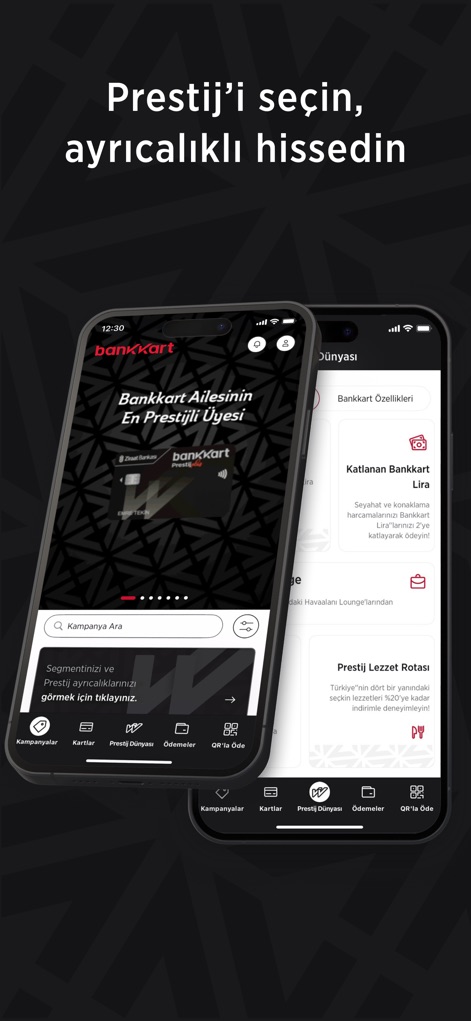
The app unveils the 'Prestige World' section, featuring a distinct premium card design and exclusive benefits such as 'Multiplied Bankkart Lira' for enhanced rewards.
Exclusive Prestige Benefits
Description
Download
More Like This
Apps with similar features and user experience

掌上生活-招商银行信用卡
CHINA MERCHANTS BANK CO.,LTD.

平安口袋银行-更懂您的智能银行
PingAn Bank

Credit One Bank Mobile
Credit One Bank, National Association

MySynchrony
Synchrony Financial

买单吧-交通银行信用卡
Bank of Communications

浦大喜奔-浦发银行信用卡
Shanghai Pudong Development Bank Co.Ltd

Bread Financial
Bread Financial Holdings, Inc.

丰收互联
Zhejiang Rural Commercial United Bank

CareCredit Mobile
Synchrony Financial
This page is not an official page of the app or its developer, but an independent editorial publication created for informational and commentary purposes. Unless expressly stated otherwise, neither the app nor its developer is affiliated with, endorsed by, sponsored by, authorized by, or otherwise officially connected with MWM, Apple, Google Play, the app publisher, or the app's developer, and nothing on this page implies that the app was developed using MWM's services. Any trademarks, logos, screenshots, and other content remain the property of their respective owners.