Batch Videos Edit

Batch Videos Edit

Download on App Store
Logo of Batch Videos Edit

Batch Videos Edit: The Ultimate Bulk Video Resizer for Creators

Stop editing clips one by one. Instantly reformat your videos for TikTok, Instagram, and YouTube with local processing that protects your privacy and saves your data.

Download on App Store

Publisher

Heng Jia Liang

Category

Photo & Video

Downloads

0

User Rating

1.0/5

Total Ratings

0

Locales

1

Precision in Every Frame

Discover the interface used by 0 users.
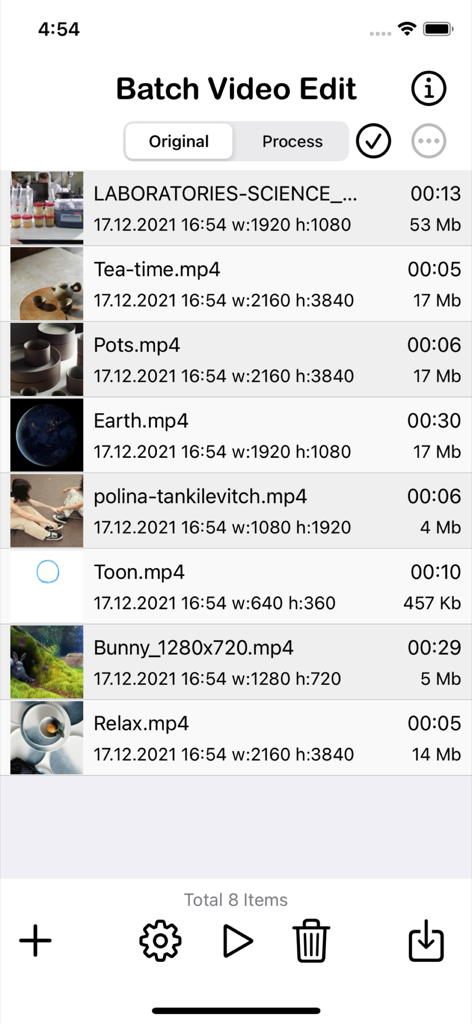
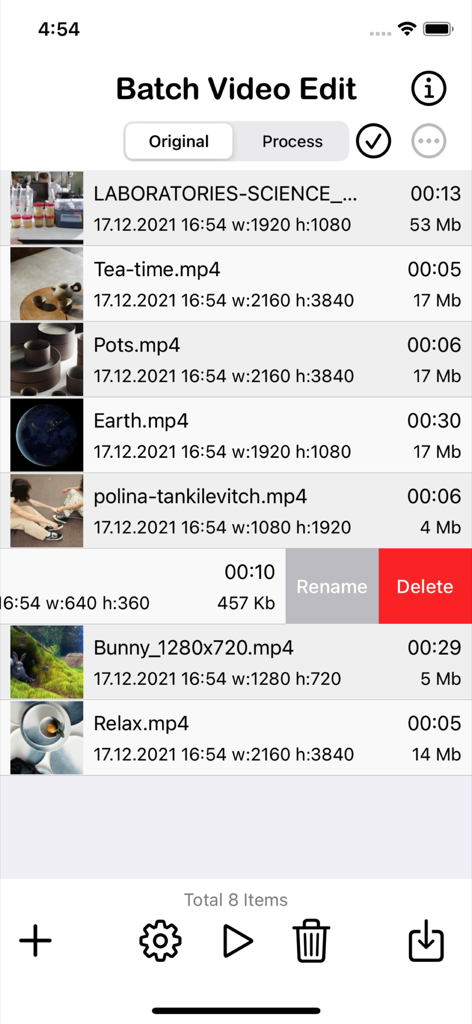
Interface of the Batch Video Edit app showing a list of imported videos with metadata like resolution duration and file size

Interface of the Batch Video Edit app showing a list of imported videos with metadata like resolution duration and file size

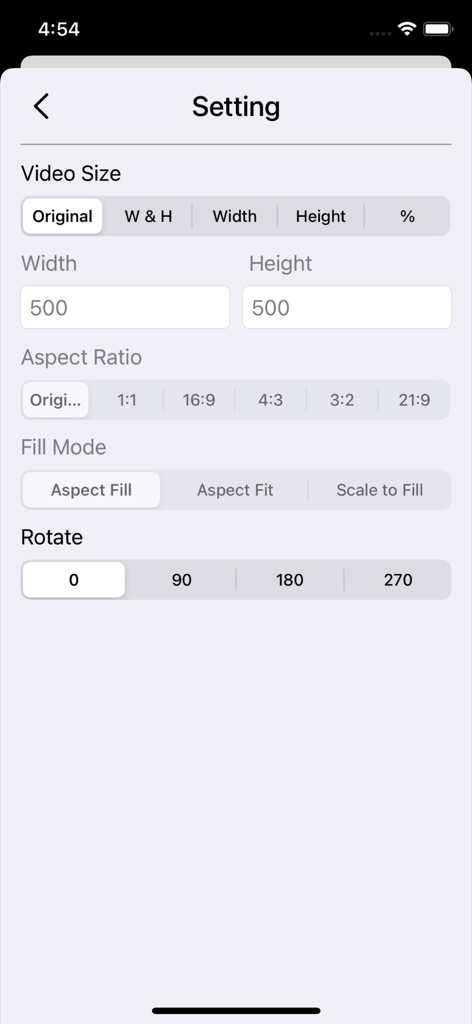
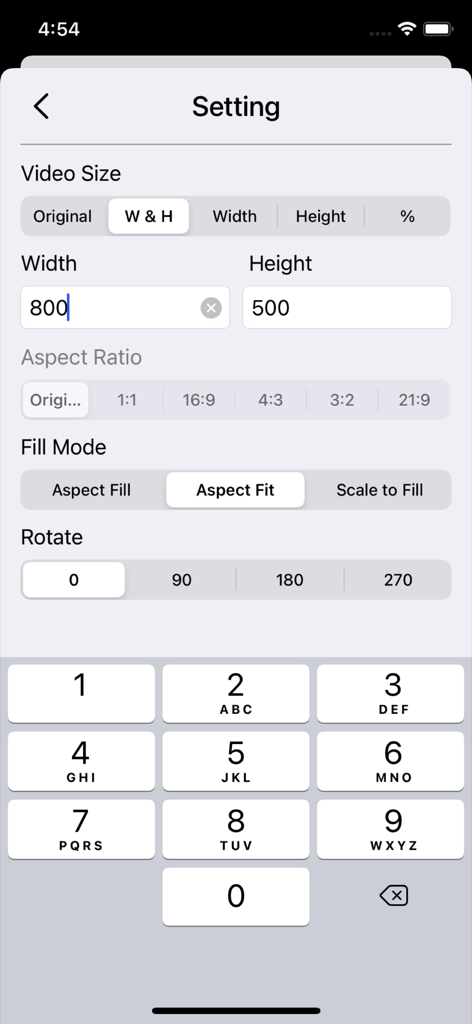
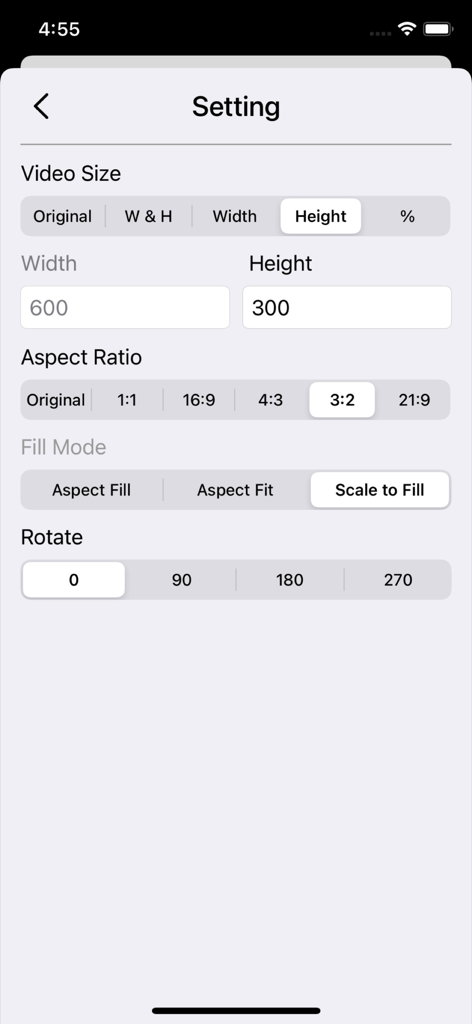
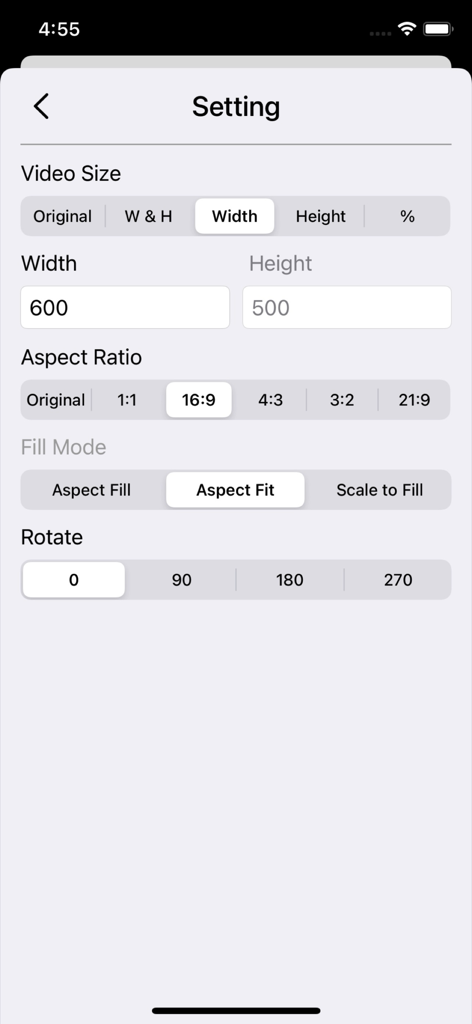
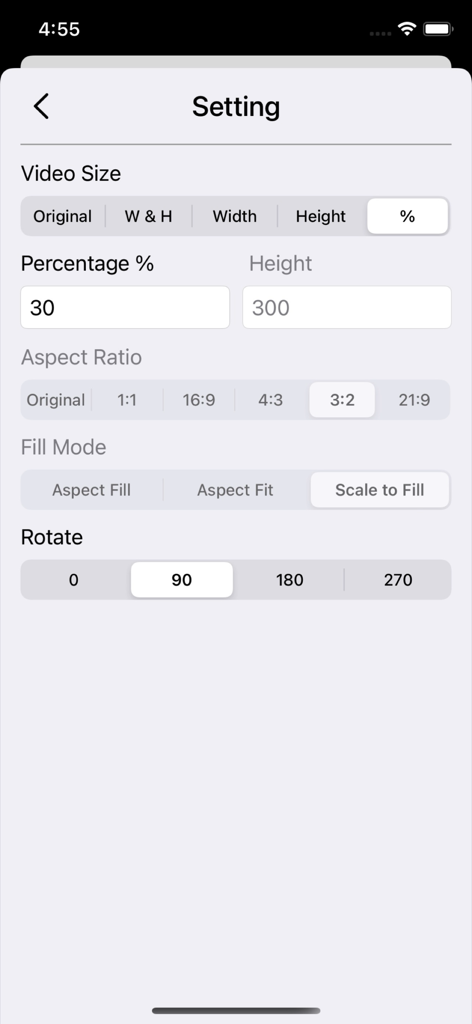
Settings interface of Batch Videos Edit app showing video size aspect ratio and rotation options

Settings interface of Batch Videos Edit app showing video size aspect ratio and rotation options

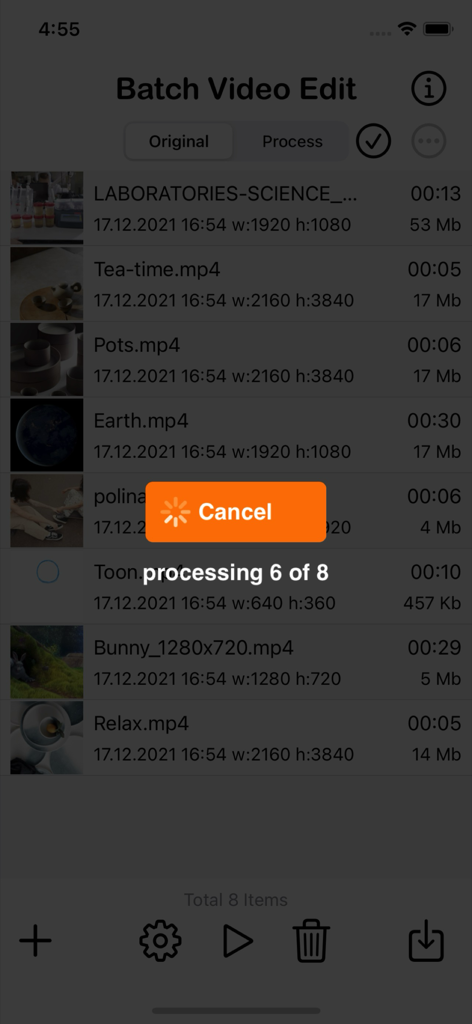
The Batch Video Edit app interface showing the progress of processing eight videos simultaneously.

The Batch Video Edit app interface showing the progress of processing eight videos simultaneously.

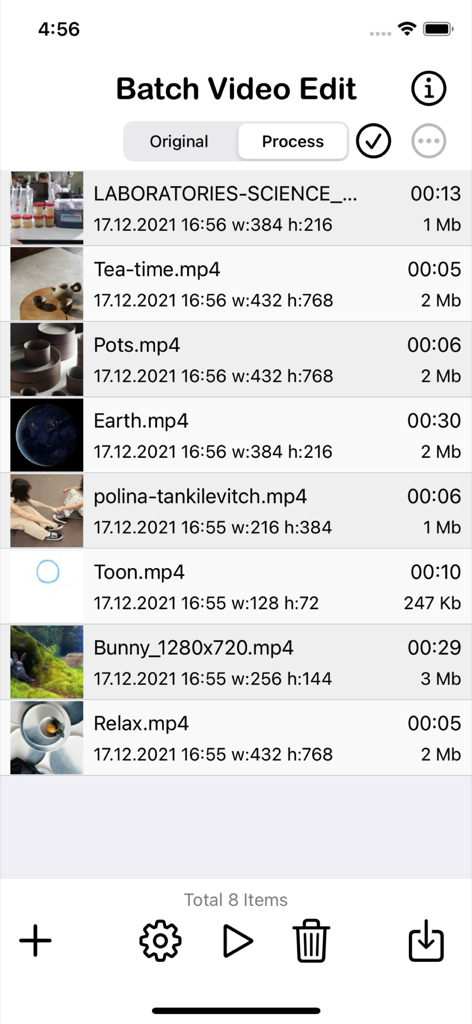
A list of processed video clips with file details in the Batch Video Edit app

A list of processed video clips with file details in the Batch Video Edit app

Interface of the Batch Videos Edit app showing a list of imported videos with file details like resolution and size

Interface of the Batch Videos Edit app showing a list of imported videos with file details like resolution and size

Settings screen for Batch Videos Edit app showing video size, aspect ratio, and rotation options.

Settings screen for Batch Videos Edit app showing video size, aspect ratio, and rotation options.

Settings screen of the Batch Videos Edit app showing options for video size aspect ratio fill mode and rotation

Settings screen of the Batch Videos Edit app showing options for video size aspect ratio fill mode and rotation

Mobile app settings screen for batch processing video size aspect ratio and orientation

Mobile app settings screen for batch processing video size aspect ratio and orientation

The settings interface of the Batch Videos Edit app showing controls for video size aspect ratio fill mode and rotation.

The settings interface of the Batch Videos Edit app showing controls for video size aspect ratio fill mode and rotation.

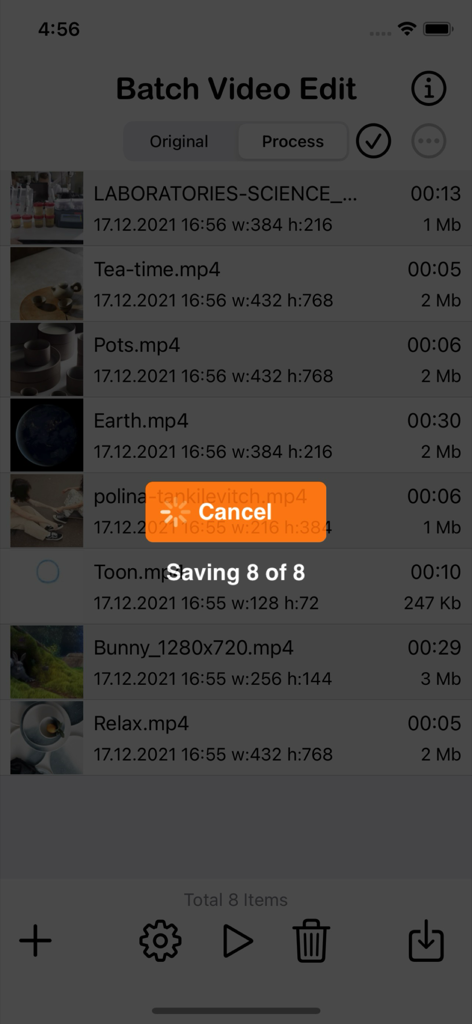
Interface of Batch Videos Edit app showing the saving progress of multiple videos with a status overlay saying Saving 8 of 8.

Interface of Batch Videos Edit app showing the saving progress of multiple videos with a status overlay saying Saving 8 of 8.

Streamline Your Content Workflow

The tools that make this app stand out, trusted by 0 users.

Bulk Processing Power

Transform your entire library in seconds. Change aspect ratios for TikTok, Reels, or YouTube across multiple clips with a single tap.

🔒

100% Private & Local

No cloud uploads required. Process high-res files directly on your hardware to save data bandwidth and keep your footage secure.

📐

Professional Precision

Total control over dimensions and orientation. Set custom pixel widths, heights, and rotations to meet any platform's strict requirements.

About the app

Everything you need to know about Batch Videos Edit.

Description

Batch Videos Edit – A powerful tool for iPhone and iPad that lets you resize, crop, change the aspect ratio, or rotate your videos and movies in bulk—quickly and easily. With Batch Videos Edit, you can save your data plan and bandwidth since all video processing happens directly on your device. Once resized, you can effortlessly upload your videos to your favorite social media platforms like YouTube, Facebook, Tiktok, Instagram and X. Features: • Load multiple videos/clips from your library. • Rename or delete videos easily. • View detailed video info (name, date, duration, dimensions, and file size). • Review and remove videos before proceeding. • Preview each video/clip individually. • Organized storage – View original and processed videos in separate folders. • One-tap cleanup – Clear all videos in a single press. • Save all processed videos directly to your Camera Roll. • Works seamlessly on both iPhone and iPad. • Lightweight, compact app optimized for everyday use. • Ad-free and built with privacy in mind. Setting: - Set Video Size -- Original, By Width and Height, By Width, by Height and By percentage. - Set Aspect Ratio -- Original, 1:1, 16:9, 4:3, 3:2, 21:9 - Set Fill Mode -- Aspect Fill, Aspect Fit and Scale to fill - Set Video Rotation -- 0, 90, 180 and 270 degree. Quick Guide: 1. Tap the [+] icon and select the videos you want to batch edit. 2. Tap the Settings icon for detailed adjustments. 3. Let's assume we want to resize all videos to 640x320. 4. Tap on W & H (Width and Height). 5. Set the width to 640 and the height to 320. 6. Once finished, tap the Back button. 7. Tap the Run icon and wait for the process to complete. 8. Tap the Process tab at the top to check the processed videos. 9. Tap the Save icon to save all processed videos to the Camera Roll. 10. After saving, clear all videos by tapping the Bin icon. * After picking videos from the gallery, you can reselect any videos you missed by tapping the [+] icon again. * When selecting videos from the gallery, duplicate videos (videos with the same name) will be skipped. * Remember to clear all videos before starting a new process. Batch Videos Edit makes it easy to resize multiple videos at once. It is incredibly fast because your videos are resized directly on your device, without needing to be uploaded or transmitted to any servers. This makes it easier to send and share them with your family and friends. Thanks for your support and do visit nitrio.com for more apps for your iOS devices.

Latest Version

1.2

Size

1.8 MB

First Released

Dec 19, 2021

Stop Editing One by One.

Transform your entire video library for TikTok, Instagram, and YouTube in seconds. Join thousands of creators using the fastest, most private batch processing tool for iPhone and iPad.

Download on App Store

App information, icons, screenshots, and descriptions displayed on this page are sourced from the Apple App Store and are the property of their respective developers. Download estimates and rankings are based on MWM's proprietary models and may not reflect actual figures. This page is provided for informational and analytical purposes only.

Believe this page infringes your intellectual property? File a dispute