
This page is not an official page of the app or its developer, but an independent editorial publication created for informational and commentary purposes. Unless expressly stated otherwise, neither the app nor its developer is affiliated with, endorsed by, sponsored by, authorized by, or otherwise officially connected with MWM, Apple, Google Play, the app publisher, or the app's developer, and nothing on this page implies that the app was developed using MWM's services. Any trademarks, logos, screenshots, and other content remain the property of their respective owners.


Blockly for Dash & Dot robots
Finally, an app that turns coding into child's play. It empowers young minds to command robots, not just consume content.
Downloads
1M+User Rating
Total Ratings
470Publisher
Category
EducationLocales
1Latest Version
5.0.7Size
142.4 MBFirst Released
Nov 17, 2014An analytical overview of key functionalities enhancing STEM learning and robotics engagement.
Blockly for Dash & Dot Robots: Core Educational Features
Physical Robot Interaction
It enables direct programming and control of Dash & Dot robots, bringing abstract coding concepts to life through tangible, interactive physical outcomes.
Visual Block-Based Coding
The app utilizes a visual drag-and-drop interface, making complex coding concepts accessible and engaging for young learners through an intuitive puzzle-like system.
Structured Coding Challenges
It includes numerous pre-designed coding challenges that guide users through fundamental programming concepts, offering a progressive learning experience.
Foundational STEM & Coding Education
The app introduces key computational thinking concepts such as sequencing, events, loops, algorithms, operations, and variables through interactive play.
Open-Ended Creative Programming
This tool empowers users to invent their own unique programs and control Dash & Dot robots, fostering creativity and problem-solving beyond guided lessons.
Gamified Learning Through Puzzles
A series of engaging puzzles with playful storylines provides an enjoyable and self-directed method for children to grasp coding principles.
Sensor-Based Robot Programming
The app allows users to program robots to react to their environment using sensors, such as object detection for navigation or responding to being picked up.
Expressive Robot Customization
Users can program Dash & Dot with synchronized movements, light patterns, and sounds, enabling personalized and elaborate robot performances.
Frequently Asked Questions
Everything you need to know about Blockly for Dash & Dot robots
What is the Blockly app for Dash & Dot robots?
Blockly for Dash & Dot robots is a visual drag-and-drop programming tool by Google. It enables children to program Wonder Workshop's Dash & Dot robots using puzzle-like commands.
Is a robot required to use the Blockly for Dash & Dot robots app?
Yes, the Blockly for Dash & Dot robots app requires a Wonder Workshop robot (Dash or Dot) to function. The app connects to these robots via Bluetooth Smart/4 for interactive programming.
What is the price of the Blockly for Dash & Dot robots app?
The Blockly for Dash & Dot robots app is free to play. It does not contain any in-app purchases or third-party advertising.
What coding skills can children learn with Blockly for Dash & Dot robots?
Blockly for Dash & Dot robots teaches essential coding concepts such as sequencing, events, loops, algorithms, operations, and variables. Learning occurs through self-directed play and guided programming challenges.
What is the recommended age for the Blockly for Dash & Dot robots app?
The Blockly for Dash & Dot robots app is recommended for children ages 6 and up. It provides an engaging and frustration-free environment for learning coding.
How does Blockly for Dash & Dot robots protect children's privacy?
The Blockly for Dash & Dot robots app protects children's privacy by not collecting any personal information. It also does not include any third-party advertising.
Can users create custom programs in Blockly for Dash & Dot robots?
Yes, users can invent their own creations using Blockly to program Dash & Dot robots. The app supports starting new projects from scratch or modifying sample projects.
Does Blockly for Dash & Dot robots offer coding challenges?
Yes, Blockly for Dash & Dot robots offers dozens of coding challenges for children. These challenges feature playful storylines and puzzles to teach coding concepts effectively.
What are some robot actions users can program with Blockly for Dash & Dot robots?
Users can program Dash & Dot robots to navigate mazes, detect objects to avoid walls, sound an alarm when moved, and perform synchronized dance moves with lights, motion, and sounds.
The following screenshots and description are sourced directly from the app's official store listing and are the property of the app developer.
App Store
Screenshots
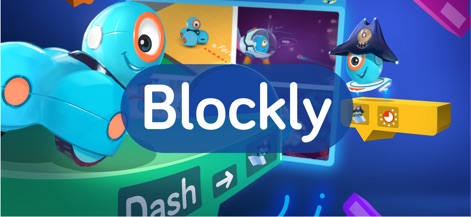
The app immediately showcases the intuitive Blockly environment and the charming Dash and Dot robots, inviting users into a world of creative coding possibilities.
Coding Adventure Begins
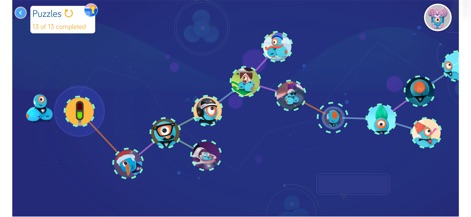
Users can explore the app's engaging puzzle progression map, tracking their mastery through distinct challenge nodes and observing their overall completion status.
Learning Journey Map

This tool reveals the core drag-and-drop programming interface, allowing users to assemble commands from the category palette into a functional sequence of code blocks.
Drag-and-Drop Logic

Observe how the app provides a detailed numerical input interface for setting specific values within programming blocks, alongside the existing assembled code sequences.
Parameter Input
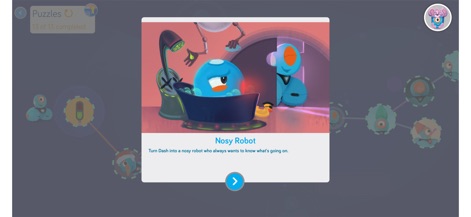
The app presents engaging narrative puzzle introductions, complete with custom illustrations and clear task descriptions, setting the stage for each coding challenge.
Challenge Introduction
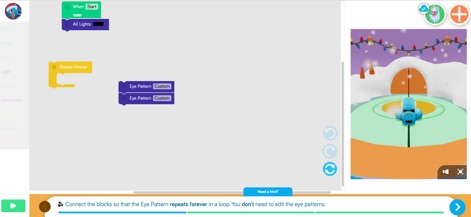
Experience the app's real-time simulation, where users can see their coded actions translate directly to a 3D robot visualization and receive helpful hint messages for guidance.
Visual Feedback Loop
Description
Download
More Like This
Apps with similar features and user experience




This page is not an official page of the app or its developer, but an independent editorial publication created for informational and commentary purposes. Unless expressly stated otherwise, neither the app nor its developer is affiliated with, endorsed by, sponsored by, authorized by, or otherwise officially connected with MWM, Apple, Google Play, the app publisher, or the app's developer, and nothing on this page implies that the app was developed using MWM's services. Any trademarks, logos, screenshots, and other content remain the property of their respective owners.