Blur Face in Photo

Blur Face in Photo

Download on App Store
Logo of Blur Face in Photo

Blur Face in Photo: The Smartest Way to Protect Privacy Instantly

Leverage one-tap AI to detect and blur faces securely. With 100% on-device processing, your photos never leave your phone—perfect for parents, creators, and professionals who value safety.

Download on App Store

Publisher

DrawingData, Inc.

Category

Photo & Video

Downloads

100

User Rating

1.0/5

Total Ratings

0

Locales

16

Privacy in Action

Discover the interface used by 100 users.
Graphic illustrating effortless face blurring for privacy in photos.

Graphic illustrating effortless face blurring for privacy in photos.

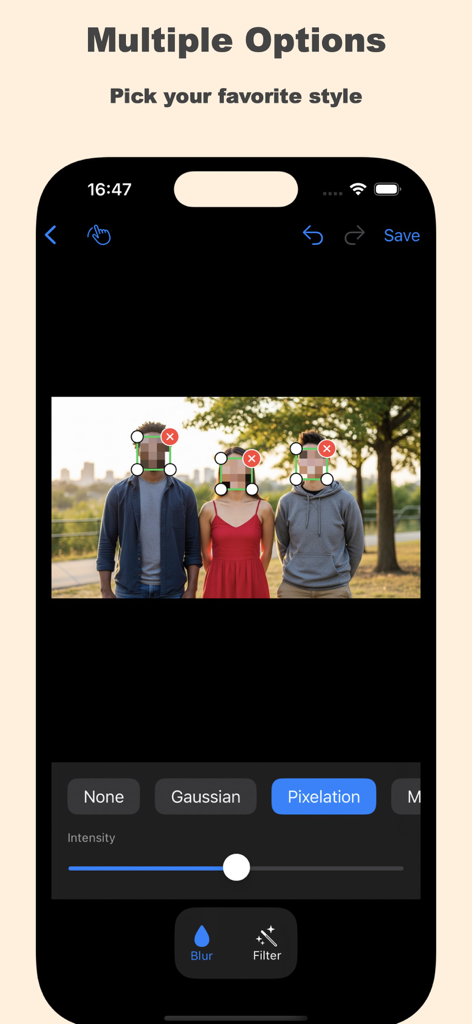
Interface of the Blur Face in Photo app showing three people with pixelated faces and various blur style options

Interface of the Blur Face in Photo app showing three people with pixelated faces and various blur style options

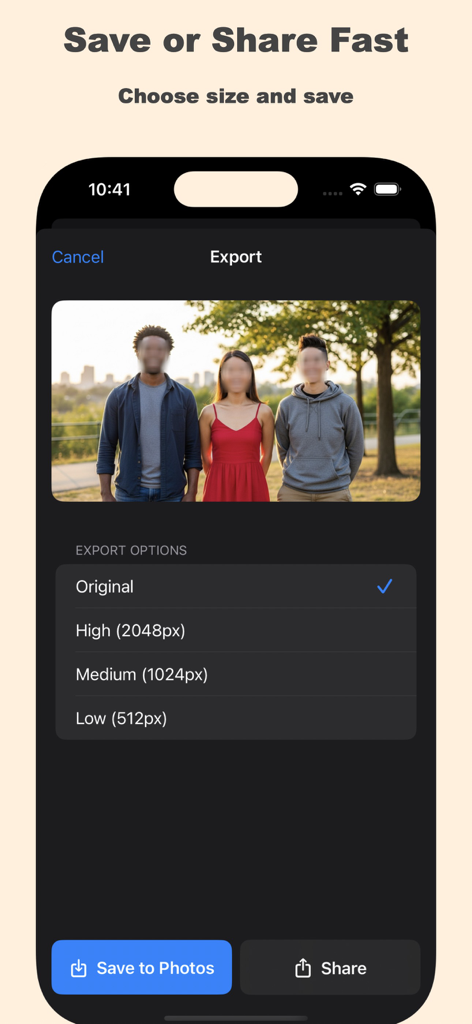
A screenshot of the export screen in the Blur Face in Photo app showing various image size options and save buttons.

A screenshot of the export screen in the Blur Face in Photo app showing various image size options and save buttons.

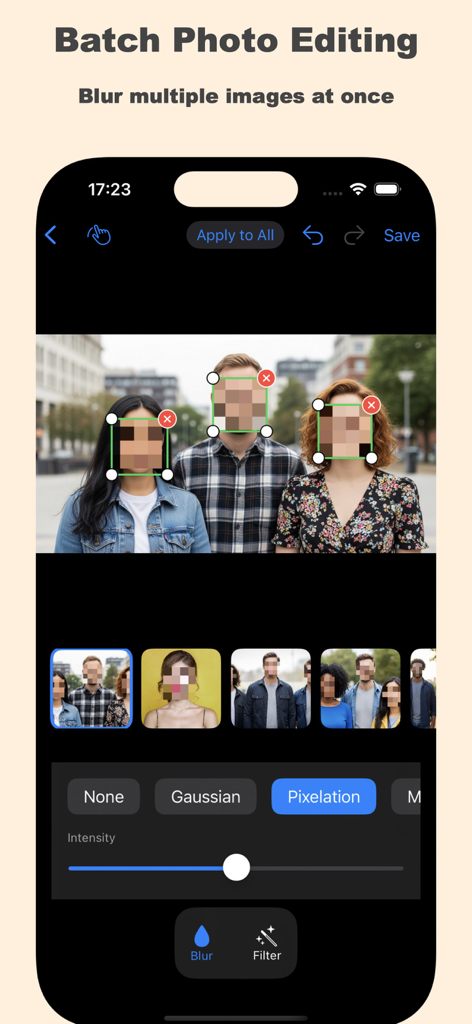
Interface of the Blur Face in Photo app showing batch editing to pixelate faces in multiple photos at once

Interface of the Blur Face in Photo app showing batch editing to pixelate faces in multiple photos at once

Smart Privacy for Every Shared Moment

The tools that make this app stand out, trusted by 100 users.

🔒

Private On-Device Processing

Your photos never leave your phone. All AI face detection happens locally, ensuring your family’s data and locations stay 100% secure.

🤖

Instant AI Face Detection

Save time with smart technology that spots faces automatically. Perfectly hide classmates or bystanders in group photos with a single tap.

🎨

Custom Blur Control

Choose from pixelation, classic blur, or censor bars. Manually obscure sensitive info like license plates or documents with total precision.

About the app

Everything you need to know about Blur Face in Photo.

Description

Protect your privacy in one tap with Blur Face in Photo. Our app is the easiest way to blur, pixelate, and hide faces in your photos. Whether you’re sharing images online, creating memes, or safeguarding identities, Blur Face in Photo helps you quickly and securely censor faces and sensitive details. Every photo is processed 100% on your device for maximum privacy. Key Features * Use AI to instantly detect faces in your photos. * Toggle individual faces on/off for custom editing. * Tap and drag to blur any area of the photo manually. * Multiple Blur Styles * Simple Import & Export * Undo / Redo to easily fix mistakes without starting over. Why Choose us? * Your images never leave your phone. * Edit and save in seconds. * Simple UI, no complex settings. * Works for social posts, journalism, business, and personal use. Perfect For: * Social media sharing without revealing identities. * Protecting children’s privacy in school or sports photos. * Obscuring sensitive information in images. * Meme creation with creative pixelation or censor effects. * Professional uses in journalism or client work. How It Works * Select a photo / multiple photos * Blur faces automatically or manually select faces. * Choose your preferred blur style. * Save or share securely. Privacy First. Always. We never collect your data. All face detection and blurring happens on your device. No accounts, no tracking, no cloud uploads. Download Blur Face: today and take control of your privacy. Subscription Information: – Face Blurring is limited and needs a subscription for unlimited edits to images. – Subscription Length: Weekly and Lifetime – Free Trial: If offered, it will automatically convert to a paid subscription unless canceled. – Payment: Charged to your Apple ID account at confirmation of purchase. – Auto-Renewal: Automatically renews unless canceled at least 24 hours before the end of the current period. – Renewal Charge: Your account will be charged within 24 hours before the end of the current period, based on the selected plan. – Managing Subscription: Users can manage subscriptions and turn off auto-renewal in Account Settings on the App Store. – Free Trial Policy: Any unused portion of a free trial will be forfeited upon purchasing a subscription. Terms of Use: https://www.apple.com/legal/internet-services/itunes/dev/stdeula/ Privacy Policy: https://drawingdata.io/privacy-policy

Latest Version

1.2

Size

4.4 MB

First Released

Aug 15, 2025

Protect Your Privacy and Share with Confidence

Join thousands of parents and creators using our 100% on-device AI to blur faces instantly. No cloud uploads, no tracking—just total control over your digital footprint.

Download on App Store

App information, icons, screenshots, and descriptions displayed on this page are sourced from the Apple App Store and are the property of their respective developers. Download estimates and rankings are based on MWM's proprietary models and may not reflect actual figures. This page is provided for informational and analytical purposes only.

Believe this page infringes your intellectual property? File a dispute