
This page is not an official page of the app or its developer, but an independent editorial publication created for informational and commentary purposes. Unless expressly stated otherwise, neither the app nor its developer is affiliated with, endorsed by, sponsored by, authorized by, or otherwise officially connected with MWM, Apple, Google Play, the app publisher, or the app's developer, and nothing on this page implies that the app was developed using MWM's services. Any trademarks, logos, screenshots, and other content remain the property of their respective owners.


伯索云学堂
Master difficult concepts through real-time interactive classes and instant tutoring. Join over 1 million students in a seamless cloud classroom designed to bridge the gap between school and home.
Downloads
1M+User Rating
Total Ratings
16K+Publisher
Category
EducationLocales
6Latest Version
5.63.100Size
380.4 MBFirst Released
Aug 1, 2015Empowering Academic Excellence Anywhere
Plaso Cloud Classroom combines interactive tutoring with on-demand expert lessons to help students master challenging subjects at their own pace.
Targeted Knowledge Mastery
Access deep-dive video explanations of complex concepts and review key knowledge points as many times as needed to ensure full understanding.
Instant Homework Support
Stuck on a problem? Send photos or voice recordings to your teachers for timely, personalized guidance and expert solutions to your specific questions.
Frequently Asked Questions
Everything you need to know about 伯索云学堂
What is Plaso?
Plaso is an interactive iOS learning application developed for schools to facilitate interconnected education. It allows students to watch courses, ask questions, and receive teacher responses.
How do students communicate with teachers using Plaso?
Students communicate through Plaso's tutoring module by submitting questions via pictures or recordings. They also interact directly with teachers online during real-time classes initiated by the school.
Can Plaso courses be replayed for review?
Yes, students can watch and review Plaso's video explanation courses repeatedly at their convenience. These courses are created by schools to cover specific knowledge points.
What interactive features are available in Plaso's real-time classes?
Plaso's real-time classes offer interactive features including answer responders, video calls, red packets for engagement, check-ins, small blackboards, and quick answer functionality, enhancing student participation.
What types of educational materials does Plaso offer?
Plaso provides a diverse range of educational materials. This includes live sessions, videos, AI courses, audio content, and documents, ensuring rich learning experiences for students.
Does Plaso provide support after class sessions?
Yes, Plaso offers flexible after-class services. These include consolidation activities, micro-lessons, quizzes, tutoring, and practice exercises, all designed to reinforce student learning.
Does Plaso track student performance and progress?
Yes, Plaso tracks comprehensive student learning data. It provides insights into live session participation, course progress, consolidation activities, and test data, including scores and correct answers.
The following screenshots and description are sourced directly from the app's official store listing and are the property of the app developer.
App Store
Screenshots

Plaso Cloud Classroom interface showing a live interactive teaching session with multiple student video feeds and digital learning tools.
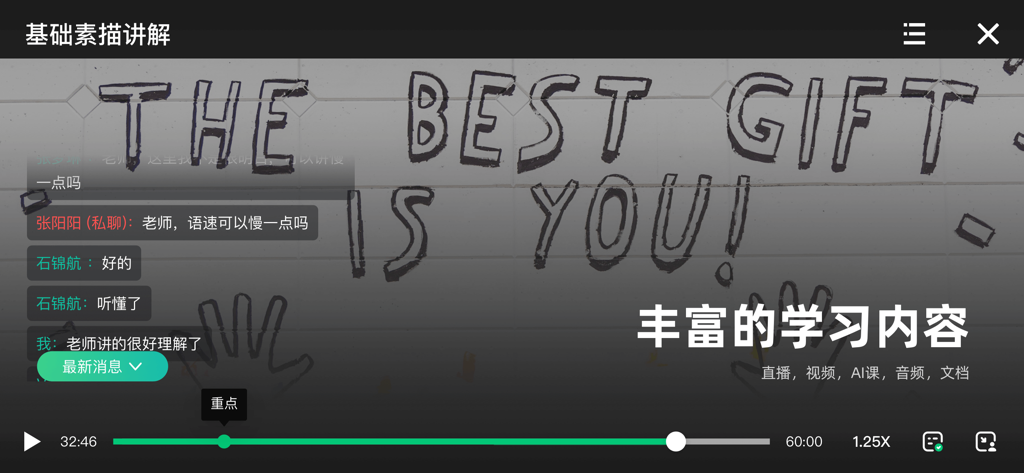
Interactive video lesson interface in Plaso Cloud Classroom with student chat and sketching tutorial

Smartphone displaying the Plaso Cloud Classroom app with a graded student essay featuring red ink corrections and teacher audio feedback icons
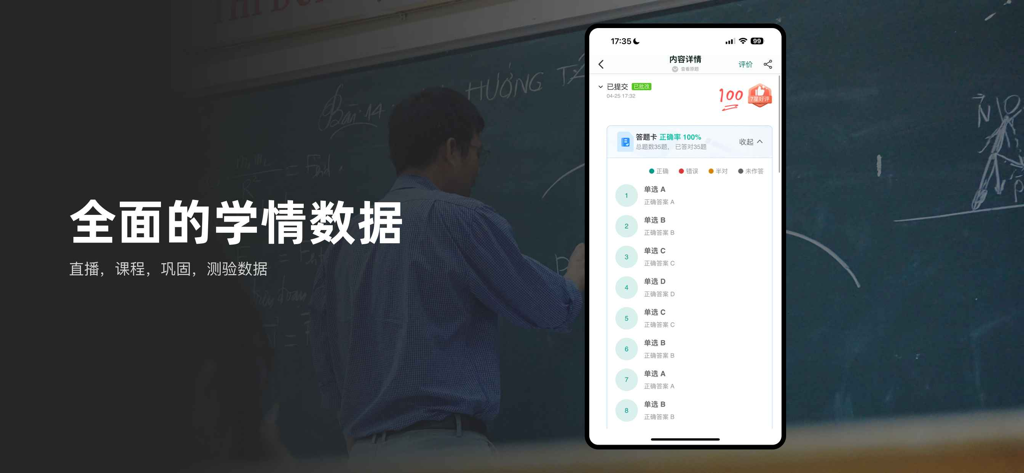
A screenshot of the Plaso Cloud Classroom app showing a student test score and comprehensive learning analytics
Description
Download
More Like This
Apps with similar features and user experience

GetCourse
Timur Karimbaev

CourseKey Student
COURSE KEY

少年得到-知识百科平台
Kude youth (tianjin) culture communication co. LTD

Ulife
GAEC Educacao S/A

知享学堂
Hangzhou Kuozhi Network Technology Co., Ltd.

Tfaseel
QUANTIC TECH SOLUTIONS FZC

Classera
Classera Inc.

JustSchool - English Online
Igor Furmanenko

myWGU Mobile
Western Governors University
This page is not an official page of the app or its developer, but an independent editorial publication created for informational and commentary purposes. Unless expressly stated otherwise, neither the app nor its developer is affiliated with, endorsed by, sponsored by, authorized by, or otherwise officially connected with MWM, Apple, Google Play, the app publisher, or the app's developer, and nothing on this page implies that the app was developed using MWM's services. Any trademarks, logos, screenshots, and other content remain the property of their respective owners.