
This page is not an official page of the app or its developer, but an independent editorial publication created for informational and commentary purposes. Unless expressly stated otherwise, neither the app nor its developer is affiliated with, endorsed by, sponsored by, authorized by, or otherwise officially connected with MWM, Apple, Google Play, the app publisher, or the app's developer, and nothing on this page implies that the app was developed using MWM's services. Any trademarks, logos, screenshots, and other content remain the property of their respective owners.

BP diary (self-monitoring)
Log your daily measurements, visualize trends with clear charts, and generate professional PDF reports for your next doctor’s visit.
Downloads
231K+User Rating
Total Ratings
15K+Publisher
Category
MedicalLocales
3Latest Version
1.10.3Size
8.7 MBFirst Released
Feb 8, 2019Master Your Health with Simple Tracking
The reliable, easy-to-use blood pressure diary designed to help you monitor trends and prepare for your next doctor’s visit with confidence.
Quick & Easy Logging
Record your systolic, diastolic, and pulse readings in seconds. Perfect for your daily morning and evening routines.
Visual Health Trends
See the big picture with intuitive charts and history logs that help you and your doctor track the success of your health plan.
Frequently Asked Questions
Everything you need to know about BP diary (self-monitoring)
Does BP diary (self-monitoring) measure blood pressure?
No, the BP diary (self-monitoring) application does not measure blood pressure. Users must make measurements themselves using a suitable blood pressure monitor.
What features does the BP diary (self-monitoring) app offer?
BP diary (self-monitoring) offers blood pressure record keeping, history viewing in log, chart, or report forms, and options to send reports to doctors or save them as PDF files.
How do I record a new blood pressure measurement in BP diary (self-monitoring)?
Users record new blood pressure measurements in BP diary (self-monitoring) by entering time, arm, systolic, diastolic, pulse, general health state, and notes on the 'New record' screen.
Can I view my blood pressure history as a chart in BP diary (self-monitoring)?
Yes, the BP diary (self-monitoring) app allows users to view their blood pressure history as a chart. It provides options for viewing data from yesterday, today, 7 days, and 30 days.
How can I share my blood pressure report from BP diary (self-monitoring)?
Yes, users can share blood pressure reports from BP diary (self-monitoring) by sending them via email to a doctor or exporting them directly as a PDF file.
Can I edit or delete blood pressure records in BP diary (self-monitoring)?
Yes, the BP diary (self-monitoring) app allows users to edit or delete existing blood pressure records directly from the main diary log view.
The following screenshots and description are sourced directly from the app's official store listing and are the property of the app developer.
App Store
Screenshots
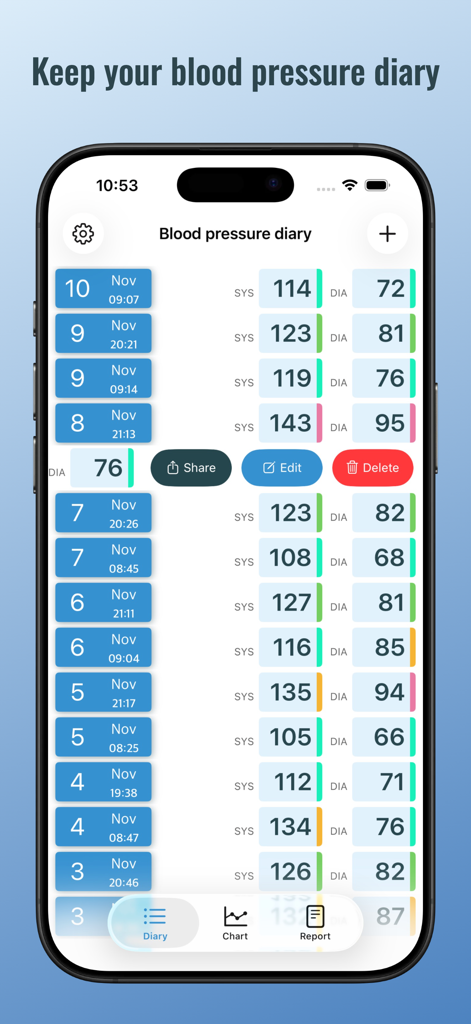
Blood pressure diary interface showing a history of systolic and diastolic readings with dates
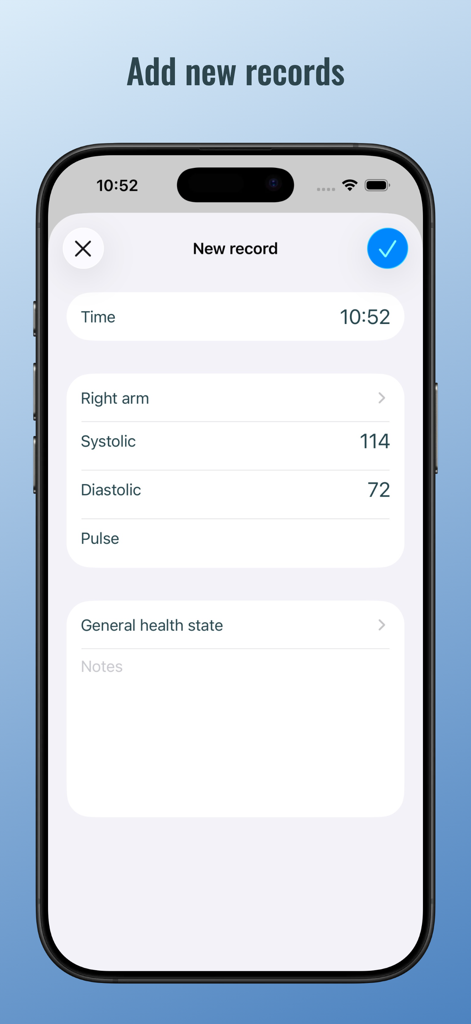
Smartphone screen showing the add record form in the BP diary app with fields for blood pressure and pulse
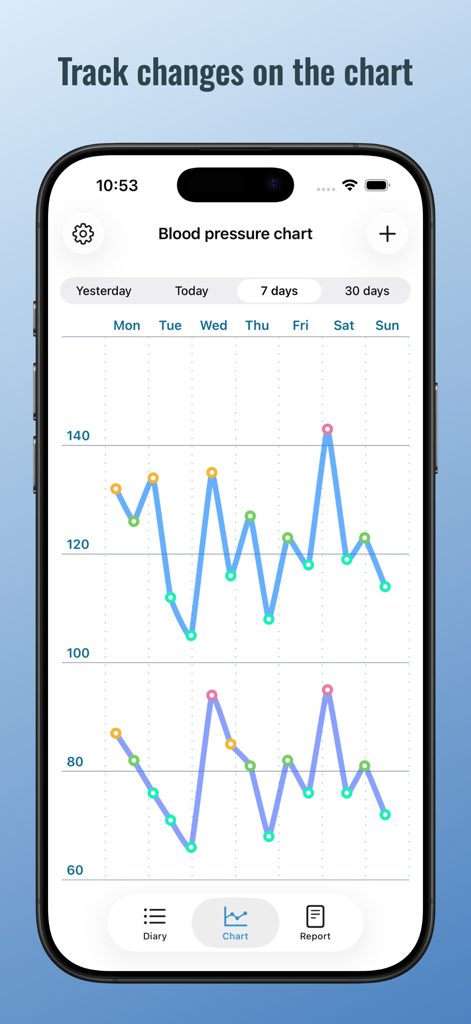
Weekly blood pressure monitoring chart showing systolic and diastolic trends on an iPhone
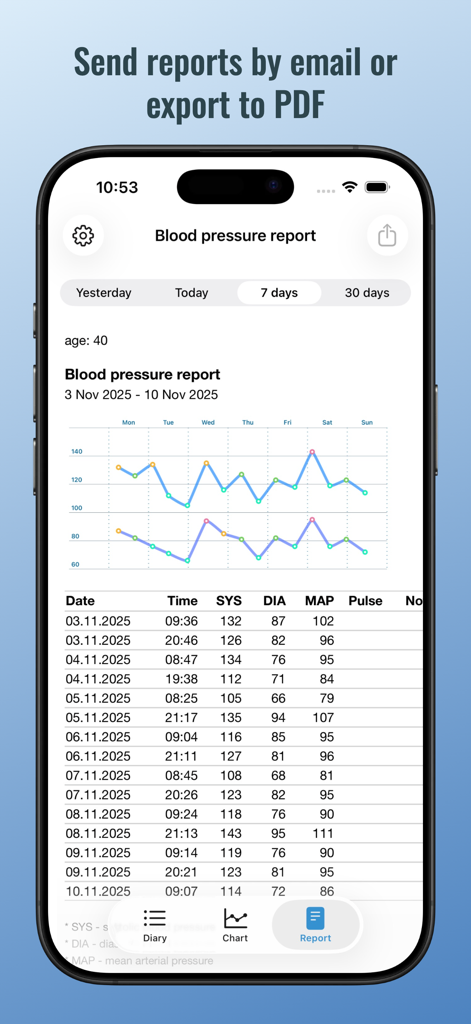
Blood pressure report screen showing health data chart and log table for PDF export
Description
Download
More Like This
Apps with similar features and user experience

Hello Heart • For heart health
Hello Doctor Ltd.

Blood Pressure Log Feeltracker
Custom Arts Ltd

MyBP - Blood Pressure App
Healthcare Algorithms LLC

Blood Pressure App Monitor
Hendrik Folkerts
AlodBloodPressure:HealthRecord
Guangzhou Kangyimei Network Technology Co., Ltd.
Blood Sugar : Pulse Monitor
THREE TIGER NETWORK TECHNOLOGY LIMITED

Blood Pressure Monitor
Taconic System LLC

Blood Pressure Tracker •
App Sub 1 LLC

Blood Pressure H+
Szymon Klimaszewski
This page is not an official page of the app or its developer, but an independent editorial publication created for informational and commentary purposes. Unless expressly stated otherwise, neither the app nor its developer is affiliated with, endorsed by, sponsored by, authorized by, or otherwise officially connected with MWM, Apple, Google Play, the app publisher, or the app's developer, and nothing on this page implies that the app was developed using MWM's services. Any trademarks, logos, screenshots, and other content remain the property of their respective owners.