
This page is not an official page of the app or its developer, but an independent editorial publication created for informational and commentary purposes. Unless expressly stated otherwise, neither the app nor its developer is affiliated with, endorsed by, sponsored by, authorized by, or otherwise officially connected with MWM, Apple, Google Play, the app publisher, or the app's developer, and nothing on this page implies that the app was developed using MWM's services. Any trademarks, logos, screenshots, and other content remain the property of their respective owners.


Brickit App
Stop digging. This app transforms your random brick pile into a treasure chest of new builds, instantly.
Downloads
5M+User Rating
Total Ratings
42.4KPublisher
Category
EntertainmentLocales
1Latest Version
4.90.9Size
233.6 MBFirst Released
Oct 17, 2019Evaluating key functionalities for building block enthusiasts and families.
Analytical Overview of Brickit App Features
Interactive Brick Finder
The app highlights the exact location of a needed brick within the user's physical pile shown in a photo, dramatically reducing search time and enhancing the efficiency of the building process.
Brick Identification & Counting
The app identifies and counts individual building blocks from a photograph, digitizing the inventory process and saving users significant time and effort compared to manual sorting.
Personalized Building Suggestions
The app suggests new building ideas tailored to the specific bricks the user already possesses, fostering creativity within existing collections and preventing frustration from missing pieces.
Guided Construction Instructions
This tool features clear, step-by-step instructions for suggested builds, making complex models accessible to users while also allowing flexibility for creative deviation.
Frequently Asked Questions
Everything you need to know about Brickit App
How does the Brickit App work to help me build with old bricks?
The Brickit App scans a photo of your bricks, identifies them, and suggests building ideas. It then provides step-by-step instructions and helps you find specific bricks in your pile.
Can the Brickit App identify all my LEGO bricks?
Yes, the Brickit App scans a photo of your spread-out bricks, identifying and counting them automatically. This feature helps you catalog your collection for building projects.
What kind of building ideas does the Brickit App suggest?
The Brickit App suggests various building ideas, such as robots, kangaroos, X-Wings, animals, and flowers, based on the bricks you have. It offers options like "Puzzles" and "Ideas."
Does the Brickit App provide instructions for building?
Yes, the Brickit App provides step-by-step instructions for chosen creations. Users can follow these guides or use them as a starting point for their own ideas.
How does Brickit App help find specific bricks?
The Brickit App features a catalog where you can choose a specific detail. The app then highlights that brick within your physical pile, making it easy to find for your construction.
Is the Brickit App free to use, or does it require a subscription?
The Brickit App offers a "Scanner Pro Subscription." This subscription automatically renews, and payment is charged to your iTunes account upon purchase confirmation.
How can I manage or cancel my Brickit App subscription?
Users can manage their Brickit App subscriptions and turn off auto-renewal by accessing their Account Settings after purchase. Auto-renewal must be turned off 24 hours before the period ends.
Is the Brickit App an official LEGO® product?
No, Brickit App is not an official LEGO® product. It was created by fans, and The LEGO Group of companies does not sponsor or support the Brickit App.
Where can I find the privacy policy for the Brickit App?
The privacy policy for the Brickit App is available online. Users can access it directly via the provided link: https://brickit.app/privacy-policy/.
Can users share their creations built with the Brickit App?
Yes, the Brickit App allows users to share their creations and inspire others. This feature fosters a community where users can showcase their builds.
The following screenshots and description are sourced directly from the app's official store listing and are the property of the app developer.
App Store
Screenshots

Discover how the app transforms classic building blocks and unique brick pieces into new creative possibilities.
Reimagining Old Bricks

This tool highlights diverse brick shapes, including standard blocks and transparent elements, to spark inspiration for new models.
Unleash Creativity

See the app's advanced scanning feature in action, identifying individual bricks and counting the total number of pieces in a pile.
Effortless Brick Scan
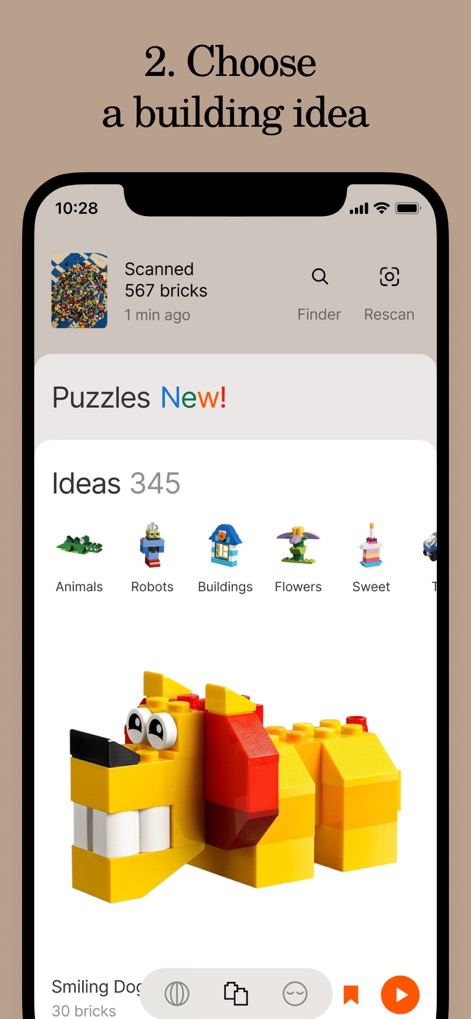
Users can browse an extensive library of ideas, categorized by themes like animals and robots, to find their next construction project.
Curated Building Ideas

The app provides clear, illustrated instructions for each build, showing required brick placements and rotation indicators.
Step-by-Step Guidance

This feature instantly highlights specific bricks within a user's pile, making it simple to locate needed components and streamline the building process.
Intelligent Brick Finder
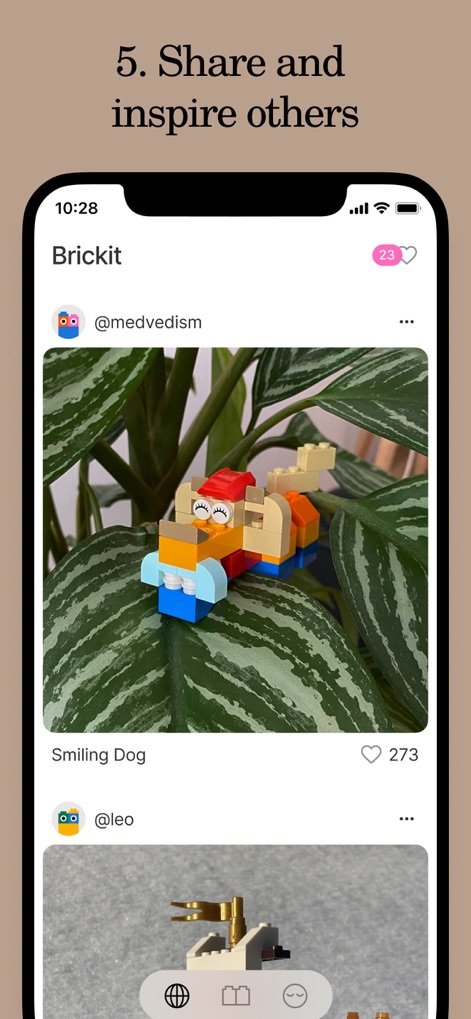
Explore a vibrant social feed where users can share their finished creations, such as the "Smiling Dog", and engage with other builders.
Community & Sharing

The app introduces a new 'Puzzles' section, offering unique challenges that transform abstract shapes into recognizable builds like a "Duckling".
Innovative Puzzles Arrive

This feature presents individual colored bricks as visual hints, guiding users towards an imaginative final creation.
Creative Hint System

Observe how simple, colored bricks combine to form an unexpected and delightful construction, encouraging playful experimentation.
Surprising Creations Unfold
Description
Download
More Like This
Apps with similar features and user experience

Arntreal
ANDREA ALBRIZIO

LEGO® Super Mario™
LEGO System A/S

Jurassic World Play
Mattel

LEGO® TECHNIC® CONTROL+
LEGO System A/S
Fukuoka / Collecting Forest
teamLab Inc.

SmartRace for Carrera Digital
Marc Bonsels

BABYMONSTER LIGHT STICK
FANLIGHT Co., Ltd

LEGO® DUPLO® Trains
LEGO System A/S

Snap Ships
Snap Ships LLC
This page is not an official page of the app or its developer, but an independent editorial publication created for informational and commentary purposes. Unless expressly stated otherwise, neither the app nor its developer is affiliated with, endorsed by, sponsored by, authorized by, or otherwise officially connected with MWM, Apple, Google Play, the app publisher, or the app's developer, and nothing on this page implies that the app was developed using MWM's services. Any trademarks, logos, screenshots, and other content remain the property of their respective owners.