
This page is not an official page of the app or its developer, but an independent editorial publication created for informational and commentary purposes. Unless expressly stated otherwise, neither the app nor its developer is affiliated with, endorsed by, sponsored by, authorized by, or otherwise officially connected with MWM, Apple, Google Play, the app publisher, or the app's developer, and nothing on this page implies that the app was developed using MWM's services. Any trademarks, logos, screenshots, and other content remain the property of their respective owners.

Camera360-Selfie Editor
Unedited photos are a choice, not a mandate. This editor hands users the power to meticulously craft their ideal visual identity, pixel by precise pixel.
Downloads
25M+User Rating
Total Ratings
1.7MPublisher
Category
Photo & VideoLocales
10Latest Version
10.02.29Size
478.7 MBFirst Released
Jun 22, 2011Core Features of Camera360: A User-Centric Analysis
An evaluation highlighting key functionalities and their impact on social media-savvy users.
Virtual Makeup Studio
This tool offers over 30 customizable makeup filters, enabling users to experiment with various styles and colors to create their ideal look.
Original Face Retouching
The app provides advanced tools for smoothing skin, refining facial features with micro-adjustments, and instant one-tap beautification, ensuring a flawless and natural appearance.
Extensive Filter Collection
It provides access to over 300 high-quality filters across diverse styles, from retro to cinematic, enabling users to achieve varied artistic effects.
Advanced Face & Body Reshaping
It allows users to meticulously refine facial and body contours through both manual and automatic adjustments, with the option to protect specific areas from editing.
Enhanced Video Selfies
The app supports video selfies ranging from 10s to 60s, allowing users to apply filters and makeup seamlessly while adding their chosen music for dynamic content.
Interactive AR Stickers
This tool integrates smart face recognition with interactive AR stickers, allowing users to add playful and dynamic elements that respond to their expressions.
Dynamic Sky Replacement
This feature allows users to transform the sky in their photos with various styles, such as anime or dreamy effects, adding a unique and imaginative touch.
Precise Color Control
The app provides fine-grained control over individual color parameters, enabling users to precisely adjust specific hues for distinctive photo aesthetics.
Frequently Asked Questions
Everything you need to know about Camera360-Selfie Editor
What is Camera360-Selfie Editor?
Camera360-Selfie Editor is a professional, easy-to-use app for photo editing and selfie retouching. It allows users to enhance images with filters, stickers, make-ups, and advanced editing tools.
Does Camera360 offer face retouching features?
Yes, Camera360 provides original face retouching. Features include smoothing skin, reshaping with 21 micro-adjustments, and one-tap beautification. Users can also protect specific parts during adjustments.
What types of photo filters are available in Camera360?
Camera360 offers diverse filters like Magic Sky, Painting, Anime, and Movie filters. It includes over 300 high-quality filters from retro to HDR, and over 30 natural and stylish makeup filters.
Can I use AR stickers in Camera360-Selfie Editor?
Yes, Camera360-Selfie Editor includes cute AR stickers with smart face recognition. These stickers capture facial expressions, allowing for interactive photo experiences, visible in screenshots showing themed stickers.
How can I cancel my Camera360 VIP subscription?
To cancel Camera360 VIP, go to iPhone "Settings" > "iTunes Store and App Store" > "Apple ID" > "View Apple ID" > "Account Settings" > "Subscribe", then select Camera360 VIP to cancel.
Does Camera360-Selfie Editor support video recording?
Yes, Camera360-Selfie Editor supports video selfies from 10 to 60 seconds. Users can customize videos with music, filters, and makeup simultaneously, enhancing their short video creations.
Can Camera360 correct image distortion or perspective?
Yes, Camera360 offers Image Correction, supporting vertical and horizontal adjustments. This feature is particularly useful for photos of buildings, ensuring lines are straight and the perspective is balanced.
The following screenshots and description are sourced directly from the app's official store listing and are the property of the app developer.
App Store
Screenshots

Fun Sticker Library
Users can instantly enhance photos with playful bunny ear overlays and glowing heart frame stickers for a fun and engaging look.

Makeup & Filter Gallery
This tool offers a diverse range of trending makeup styles, including 'Magic Skin' for flawless complexions and 'Pandora' for unique aesthetic touches.

Instant Photo Templates
The app provides diverse filter templates for quick edits, allowing users to apply cheerful celebration themes and 'Beautify' options effortlessly.
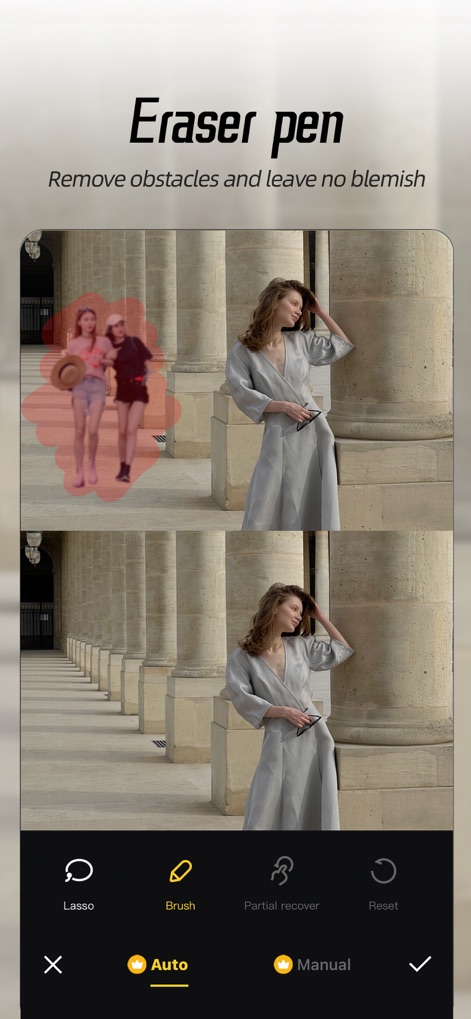
Precise Object Removal
Users can seamlessly remove unwanted elements from photos using the 'Brush' tool for detailed selection and the 'Auto' function for quick background clean-up.
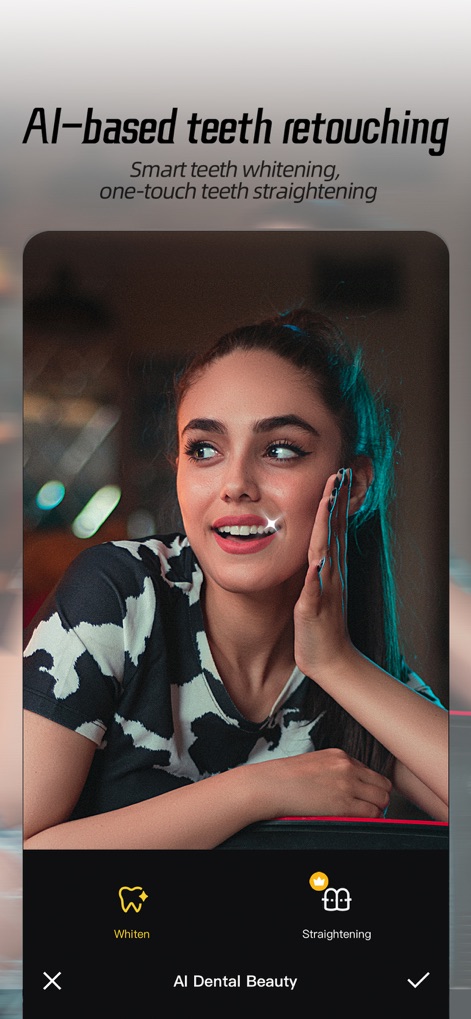
Smile Enhancement AI
This tool utilizes AI for advanced dental beautification, offering features like 'Whiten' for brighter smiles and 'Straightening' for perfect alignment.

Flawless Skin Retouch
The app ensures natural skin perfection with its 'Concealer' tool to hide imperfections and 'Smooth' feature to refine skin texture while preserving authenticity.

Creative Blur Effects
Explore a variety of sophisticated visual effects, including 'Motion blur' for dynamic shots and 'Tilt-Shift' for miniature world aesthetics.

Advanced Facial Sculpting
Achieve a stunning look with comprehensive facial reshaping options, including 'Nose' adjustments for refinement and 'Contour & Highlight' for sculpted features.
Description
Download
More Like This
Apps with similar features and user experience

Meitu- AI Photo & Video Editor
Xiamen Meitu Technology Co., Ltd.

BeautyCam-AI Photo Editor
Xiamen Meitu Technology Co., Ltd.

BeautyPlus-Selfie Photo Editor
PIXOCIAL TECHNOLOGY (SINGAPORE) PTE. LTD.

Peachy - AI Face & Body Editor
SHANTANU PTE. LTD.

Airbrush: Face Photo Editor
PIXOCIAL TECHNOLOGY (SINGAPORE) PTE. LTD.
YouCam Perfect AI Photo Editor
PERFECT MOBILE CORP.

Persona: AI Beauty Editor
TICKET TO THE MOON, INC.

Wuta Camera - Nice Shot Always
Shanghai Benqumark Network Tech Co., Ltd.

Perfect365 Makeup Photo Editor
Perfect365, Inc.
This page is not an official page of the app or its developer, but an independent editorial publication created for informational and commentary purposes. Unless expressly stated otherwise, neither the app nor its developer is affiliated with, endorsed by, sponsored by, authorized by, or otherwise officially connected with MWM, Apple, Google Play, the app publisher, or the app's developer, and nothing on this page implies that the app was developed using MWM's services. Any trademarks, logos, screenshots, and other content remain the property of their respective owners.