
This page is not an official page of the app or its developer, but an independent editorial publication created for informational and commentary purposes. Unless expressly stated otherwise, neither the app nor its developer is affiliated with, endorsed by, sponsored by, authorized by, or otherwise officially connected with MWM, Apple, Google Play, the app publisher, or the app's developer, and nothing on this page implies that the app was developed using MWM's services. Any trademarks, logos, screenshots, and other content remain the property of their respective owners.


Meitu- AI Photo & Video Editor
Visual perfection isn't optional; it's engineered. This app delivers an AI-powered arsenal, allowing users to sculpt their digital image for uncompromising online impact.
Downloads
100M+User Rating
Total Ratings
13.3MPublisher
Category
Photo & VideoLocales
16Latest Version
12.6.5Size
713.9 MBFirst Released
Feb 15, 2011Meitu- AI Photo & Video Editor: Key Feature Analysis
An AI-powered mobile solution for visual content creation and personal enhancement.
Advanced AI Retouching
It allows users to precisely refine facial features, smooth skin, remove blemishes, apply virtual makeup, and sculpt body shapes, ensuring a flawless and personalized appearance for social media.
Instant One-Tap Beautification
The app provides quick, AI-driven enhancements to achieve flawless skin, whiter teeth, fuller lips, and defined features with a single tap, catering to immediate beautification needs.
Comprehensive Video Editing & Retouching
This tool features a robust video editor that enables users to create and refine vlogs and TikTok content with advanced filters, effects, music, and portrait retouching, ensuring high-quality visual storytelling.
AI Art & Aesthetic Filters
It transforms portraits into stunning AI-generated illustrations and offers over 200 original filters, including AI-adjusted vintage aesthetics, for creating unique and trending visual content.
Real-time AI Selfie Enhancements
The app automatically detects facial features in real-time, allowing users to add fun motion stickers and hand-drawn effects directly to their selfies for dynamic and engaging content.
AI Object Remover
This tool features intelligent AI that allows users to effortlessly erase unwanted objects or distractions from their photos, ensuring clean and professional-looking compositions.
Frequently Asked Questions
Everything you need to know about Meitu- AI Photo & Video Editor
What is Meitu- AI Photo & Video Editor?
Meitu is a free all-in-one mobile photo and video editor. It provides tools for stunning edits, including filters, AI art effects, instant beautification, and advanced retouching capabilities for both images and videos.
Does Meitu offer AI-powered editing features?
Yes, Meitu incorporates AI technology. It provides AI Art Effects to transform portraits into illustrations, AI Remover for object cleanup, and AI features for real-time facial detection with motion stickers during selfies.
Can I edit videos with the Meitu app?
Yes, Meitu includes a comprehensive video editor. Users can effortlessly create and edit videos, add filters, special fonts, stickers, music, and retouch portraits with effects like makeup and body adjustments.
How can I remove unwanted objects from my photos using Meitu?
Meitu provides an AI Remover feature. This intelligent tool erases unwanted objects, such as passersby, wrinkles, marks, or text, from photos, ensuring a clean and polished image.
What exclusive features does Meitu VIP offer?
Meitu VIP members access over 1000 exclusive materials, including stickers, filters, AR cameras, and stylish makeups. VIP functions also include teeth correction, hair bangs adjustment, wrinkle removal, and eye retouch.
Does Meitu allow body reshaping with a locked background?
Yes, Meitu's Retouch features include Body Shape adjustments. Users can shape their body to be curvier, slimmer, more muscular, or taller, with the background locked to prevent distortion.
How many filters are available in the Meitu photo editor?
The Meitu photo editor offers over 200 original filters. These filters animate and liven up photos, and a new AI flash feature adjusts for vintage aesthetics.
Where can I find Meitu's privacy policy?
The privacy policy for Meitu is available at: https://pro.meitu.com/xiuxiu/agreements/global-privacy-policy.html?lang=en. This link ensures transparency regarding data handling practices.
Can Meitu instantly beautify photos?
Yes, Meitu provides an Instant Beautification feature. Users select a desired beautification level to achieve flawless skin, defined muscles, fuller lips, or whiter teeth with just one tap.
How do I contact Meitu customer support?
Users can contact Meitu customer support via email at global.support@meitu.com. An in-app support channel is also available: App → Me → Help & Feedback → Submit Feedback.
The following screenshots and description are sourced directly from the app's official store listing and are the property of the app developer.
App Store
Screenshots

Global Beauty Community
See how the app highlights its massive user base with "1.5 Billion+ Users worldwide" and social media integration via platform icons.

Aesthetic Lighting Tools
This tool demonstrates its powerful "Flash" feature and granular "Light" controls, allowing users to achieve digicam aesthetics with precise adjustments.

Instant Facial Perfection
Users can instantly 'glow up' using the app's advanced "Contour" features and varied "Decorations" to perfect facial aesthetics.

Precision Body Sculpting
The app enables users to precisely "Reshape" their body with options like "Waist" and "Legs" adjustments, ensuring the background remains "locked".
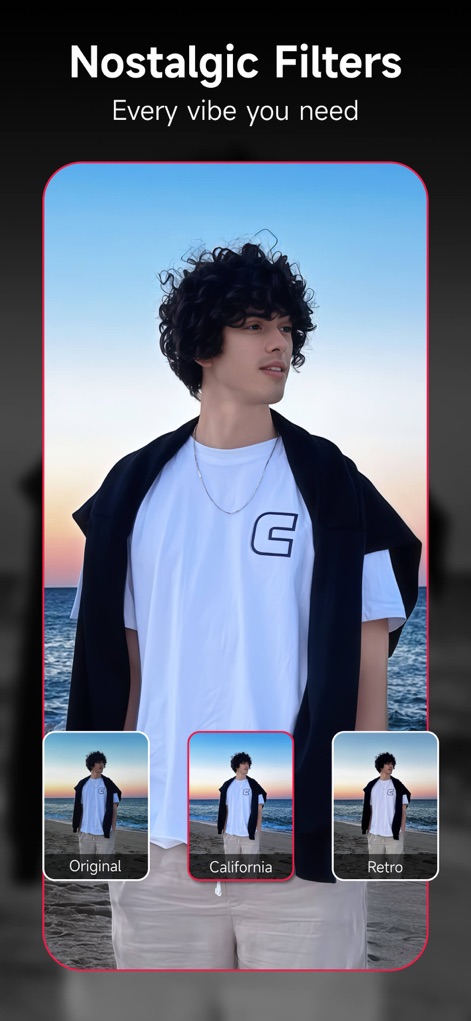
Diverse Filter Collection
Explore the app's extensive "Nostalgic Filters" collection, offering a range of vibes from "California" brights to classic "Retro" tones.

Creative Doodle Effects
Unleash creativity with the "Magic Brush" feature, allowing users to "Doodle" personalized designs and add whimsical elements like sparkling butterflies.

Intelligent Object Removal
The "AI Remover" provides "Smart Cleanup" capabilities, allowing users to effortlessly erase unwanted "Passerby" or other "Objects" from their photos.

Dynamic Video Enhancements
The video editor allows users to "Enhance, stylize, and beautify" their footage with features like "Quality Restoration" and precise "Cut" tools.
Description
Download
More Like This
Apps with similar features and user experience

BeautyCam-AI Photo Editor
Xiamen Meitu Technology Co., Ltd.

BeautyPlus-Selfie Photo Editor
PIXOCIAL TECHNOLOGY (SINGAPORE) PTE. LTD.

Peachy - AI Face & Body Editor
SHANTANU PTE. LTD.

Airbrush: Face Photo Editor
PIXOCIAL TECHNOLOGY (SINGAPORE) PTE. LTD.

YouCam Perfect AI Photo Editor
PERFECT MOBILE CORP.

Persona: AI Beauty Editor
TICKET TO THE MOON, INC.

Wuta Camera - Nice Shot Always
Shanghai Benqumark Network Tech Co., Ltd.

Perfect365 Makeup Photo Editor
Perfect365, Inc.

Polish - AI Photo Editor
SHANTANU PTE. LTD.
This page is not an official page of the app or its developer, but an independent editorial publication created for informational and commentary purposes. Unless expressly stated otherwise, neither the app nor its developer is affiliated with, endorsed by, sponsored by, authorized by, or otherwise officially connected with MWM, Apple, Google Play, the app publisher, or the app's developer, and nothing on this page implies that the app was developed using MWM's services. Any trademarks, logos, screenshots, and other content remain the property of their respective owners.