
This page is not an official page of the app or its developer, but an independent editorial publication created for informational and commentary purposes. Unless expressly stated otherwise, neither the app nor its developer is affiliated with, endorsed by, sponsored by, authorized by, or otherwise officially connected with MWM, Apple, Google Play, the app publisher, or the app's developer, and nothing on this page implies that the app was developed using MWM's services. Any trademarks, logos, screenshots, and other content remain the property of their respective owners.

Chat Backup & Direct Chat
Securely export chats to PDF, recover deleted messages, and message any number without cluttering your contacts. The essential utility for freelancers, small business owners, and digital archivists.
Downloads
500User Rating
Total Ratings
0Publisher
Category
Social NetworkingLocales
1Latest Version
4.1Size
33.9 MBFirst Released
May 6, 2025Professional Tools for Your Digital Conversations
Securely backup, recover, and streamline your messaging workflow with features designed for digital archivists and busy professionals.
Professional Chat Archiving
Export entire conversations into formatted PDF or HTML files, preserving media and timestamps for legal records or personal memories.
Frictionless Direct Messaging
Send messages to any number instantly without saving them to your contacts. Keep your phone book clean while handling marketplace deals.
Frequently Asked Questions
Everything you need to know about Chat Backup & Direct Chat
What is Chat Backup & Direct Chat app used for?
The Chat Backup & Direct Chat app recovers deleted messages, backs up chat conversations, and allows access to them. It also facilitates direct messaging without saving contacts and generates direct message links.
Can Chat Backup & Direct Chat export images and videos?
Yes, the Chat Backup & Direct Chat app supports exporting media attachments, including images, videos, and documents, alongside chat text.
What document formats does Chat Backup & Direct Chat use for export?
Chat Backup & Direct Chat supports exporting conversations in multiple formats. These include PDF, HTML, and plain text.
Do I need to connect a messaging account to view exported chats in Chat Backup & Direct Chat?
No, once chats are exported, the Chat Backup & Direct Chat app does not require a connected messaging account to view them.
Can I re-import chat files into Chat Backup & Direct Chat?
Yes, Chat Backup & Direct Chat allows quick and secure re-import of chat files from your device or cloud storage, recreating message threads with media previews.
How does Chat Backup & Direct Chat's direct message feature work?
The Chat Backup & Direct Chat app's direct message feature enables users to send messages directly to any phone number using the official API without saving it as a contact.
Does Chat Backup & Direct Chat support international numbers for direct messages?
Yes, Chat Backup & Direct Chat supports international phone numbers when utilizing its Direct Chat feature.
What iOS versions are compatible with Chat Backup & Direct Chat?
Chat Backup & Direct Chat is fully compatible with iOS 15 and above. It works with chat exports from iOS on both iPhone and iPad devices.
What are the subscription options for Chat Backup & Direct Chat?
Chat Backup & Direct Chat offers in-app purchases with weekly, monthly, and yearly subscription options.
Does Chat Backup & Direct Chat have a dark mode?
Yes, Chat Backup & Direct Chat supports both dark and light modes for its familiar chat interface.
Where can I find the privacy policy for Chat Backup & Direct Chat?
The privacy policy for Chat Backup & Direct Chat is available via the link provided in the app description: "https://wachatbackup.blogspot.com/2025/04/privacy-policy.html".
Is Chat Backup & Direct Chat considered a safe app?
Yes, Chat Backup & Direct Chat is promoted as a safe, simple, and trusted top-rated chat backup app.
The following screenshots and description are sourced directly from the app's official store listing and are the property of the app developer.
App Store
Screenshots
Promotional screen for Chat Backup and Direct Chat app featuring its security and accessibility benefits
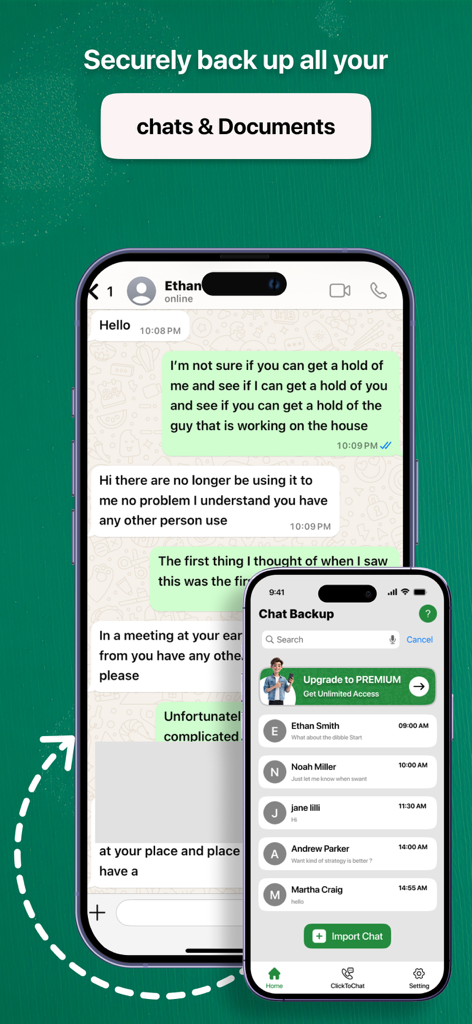
iPhone screen displaying chat backup history and message archiving features
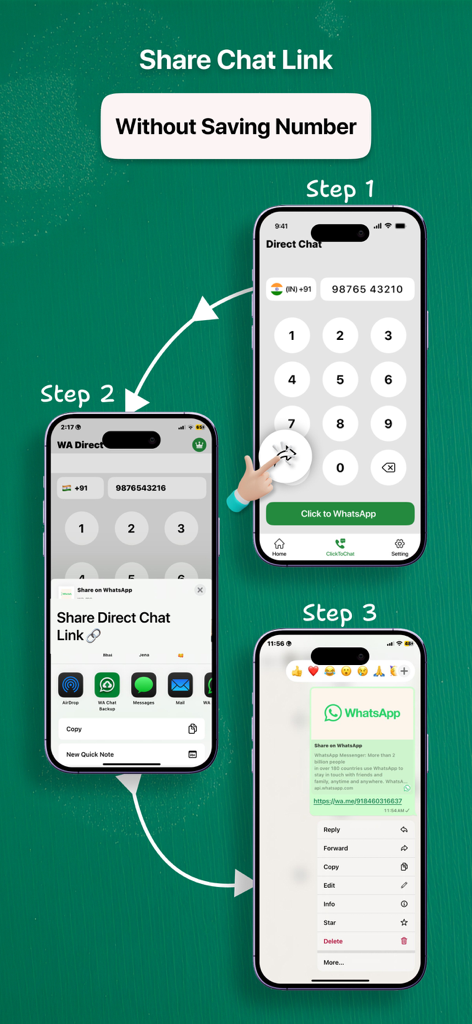
A three step tutorial showing how to generate and share a direct chat link without saving a phone number
Description
Download
More Like This
Top-ranked apps in the same category

Threads
Instagram, Inc.

Telegram Messenger
Telegram FZ-LLC

WhatsApp Messenger
WhatsApp Inc.

Meta Platforms, Inc.

Messenger
Meta Platforms, Inc.
Google Meet
Google LLC

Discord - Talk, Play, Hang Out
Discord Inc.

rednote
Xingin Information Technology (Shanghai) Co., Ltd

Tencent Technology (Shenzhen) Company Limited
This page is not an official page of the app or its developer, but an independent editorial publication created for informational and commentary purposes. Unless expressly stated otherwise, neither the app nor its developer is affiliated with, endorsed by, sponsored by, authorized by, or otherwise officially connected with MWM, Apple, Google Play, the app publisher, or the app's developer, and nothing on this page implies that the app was developed using MWM's services. Any trademarks, logos, screenshots, and other content remain the property of their respective owners.