
This page is not an official page of the app or its developer, but an independent editorial publication created for informational and commentary purposes. Unless expressly stated otherwise, neither the app nor its developer is affiliated with, endorsed by, sponsored by, authorized by, or otherwise officially connected with MWM, Apple, Google Play, the app publisher, or the app's developer, and nothing on this page implies that the app was developed using MWM's services. Any trademarks, logos, screenshots, and other content remain the property of their respective owners.


Clock-in KING OF TIME
Attendance just got a brain. This app locks down your work location, ensuring every punch counts.
Downloads
500k+User Rating
Total Ratings
341Publisher
Category
BusinessLocales
3Latest Version
5.5.0Size
76.2 MBFirst Released
Mar 9, 2021An analysis of the core functionalities for active employees using KING OF TIME attendance.
Key Features Analysis: Clock-in KING OF TIME
Secure Identity & Location Verification
This tool ensures that time entries are accurate and compliant by verifying both the user's identity and their physical presence at an authorized location. It provides employees with confidence in the integrity of their attendance records.
Biometric Authentication
The app leverages smartphone biometric capabilities (e.g., fingerprint, facial recognition) to provide a fast, secure, and convenient method for employees to authenticate themselves for clocking actions.
Geofence-Enabled Time Tracking
It allows users to clock in and out only when within designated geographical boundaries, ensuring accurate attendance based on physical presence. This automates location verification, simplifying the process for employees.
Efficient Time Recording
This tool provides a straightforward and efficient method for employees to record their work start and end times, minimizing friction in daily attendance procedures.
Frequently Asked Questions
Everything you need to know about Clock-in KING OF TIME
What is Clock-in KING OF TIME?
Clock-in KING OF TIME is the number one time attendance system in Japan. It is an employee-focused application for easy geofence clock-in and clock-out.
How does the Clock-in KING OF TIME app handle clock-in verification?
The Clock-in KING OF TIME app utilizes biometric capabilities in smartphones. It checks both the employee's identity and location during clock-in.
Is an account required to use the Clock-in KING OF TIME application?
Yes, an account for KING OF TIME and a unique login ID are required to use the Clock-in KING OF TIME application.
What are the key features of the Clock-in KING OF TIME app for geofencing?
The app offers unlimited geofence locations, a simple 3-step setup process, and allows geofence clock-in location to be completed within one minute.
What time attendance functions are available in the Clock-in KING OF TIME app?
The Clock-in KING OF TIME app allows employees to clock-in, clock-out, start breaks, and end breaks directly from the main screen.
Can employees manage time cards and requests within the Clock-in KING OF TIME app?
Yes, the app supports confirming time records, shift confirmations, vacation requests, and overtime requests. It also has a 'My Recorder' feature.
Does Clock-in KING OF TIME provide reminders and notifications?
Yes, the app provides clock-in reminders, time record error notifications, unsubmitted overtime alerts, and attendance closing reminders after initial setup.
Who is the Clock-in KING OF TIME app for?
This Clock-in KING OF TIME application is specifically designed for employees to clock in. HR managers and admins require a separate 'Admin' version.
The following screenshots and description are sourced directly from the app's official store listing and are the property of the app developer.
App Store
Screenshots

Users can swiftly manage their work attendance with the prominent digital time display and intuitive 'Clock-in' and 'Clock-out' buttons.
Effortless Time Tracking
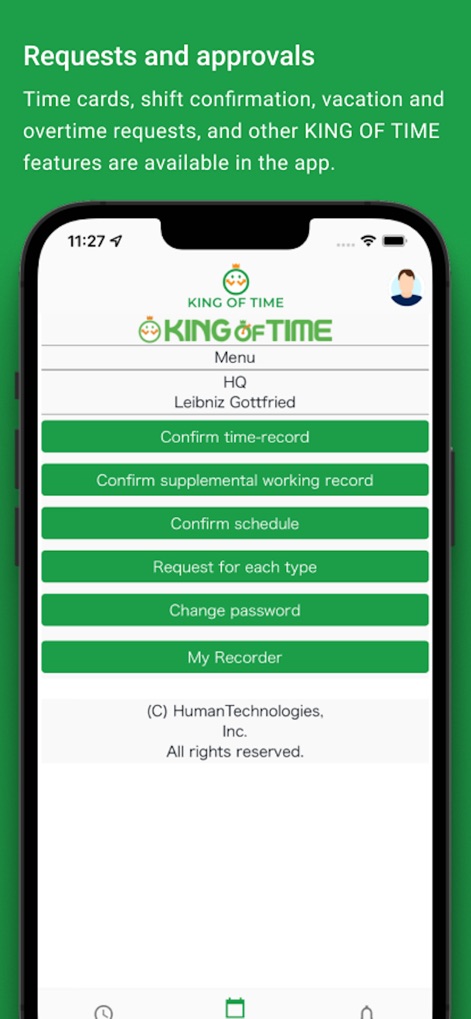
This tool simplifies administrative tasks, offering direct access to 'Confirm schedule' and the ability to 'Request for each type' of time-related adjustment.
Manage Requests Easily

The app keeps users updated with a clear 'Reminders Today' section and highlights critical issues like 'Attendance Error' and 'Unsubmitted Overtime'.
Stay Informed Instantly

Users benefit from comprehensive in-app support, featuring a search bar for quick answers and detailed articles like 'Installation and initial settings' with a table of contents.
Instant Support Access
Description
Download
More Like This
Apps with similar features and user experience
SFBB+
All Environmental Health Services Limited

安心食堂留样
Khalies Nasherz

BACtrack View
KHN Solutions Inc
miMove
Mi Move PA Limited

RoadReady
Safe Roads Alliance, Inc.

IPAF ePAL
International Powered Access Federation Limited

myLearners
Roads Corporation

ЧЗ.Бизнес
TSENTR RAZVITIYA PERSPEKTIVNYKH TEKHNOLOGI, OOO

SWS Student
JE SUIS EN COURS JSEC
This page is not an official page of the app or its developer, but an independent editorial publication created for informational and commentary purposes. Unless expressly stated otherwise, neither the app nor its developer is affiliated with, endorsed by, sponsored by, authorized by, or otherwise officially connected with MWM, Apple, Google Play, the app publisher, or the app's developer, and nothing on this page implies that the app was developed using MWM's services. Any trademarks, logos, screenshots, and other content remain the property of their respective owners.