
This page is not an official page of the app or its developer, but an independent editorial publication created for informational and commentary purposes. Unless expressly stated otherwise, neither the app nor its developer is affiliated with, endorsed by, sponsored by, authorized by, or otherwise officially connected with MWM, Apple, Google Play, the app publisher, or the app's developer, and nothing on this page implies that the app was developed using MWM's services. Any trademarks, logos, screenshots, and other content remain the property of their respective owners.


Counter Tally Count
Stop guessing. MWM's creation arms users with absolute, undeniable data on every last count.
Downloads
1M+User Rating
Total Ratings
20.0KPublisher
Category
UtilitiesLocales
18Latest Version
2026.3Size
8.7 MBFirst Released
Sep 8, 2016An evaluation of 'Counter Tally Count' for efficiency-seeking users.
Key Features Analysis
Unlimited Counters
The app provides the ability to create an unlimited number of counters, essential for users tracking multiple distinct events or habits simultaneously.
Detailed Count Logging & CSV Export
It allows users to view a detailed log of every count with exact timestamps and export this data as a CSV file, supporting robust data analysis and record-keeping.
Simple Interface
This tool features a clean and intuitive interface, ensuring ease of use and a straightforward counting experience without unnecessary distractions.
Color-coded Counters
The app enables users to assign distinct colors to individual counters, enhancing visual organization and quick identification of specific tallies.
Customizable Counter Names
It provides the flexibility to rename each counter according to specific needs, facilitating clear identification and organization of tracked items.
Adjustable Step Size
This feature allows users to customize the increment or decrement step size for each count, offering versatility for various tracking scenarios beyond simple unit increments.
Counter Locking
The app includes a lock function for individual counters, preventing unintended adjustments and ensuring the accuracy and reliability of tracked data.
Widget Support
It offers widget support, allowing users to access and update their counters directly from their device's home screen for quick and efficient tracking.
Advanced Counter Reordering
This tool features advanced sorting options, allowing users to reorder counters by criteria such as name, creation date, last update, or color, to maintain optimal organization.
Bulk Data Export
The app provides a consolidated export function, enabling users to download all counter data simultaneously for comprehensive backups or external analysis.
Frequently Asked Questions
Everything you need to know about Counter Tally Count
What is Counter Tally Count?
Counter Tally Count is a simple yet powerful tally counter application for iPhone and iPad. It enables users to create and manage unlimited counters for various purposes.
Can I customize the appearance of counters in Counter Tally Count?
Yes, Counter Tally Count offers extensive appearance customization. Users can rename each counter and assign different colors to personalize their tallies.
Does Counter Tally Count support an unlimited number of counters?
Yes, Counter Tally Count supports an unlimited number of counters. Users can create, manage, and reorder multiple tallies for various activities or items as needed.
How can I prevent accidental changes to a counter in Counter Tally Count?
Counter Tally Count allows users to lock specific counters. This feature prevents unintended modifications to the count value, ensuring data integrity for important tallies.
Can I export my counter data from the Counter Tally Count app?
Yes, the Counter Tally Count app offers data export capabilities. Users can view logs for individual counters and export them as CSV files, or export all counter data at once.
Does Counter Tally Count provide sound feedback during counting?
Yes, Counter Tally Count provides optional audible feedback. Users can enable a tic sound or speech of each number to confirm counts within the app settings.
How do I adjust the increment or decrement step size in Counter Tally Count?
Users can adjust the counting step size in Counter Tally Count. The step size is configurable from -100 to 100, allowing for flexible increments or decrements.
Does the Counter Tally Count app offer widget functionality?
Yes, the Counter Tally Count app provides widget support. This feature allows users to access and manage their counters directly from their iPhone or iPad home screen.
Can I remove advertisements from the Counter Tally Count application?
Yes, users can remove advertisements from the Counter Tally Count application. This option is available within the app's settings menu for an ad-free experience.
How do I organize my counters in Counter Tally Count?
Counter Tally Count allows users to organize counters manually or automatically. Counters can be reordered by name, creation date, last update time, or assigned color.
Does Counter Tally Count keep a history of individual counts?
Yes, Counter Tally Count keeps a detailed history of individual counts for each counter. Users can view the log showing the exact time of every count.
Is Counter Tally Count available on both iPhone and iPad?
Yes, Counter Tally Count is designed for both iPhone and iPad. It provides a simple yet powerful tally counting experience across both Apple devices.
The following screenshots and description are sourced directly from the app's official store listing and are the property of the app developer.
App Store
Screenshots
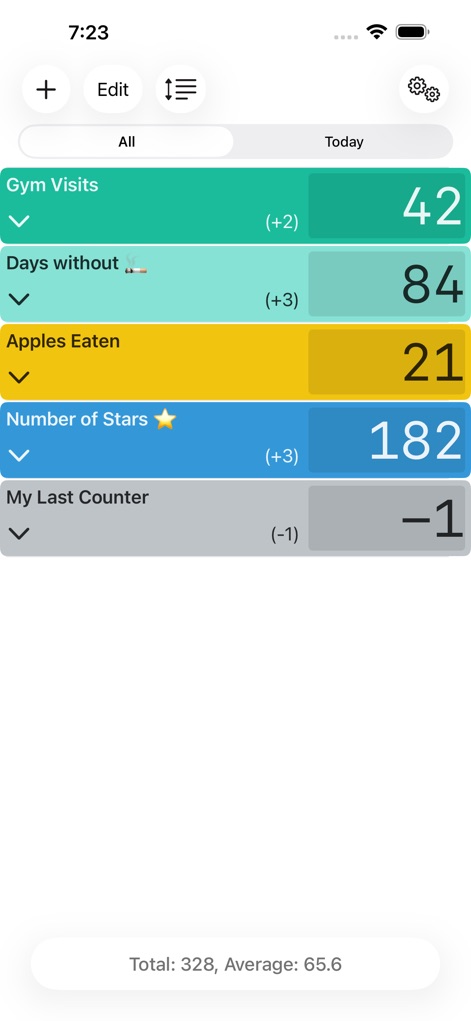
See how Counter Tally Count presents multiple, color-coded tally entries and provides a quick glance at total and average values for comprehensive tracking.
Dashboard Overview

Observe the focused counting interface, featuring a large central count display and intuitive increment/decrement buttons for precise and rapid tallying.
Focused Counting

Explore the app's extensive settings, from selecting a default interface color to enabling useful features like vibration feedback for a personalized experience.
App Customization
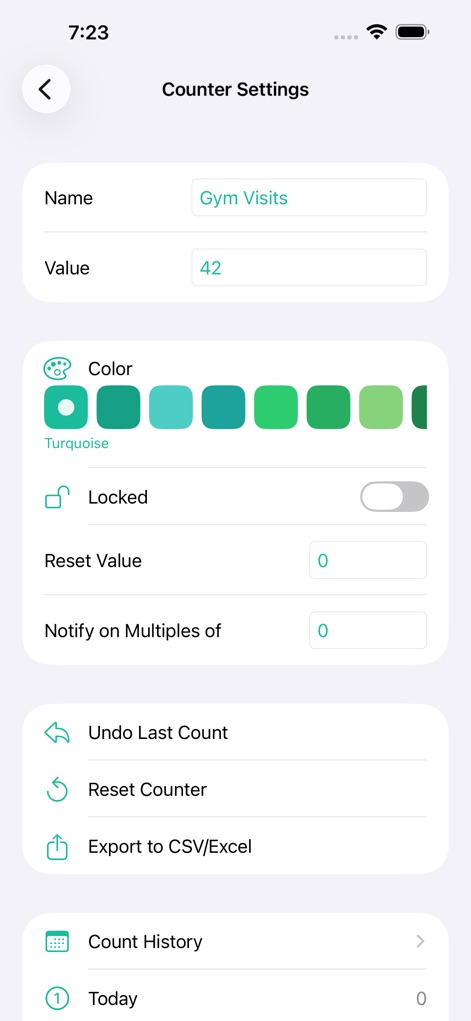
Discover how users can configure individual counters, setting a custom name and value, and utilize advanced options such as exporting data to CSV/Excel.
Counter Configuration
Description
Download
More Like This
Apps with similar features and user experience

Kawaii Sushi Counter: Kawashi
JOSE DOMINGO CASTRO CRESPO

Domino Apunte
DMICANO LLC

Sushi Count
Sean Gransee

Sushi Score - Count your sushi
Jonas Boserup

Scoreboard: Keep 2 Teams Score
Edwin Chan

Super Scoreboard
Appcano LLC
Counter+.
Unicom TOV

Point Counter - Scoreboard
One Pixel Studio s. r. o.

Sushiter: Sushi Count
Ruben Sanchez
This page is not an official page of the app or its developer, but an independent editorial publication created for informational and commentary purposes. Unless expressly stated otherwise, neither the app nor its developer is affiliated with, endorsed by, sponsored by, authorized by, or otherwise officially connected with MWM, Apple, Google Play, the app publisher, or the app's developer, and nothing on this page implies that the app was developed using MWM's services. Any trademarks, logos, screenshots, and other content remain the property of their respective owners.