
This page is not an official page of the app or its developer, but an independent editorial publication created for informational and commentary purposes. Unless expressly stated otherwise, neither the app nor its developer is affiliated with, endorsed by, sponsored by, authorized by, or otherwise officially connected with MWM, Apple, Google Play, the app publisher, or the app's developer, and nothing on this page implies that the app was developed using MWM's services. Any trademarks, logos, screenshots, and other content remain the property of their respective owners.


cTrader: Trading & Charting
Complexity, demystified. This app empowers users to command markets, not just react to them.
Downloads
500k+User Rating
Total Ratings
5.6KPublisher
Category
FinanceLocales
23Latest Version
5.8.130Size
264.6 MBFirst Released
Dec 5, 2013An analytical overview of key features for experienced retail and institutional traders.
cTrader: Advanced Mobile Trading Platform Evaluation
Sophisticated Technical Analysis
The app provides an extensive suite of technical analysis tools, including five chart types, five view options, sixteen drawing tools, and sixty-five popular technical indicators, enabling deep market scrutiny.
Multi-Asset Trading Capabilities
It allows users to trade a wide array of global assets, encompassing Forex, Metals, Oil, Indices, Stocks, and ETFs, facilitating diversified portfolio management.
Premium Execution Model (STP/NDD)
This tool features a Direct Processing (STP) and No Dealing Desk (NDD) trading platform, ensuring transparent pricing and efficient order execution without re-quotes.
Advanced Order Types & Management
The app offers a complete range of order types and advanced order management settings, empowering users with precise control over trade entry, exit, and risk.
Comprehensive Trade Statistics
It provides detailed trade statistics, allowing users to thoroughly review their trading strategies and evaluate performance over time for continuous improvement.
Responsive Charts & One-Click Trading
The app features fluid and responsive charts combined with a QuickTrade mode, enabling rapid one-click trading directly from the charts for swift execution.
Real-time Price Alerts
It allows users to set real-time price alerts, notifying them instantly when a specified price level is reached, ensuring no market opportunity is missed.
Integrated News Feeds
The app includes links to various news sources, keeping traders informed about significant market events that may influence their trading decisions.
Frequently Asked Questions
Everything you need to know about cTrader: Trading & Charting
What is cTrader?
cTrader is a premium mobile trading platform for buying and selling global assets across Forex, Metals, Oil, Indices, Stocks, and ETFs. It offers advanced tools for both novice and experienced traders.
What types of assets can I trade on the cTrader app?
The cTrader app allows trading of global assets, including Forex, Metals, Oil, Indices, Stocks, and ETFs, providing a diverse investment portfolio.
Does cTrader support direct processing (STP) and No Dealing Desk (NDD) trading?
Yes, the cTrader platform supports direct processing (STP) and operates as a No Dealing Desk (NDD) trading platform, ensuring efficient and transparent trade execution.
What technical analysis tools are available in the cTrader app?
cTrader offers sophisticated technical analysis tools, including 5 chart types, 5 chart view options, 16 chart drawings, and 65 popular technical indicators for in-depth market analysis.
Can I set price alerts in the cTrader app?
Yes, cTrader includes Price Alerts. Users can configure notifications to get informed when a specific price level is reached, facilitating timely trading decisions.
Does the cTrader app provide trade statistics?
Yes, cTrader provides detailed Trade Statistics. Users can review their strategies and trade performance directly within the app to optimize their trading approach.
How many active traders use the cTrader platform?
The cTrader platform has over 11 million active traders, demonstrating its widespread use and community engagement in global financial markets.
Does cTrader offer risk management tools?
Yes, cTrader offers advanced protections and risk management tools, including various order types like Market, Limit, Stop, and Stop-limit, along with Take Profit settings.
Can I use trading bots with cTrader?
Yes, cTrader supports trading bots. The cTrader Algo feature provides 24/7 free cloud execution for trading bots (cBots), allowing automated trading on the go.
Does cTrader support copy trading?
Yes, cTrader offers cross-broker copy trading through its 'cTrader Copy' feature. Users can copy strategies from other traders, with details like ROI visible.
What login options does the cTrader app offer?
The cTrader app provides multiple login options, including Apple, Facebook, and Google accounts, as well as a dedicated cTrader ID, for convenient access.
Does cTrader offer a dark theme?
Yes, cTrader offers a Dark Theme. This eye-friendly interface is popular among traders and can be customized to personal preferences.
Does the cTrader app support multiple languages?
Yes, the cTrader app supports 22 languages. Users can access all platform features translated into their native language for a localized trading experience.
Can I see detailed trade receipts in cTrader?
Yes, cTrader provides detailed trade receipts. These receipts ensure transparent trading by showing specific information like Net P&L, Pips, Fees, and trade direction.
Does cTrader show market sentiment?
Yes, cTrader features a Market Sentiment Indicator. This tool shows how other people are trading, offering insights into overall market positioning and trends.
The following screenshots and description are sourced directly from the app's official store listing and are the property of the app developer.
App Store
Screenshots
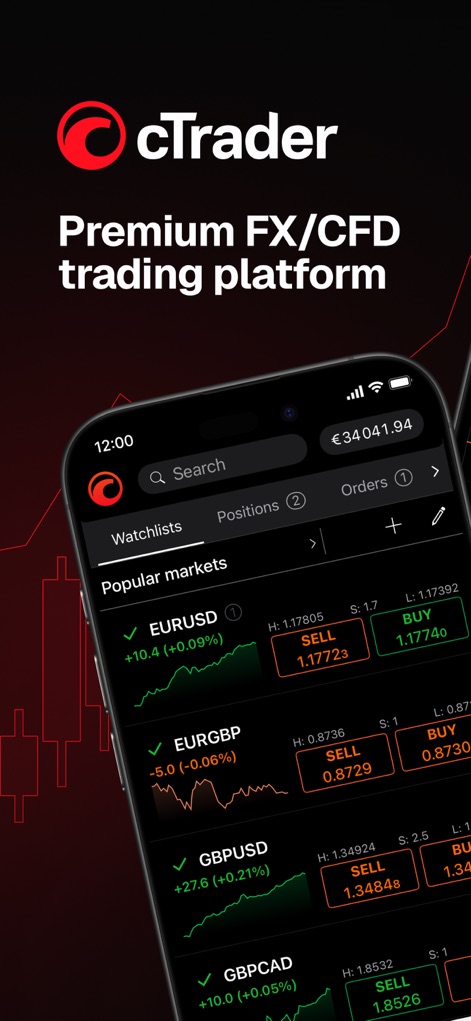
The app presents a dynamic watchlist of popular markets like EURUSD and EURGBP, displaying real-time price movements and instant trading options.
Market Watchlist Hub

Users gain deep insights through detailed candlestick charts for assets such as XAUUSD, complemented by integrated price alert functionality.
Advanced Chart Views

This tool offers comprehensive trade receipts detailing Net P&L and fees, alongside a visual representation of bid price changes over time.
Transparent Trade History

The platform empowers traders with an interactive risk-reward calculator directly on the chart, visualizing potential profit/loss zones and lot sizes.
Dynamic Risk Analysis
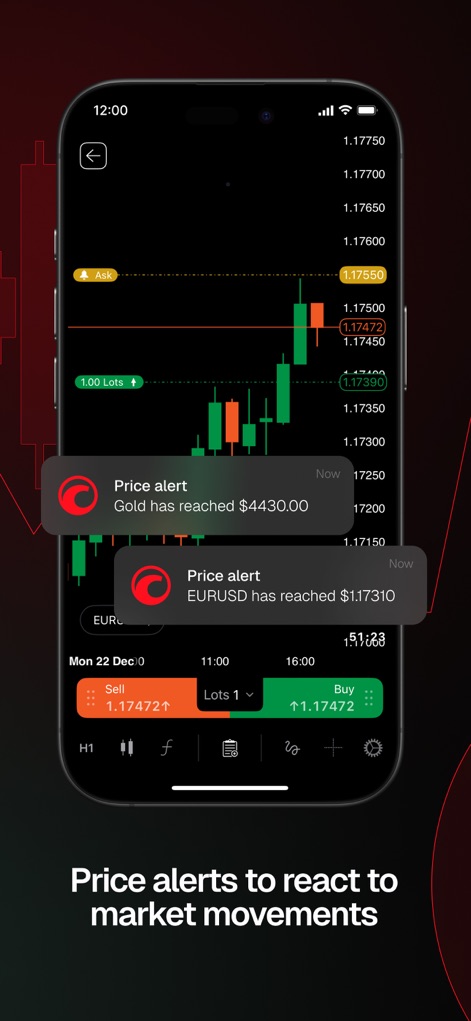
The app ensures traders stay informed with real-time price alerts for instruments like Gold and EURUSD, delivering notifications directly to the user.
Instant Market Alerts

This screenshot visually emphasizes the platform's expansive reach with "11M+" active traders, reflecting its broad adoption across the global market.
Expansive Trader Network

Users can execute advanced order types such as Market, Limit, and Stop orders, customizing their strategy with detailed "Take profit" and "Stop Loss" settings.
Precise Order Control

The tool combines visual trading signals and comprehensive technical charts with direct access to market news from providers like FXStreet.
Integrated News & Signals

The cTrader Copy feature allows users to explore and replicate diverse trading strategies, with clear ROI percentages and performance charts for each.
Diverse Copy Strategies

cTrader Algo serves as a dedicated hub for managing automated trading with listed cBots and options to add new instances for continuous operation.
Algorithmic Trading Hub
Description
Download
More Like This
Apps with similar features and user experience

IUX: Online Trading
International United Expertise Holding Ltd.

光大期货官方开户交易平台-尊享版
Everbright Futures Co., Ltd.

Forex Trading Broker FOREX.com
GAIN Capital Group LLC

国泰君安期货
Guotai Junan Futures Co., Ltd.

方正中期期货-期货开户交易软件
FOUNDER CIFCO FUTURES CO., LTD.

广发期货投资交易-期货开户交易软件
GF Futures Co., Ltd.

TMGM: Global CFD Trading App
Trademax Australia Limited

Tradovate: Trade & Invest
Tradovate, LLC

PrimeXBT: Trading & Investing
Prime XBT Trading Services Ltd.
This page is not an official page of the app or its developer, but an independent editorial publication created for informational and commentary purposes. Unless expressly stated otherwise, neither the app nor its developer is affiliated with, endorsed by, sponsored by, authorized by, or otherwise officially connected with MWM, Apple, Google Play, the app publisher, or the app's developer, and nothing on this page implies that the app was developed using MWM's services. Any trademarks, logos, screenshots, and other content remain the property of their respective owners.