
This page is not an official page of the app or its developer, but an independent editorial publication created for informational and commentary purposes. Unless expressly stated otherwise, neither the app nor its developer is affiliated with, endorsed by, sponsored by, authorized by, or otherwise officially connected with MWM, Apple, Google Play, the app publisher, or the app's developer, and nothing on this page implies that the app was developed using MWM's services. Any trademarks, logos, screenshots, and other content remain the property of their respective owners.


Cubasis LE 3
Unleash studio power on your iPhone or iPad. The app proves to be a robust mobile studio. Users create professional tracks anywhere.
Downloads
1M+User Rating
Total Ratings
1.4KPublisher
Category
MusicLocales
1Latest Version
3.8.3Size
1.2 GBFirst Released
Mar 29, 2020An evaluation of key features impacting aspiring and intermediate music producers on iOS.
Cubasis LE 3: Mobile Production Powerhouse Analysis
Scalable Functionality via IAPs
The app offers extensive expandability through in-app purchases, allowing users to unlock the full Cubasis feature set and integrate professional-grade third-party plugins.
Universal iOS Compatibility
The app provides seamless operation and a consistent user experience across both iPhone and iPad, catering to mobile music production needs.
Advanced Mixer and Pro-Grade Effects
It features a comprehensive full-screen mixer and professional-grade effects, complete with ready-to-use presets, enabling users to achieve high-quality mixes.
Intuitive Audio and MIDI Editors
This tool offers streamlined audio and MIDI editors, providing intuitive workflows and handy tools for precise creation and mastering of tracks.
Built-in MicroSonic Instruments
The app includes the MicroSonic virtual instrument, featuring 25 sounds based on HALion Sonic and Allen Morgan drum kits, for immediate melodic and rhythmic composition.
External Hardware Integration
It allows users to connect external devices such as guitars, microphones, and MIDI hardware, including MIDI over Bluetooth LE, for recording and control.
Versatile Recording Modes
This tool provides overdub and looper recording modes, offering flexibility to adapt to various creative recording processes.
High-Resolution MIDI Editing
It provides 960 PPQN MIDI resolution, ensuring precise and detailed editing of MIDI events for professional-level compositions.
Frequently Asked Questions
Everything you need to know about Cubasis LE 3
Does Cubasis LE 3 require a hardware device to unlock its features?
Yes, Cubasis LE 3 requires a supported hardware device to unlock its full feature set. Without it, the app operates in demo mode.
What are the core functions of Cubasis LE 3?
Cubasis LE 3 is a compact mobile multitouch sequencer. It is designed for recording, editing, and mixing music on iPhone and iPad with quick and easy operation.
Is Cubasis LE 3 compatible with both iPhone and iPad?
Yes, Cubasis LE 3 offers universal app support, allowing it to run on both iPhone and iPad. This is a new feature in Cubasis LE 3.
What virtual instruments are available in Cubasis LE 3?
Cubasis LE 3 includes a virtual keyboard and MicroSonic instruments. These feature 25 sounds based on acclaimed HALion Sonic and Allen Morgan drum kits.
Can Cubasis LE 3 connect to external musical equipment?
Yes, Cubasis LE 3 allows connecting external devices like guitars, vocals, and keyboard hardware via MIDI, including Bluetooth LE support.
What is the maximum number of audio and MIDI tracks supported by Cubasis LE 3?
Cubasis LE 3 supports up to 4 audio tracks and 4 MIDI tracks, allowing users to build their musical projects efficiently.
How can I unlock all features of the full Cubasis version within Cubasis LE 3?
You can unlock all features of the full Cubasis version by purchasing an in-app purchase directly within Cubasis LE 3.
Is it possible to transfer in-app purchases from Cubasis LE 2 to Cubasis LE 3?
Yes, Cubasis LE 3 allows users to freely transfer previous plug-in in-app purchases made in Cubasis LE 2.
Does Cubasis LE 3 feature a full-screen mixer and professional effects?
Yes, Cubasis LE 3 includes a full-blown mixer that extends to full-screen. It also offers pro-grade effects with ready-to-use presets.
What audio editing tools are available in Cubasis LE 3?
Cubasis LE 3 provides an Audio Editor with tools such as trim, reverse, normalize, fade in, and fade out for effective file editing.
What is the MIDI resolution offered by Cubasis LE 3?
Cubasis LE 3 offers a 960 PPQN MIDI resolution, ensuring precise audio and MIDI event editing at the highest level.
Does Cubasis LE 3 include a reverb effect?
Yes, Cubasis LE 3 includes the super-versatile RoomWorks SE reverb effect. It features an intuitive graphical display for adjustments and comes with presets.
What audio engine and resolution does Cubasis LE 3 use?
Cubasis LE 3 uses a 32-bit floating point audio engine. It supports an audio I/O resolution of 16-bit/44.1 + 48 kHz.
Does Cubasis LE 3 have an undo history?
Yes, Cubasis LE 3 includes an undo with history list feature. This allows users to quickly revert to earlier versions of their song.
The following screenshots and description are sourced directly from the app's official store listing and are the property of the app developer.
App Store
Screenshots
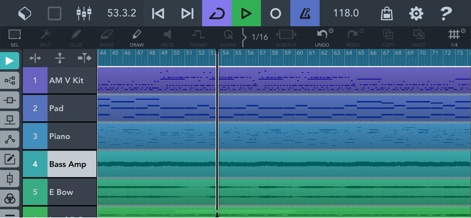
Users can effortlessly arrange musical ideas across multiple colored track lanes and precisely time events using the detailed timeline ruler.
Track Sequencing Interface
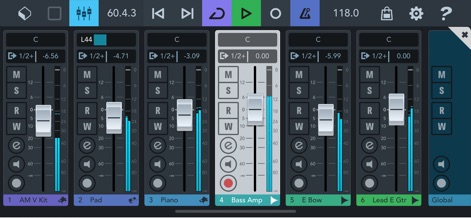
The app offers a comprehensive full-screen mixer featuring individual channel faders and detailed level meters for precise audio balancing.
Professional Mixing Controls
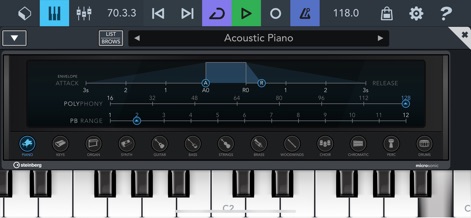
Aspiring producers can sculpt unique sounds using the ADSR envelope controls and explore a wide array of instrument types via the virtual keyboard.
Instrument Sound Design
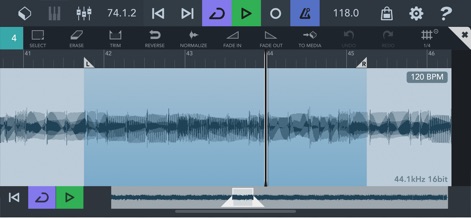
This tool provides a clear audio waveform display for intricate adjustments and dedicated tools like 'Trim' and 'Fade In' for flawless edits.
Precise Audio Editing
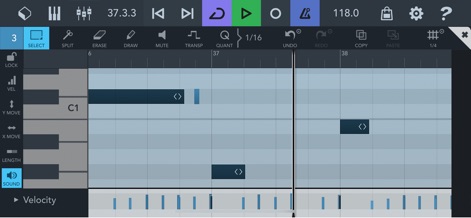
Musicians can refine their compositions within the intuitive MIDI notes grid and adjust dynamics using the integrated velocity editor.
MIDI Composition Workspace
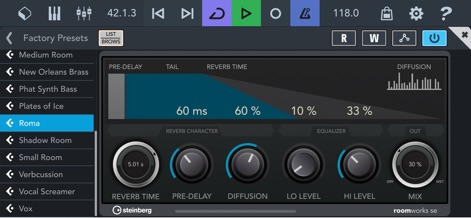
The app's RoomWorks SE reverb offers a visual representation of its characteristics and granular control over parameters like 'Reverb Time' and 'Pre-Delay'.
Advanced Reverb Effects
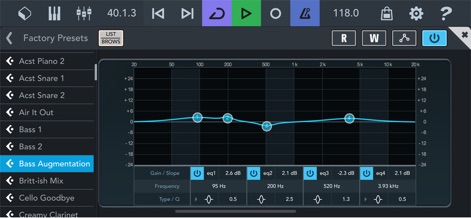
This tool allows for precise tonal shaping with its graphical EQ curve and detailed frequency and gain adjustment controls.
Surgical EQ Adjustments
Description
Download
More Like This
Apps with similar features and user experience

Loopy Pro: Looper DAW Sampler
A Tasty Pixel

AUM - Audio Mixer
Kymatica AB

Drambo
Jaroslaw Jacek

Groove Rider 2
Dmitrij Pavlov

BandLab – Music Maker & Beats
BandLab Singapore Pte Ltd

Medly
Medly Labs Inc.

Cubasis 3 - DAW & Music Studio
Steinberg Media Technologies GmbH

KORG Gadget 3
KORG INC.
iMPC Pro 2 for iPhone
Akai Professional
This page is not an official page of the app or its developer, but an independent editorial publication created for informational and commentary purposes. Unless expressly stated otherwise, neither the app nor its developer is affiliated with, endorsed by, sponsored by, authorized by, or otherwise officially connected with MWM, Apple, Google Play, the app publisher, or the app's developer, and nothing on this page implies that the app was developed using MWM's services. Any trademarks, logos, screenshots, and other content remain the property of their respective owners.