
This page is not an official page of the app or its developer, but an independent editorial publication created for informational and commentary purposes. Unless expressly stated otherwise, neither the app nor its developer is affiliated with, endorsed by, sponsored by, authorized by, or otherwise officially connected with MWM, Apple, Google Play, the app publisher, or the app's developer, and nothing on this page implies that the app was developed using MWM's services. Any trademarks, logos, screenshots, and other content remain the property of their respective owners.


Dazz Cam - Vintage Camera
Digital capture just got a history lesson. The app arms users with instant, raw film character, bypassing tedious post-production to secure an authentic retro vibe.
Downloads
100M+User Rating
Total Ratings
2.2MPublisher
Category
Photo & VideoLocales
14Latest Version
2.16Size
137.1 MBFirst Released
Aug 17, 2018Dazz Cam - Vintage Camera: Core Functionality Overview
An analytical breakdown of key features empowering creative, retro-inspired content creation for modern social media users.
Authentic Vintage Film Recreation
The app meticulously recreates the colors and textures of classic film stocks from the 80s, offering a genuine retro photographic experience without complex editing.
Retro Video Capture Modes
It allows users to capture videos with distinct retro aesthetics, including formats like 8mm, 16mm, and VHS tape, perfect for creating nostalgic social media content.
Extensive Camera & Film Emulations
This tool features support for numerous retro film formats like 135, 120, instant, and disposable cameras, alongside modern digital profiles such as compact and CCD cameras, broadening creative options.
Effortless One-Tap Vintage Capture
The app provides a streamlined experience, allowing users to capture authentic vintage photos or videos with just one tap, encouraging enjoyment of the moment rather than extensive post-editing.
Retro-fy Existing Photos & Videos
It enables users to import their pre-existing photos and videos, applying the app's signature vintage effects and styles to their archived memories or content.
Artistic Lens & Flash Effects
The app offers creative lens simulations like Fisheye and Prism, alongside color flash filters, empowering users to add unique and artistic distortions or lighting to their visual content.
Frequently Asked Questions
Everything you need to know about Dazz Cam - Vintage Camera
What is Dazz Camera?
Dazz Camera is an app that recreates authentic vintage photos and videos with one tap. It is inspired by classic film cameras from the 80s, offering various retro film formats and modern digital camera color profiles.
What types of vintage film formats does Dazz Cam support?
Dazz Cam supports shooting in retro film formats like 135 film, 120 film, toy cameras, slide film, half-frame cameras, instant cameras, 3D film photography, and disposable cameras.
Can Dazz Camera record retro-style videos?
Yes, Dazz Camera records videos with a retro vibe. It supports formats such as 8mm film camera, 16mm film camera, VHS tape camera, DCR camera, movie camera, and slide projector.
What advanced photo capture features does Dazz Cam offer?
Dazz Cam offers features like saving negatives, double exposure, a timer, flash, adjusting color temperature and tint, focal length adjustments, exposure compensation, ISO, shutter speed, stabilization, and composition grids.
Does Dazz Camera include special lens effects?
Yes, Dazz Camera includes special lens effects. These features comprise a fisheye lens, starburst lens, color flash filters, prism lens, and ND filter for creative photography.
Can Dazz Cam edit existing photos from my device?
Yes, Dazz Cam can import existing photos for editing. This feature is available on select cameras within the application, allowing users to apply vintage effects to their stored images.
How do I access all cameras and accessories in Dazz Cam?
You access all cameras and accessories in Dazz Cam by joining Dazz Pro. This is a subscription service that unlocks all premium features and content within the application.
How does the Dazz Pro subscription work for Dazz Camera?
The Dazz Pro subscription automatically renews unless auto-renew is turned off 24 hours before the period ends. Payment charges to your iTunes account upon purchase confirmation.
How do I manage or cancel my Dazz Pro subscription?
You manage or turn off auto-renew for your Dazz Pro subscription in your Apple ID account settings. This is accessible at any time after the initial purchase.
Where can I find the terms of use for Dazz Camera?
The terms of use for Dazz Camera are available at http://dazz.ltd/dazz/terms_and_conditions.html. This link is provided within the app description for user reference.
Does Dazz Cam support double exposure effects?
Yes, Dazz Cam supports double exposure effects. Users can layer two photos to create this artistic outcome, adding a unique vintage feel to their images.
Can Dazz Camera apply starburst lens effects to photos?
Yes, Dazz Camera applies starburst lens effects to photos. This feature is listed among the additional cool features and accessories available in the app for creative visual enhancements.
The following screenshots and description are sourced directly from the app's official store listing and are the property of the app developer.
App Store
Screenshots

Camera Collection Preview
Discover the extensive collection of vintage camera models and the "Analog Vintage Cameras" title, showcasing the variety of film-inspired options available.

Instant Film Aesthetics
Users can see the classic Polaroid-style frames and the distinctive "Inst Color" feature, delivering instant vintage photo looks.

Dynamic 3D Effects
Explore the striking "D3D" camera effect which creates unique, layered shots from a single capture, enhancing depth and movement.

Creative Flare Effects
Witness the dazzling "Starburst" lens effect complementing the "DFunS" camera, adding a touch of glamour and light to dynamic shots.

Retro Video Capture
The app allows users to capture videos with an authentic 8mm film aesthetic, complete with classic film strip borders and aged visual quality.
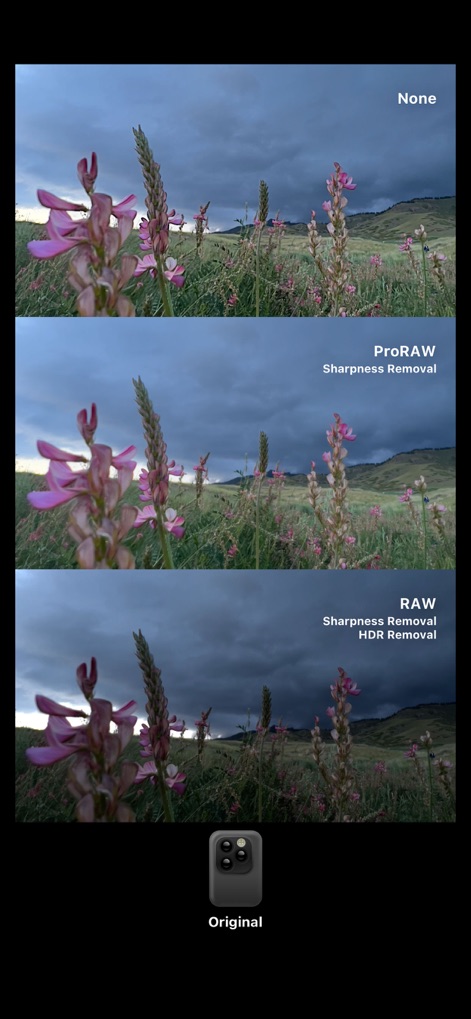
Advanced Image Processing
Compare the distinct differences between "ProRAW" and "RAW" image processing options, highlighting the app's advanced control over photo quality and detail.

Authentic VHS Experience
Recreate nostalgic video memories with the distinct VHS visual style, featuring authentic date/time overlays and analog tape imperfections.

Artistic Double Exposure
Unleash creativity with the stunning "Double Exposure" feature, allowing users to layer two images for ethereal and artistic compositions using the "CT2F" camera.
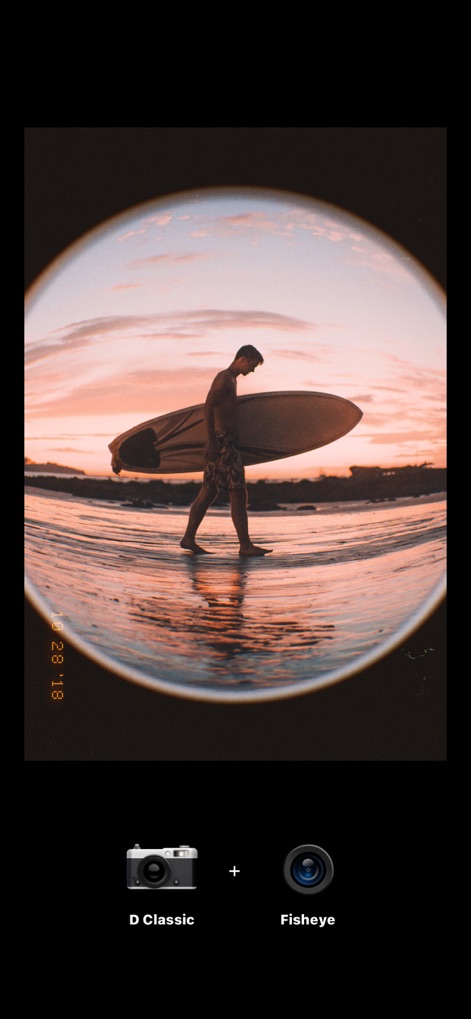
Iconic Fisheye Perspective
Capture expansive and distorted views using the unique "Fisheye" lens effect combined with the "D Classic" camera, perfect for dynamic and wide-angle shots.

Creative Flash Effects
Experiment with expressive lighting using the "Flash C" feature, which applies a bold color overlay when taking photos with the "Dazz Classic" camera.
Description
Download
More Like This
Apps with similar features and user experience

Kapi - Vintage Film Camera
Shanghai Yuhuan Technology Co., Ltd.
ProCCD - Digital Film Camera
秉妍 蔡

Fomz - Vintage Analog Camera
Guangzhou Mengdong Information Technology Co., Ltd.

Liit - Photo & Video Editor
DAZZ PTE. LTD.
1998 Cam - Vintage Camera
Huu Nguyen Chi

y2k: 2000s photo editor
Abel Thomas Noble

Uplens: Photo & Video Editor
MPGAMES LTD

Buttercam
Beijing Muke Technology Co., Ltd.

West - Photo & Video Editor
TheStudio, LLC
This page is not an official page of the app or its developer, but an independent editorial publication created for informational and commentary purposes. Unless expressly stated otherwise, neither the app nor its developer is affiliated with, endorsed by, sponsored by, authorized by, or otherwise officially connected with MWM, Apple, Google Play, the app publisher, or the app's developer, and nothing on this page implies that the app was developed using MWM's services. Any trademarks, logos, screenshots, and other content remain the property of their respective owners.