
This page is not an official page of the app or its developer, but an independent editorial publication created for informational and commentary purposes. Unless expressly stated otherwise, neither the app nor its developer is affiliated with, endorsed by, sponsored by, authorized by, or otherwise officially connected with MWM, Apple, Google Play, the app publisher, or the app's developer, and nothing on this page implies that the app was developed using MWM's services. Any trademarks, logos, screenshots, and other content remain the property of their respective owners.


Dialog - Translate Speech
Stop guessing. Dialog turns foreign tongues into your native language, instantly.
Downloads
7.5M+User Rating
Total Ratings
51.4KPublisher
Category
ReferenceLocales
19Latest Version
4.72.1Size
327.1 MBFirst Released
Apr 22, 2018An evaluation of the application's core capabilities for diverse communication needs.
Dialog - Translate Speech: Key Analytical Features
Offline Translation Mode
It allows users to translate text even without an internet connection, which is crucial for international travelers and digital nomads.
Real-time Voice Translation
The app provides instant voice-to-voice translation across over 175 languages, facilitating natural and immediate spoken communication.
AI-Enhanced Text Translation
This tool features sophisticated AI capabilities that allow users to not only translate text but also adjust its tone, check grammar, and modify length for nuanced communication.
Visual Translation via Camera & AR
It enables users to translate text instantly from signs, menus, or images using the camera, and also identify and translate physical objects via AR.
In-App Translation Keyboard
The app integrates a translation keyboard, allowing users to communicate effortlessly in messaging apps and emails in different languages.
Robust Speech Recognition
The app boasts advanced speech recognition technology that performs reliably even in challenging and noisy environments, ensuring accurate translations.
Automatic Language Detection
It automatically detects the spoken language between selected options, simplifying the translation process for users.
Apple Watch Integration
The app extends its functionality to an Apple Watch companion app, providing instant translations directly from the user's wrist for added convenience.
Frequently Asked Questions
Everything you need to know about Dialog - Translate Speech
What is Dialog - Translate Speech?
Dialog - Translate Speech is an app providing quick speech and text translation. It supports over 175 languages for voice-to-voice, text, and camera-based translations, facilitating communication and language learning.
How many languages does Dialog - Translate Speech support?
Dialog - Translate Speech supports instantaneous translation between more than 175 languages and dialects for both speech and text. This includes a wide range of global languages.
Does Dialog - Translate Speech offer camera translation?
Yes, Dialog - Translate Speech includes a Camera Translator feature. Users can utilize their device's camera to instantly translate text found on signs, menus, or any other printed material.
Can I use Dialog - Translate Speech without an internet connection?
Yes, Dialog - Translate Speech offers an offline mode. This feature allows users to translate texts even when they do not have an active internet connection.
What are the subscription options for Dialog - Translate Speech?
Dialog - Translate Speech offers a weekly subscription option. This subscription automatically renews unless turned off at least 24 hours before the current period ends.
Is Dialog - Translate Speech available on Apple Watch?
Yes, Dialog - Translate Speech has an Apple Watch app. It enables instant translation of over 175 languages directly from the user's wrist. Unlimited translations require a Dialog Plus subscription.
What AI tools are available in Dialog - Translate Speech?
Dialog - Translate Speech provides advanced AI tools. Users can adjust the tone, check grammar, and change the length of their translations to refine the output.
Does Dialog - Translate Speech translate physical objects using AR?
Yes, Dialog - Translate Speech includes an AR Translator feature. This allows users to employ their camera to translate the names of physical objects located around them in real-time.
Can Dialog - Translate Speech be used for messaging?
Yes, Dialog - Translate Speech includes a translation keyboard feature. This allows users to communicate via text and email with friends and contacts directly through a built-in translator.
What translation engine does Dialog - Translate Speech use?
Dialog - Translate Speech utilizes Google Translate to power its translations. This ensures excellent accuracy and lightning-fast results across supported languages.
The following screenshots and description are sourced directly from the app's official store listing and are the property of the app developer.
App Store
Screenshots

See the app's intuitive interface with its prominent microphone button and real-time speech waveform display.
Instant Voice Translation

Discover the wide range of over 175 languages available, clearly indicated by the diverse country flags and user-friendly language selection options.
Extensive Language Support

Witness the camera translator in action, effortlessly converting foreign signs into understandable text and offering a clear text/object translation toggle.
Visual Text Translation

Explore the integrated translation keyboard, enabling users to effortlessly chat in foreign languages and view real-time translated message bubbles.
Seamless Keyboard Integration

Understand how the app provides essential offline translation, signaled by the airplane icon and the "Offline Mode On" notification.
Offline Capability

Navigate the app's comprehensive phrasebook feature, offering categorized common phrases for quick reference and language-specific translations.
Essential Phrasebook Access

Experience the innovative AR translator, instantly identifying and translating physical objects in the environment with overlaid text labels.
Augmented Reality Translation
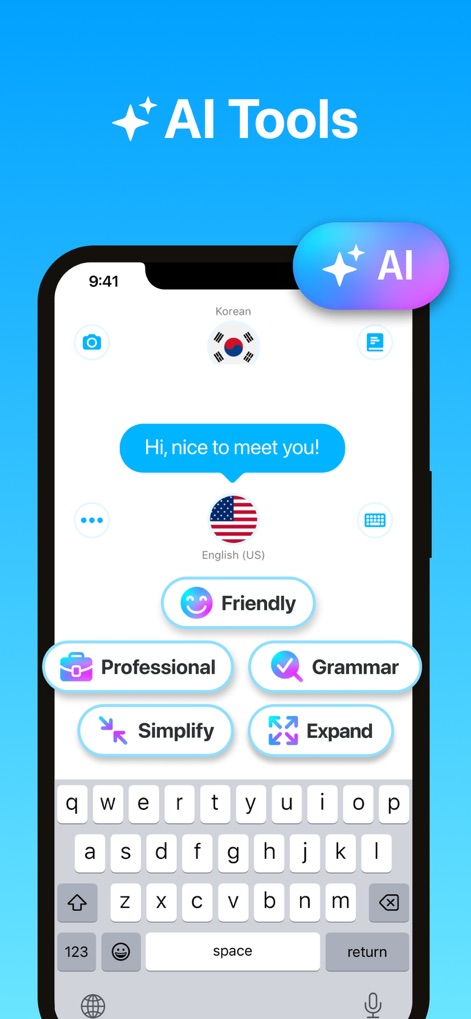
Delve into the advanced AI tools, allowing users to refine translations with options for tone adjustment (e.g., "Friendly", "Professional") and grammar checks.
Advanced AI Tools

See the full functionality of the Apple Watch app, featuring immediate voice input via the microphone icon and convenient language selection directly from the wrist.
Watch App Convenience
Description
Download
More Like This
Apps with similar features and user experience

DeepL Translate
DeepL SE

腾讯翻译君-多语言翻译
Tencent Technology (Shenzhen) Company Limited

出国翻译官- 多语言语音翻译聊天交友
Beijing Qicai Muzhi Technology Co.,Ltd.

Translate Voice:Ai Chat
TINY BOLT (HK) CO., LIMITED

GO Translate・AI Translator App
INNOVAPP LLC

翻译全能王-中文日文图片扫描翻译器
Shanghai Baowu Network Technology Co., Ltd.

translation-Global translation
Hebei jiudao network technology co., ltd

Photo Translator: Camera OCR
Son Hoang

Voice Translator : Language +
AmazinPro Technology Solutions And Training Company Limited
This page is not an official page of the app or its developer, but an independent editorial publication created for informational and commentary purposes. Unless expressly stated otherwise, neither the app nor its developer is affiliated with, endorsed by, sponsored by, authorized by, or otherwise officially connected with MWM, Apple, Google Play, the app publisher, or the app's developer, and nothing on this page implies that the app was developed using MWM's services. Any trademarks, logos, screenshots, and other content remain the property of their respective owners.