
This page is not an official page of the app or its developer, but an independent editorial publication created for informational and commentary purposes. Unless expressly stated otherwise, neither the app nor its developer is affiliated with, endorsed by, sponsored by, authorized by, or otherwise officially connected with MWM, Apple, Google Play, the app publisher, or the app's developer, and nothing on this page implies that the app was developed using MWM's services. Any trademarks, logos, screenshots, and other content remain the property of their respective owners.


Drawing Pad -
Unleash raw creative power. It turns your device into an art studio, wherever you are.
Downloads
5M+User Rating
Total Ratings
204.1KPublisher
Category
Graphics & DesignLocales
1Latest Version
13.8Size
252.8 MBFirst Released
Oct 29, 2016An analytical overview of the core functionalities enhancing creative expression for a broad user base.
Key Features of Drawing Pad
Essential Drawing Control & Editing
It allows users to refine their artwork with smooth erasing, undo, and redo functionalities, ensuring a perfect finish for every creation.
Engaging Digital Coloring Book
The app provides access to a rich collection of over 10 categories of unique coloring pages from talented illustrators, with frequent updates to ensure new content.
Artistic Photo Enhancement with Magic Brushes
This tool features unique "Magic brush stroke effects" to add liveliness and artistic flair to personal photos.
Versatile Digital Sketching Instruments
It allows users to create detailed sketches using various brush tools, including realistic pens, pencils, and highlighters.
Creative Photo Beautification Tools
The app offers a collection of attractive stamps, stickers, vibrant frames, and a cropping tool to beautify and personalize photos.
Advanced Doodle Creation Tools
This tool features specialized elements like 3D brushes, stickers, and stamps to unleash creativity in doodling.
Artwork Process Recording & Sharing
It allows users to record their drawing process as a video and easily share it with friends and on social media platforms.
Physical Product Artwork Export
The app provides the option to export sketches, drawings, and doodles for use on physical products like phone cases, posters, and cushions.
Curated & Customizable Color Palettes
This tool features beautiful preset color palettes and the ability to create custom combinations, offering flexibility for all artistic styles.
Seamless Social Media Photo Import
It allows users to easily import photos from various social networks such as Facebook, Instagram, and Flickr for creative editing.
Frequently Asked Questions
Everything you need to know about Drawing Pad -
What is Drawing Pad -?
Drawing Pad - is a doodling app for drawing, sketching, and coloring. It offers features like Kids Doodle, Doodle Desk, Sketch Desk, Photo Desk, and a Coloring Book for creative expression and photo editing.
Does Drawing Pad - support Apple Pencil?
Yes, Drawing Pad - supports Apple Pencil. Users can enjoy an easy and intuitive process of coloring and drawing on the crisp screen of iPad Pro with Apple Pencil.
Can I record my drawings in Drawing Pad -?
Yes, Drawing Pad - allows users to record their drawing on canvas as a video. This video can then be shared with friends.
What are the main features of the Doodle Desk in Drawing Pad -?
The Doodle Desk in Drawing Pad - offers tools like 3D brushes, stickers, and stamps. It includes smooth erasing, undo, redo functions, and specific brushes for creating and refining doodles.
What kind of brushes are available for sketching in Drawing Pad -?
Drawing Pad - provides various brush tools for sketching, including a pen, pencil, and highlighter. Users can create beautiful sketches with these diverse options.
Can Drawing Pad - be used to edit photos?
Yes, Drawing Pad - includes a Photo Desk for creative photo editing. It offers Magic brush stroke effects, attractive stamps, stickers, vibrant frames, and a cropping tool.
Where can I import photos from into Drawing Pad -?
Drawing Pad - allows users to import photos from various platforms including Facebook, Instagram, Flickr, and other networks into the Photo Desk for editing.
Can I share my artwork created in Drawing Pad - on social media?
Yes, users can share their doodling skills and artwork created in Drawing Pad - on social media platforms like Facebook or Instagram.
What is the price of Drawing Premium subscription for Drawing Pad -?
The Drawing Premium subscription for Drawing Pad - costs $8.99 per month after a 3-day free trial. This is an auto-renewed monthly subscription.
Is there a free trial for Drawing Pad - Premium?
Yes, Drawing Pad - Premium offers an introductory 3-day free trial. After the trial period, the subscription automatically renews at $8.99 per month.
How do I cancel my Drawing Pad - subscription?
Users can manage their Drawing Pad - subscription and turn off auto-renewal by going to their Account Settings after purchase, either in iTunes or on their device.
Does Drawing Pad - offer coloring pages?
Yes, Drawing Pad - includes a Creative coloring book feature. It offers over 10 categories of unique coloring pages from talented illustrators, with frequent collection updates.
Can I export my artwork from Drawing Pad - to physical products?
Yes, Drawing Pad - allows users to export their sketches, drawings, and doodles to other physical products. These include phone cases, posters, cushions, and frames.
The following screenshots and description are sourced directly from the app's official store listing and are the property of the app developer.
App Store
Screenshots
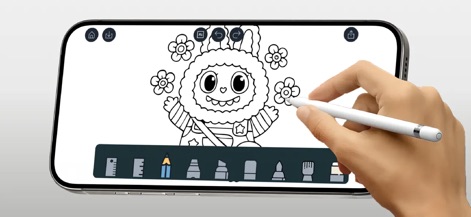
The app offers a vibrant canvas for doodling, showcasing seamless Apple Pencil integration and a diverse range of drawing tools.
Creative Doodle Canvas
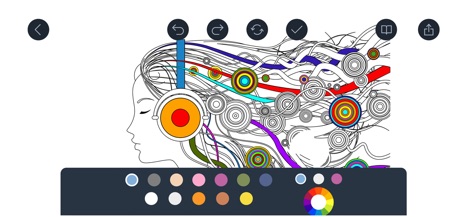
Discover engaging coloring pages within the app, complete with intricate designs and a rich, customizable color palette for endless creativity.
Vibrant Coloring Pages

Users can unleash their creativity on a dynamic sketching canvas, utilizing diverse brush tools and enriching their art with beautiful watercolor backgrounds.
Dynamic Sketching Canvas
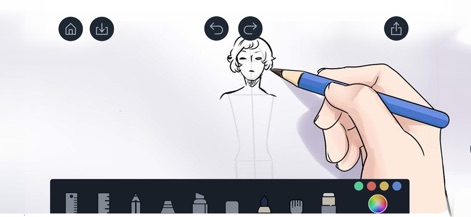
This tool provides precise sketching functionalities, allowing users to accurately draw figures and refine their artwork with dedicated pencil brush options.
Precise Sketching Tools

The app supports detailed portrait sketching capabilities, enhanced by soft watercolor effects that add an artistic flair to any composition.
Detailed Portraiture
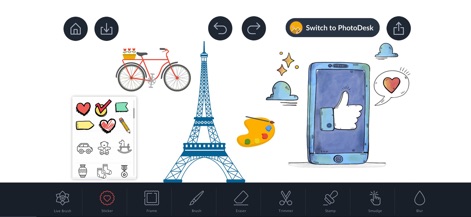
Enhance photos and creations with a diverse sticker collection, seamlessly integrating various photo desk tools like the trimmer and stamp for personalized touches.
Photo Enhancement Suite
Description
Download
More Like This
Apps with similar features and user experience

Sketchbook®
Sketchbook, Inc.

Mental Canvas Draw
Mental Canvas, Inc.

ibis Paint
ibis inc.

ibis Paint X
ibis inc.

Paper: Sketch, Draw & Create
Evernote Corporation

Adobe Fresco: Draw & Paint App
Adobe Inc.

Art Set 4
Lofopi Ltd

MediBang Paint – Drawing & Art
MediBang inc.

Tayasui Sketches
SKETCHES SRL
This page is not an official page of the app or its developer, but an independent editorial publication created for informational and commentary purposes. Unless expressly stated otherwise, neither the app nor its developer is affiliated with, endorsed by, sponsored by, authorized by, or otherwise officially connected with MWM, Apple, Google Play, the app publisher, or the app's developer, and nothing on this page implies that the app was developed using MWM's services. Any trademarks, logos, screenshots, and other content remain the property of their respective owners.