
This page is not an official page of the app or its developer, but an independent editorial publication created for informational and commentary purposes. Unless expressly stated otherwise, neither the app nor its developer is affiliated with, endorsed by, sponsored by, authorized by, or otherwise officially connected with MWM, Apple, Google Play, the app publisher, or the app's developer, and nothing on this page implies that the app was developed using MWM's services. Any trademarks, logos, screenshots, and other content remain the property of their respective owners.

DriveRecorderX
Protect your journey and secure your liability with professional-grade drive recording. Turn your phone into a powerful safety tool featuring automatic shock detection, 4K video quality, and zero intrusive advertisements.
Downloads
12K+User Rating
Total Ratings
0Publisher
Category
NavigationLocales
2Latest Version
2.7.1Size
24.1 MBFirst Released
Apr 25, 2013Smart Security for Every Drive
Transform your iPhone into a high-performance dashcam with professional features designed for safety, clarity, and peace of mind.
Zero Ads, Total Focus
Enjoy a completely ad-free interface that prioritizes your safety without the distraction of intrusive pop-ups or banners.
4K Evidence & Shock Sensing
Capture every license plate in ultra-HD resolution with automatic G-force detection that stops recording during an impact to secure your footage.
Frequently Asked Questions
Everything you need to know about DriveRecorderX
What is DriveRecorderX?
DriveRecorderX is an iPhone application that functions as a simple drive recorder. It captures video recordings of your journeys and operates without advertisements.
How long can DriveRecorderX record videos?
Yes, DriveRecorderX allows users to set recording durations to 30, 60, or 90 seconds per segment. The oldest file is deleted when continuously recording past the maximum saved files limit.
Does DriveRecorderX support 4K video recording?
Yes, DriveRecorderX supports 4K video recording on iPhone 6S models and later. A 30-second 4K video records at approximately 150MB.
Where are videos saved by DriveRecorderX?
DriveRecorderX saves recorded videos to the iTunes shared folder. Users can copy these files to a PC or delete them directly from within the app.
Can the DriveRecorderX app be operated by the driver?
No, the DriveRecorderX app is not designed for operation by the driver. A fellow passenger should operate the application for safety and functionality.
What happens if the iPhone receives a shock while using DriveRecorderX?
If the iPhone receives a shock exceeding 4g, DriveRecorderX automatically stops recording. This feature is integrated for event detection.
Can I switch between front and back cameras in DriveRecorderX?
Yes, DriveRecorderX allows users to switch between the back and front cameras. This feature enables recording of the car's interior.
What are the available map tracking modes in DriveRecorderX?
DriveRecorderX offers two map tracking modes: "Tracking-follow" and "tracking-follow with heading mode." These modes dictate how the map view follows your route.
What are the minimum storage requirements for DriveRecorderX to record?
DriveRecorderX requires a minimum of 500MB of free disk space to initiate recording. A warning displays if the available space falls below this threshold.
Does DriveRecorderX show advertisements?
No, DriveRecorderX does not display advertisements. The application provides a recording function for your iPhone without ad interruptions.
What impact does recording have on iPhone battery life and memory with DriveRecorderX?
Recording video with DriveRecorderX can lead to a shortage of memory and decrease battery life. It is recommended to connect your iPhone to a charger and quit other suspended apps.
Can users change the video resolution in DriveRecorderX?
Yes, users can change the video resolution in DriveRecorderX. Available options include 352x288, 640x480, and 1280x720, selectable from the "Video size & duration" menu.
The following screenshots and description are sourced directly from the app's official store listing and are the property of the app developer.
App Store
Screenshots
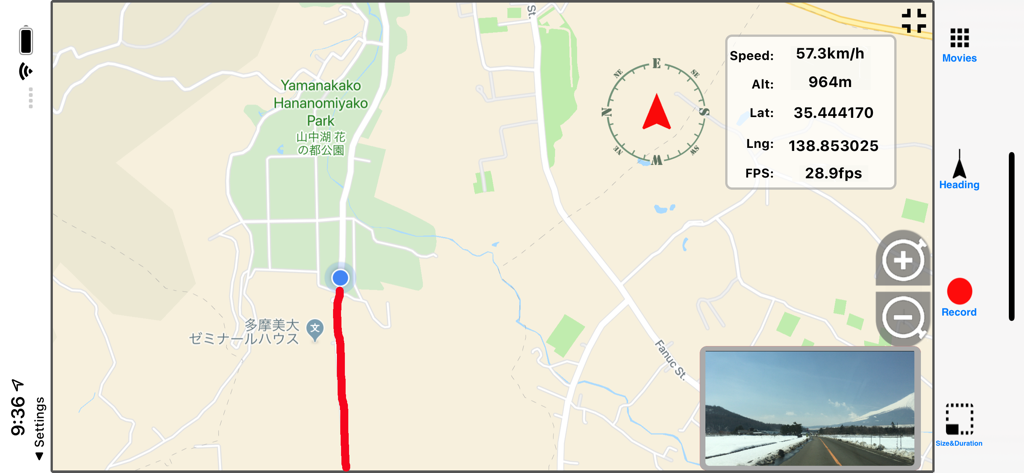
DriveRecorderX interface displaying a navigation map with route tracking and a live dashcam video feed
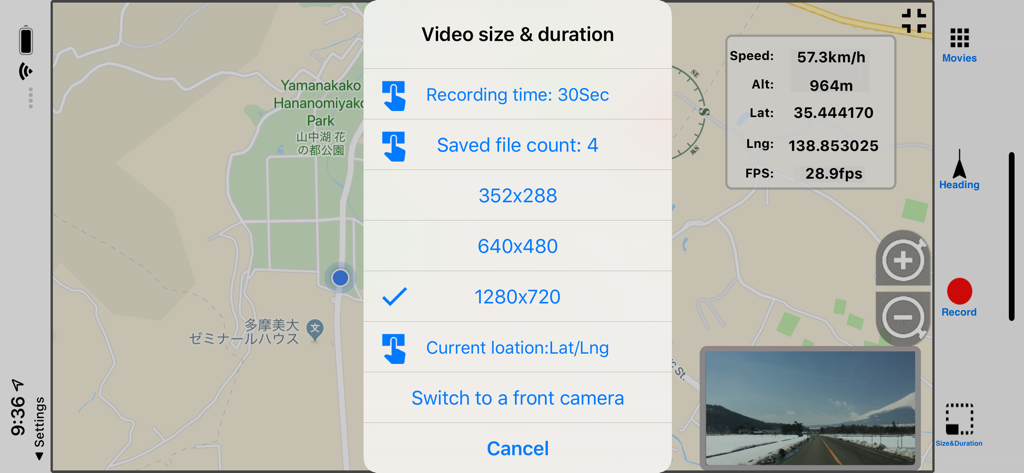
DriveRecorderX app screen showing video size and duration settings menu overlaid on a GPS map with real-time speed and altitude data
Description
Download
More Like This
Top-ranked apps in the same category

Google Maps
Google LLC

Waze Navigation & Live Traffic
waze

AMap Global
AutoNavi Information Technology Co. Ltd.

百度地图-路线规划,出行必备
Beijing Baidu Netcom Science & Technology Co.,Ltd

Moovit: Bus & Transit Tracker
Moovit App Global LTD

Transit • Subway & Bus Times
9280-0366 Quebec inc.

ParkMobile: Park. Pay. Go.
Parkmobile USA, Inc

腾讯地图-路线规划,导航地铁打车出行
Shenzhen Tencent Computer Systems Company Limited

Île-de-France Mobilités
Ile de France Mobilites
This page is not an official page of the app or its developer, but an independent editorial publication created for informational and commentary purposes. Unless expressly stated otherwise, neither the app nor its developer is affiliated with, endorsed by, sponsored by, authorized by, or otherwise officially connected with MWM, Apple, Google Play, the app publisher, or the app's developer, and nothing on this page implies that the app was developed using MWM's services. Any trademarks, logos, screenshots, and other content remain the property of their respective owners.