
This page is not an official page of the app or its developer, but an independent editorial publication created for informational and commentary purposes. Unless expressly stated otherwise, neither the app nor its developer is affiliated with, endorsed by, sponsored by, authorized by, or otherwise officially connected with MWM, Apple, Google Play, the app publisher, or the app's developer, and nothing on this page implies that the app was developed using MWM's services. Any trademarks, logos, screenshots, and other content remain the property of their respective owners.


EasyLive Plus
Experience peace of mind with real-time monitoring and seamless historical playback for your property, right from your mobile device.
Downloads
213K+User Rating
Total Ratings
200Publisher
Category
UtilitiesLocales
27Latest Version
5.33.1Size
281.4 MBFirst Released
Jul 8, 2021Your Security, Managed from Anywhere
EasyLive Plus provides the professional-grade tools you need to monitor your home and business with precision, reliability, and total peace of mind.
Real-Time Remote Monitoring
Stay connected to what matters most with high-definition live video feeds accessible directly from your smartphone, no matter where you are.
Advanced Video Playback
Quickly review historical footage and pinpoint specific events with an intuitive timeline designed for incident verification and dispute resolution.
Frequently Asked Questions
Everything you need to know about EasyLive Plus
What is EasyLive Plus?
EasyLive Plus is a video service product designed for home and business users. It enables users to view real-time video and historical video playback.
Can I view live video with EasyLive Plus?
Yes, EasyLive Plus allows users to easily view real-time video from their connected devices, as shown by live feeds with timestamps.
Does EasyLive Plus support historical video playback?
Yes, EasyLive Plus supports historical video playback. Users can review past recordings using a date selector and timeline as displayed in the playback interface.
What types of alarms does EasyLive Plus provide?
EasyLive Plus provides various alarms including smart alarms and video loss alarms, notifying users of important events and potential issues.
How do I manage device settings in EasyLive Plus?
EasyLive Plus offers configuration options for managing device settings. Users can access local configuration and WiFi configuration within the user menu.
Can I share videos or content using EasyLive Plus?
Yes, EasyLive Plus includes a 'My share' option within the user menu, indicating that users can share content directly from the application.
How does EasyLive Plus indicate an offline device?
EasyLive Plus displays a 'Device is offline' message when the mobile phone or device network is unstable, prompting users to check their connection.
Does EasyLive Plus offer video recording features?
Yes, EasyLive Plus provides a 'Record' function during video playback. This feature allows users to capture and save specific video segments.
The following screenshots and description are sourced directly from the app's official store listing and are the property of the app developer.
App Store
Screenshots
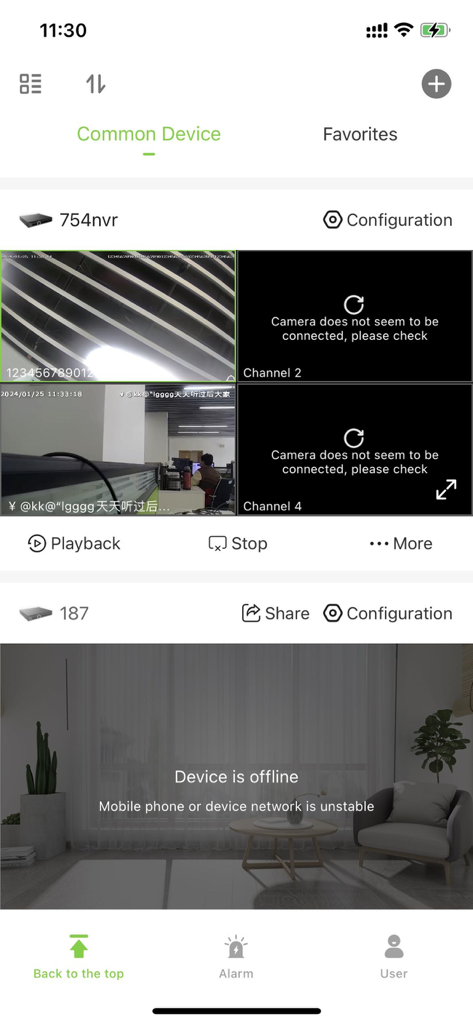
EasyLive Plus app dashboard showing live video feeds from multiple security camera channels and device status information
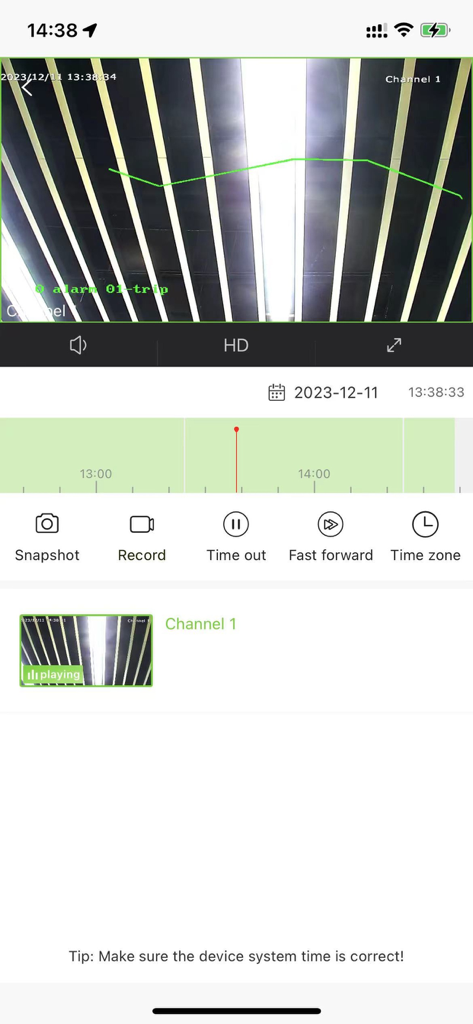
EasyLive Plus mobile app interface showing security camera video playback and timeline
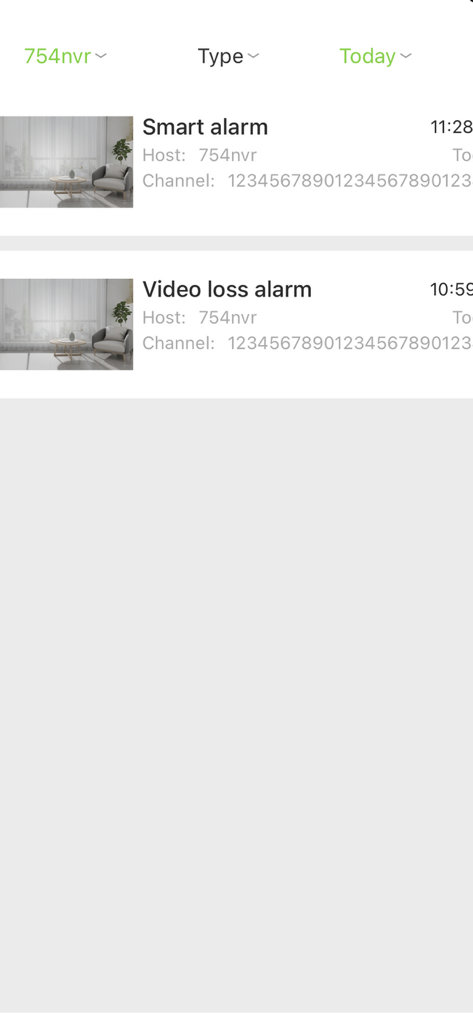
EasyLive Plus mobile app interface showing a list of security notifications including smart alarms and video loss alerts with camera thumbnails
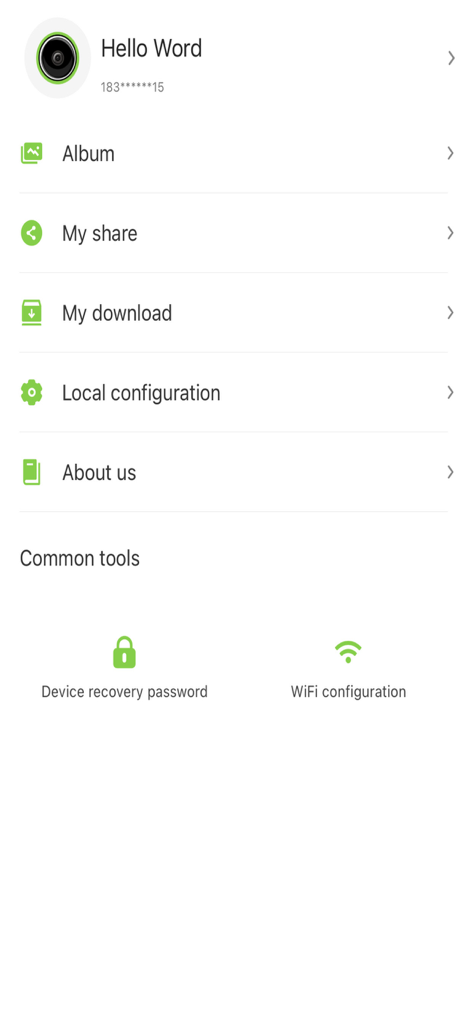
User profile and settings screen in the EasyLive Plus app showing menu options and common tools like WiFi configuration.
Description
Download
More Like This
Apps with similar features and user experience

TP-Link VIGI
TP-Link Systems Inc.
Intelbras ISIC Lite
Intelbras S.A. Ind. de Telecom. Elet. Brasileira

Intelbras Guardian
Intelbras S.A. Ind. de Telecom. Elet. Brasileira

Smart Security Camera App
On Hand Apps - FZCO

Guarding Vision
明军 顾

IPEYE CCTV
KONSTANTA, OOO Apps

BoifunCam
健 冯

Prama Online
PRAMA INDIA PRIVATE LIMITED

Annke Vision
Shenzhen Kean Digital Co. LTD.
This page is not an official page of the app or its developer, but an independent editorial publication created for informational and commentary purposes. Unless expressly stated otherwise, neither the app nor its developer is affiliated with, endorsed by, sponsored by, authorized by, or otherwise officially connected with MWM, Apple, Google Play, the app publisher, or the app's developer, and nothing on this page implies that the app was developed using MWM's services. Any trademarks, logos, screenshots, and other content remain the property of their respective owners.