
This page is not an official page of the app or its developer, but an independent editorial publication created for informational and commentary purposes. Unless expressly stated otherwise, neither the app nor its developer is affiliated with, endorsed by, sponsored by, authorized by, or otherwise officially connected with MWM, Apple, Google Play, the app publisher, or the app's developer, and nothing on this page implies that the app was developed using MWM's services. Any trademarks, logos, screenshots, and other content remain the property of their respective owners.


eufy Life
Forget health guesswork. This app equips users with precise body data, transforming vague wellness goals into actionable metrics.
Downloads
1M+User Rating
Total Ratings
12.6KPublisher
Category
LifestyleLocales
15Latest Version
3.3.12Size
152.1 MBFirst Released
Jan 3, 2017An evaluation of key features impacting health-conscious users and smart scale owners.
Eufy Life App: Core Functionality Analysis
Apple Health & Key Metric Integration
It allows users to seamlessly synchronize body composition data, including Body Fat Percentage, Body Mass Index, Height, Lean Body Mass, and Weight, with Apple Health for a holistic view of their wellness.
Granular Data Privacy Controls
The app provides explicit control over personal health data, allowing users to choose whether and when to sync their information with third-party platforms like Apple Health, ensuring privacy and trust.
Effortless Health Data Synchronization
It automatically syncs health data from connected Eufy devices, eliminating manual entry and ensuring up-to-date records for consistent progress tracking.
Intuitive Device Pairing Process
This tool features a straightforward process for pairing Eufy smart scales via Wi-Fi or Bluetooth, ensuring quick and easy setup for new devices.
Exclusive Eufy Smart Scale Support
The app is specifically designed to work with Eufy's BodySense line of smart scales, providing tailored functionalities for accurate body composition analysis.
Streamlined Account Setup
It allows users to create an account in just two simple steps using an email address, facilitating a rapid onboarding experience.
Frequently Asked Questions
Everything you need to know about eufy Life
What is the EufyLife app used for?
The EufyLife app is dedicated to improving your health by automatically syncing and tracking various health data. It blends technology and convenience for user well-being.
How do I create a new account for the EufyLife app?
To create an EufyLife account, users must provide an email address. The registration process involves two steps and can be completed in approximately one minute.
How do I pair a new device with the EufyLife app?
To pair a device with EufyLife, enable Wi-Fi or Bluetooth on your mobile device, turn on the Eufy product, and follow the simple on-screen instructions.
Which Eufy products are compatible with the EufyLife app?
The EufyLife app is compatible with Eufy’s BodySense line of health and wellness products, including the Eufy Smart Scale. It works with models like the Smart Scale P2 Pro.
Does the EufyLife app share health data with Apple Health?
Yes, the EufyLife app can synchronize health records including Body Fat Percentage, BMI, Height, Lean Body Mass, and Weight to Apple Health. User consent is required.
Does EufyLife share user health data with third parties without consent?
No, EufyLife does not sync user health data to any third party without explicit user choice. Data sharing only occurs after the user provides consent.
What health metrics does the EufyLife app track and display?
The EufyLife app tracks and displays various metrics including Weight, BMI, Body Fat, Muscle Mass, Skeletal Muscle Mass, Protein, Visceral Fat, and Lean Body Mass.
Can I track my health data trends over time in the EufyLife app?
Yes, the EufyLife app allows users to view detailed health data trends. Users can analyze progress by day, week, month, or year for various metrics.
Can users set and modify personal health goals within EufyLife?
Yes, EufyLife enables users to set personal health goals, such as target weight and body fat. The app provides visual tracking and an option to modify goals.
Does the EufyLife app support multiple family members?
Yes, the EufyLife app supports multiple family members. Each individual can have their own profile to track and manage their personal health data separately.
The following screenshots and description are sourced directly from the app's official store listing and are the property of the app developer.
App Store
Screenshots

The app provides an immediate snapshot of vital statistics, displaying current weight and an intuitive weight trend graph for clear progress tracking.
Health At A Glance

Users can effortlessly manage multiple family members' profiles and view all connected Eufy Smart Scale devices within this centralized section.
Profiles & Devices

This tool offers a detailed breakdown of body composition metrics like muscle mass and visceral fat, complemented by flexible trend views across various timeframes.
Comprehensive Data Insights

Easily review past weigh-ins through a chronological report history, showcasing individual entries with weight, BMI, and body fat percentage.
Historical Progress View
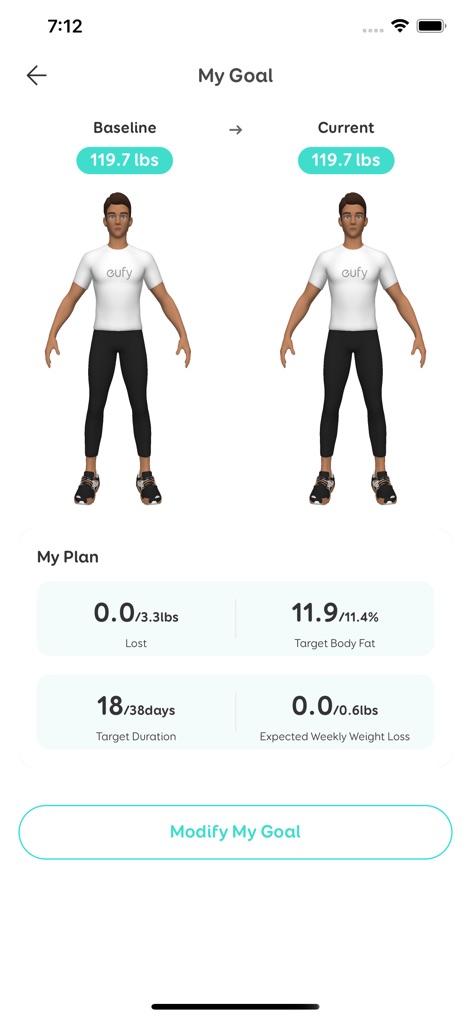
Monitor personal health objectives with a side-by-side comparison of baseline and current body representations, alongside detailed progress parameters for weight and body fat.
Visual Goal Tracking
Description
Download
More Like This
Apps with similar features and user experience

Fit Profile-GE branded scales
Global eFit Incorporated

RelaxFit
RELAXMEDIC IMPORTACAO EXPORTACAO LTDA

Unique Health
Shenzhen Lefu Scale Co., Ltd.

arboleaf
Arboleaf Corporation

OKOK·International
Shenzhen Careyou Health Science and Technology Co., LTD

Starfit
RUNSTAR FL INC.

MovingLife
Zhongshan Camry Electronic Company Limited

Feelfit
Shenzhen QingNiu Software Co. Ltd

iHome Fitness & Health
Design Headquarters LLC
This page is not an official page of the app or its developer, but an independent editorial publication created for informational and commentary purposes. Unless expressly stated otherwise, neither the app nor its developer is affiliated with, endorsed by, sponsored by, authorized by, or otherwise officially connected with MWM, Apple, Google Play, the app publisher, or the app's developer, and nothing on this page implies that the app was developed using MWM's services. Any trademarks, logos, screenshots, and other content remain the property of their respective owners.