Eye Keyboard-Input with eyes
Download on App Store

This page is not an official page of the app or its developer, but an independent editorial publication created for informational and commentary purposes. Unless expressly stated otherwise, neither the app nor its developer is affiliated with, endorsed by, sponsored by, authorized by, or otherwise officially connected with MWM, Apple, Google Play, the app publisher, or the app's developer, and nothing on this page implies that the app was developed using MWM's services. Any trademarks, logos, screenshots, and other content remain the property of their respective owners.

Logo of Eye Keyboard-Input with eyes
Download on App Store

Eye Keyboard-Input with eyes

Empowering individuals with ALS, SCI, and motor impairments to type, speak, and stay connected using only their eyes—completely hands-free on your iPhone or iPad.

Key Figures

Downloads

100

User Rating

1.0/5

Total Ratings

0

Publisher

Beijing Grand Penway technology Ltd

Category

Medical

Locales

1

Latest Version

1.0.2

Size

18.9 MB

First Released

Nov 19, 2025
Features

Empowering Independence Through Innovation

Designed for individuals with limited mobility, Eye Keyboard turns eye movements into a powerful voice, helping you stay connected with the world on your own terms.

Precision Eye-Gaze Typing

Communicate effortlessly using your iPhone or iPad's TrueDepth camera. Type letters and sentences with high accuracy simply by focusing your gaze.

Instant Voice Output

Break the silence and participate in conversations. Our text-to-speech feature allows you to speak your thoughts aloud to family, friends, and caregivers.

The following screenshots and description are sourced directly from the app's official store listing and are the property of the app developer.

App Store

Screenshots
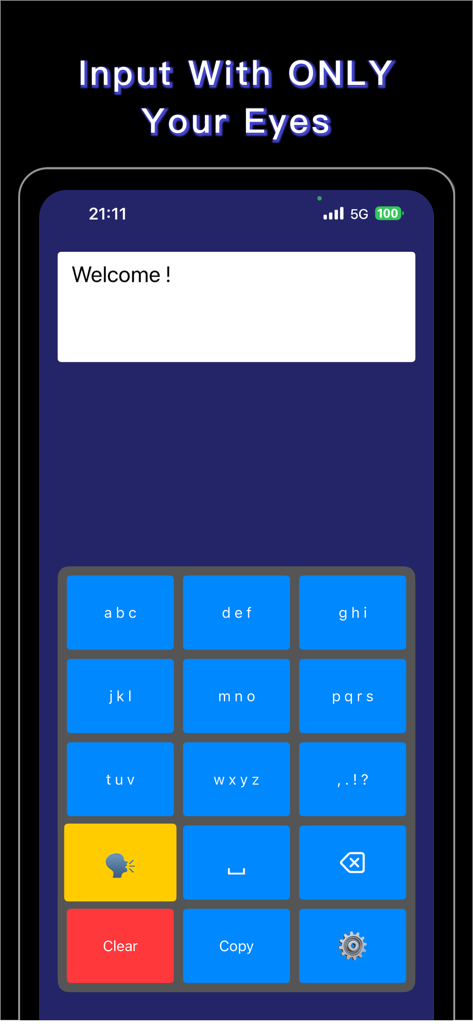
Eye Keyboard-Input with eyes - Eye Keyboard app interface showing a blue grid keyboard for eye tracking text input
Eye Keyboard app interface showing a blue grid keyboard for eye tracking text input

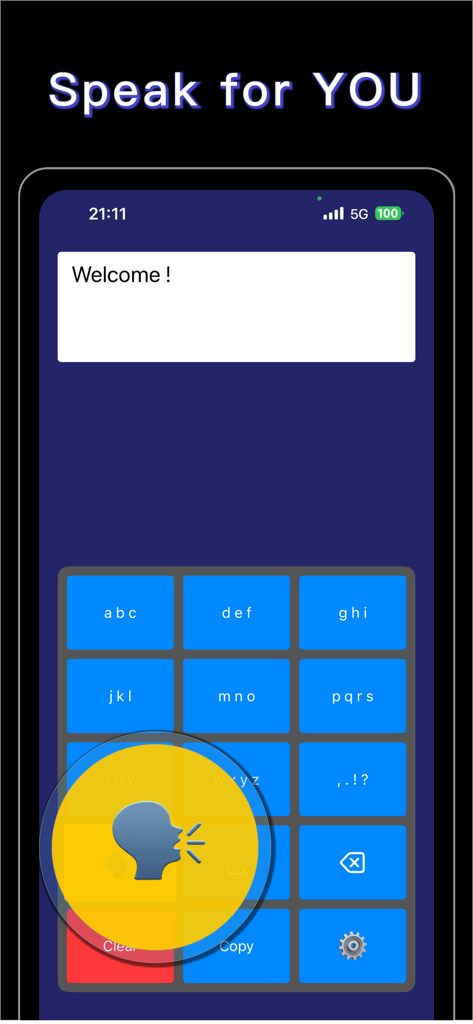
Eye Keyboard-Input with eyes - Eye Keyboard app interface showing the voice output feature and grid keyboard for assistive communication
Eye Keyboard app interface showing the voice output feature and grid keyboard for assistive communication

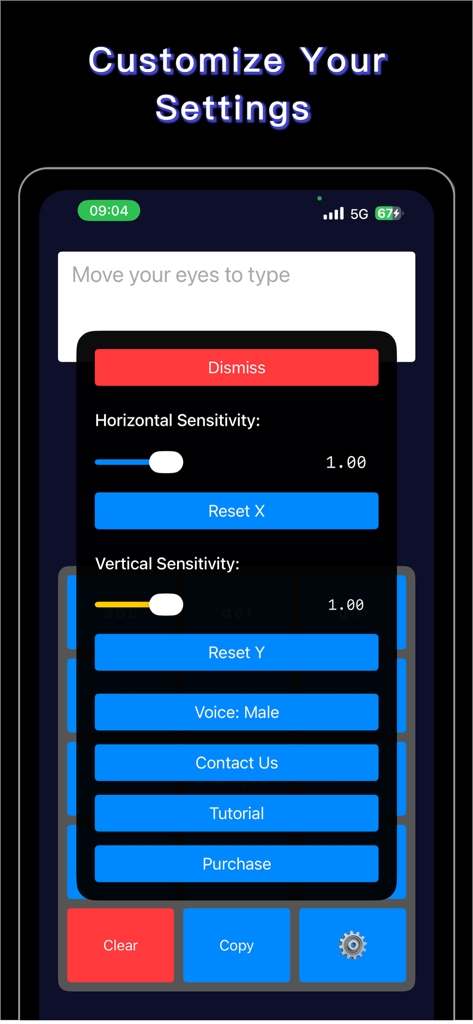
Eye Keyboard-Input with eyes - Settings menu of the Eye Keyboard app showing eye tracking sensitivity sliders and voice options.

Settings menu of the Eye Keyboard app showing eye tracking sensitivity sliders and voice options.

Description

Eye Keyboard is an innovative assistive technology app that enables text input through eye movements alone. Designed with accessibility at its core, this app empowers individuals with limited mobility to communicate, type, and interact with their devices using only their eyes. **Who Can Benefit** Eye Keyboard is particularly helpful for individuals with conditions that limit physical movement but retain eye mobility, including: - ALS (Amyotrophic Lateral Sclerosis) - Locked-in Syndrome - Cerebral Palsy (CP) - Spinal Cord Injury (SCI) - Stroke survivors with severe motor impairment - Muscular Dystrophy - Multiple Sclerosis (MS) - Other conditions affecting motor control **Key Features** FREE: - Basic Eye-Tracking Technology: Try the core eye-tracking functionality - Grid-Based Keyboard: Test the interface with limited usage PREMIUM (In-App Purchase Required): - Advanced Eye-Tracking Technology: Full access to precise text input using your device's TrueDepth camera - Unlimited Usage: No restrictions on typing sessions - Smart Word Suggestions: Intelligent predictive text to speed up typing - Customizable Settings: Adjust sensitivity, dwell time, and other parameters to match your needs - Voice Output: Text-to-speech functionality to help you communicate - Email Integration: Send emails directly from the app ALL VERSIONS: - Hands-Free Operation: Complete text input without touching the screen - Privacy-Focused: All processing happens on your device - no data leaves your phone **How It Works** 1. Position your device at a comfortable viewing distance 2. Look at the keyboard grid displayed on screen 3. Focus your gaze on the desired letter or function 4. The app detects your eye position and makes selections based on dwell time 5. Build words and sentences naturally through eye movements **Important Medical Disclaimer** Eye Keyboard is designed as a communication and accessibility aid. This app is NOT a medical device and is not intended to diagnose, treat, cure, or prevent any disease or medical condition. It should not be used as a substitute for professional medical equipment, medical advice, diagnosis, or treatment. Always consult with qualified healthcare professionals regarding your medical needs. **Privacy and Security** Your privacy is our priority. Eye Keyboard processes all eye-tracking data locally on your device. We do not collect, store, or transmit your eye-tracking information or typed content to any external servers. For more information: - Privacy Policy: https://lago.chat/eye/privacy-policy.html - Terms of Use: https://lago.chat/eye/terms-of-use.html **Requirements** - Device with TrueDepth camera (iPhone X or later, iPad Pro 11-inch or later, iPad Pro 12.9-inch 3rd generation or later) - iOS 13.0 or later - ARKit support **Support** We are committed to making Eye Keyboard the best assistive technology tool possible. If you have questions, feedback, or need assistance, please reach out to our support team through the app's contact feature. Eye Keyboard - Empowering communication through eye-tracking technology.

Download

Download on App Store

This page is not an official page of the app or its developer, but an independent editorial publication created for informational and commentary purposes. Unless expressly stated otherwise, neither the app nor its developer is affiliated with, endorsed by, sponsored by, authorized by, or otherwise officially connected with MWM, Apple, Google Play, the app publisher, or the app's developer, and nothing on this page implies that the app was developed using MWM's services. Any trademarks, logos, screenshots, and other content remain the property of their respective owners.








