
This page is not an official page of the app or its developer, but an independent editorial publication created for informational and commentary purposes. Unless expressly stated otherwise, neither the app nor its developer is affiliated with, endorsed by, sponsored by, authorized by, or otherwise officially connected with MWM, Apple, Google Play, the app publisher, or the app's developer, and nothing on this page implies that the app was developed using MWM's services. Any trademarks, logos, screenshots, and other content remain the property of their respective owners.


ezQuran - Easy Read Quran
Paper-like experience. This app puts the familiar 13-line script directly onto your iPhone, eliminating a common barrier to digital Quran reading.
Downloads
1M+User Rating
Total Ratings
3.4KPublisher
Category
ReferenceLocales
1Latest Version
2.3.3Size
183.4 MBFirst Released
Jul 29, 2011An evaluation of core functionalities tailored for the South African/Subcontinental 13-line script preference.
Key Features Analysis: ezQuran - Easy Read Quran
Authentic 13-line Script
The app provides the Holy Quran displayed in the traditional South African / Subcontinental / Indo-pak 13-line Arabic script, catering specifically to the preferred reading style of its target audience.
Complimentary Access
It offers the complete Quranic text free of charge, ensuring widespread accessibility for all users without financial barriers.
Effortless Navigation
This tool features seamless navigation, allowing users to quickly jump to any specific page, Surah (chapter), or Juz (part) of the Quran.
Personalized Bookmarking
It allows users to bookmark any verse, enabling them to easily return to their last reading point or mark significant passages for future reference.
Enhanced Readability Zoom
The app provides a double-tap zoom feature, maximizing ease of reading for users by allowing them to enlarge the Arabic text as needed.
Cover-to-Cover Reading
It offers a realistic page-flipping experience, mimicking the traditional physical Quran for a familiar and comfortable reading journey from beginning to end.
Frequently Asked Questions
Everything you need to know about ezQuran - Easy Read Quran
Is the ezQuran - Easy Read Quran app free to download and use?
Yes, the ezQuran app is available free of charge and the developers intend for it to always remain free.
What script style does the ezQuran app use for reading?
The ezQuran app utilizes the easy-to-read South African / Subcontinental / Indo-pak Arabic script for its 13-line Quran display.
How do I navigate to a specific surah or page in ezQuran?
The ezQuran app allows users to easily navigate to a specific page, surah, or juz using a dedicated 'Select Chapter' interface.
Can I zoom in on the text in the ezQuran app for better readability?
Yes, ezQuran offers a double-tap to zoom feature, which maximizes the ease of reading the Quranic text on the screen.
Does ezQuran - Easy Read Quran allow users to bookmark verses?
Yes, the ezQuran app includes a bookmarking feature that allows users to mark any verse and return to it later.
How is the reading experience structured in the ezQuran app?
The ezQuran app is designed for reading the Quran cover to cover by flipping pages, emulating a traditional book experience.
Is the ezQuran app available on iPhone?
Yes, the ezQuran - Easy Read Quran app is specifically available for download and use on iPhone devices.
How can I submit feedback or report issues for the ezQuran app?
Users can provide feedback, report bugs, or suggest improvements for ezQuran by contacting the developers through Facebook.
The following screenshots and description are sourced directly from the app's official store listing and are the property of the app developer.
App Store
Screenshots
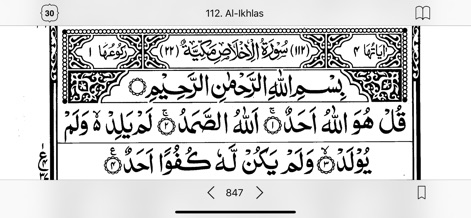
This tool showcases the 13-line Indo-pak Arabic script, making it simple to read with clearly displayed Surah titles and current page numbers.
Traditional Quran Display
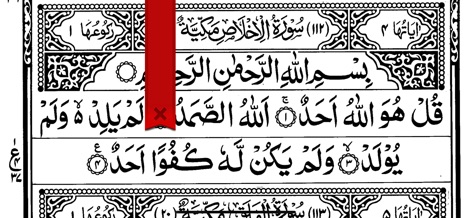
The app highlights the intuitive bookmarking function, allowing users to save their progress on any page and conveniently return to a marked verse.
Effortless Bookmarking
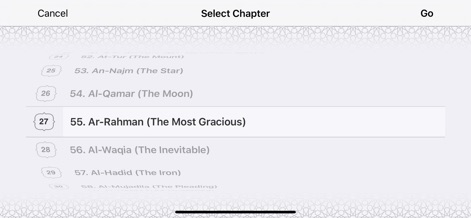
The tool features a streamlined 'Select Chapter' interface, allowing users to effortlessly browse and jump to specific Surahs like 'Ar-Rahman' from a comprehensive list.
Chapter Navigation
Description
Download
More Like This
Apps with similar features and user experience

Kur'an
Hayrat Nesriyat

Al Quran Standar Indonesia
Bustomi .

Eqra'a Quran Reader
Yutaka Tsutano

القرآن الكريم كاملا دون انترنت
Maher Al Masri

القرآن الكريم - مصحف المدينة
Maher Al Masri

HOLY QURAN - القرآن الكريم
FanzeTech

Simple Quran
YAYASAN YUFID NETWORK

القرآن الكـريم
Omran Adam
This page is not an official page of the app or its developer, but an independent editorial publication created for informational and commentary purposes. Unless expressly stated otherwise, neither the app nor its developer is affiliated with, endorsed by, sponsored by, authorized by, or otherwise officially connected with MWM, Apple, Google Play, the app publisher, or the app's developer, and nothing on this page implies that the app was developed using MWM's services. Any trademarks, logos, screenshots, and other content remain the property of their respective owners.